
Last updated on December 17, 2025
You can store Rublon Auth Proxy secrets in Windows Credential Manager by setting the secret_source option to winvault in the global section of the config.
When secret_source is set to winvault, each secret value in the config file is treated as the name of a credential stored in Windows Credential Manager, and the Auth Proxy retrieves the actual secret from there.
The Rublon Authentication Proxy secrets are:
- rublon section:
- system_token
- secret_key
- proxy_servers section:
- RADIUS:
- radius_secret
- LDAP:
- pkey_password (if used)
- RADIUS:
- auth_sources section:
- RADIUS:
- radius_secret
- LDAP:
- access_user_password
- RADIUS:
Configuration Example
log:
  debug: false

global:
  secret_source: winvault

rublon:
  api_server: https://core.rublon.net
  system_token: SYSTEM_TOKEN
  secret_key: SECRET_KEY

proxy_servers:
  - name: RADIUS-Proxy
    type: RADIUS
    radius_secret: RADIUS_SECRET
    ip: 0.0.0.0
    port: 1812
    mode: standard
    auth_source: LDAP_SOURCE_1
    auth_method: email

  - name: LDAP-Proxy
    type: LDAP
    ip: 0.0.0.0
    port: 389
    auth_source: LDAP_SOURCE_1
    auth_method: email

auth_sources:
  - name: LDAP_SOURCE_1
    type: LDAP
    ip: 127.0.2.0
    port: 389
    transport_type: plain
    search_dn: OU=Organization,DC=org,DC=com
    access_user_dn: CN=AccessUser,OU=Organization,DC=org,DC=com
    access_user_password: ACCESS_USER_PW

  - name: RADIUS_SOURCE_1
    type: RADIUS
    ip: 127.0.1.0
    port: 1812
    radius_secret: RADIUS_SECRET
The preceding example sets secret_source to winvault. This means that the Rublon Auth Proxy will now treat the config file’s secret values as names of the credentials in Windows Credential Manager to retrieve the actual secrets from. In this example, the Auth Proxy expects to find four variables defined in the Windows Credential Manager:
- SYSTEM_TOKEN
- SECRET_KEY
- RADIUS_SECRET (used twice)
- ACCESS_USER_PW
Setting Credentials (Windows)
IMPORTANT
Rublon Authentication Proxy must run under an account that has access to the credentials stored in Windows Credential Manager. If you run it as a system service under an account that does not have access to the Credential Manager entries you configured (for example, Local System), it will not be able to read the secret and the configuration will not work correctly.
To ensure access: in the Log On tab of the Rublon Authentication Proxy service properties, select the user account for which you added credentials in Credential Manager and grant administrator rights to that account. This allows Rublon Authentication Proxy to read the credentials from Windows Credential Manager.
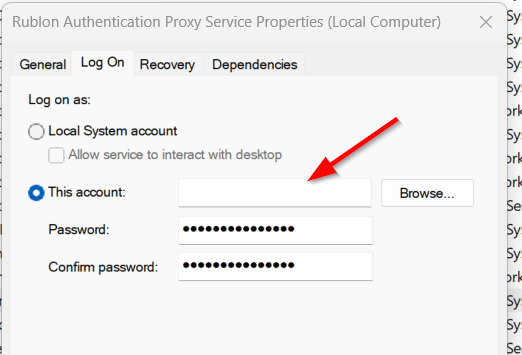
After the installation of the Rublon Authentication Proxy on your Windows machine:
1. Open the Windows Credential Manager.
2. Navigate to Windows Credentials.
3. Add a generic credential for every secret you are using: Set the value of both Internet or network address and User name to the name of the secret (same as in the Rublon Auth Proxy config file). Then set the Password to the value of the secret you want to store.
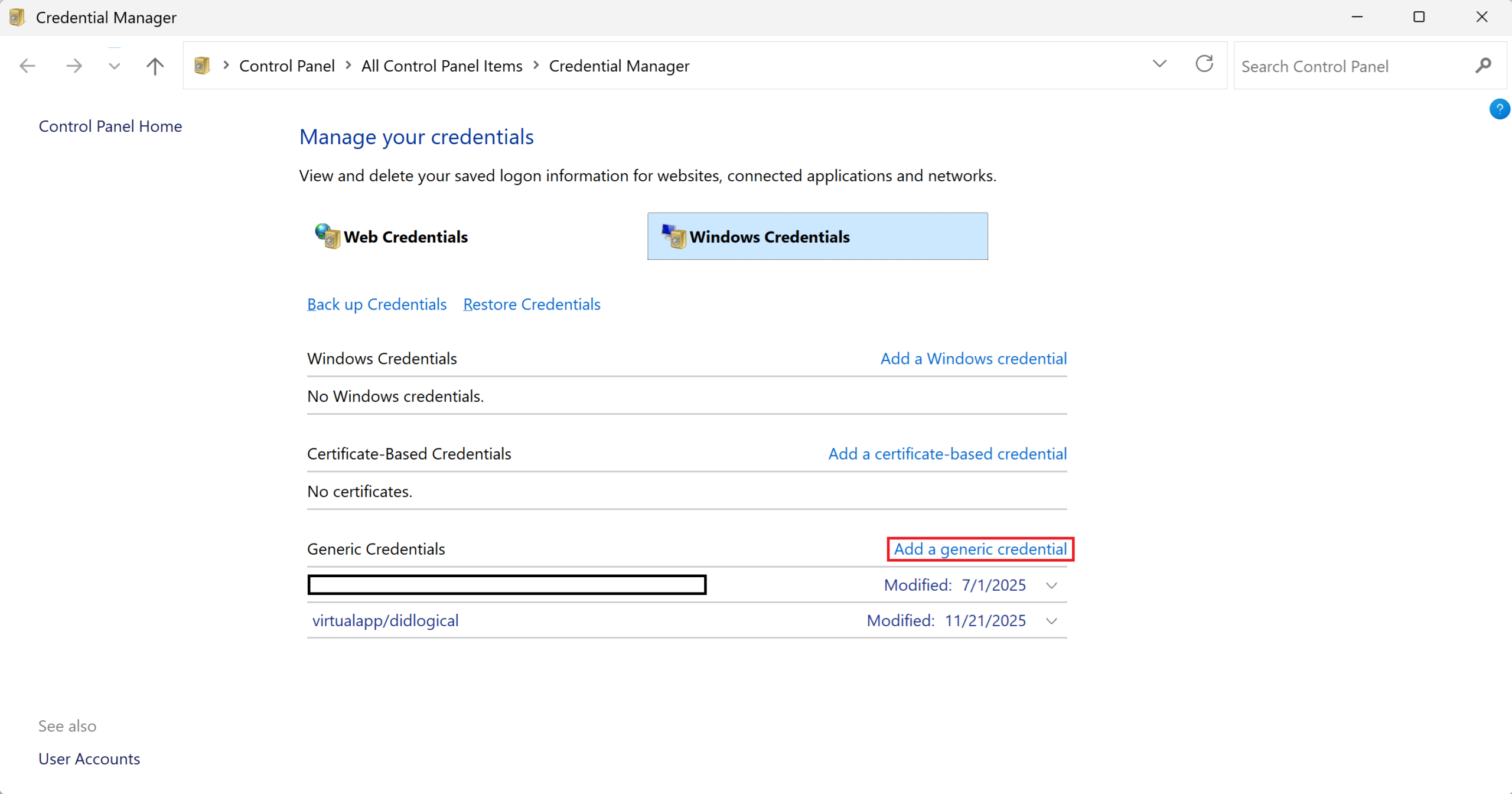
Note
Remember to add secrets as generic credentials. Otherwise, they will not work.
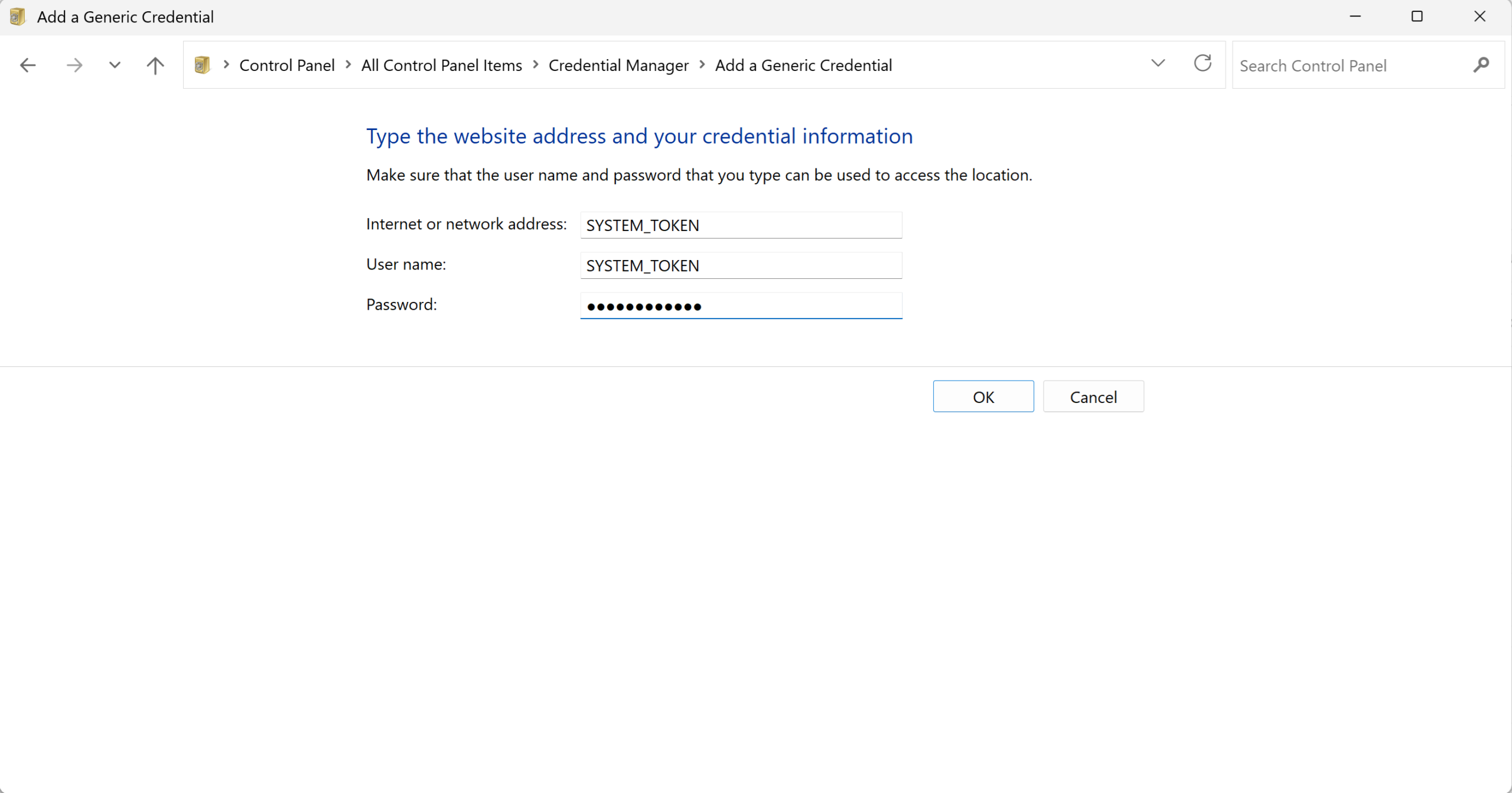
Note
Remember to set both Internet or network address and User name to the same name of your secret in the Rublon Auth Proxy config file.
4. Restart the Rublon Authentication Proxy service.
Updating
Every time you change the credentials used by the Rublon Authentication Proxy, you must restart the Auth Proxy service to apply the new values. The Auth Proxy reads credentials at start-up and does not automatically update them later.
Benefits of Setting Secrets in Windows Credential Manager
- No Plaintext Secrets in Config File. The Auth Proxy config file contains credentials names, not secret values. You do not have to redact anything before sharing the config file with the Rublon Support.
- Simpler Update. Credentials can be updated directly in Windows Credential Manager without modifying the Auth Proxy config file. After updating, simply restart the proxy to apply the changes.
- Separation of Duties. One administrator can manage and update secret values in Windows Credential Manager, while another administrator maintains the Auth Proxy configuration. This separation improves security and operational clarity.
Summary
Switching secret_source to winvault keeps sensitive values out of the Auth Proxy config file and loads them from the Windows Credential Manager instead. Define the required credentials, update the proxy config to reference their names, and restart the proxy service to apply changes. This approach yields cleaner configs and reduces accidental secret exposure in files.
Related Posts
Rublon Authentication Proxy – Documentation
Configuring the Rublon Authentication Proxy Secret Source – Environment Variables (env)