
The main difference between Federated Identity Management (FIM) and Single Sign-On (SSO) is that FIM enables users to access services across multiple organizations or domains using a single identity, while SSO allows users to access multiple applications within the same organization or domain using one set of login credentials. Although both simplify authentication and reduce password fatigue, FIM supports cross-domain identity federation, whereas SSO centralizes access within a single trust boundary.
What is Single Sign-On (SSO)?
Single Sign-On (SSO) is an authentication process that allows users to access multiple applications using one set of login credentials, typically within the same organization. Once logged in, users can switch between systems without being prompted to log in again.
SSO is commonly used in enterprises to improve productivity, reduce login fatigue, and streamline access to internal systems such as HR portals, CRMs, or internal messaging platforms.
What is Federated Identity Management (FIM)?
Federated Identity Management (FIM) is a set of standards and trust relationships that allow users to access systems across different organizations or domains using a single digital identity.
Instead of creating separate accounts for each application or partner system, users can log in using an identity from a trusted third-party Identity Provider (IdP), such as Google, AD FS, Microsoft Entra ID, or a university’s identity system.
FIM vs. SSO: What’s the Difference?
The key difference between FIM and SSO is the scope of trust and access:
- SSO is designed for multiple apps within a single organization or domain.
- FIM supports identity sharing across multiple organizations or domains through trust relationships.
Both approaches enhance user convenience and reduce password risk, but their implementation and use cases differ.
FIM vs. SSO: Differences Table
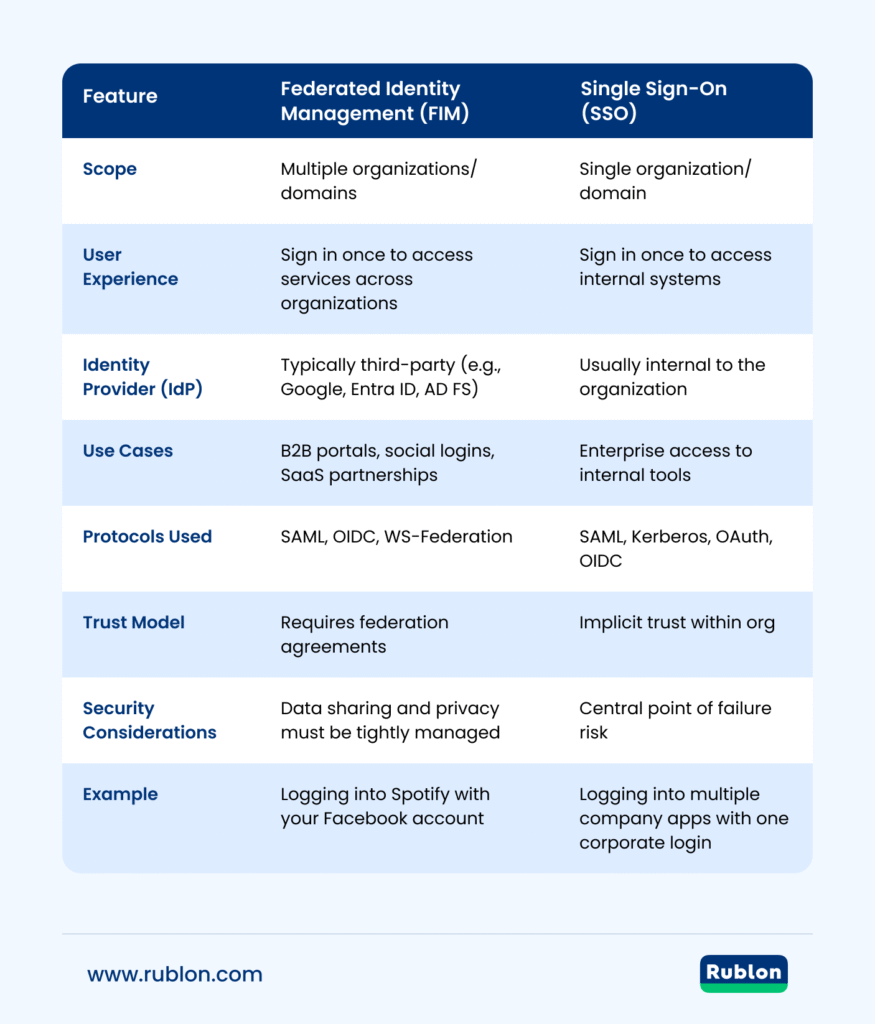
| Feature | Federated Identity Management (FIM) | Single Sign-On (SSO) |
|---|---|---|
| Scope | Multiple organizations/domains | Single organization/domain |
| User Experience | Sign in once to access services across organizations | Sign in once to access internal systems |
| Identity Provider (IdP) | Typically third-party (e.g., Google, Entra ID, AD FS) | Usually internal to the organization |
| Use Cases | B2B portals, social logins, SaaS partnerships | Enterprise access to internal tools |
| Protocols Used | SAML, OIDC, WS-Federation | SAML, Kerberos, OAuth, OIDC |
| Trust Model | Requires federation agreements | Implicit trust within org |
| Security Considerations | Data sharing and privacy must be tightly managed | Central point of failure risk |
| Example | Logging into Spotify with your Facebook account | Logging into multiple company apps with one corporate login |
Advantages of FIM over SSO
- Cross‑Organization Access: FIM enables seamless access across different domains, organizations, and federated partners using a single identity, making it ideal for B2B integrations, external portals, and partner ecosystems.
- External IdPs: With FIM, you can offload identity management to trusted external Identity Providers (e.g., Google, Microsoft Entra ID), avoiding the need to manage authentication infrastructure in-house.
- Improved Scalability for Customer Identities: Easier onboarding of external and consumer users via social logins or federated ID, reducing friction and accelerating growth for customer-facing applications.
- Decentralized Liability and Compliance Burden: When using a federated IdP that holds responsibility for authentication, your organization bears less risk in terms of identity verification and authentication compliance.
Advantages of SSO over FIM
- Simplicity and Control: SSO within a single organization is easier to manage and configure with no need for cross-domain agreements or trust relationships.
- Stronger Internal Security Policies: All authentication occurs under the same internal system by the same IdP, enabling tighter, consistent policy enforcement (e.g., strict multi-factor authentication (MFA), password policies, session control).
- Lower Latency & Better Performance: Since SSO typically operates within the enterprise network or a closed cloud environment, authentication is faster and more reliable.
- Better Visibility and Auditability: Centralized logs and monitoring of authentication events provide clearer detection of anomalies and easier audit compliance for internal apps.
Benefits of FIM and SSO
Both FIM and SSO offer significant advantages in terms of security, usability, and cost-efficiency:
- Improved user experience: Eliminate password fatigue and reduce login time.
- Better security: Reduce password reuse and enable centralized policy enforcement (e.g., MFA).
- Lower IT burden: Decrease helpdesk password reset tickets and redundant account management.
Challenges of FIM and SSO
While beneficial, these technologies come with some implementation and operational challenges:
- FIM: Requires cross-domain trust, legal agreements, and careful privacy & security oversight.
- SSO: If the identity provider goes down, access to systems can be impacted.
- Additionally, both technologies are vulnerable to password-based attacks if MFA is not enforced.
FIM + SSO + MFA: A Stronger Security Model
Adding multi-factor authentication (MFA) to FIM and SSO significantly strengthens your identity infrastructure.
Why Add MFA?
MFA requires users to provide a second factor, such as a FIDO2 key, mobile app, or biometric, making it much harder for attackers to compromise accounts.
MFA is also mandatory for compliance with regulations like:
Choosing the Right MFA Provider
If you’re deploying SSO or FIM, you need an MFA solution that integrates with:
- Identity providers (e.g., Entra ID, Active Directory, Google Workspace)
- Authentication protocols (e.g., SAML, LDAP, RADIUS)
Why Choose Rublon for MFA with SSO?
Rublon MFA allows for single sign-on (SSO) MFA logins and enhances your identity security with:
- Phishing‑resistant authentication using FIDO2 security keys and passkeys
- Access policies like allowed authentication methods, remembered devices, and authorized networks
- Compatibility with cloud and hybrid environments, as well as directory services (Active Directory, LDAP)
FIM vs. SSO: Which Is Right for You?
- Choose SSO if your focus is on internal access management and providing a unified, secure login across your organization’s applications. This is where Rublon MFA shines by adding robust MFA to SSO.
- Choose FIM if your business needs to support external users or customers signing in with external IdPs (like Google, Microsoft, universities), where federation relationships are required.
Conclusion
The main difference between Federated Identity Management (FIM) and Single Sign-On (SSO) is that FIM enables identity sharing across multiple organizations or domains, whereas SSO provides unified access only within a single organization. Choosing between them depends on whether you require cross-domain collaboration or internal access efficiency. For most businesses, a strong SSO implementation enhanced by multi-factor authentication covers internal needs, while external customer or partner access may call for FIM (managed separately).