
Geolocation-based multi-factor authentication (MFA) allows organizations to strengthen identity security and enforce conditional access rules based on the user’s geographical location. Geolocation MFA helps block high‑risk regions, prevent unauthorized country-based login attempts, and apply geographic location-based conditional access policies that align with Zero Trust. Geolocation‑Based Access Control in Rublon MFA involves creating a Geolocation Policy and assigning it to protected applications to ensure that only trusted geographical locations can authenticate into these applications.
How to Enable the Geolocation Policy for MFA?
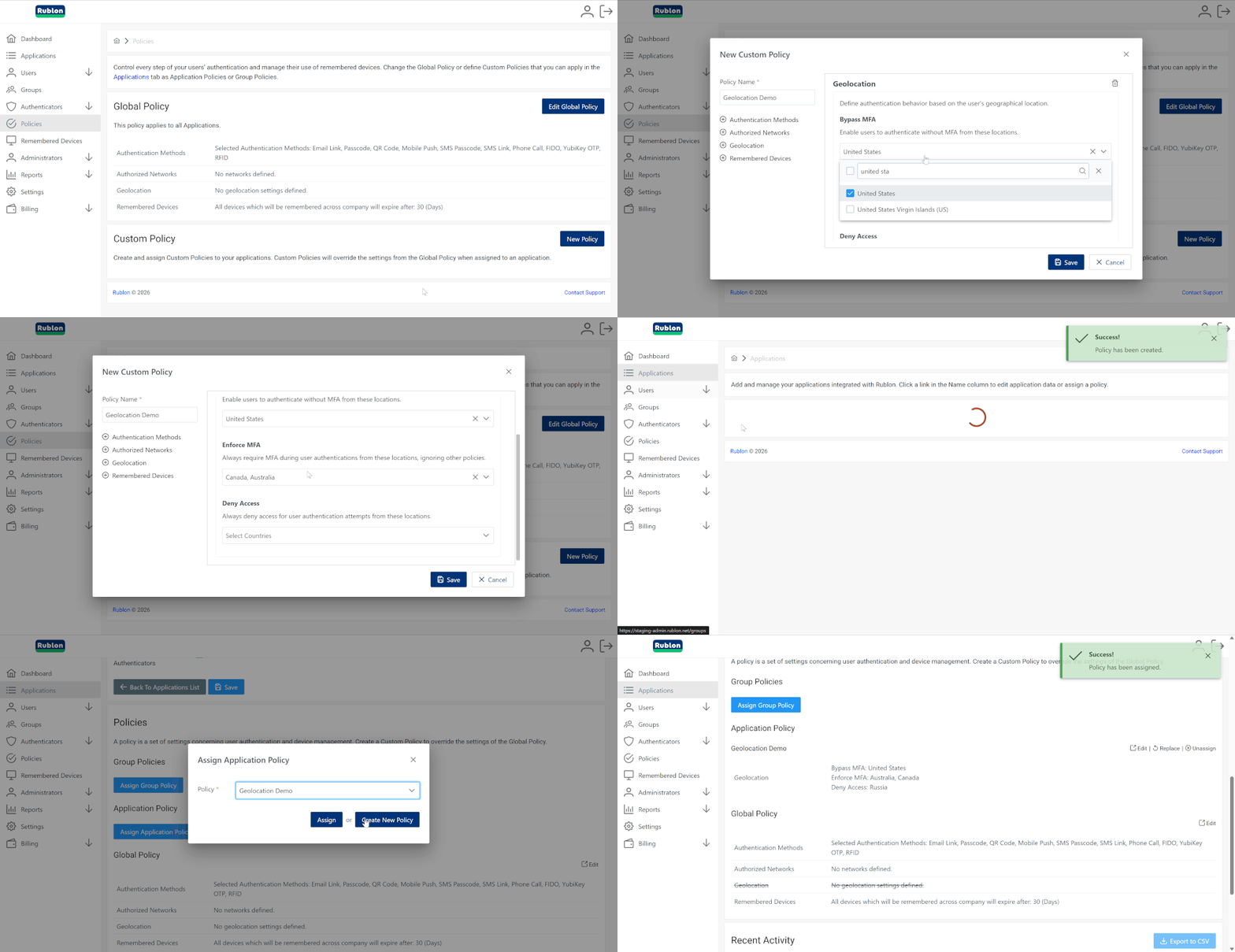
Enabling the Geolocation Policy in Rublon MFA is straightforward and gives organizations full control over how multi-factor authentication (MFA) should behave depending on the user’s location. The configuration is done directly in the Rublon Admin Console, where administrators can define whether access from selected countries should trigger MFA, bypass it, or block access entirely.
To enable the Geolocation Policy:
1. Sign in to the Rublon Admin Console and select the Policies tab.
2. Select an existing policy or create a new one.
3. In the Geolocation section, choose how authentication should behave for selected countries:
- Bypass MFA
- Enforce MFA
- Deny Access
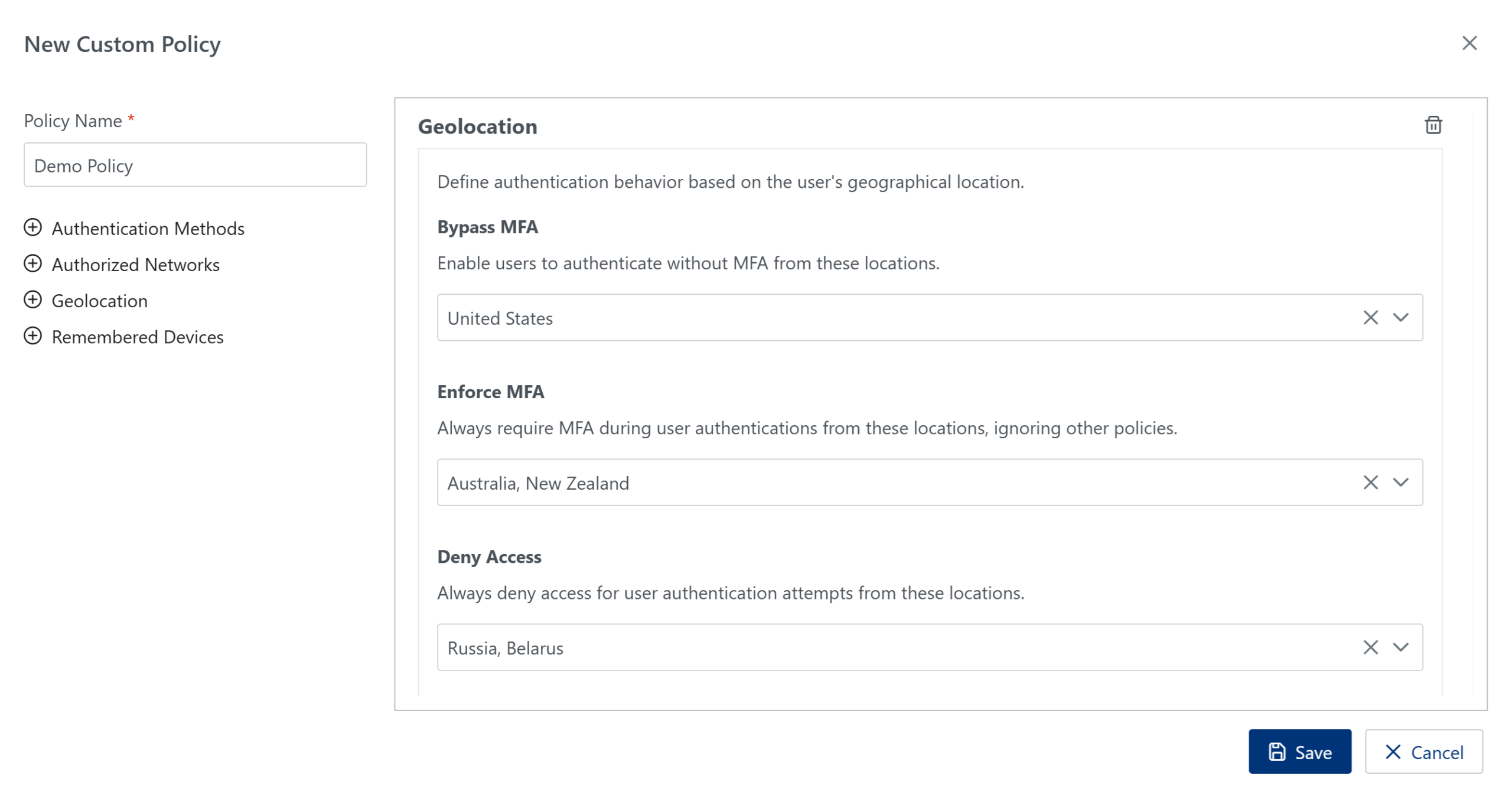
4. Save the policy and assign it either to an application (Application Policy) or to a specific user group (Group Policy), depending on your access‑control strategy.
For detailed configuration steps and more information, refer to the following resources:
- Dedicated Geolocation Policy Page
- Rublon Admin Console Documentation – Geolocation Policy
- Example of using Geolocation Policy within a Group Policy
- Rublon MFA Use Case: Geographical Location-Aware Account Protection with Rublon MFA
What is Geolocation?
Geolocation (geographical location) refers to the process of determining a user’s physical location using signals such as IP address, GPS data, Wi‑Fi networks, or cellular information. In cybersecurity, geographical location is primarily used to evaluate whether a login attempt originates from a trusted region. When combined with geolocation conditional access, organizations can enforce country-based access rules, block suspicious regions, and detect anomalies that may indicate credential theft or account compromise.
What is the Definition of Geolocation Multi-Factor Authentication?
Geolocation-based multi-factor authentication (MFA) is a mechanism that incorporates the user’s geographic location as a contextual security control during the MFA login process. In practice, geolocation-based MFA authentication evaluates where the authentication attempt originates and applies MFA Conditional Access Policies based on geographical location to determine whether to allow without MFA, challenge with MFA, or block the request.
Why Combine MFA With Geolocation
Many organizations ask: Why combine multi-factor authentication with geolocation?
The answer is simple: traditional MFA verifies who the user is, but not where they are.
By adding location intelligence, geolocation-based MFA introduces a powerful contextual layer that prevents attackers from authenticating even if they possess valid credentials.
This approach aligns with Zero Trust principles and enables geolocation‑based access control in Rublon MFA, ensuring that authentication is allowed only from approved regions.
Sign up for a Free Geolocation MFA Trial →
What Does the Geolocation MFA Policy Allow You to Do?
A geolocation policy (also known as a geographic location policy or conditional access policy based on the geographical location of users) allows administrators to define which geographical regions can gain access to applications.
With Rublon MFA’s Geolocation Policy, organizations can:
- enforce country-based login restrictions,
- block authentication attempts from high‑risk regions,
- apply conditional access based on the user’s geographical location,
- ensure that only trusted geolocations can access sensitive systems.
Benefits of Using Geographic Context for MFA Authentication
- Prevent unauthorized access from foreign regions: Only users located in approved countries can authenticate.
- Reduce exposure to credential‑based attacks: Block login attempts from high‑risk or unexpected locations.
- Enhance security with contextual signals: Combine MFA with location‑aware access control.
- Improve compliance posture: Support regulatory requirements involving location‑based access restrictions.
- No added friction for legitimate users: Authentication remains seamless for users in allowed regions.
Can Geolocation MFA Reduce Account Takeover Risks?
Yes. Geolocation MFA is one of the most effective ways to prevent account takeover attempts.
Attackers often operate from foreign or high‑risk regions. MFA geographic location rules allow organizations to block malicious login attempts before they reach internal systems.
Enforcing geographic location-based conditional access policies allows companies to stop unauthorized sign-in attempts even when passwords or MFA tokens have been compromised. This makes Geolocation Risk-Based Authentication (Geolocation RBA) a critical defense mechanism against phishing, credential stuffing, and brute‑force attacks
How Geolocation‑Based MFA Supports Security Frameworks and Compliance Standards
Zero Trust Architecture
Geolocation acts as an additional contextual signal that strengthens Zero Trust principles by validating not only who is accessing a resource, but also from where they are accessing it. This helps enforce continuous verification and reduces the attack surface associated with unexpected or high‑risk locations.
NIS2 Directive
NIS2 emphasizes risk‑based access control and strong authentication for essential and important entities. Geolocation‑based MFA supports these Article 21 requirements by enabling organizations to restrict access from untrusted regions and enforce location‑aware authentication policies.
ISO/IEC 27001:2022
- A.5.15 – Access control: Geolocation helps organizations implement stricter access control rules by limiting authentication to approved geographic regions.
- A.8.16 – Monitoring activities: Geographical location‑based authentication contributes to monitoring and detecting anomalous access attempts originating from unusual or high‑risk locations.
PCI DSS 4.0
PCI DSS 4.0 encourages the use of contextual authentication factors to strengthen identity verification. Geolocation‑based MFA supports this by adding a location signal to the authentication process, helping organizations block unauthorized access attempts from outside approved regions.
HIPAA Security Rule
HIPAA requires covered entities to implement risk‑based access controls to protect electronic protected health information (ePHI). Geolocation‑based MFA supports this by allowing organizations to restrict authentication attempts to trusted geographic areas, reducing the likelihood of unauthorized access.
Frequently Asked Questions (FAQ) on Geolocation MFA
Top software providers for geolocation multi-factor authentication?
Many MFA platforms offer basic location checks, but Rublon MFA stands out with its dedicated Geolocation Policy, allowing organizations to restrict authentication to approved countries or regions for stronger account protection.
What are the best geolocation-based MFA solutions for enterprise security?
Enterprises benefit most from MFA solutions that include precise, policy‑driven geographical location controls. Rublon MFA delivers this through its Geolocation Policy, enabling secure, location‑aware access without adding friction for users.
How to implement geolocation as part of MFA in corporate networks?
To implement geolocation as part of MFA in corporate networks, use a geolocation multi-factor authentication (MFA) like Rublon MFA. After enabling the Geolocation Policy, administrators configure country-based access rules as an MFA conditional access policy based on geographical location. From that point on, every authentication attempt is evaluated against this policy and is bypassed, challenged with MFA, or blocked depending on the user’s location.
How does location intelligence improve account security?
Location intelligence improves account security by evaluating the user’s geolocation for every login attempt and comparing it against defined geographic location-based conditional access policies. Based on this context, the system can automatically allow the login, require additional MFA verification, or block the attempt entirely if it originates from an untrusted or high‑risk region.
Is location a form of MFA?
Location is not a standalone MFA factor, but it is a powerful contextual signal used in geolocation-based MFA and geographical location conditional access to enhance authentication decisions. While MFA relies on something you know, have, or are, geolocation adds environmental context that supports adaptive authentication based on geographical location and helps enforce conditional access based on user geographical location.