
AD DS (Active Directory Domain Services) is the backbone of enterprise identity management, while AD LDS (Active Directory Lightweight Directory Services) is more flexible and lightweight, ideal for applications that need directory services but do not require full domain integration. Knowing the differences between them can help you select the right solution for your organization’s needs. Read on to discover more about the differences between AD DS and AD LDS.
What is AD DS?
Active Directory Domain Services (AD DS) is Microsoft’s core directory service that manages users, computers, groups, and security policies across a Windows Server domain. It authenticates users, authorizes access to resources, and replicates directory data among domain controllers to maintain a consistent, hierarchical directory across an organization.
What is AD LDS?
Active Directory Lightweight Directory Services (AD LDS), formerly known as ADAM, is a lightweight LDAP-based directory service for applications that do not require full domain/forest infrastructure. It supports flexible directory storage, allows multiple independently managed instances (each with its own schema), and can run on member or standalone servers. AD LDS does not rely on domain controllers or global catalogs in the way AD DS does, though integration and synchronization with AD DS is possible if explicitly configured.
AD DS vs. AD LDS: What’s the Difference?
The main difference between AD DS and AD LDS is that AD DS is a full-featured directory service providing centralized authentication and authorization for Windows domain networks, while AD LDS is a lightweight directory service offering flexible support for directory-enabled applications without the need for a full domain controller.
AD DS vs. AD LDS: Differences Table
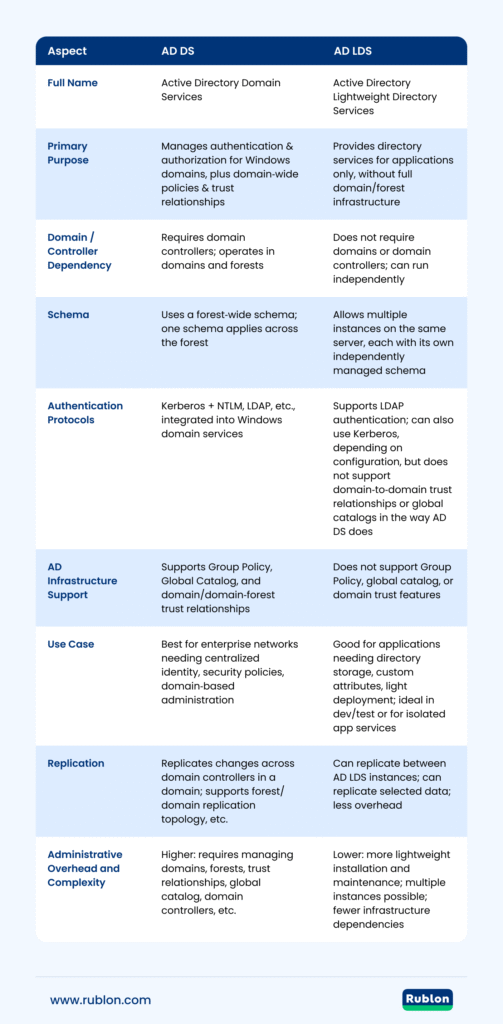
| Aspect | AD DS | AD LDS |
|---|---|---|
| Full Name | Active Directory Domain Services | Active Directory Lightweight Directory Services |
| Primary Purpose | Manages authentication & authorization for Windows domains, plus domain‑wide policies & trust relationships | Provides directory services for applications only, without full domain/forest infrastructure |
| Domain / Controller Dependency | Requires domain controllers; operates in domains and forests | Does not require domains or domain controllers; can run independently |
| Schema | Uses a forest‑wide schema; one schema applies across the forest | Allows multiple instances on the same server, each with its own independently managed schema |
| Authentication Protocols | Kerberos + NTLM, LDAP, etc., integrated into Windows domain services | Supports LDAP authentication; can also use Kerberos, depending on configuration, but does not support domain‑to‑domain trust relationships or global catalogs in the way AD DS does |
| AD Infrastructure Support | Supports Group Policy, Global Catalog, and domain/domain‑forest trust relationships | Does not support Group Policy, global catalog, or domain trust features |
| Use Case | Best for enterprise networks needing centralized identity, security policies, domain‑based administration | Good for applications needing directory storage, custom attributes, light deployment; ideal in dev/test or for isolated app services |
| Replication | Replicates changes across domain controllers in a domain; supports forest/domain replication topology, etc. | Can replicate between AD LDS instances; can replicate selected data; less overhead |
| Administrative Overhead and Complexity | Higher: requires managing domains, forests, trust relationships, global catalog, domain controllers, etc. | Lower: more lightweight installation and maintenance; multiple instances possible; fewer infrastructure dependencies |
Looking for a FIDO MFA Provider?
Protect Active Directory and Entra ID users from hackers with phishing-resistant FIDO security keys and passkeys.
Distinguishing AD DS vs AD LDS
- AD LDS is an independent mode of Active Directory, which means it does not require the domain/forest infrastructure that AD DS depends on.
- Some applications may use AD LDS when they need custom schemas, naming contexts, or directory instances dedicated to the app without affecting the domain schema or policies of AD DS.
- AD LDS does not provide domain‑level feature sets such as global catalog, trust relationships, or Group Policy linked to domains, which are core to AD DS.
- AD DS is required when you need full network authentication for Windows clients and servers, centralized policy enforcement, and domain‑wide identity and security boundaries. AD LDS is more lightweight, suited for application directories, dev/test, or instances where domain‑based overhead is unwanted.
Advantages of AD LDS over AD DS
- Flexibility: supports custom schemas per instance without altering the AD DS forest schema.
- Reduced infrastructure: no need for domains, forests, or domain controllers.
- Isolation: applications using AD LDS are less coupled with domain‑level policies or schema constraints.
- Lightweight deployment: ideal for directory‑enabled applications that do not require full domain services.
Advantages of AD DS over AD LDS
- Centralized identity: authentication and authorization managed across domain users and computers.
- Group Policy support: enforce security, configuration, and compliance across all domain‑joined machines.
- Resource & permission management: control security groups and access permissions in a domain environment.
- Deeper integration: supports domain/forest trusts, global catalog, and tight Windows ecosystem features.
Integration and Coexistence of AD DS and AD LDS
AD DS and AD LDS can coexist in the same environment. You can deploy AD LDS instances on member or standalone servers alongside AD DS to support directory‑enabled applications without requiring full domain/forest dependencies. Each AD LDS instance can use its own schema and naming contexts, which keeps the AD DS schema and domain infrastructure unaffected. But if you plan to synchronize data or share object classes, the AD LDS schema must include all necessary classes/attributes.
Security Considerations
When deploying directory services, security is paramount. AD DS offers strong built‑in security features for domain‑based environments, including Group Policy enforcement, access control lists (ACLs), trust relationships, and authentication mechanisms like Kerberos. AD LDS, while more flexible, does not provide domain‑level features like AD DS Group Policy or forest/domain trust relationships by default. Securing AD LDS requires explicitly configuring authentication, ACLs, service accounts, and auditing.
When to Choose AD DS vs. AD LDS
Choosing between AD DS and AD LDS depends on your organization’s needs.
Choose AD DS when:
- You need a full domain/forest infrastructure for centralized authentication and authorization of users and computers.
- You want to enforce security, configuration, or compliance via Group Policy across domain‑joined devices.
- You require domain‑level features such as global catalogs or trust relationships with other domains.
Choose AD LDS when:
- You have applications that need directory services but don’t require all the overhead of domain‑based management.
- You want to keep application‑specific schema changes separate, without extending or modifying the AD DS schema.
- You need a flexible directory instance that can run independently (on a standalone or member server), for apps, dev/test, or isolated services.
Conclusion
Understanding the differences between AD DS and AD LDS is crucial for deploying the right directory services in your environment. AD DS is best for managing domains, users, and network resources in a Windows environment. AD LDS offers a lightweight, flexible directory for applications without the overhead of a domain controller.