
Last updated on June 15, 2026
When users manage their own MFA authenticators, security teams gain flexibility. Employees can register a new phone, add a passkey, or remove an old phone number without waiting for the help desk. That is good for productivity, but it also creates important questions:
Who added the authenticator? Who removed the old one? Was the change expected?
Track Every MFA Authenticator Change With Confidence
Rublon MFA helps answer these questions by giving administrators visibility into authenticator-related changes performed by users and administrators through self-service flows. With a clear audit trail of authenticator registrations, updates, and removals performed through self-service flows, organizations can better monitor changes to their users’ MFA configurations, investigate suspicious activity, and support compliance requirements.
For technical details on Activity Logs, see the Rublon Admin Console documentation:
Rublon Admin Console – Activity Logs
A Practical Layer of Identity Governance
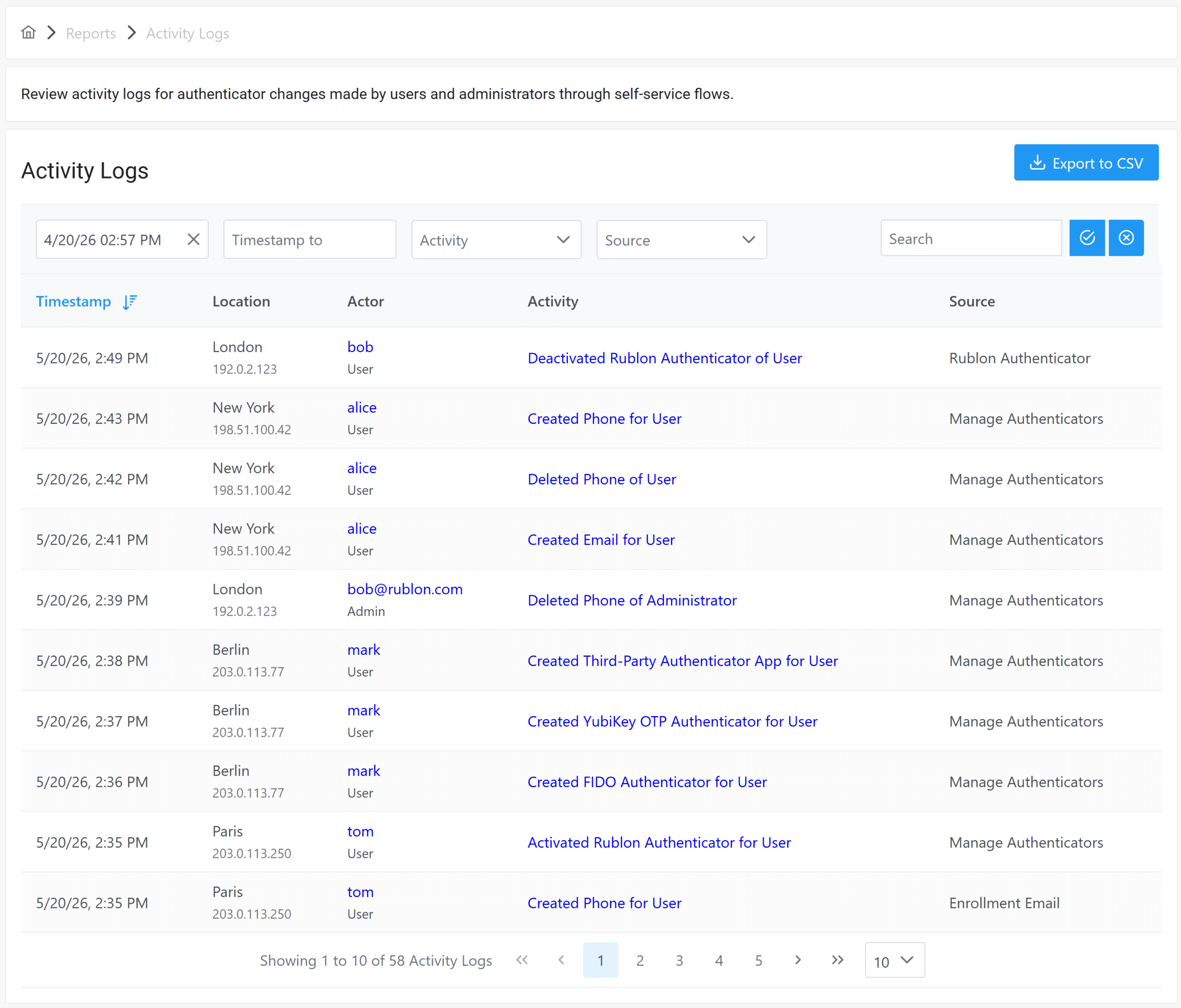
The authenticator activity history saved to the Activity Logs tab is a practical governance tool.
It helps organizations improve:
- Audit trail quality by recording authenticator‑related actions.
- Security visibility by showing changes to users’ MFA setup.
- Traceability by linking every action to a specific user or administrator.
- Risk reduction by helping teams detect suspicious or unauthorized changes faster.
- Admin efficiency by giving support teams the context they need to troubleshoot issues.
- User accountability by making self‑service authenticator changes visible.
- Compliance readiness by providing a verifiable history of MFA‑related events for audits.
- Operational transparency by ensuring no authenticator change happens without a recorded footprint.
For organizations that rely on MFA to protect remote access, cloud applications, Windows logins, VPNs, and business-critical systems, this visibility helps close an important security gap.
Why Authenticator Activity Monitoring Matters
Multi-factor authentication (MFA) protects access to business applications, VPNs, remote desktops, servers, and other critical systems. But MFA security does not end once users enroll their first device.
Over time, users may replace phones, add new security keys, register passkeys, or remove authenticators they no longer use. They may also rename authenticators, while phone authenticators may be set as the default authentication option. Administrators may also update the authenticators they use for Rublon Admin Console sign-ins. Each of these actions changes how a user can complete MFA.
Without visibility into those changes, security and IT teams may struggle to answer basic but important questions:
- When was this authenticator added, updated, or removed?
- Was it registered by the user or an administrator?
- Was an authenticator removed before a suspicious login attempt?
- Which account was affected?
- Can we provide evidence during an internal or external audit?
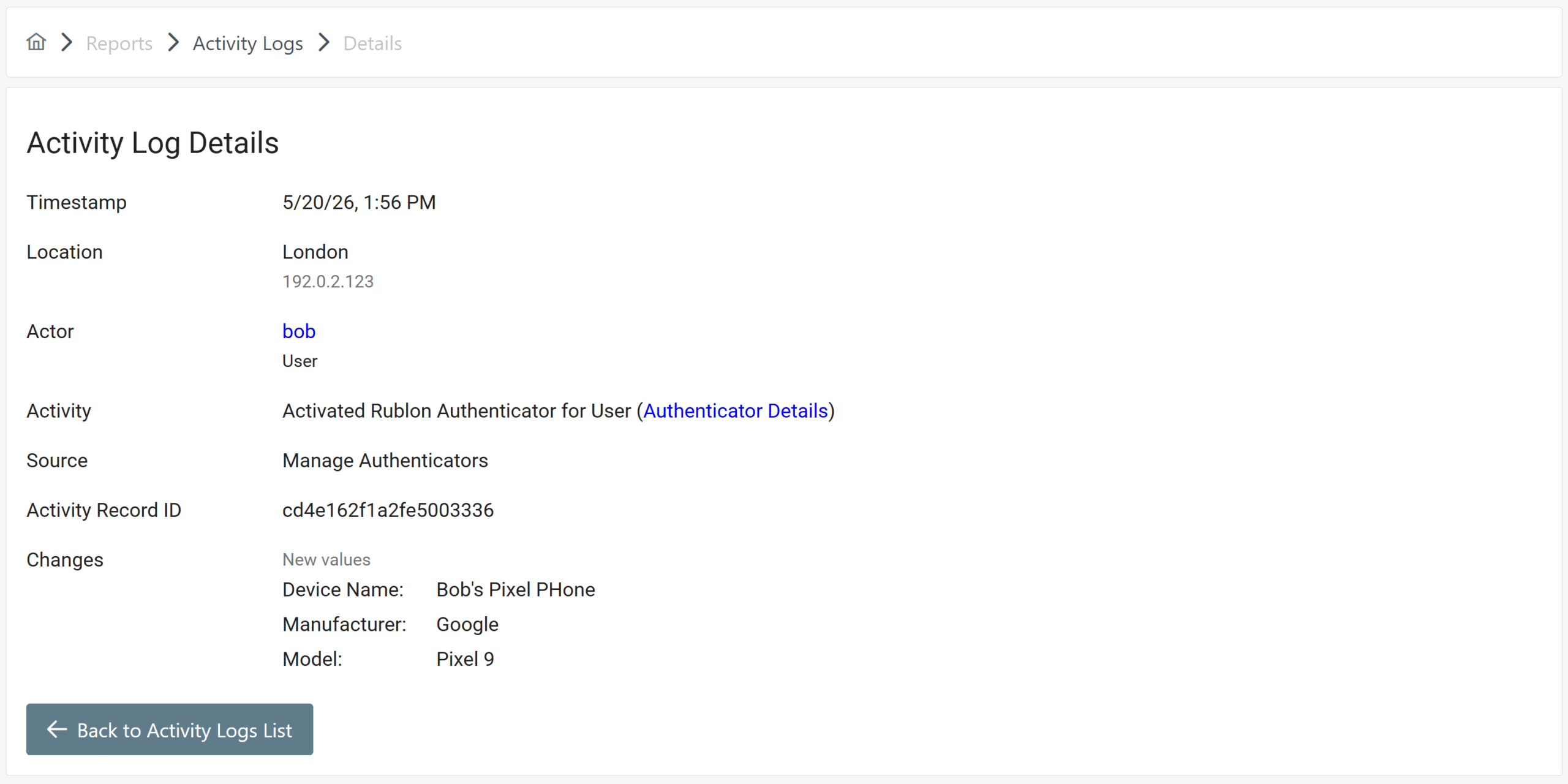
The Activity Logs tab in the Rublon Admin Console provides an MFA authenticator audit trail, giving organizations the visibility and traceability they need to confidently manage these authenticator‑related questions.
Improve Security Transparency Across Your MFA Environment
Security teams need more than authentication results. They also need visibility into the authenticator configuration changes that affect identity protection.
Rublon MFA’s authenticator activity history helps administrators see authenticator-related actions in one place, making it easier to understand how users’ MFA setups change over time. This improves security visibility across your organization and reduces blind spots in day-to-day identity governance.
Instead of relying on assumptions, administrators can review activity records and verify what happened. This supports a more transparent security process, especially in environments where users can manage authenticators themselves.
Sign up for a Free MFA Trial →
Respond Faster to Suspicious Changes
Incident response often depends on speed. If a user reports an unfamiliar authenticator or if a security team notices suspicious activity, administrators need to reconstruct the sequence of events as fast as possible.
An audit trail of authenticator registrations, updates, and removals helps reduce investigation time. Security teams can trace recent changes, identify the affected user, and determine whether the action was expected or requires escalation.
The kind of traceability offered by the Activity Logs tab supports faster decision-making during account takeover investigations, suspicious login reviews, help desk escalations, and post-incident analysis.
Support Compliance and Audit Readiness
Many organizations must demonstrate that they monitor identity and access-related events. Logging and auditability are also core themes in cybersecurity frameworks. For example, NIST highlights log management as a way to support incident investigation, operational troubleshooting, and required record retention.
For organizations subject to internal security policies, customer security questionnaires, regulatory expectations, or cyber insurance reviews, authenticator activity history can help provide evidence that MFA-related changes are tracked.
This supports compliance readiness by giving administrators access to auditable records of key MFA authenticator changes. Together with other Rublon MFA Logs (Authentication Logs, Audit Logs, and Phone Logs), Activity Logs ensure an all-encompassing audit readiness for any organization.
Reduce Help Desk Guesswork
Authenticator-related issues are very common in MFA environments. Users get new phones. Security keys are lost. Passkeys may need to be re-enrolled. Old authenticators may need to be removed.
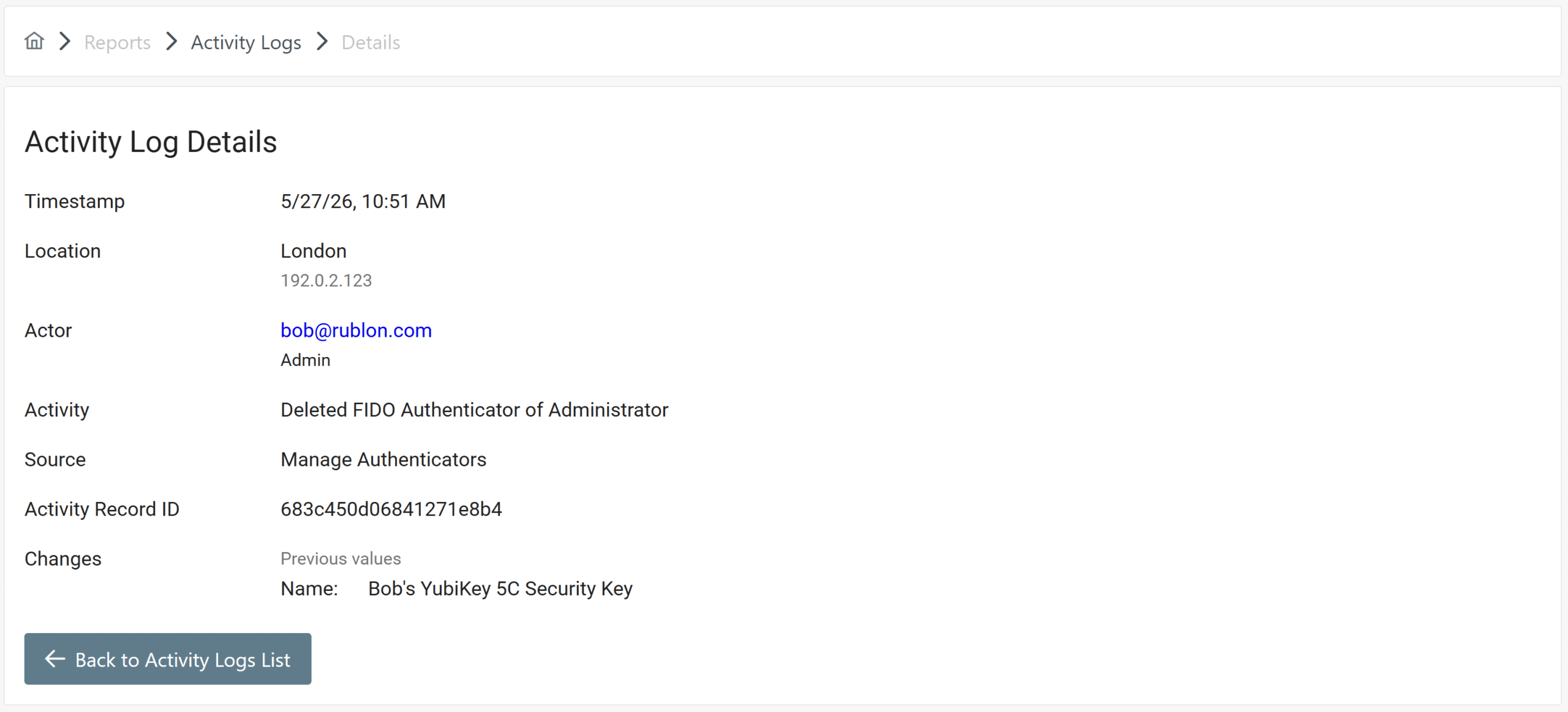
When admins can review authenticator activity, troubleshooting becomes easier. The help desk can quickly check whether an authenticator was recently added or removed, who performed the action, and when it happened.
That means fewer back-and-forth questions, less guesswork, and faster resolution for users. It also helps administrators distinguish between routine support cases and changes that may require additional security review.
Strengthen User Accountability
Accountability is a key part of identity protection. When authenticator-related actions are attributable and trackable, organizations can better understand user behavior and administrator activity.
This is especially important in larger environments, distributed teams, and regulated industries where many people are involved in user support, account recovery, and access management.
With clear activity monitoring, administrators can verify whether a change was performed through a self-service flow or by an admin in the Rublon Admin Console. This supports stronger governance and helps ensure that MFA management remains transparent.
Export Activity Logs for Audit and Compliance Reviews
Administrators can export Activity Logs to a CSV file for further analysis, reporting, and audit preparation. They can export all activity logs, or first narrow the results using the available filtering and search options, then export only the logs that match their current investigation, compliance review, or internal reporting needs.
Keep MFA Self-Service Transparent
Self-service authenticator management can improve the user experience and reduce support workload. But self-service should not mean reduced oversight.
Rublon MFA helps organizations balance convenience with control by giving administrators the visibility they need to monitor authenticator changes. End-users can manage their MFA authenticators more easily, while security teams retain the audit trail required for compliance, investigation, and governance.
The result is a more transparent, accountable, and efficient MFA environment.
Learn more about Activity Logs in the Rublon Admin Console documentation.
Modern MFA for Your Organization
Try a 30-day Free Trial of Rublon MFA and enhance your organization’s security by adding multi-factor authentication to your users’ logins.
Frequently Asked Questions About MFA Audit Trails
What is an MFA audit trail?
An MFA audit trail is a record of important multi-factor authentication events and configuration changes. In the context of authenticator management, it helps administrators see when an authenticator was registered, updated, or removed, which user account was affected, and whether the action was performed by a user or an administrator. This improves security visibility, traceability, and user accountability.
What other logs does Rublon MFA provide for audit and security visibility?
In addition to Activity Logs, Rublon MFA also supports broader audit visibility through other logs, including Authentication Logs, Audit Logs, and Phone Logs, which help administrators review authentication events, administrative changes, and phone-based authentication activity.
Why should organizations track authenticator changes?
Organizations should track authenticator changes because every registered authenticator can affect how a user accesses protected systems. If a new MFA authenticator is added, an existing one is updated, or an old one is removed, administrators need a reliable way to verify whether the change was expected. Tracking these actions supports risk reduction, identity protection, and faster investigation of suspicious account activity.
How does authenticator activity monitoring help with compliance?
Authenticator activity monitoring helps with compliance by creating an auditable history of MFA-related changes. Many security and compliance programs require organizations to monitor access-related events, retain relevant logs, and review activity when needed. A clear audit trail can help security teams provide evidence during internal audits, customer reviews, and regulatory assessments.
How can an audit trail for authenticator changes improve incident response?
An MFA audit trail for authenticator changes improves incident response by helping administrators quickly reconstruct what happened before, during, or after a suspicious event. For example, if a user reports an unknown authenticator or unusual login behavior, the admin can review recent authenticator registrations and removals to identify potentially risky changes. This reduces investigation time and helps teams respond with more confidence.
How does Rublon MFA help administrators improve authenticator security and visibility?
Rublon MFA helps administrators improve security and visibility of MFA authenticators by showing authenticator-related activity in the Rublon Admin Console. This gives security and IT teams a clearer view of changes made through self-service flows by users and admins of the organization, helping them monitor their MFA environment without relying on guesswork.
Can authenticator activity logs reduce the help desk workload?
Yes. Authenticator activity logs can reduce the help desk workload by giving administrators more context when users report MFA issues. Instead of asking multiple follow-up questions, support teams can check whether an authenticator was recently added or removed and use that information to diagnose the issue faster. This improves admin efficiency and helps users regain secure access more quickly.
What does user accountability mean in MFA?
User accountability in MFA means users are responsible for the changes they make to their own authenticators, and those changes are fully visible and traceable. When organizations can see who registered or removed an authenticator and when the action happened, they gain better control over their identity protection processes. This is especially important in larger teams, regulated environments, and organizations that use self-service MFA management.
Is authenticator activity history useful for identity governance?
Yes. Authenticator activity history supports identity governance by giving administrators better oversight of MFA configuration changes. It helps organizations monitor how authentication methods are managed, identify unusual activity, and maintain a reliable record of changes that affect user access. This strengthens governance without taking away the convenience of self-service MFA.