
The main difference between OAuth and OpenID Connect is that OAuth is a framework for authorization, whereas OpenID Connect is an identity layer on top of OAuth for authentication. This means that OpenID Connect provides information about the user who is logged in, such as their name, email, profile picture, etc., while OAuth provides access to the user’s resources, such as their photos, contacts, files, etc.
OAuth vs. OpenID Connect: What’s the Difference?
OAuth is great for delegated access. In contrast, OpenID Connect is ideal for user login.
OAuth 2.0 is about authorization. It lets third-party applications access specific resources (like your Google Drive or calendar) without needing your password. Instead, you grant permission, and the app receives an access token to act on your behalf within defined limits.
OpenID Connect (OIDC) builds on OAuth 2.0 to add authentication. It tells the application who you are by issuing an ID token that includes verified identity details like your name, email, and profile picture. This enables login functionality, so the app can establish a session and personalize your experience.
OpenID Connect and OAuth: Difference Explained
To illustrate the difference between OAuth and OIDC, let’s use an example of a third-party application that wants to access the user’s Google account. With OAuth, the application can request permission from the user to access specific scopes of their Google account, such as Gmail, Google Drive, or Google Photos. The user can grant or deny these permissions, and the application can then use an access token to access the authorized resources on behalf of the user.
With OpenID Connect, the application can also request an ID token from Google, which contains information about the user’s identity, such as their name, email, profile picture, etc. The application can use this ID token to verify the user’s identity and display their information on the application’s interface. The application can also use the ID token to establish a login session for the user so that they don’t have to enter their credentials again.
OpenID Connect vs. OAuth: Differences Table
The following table summarizes the difference between OpenID Connect and OAuth:
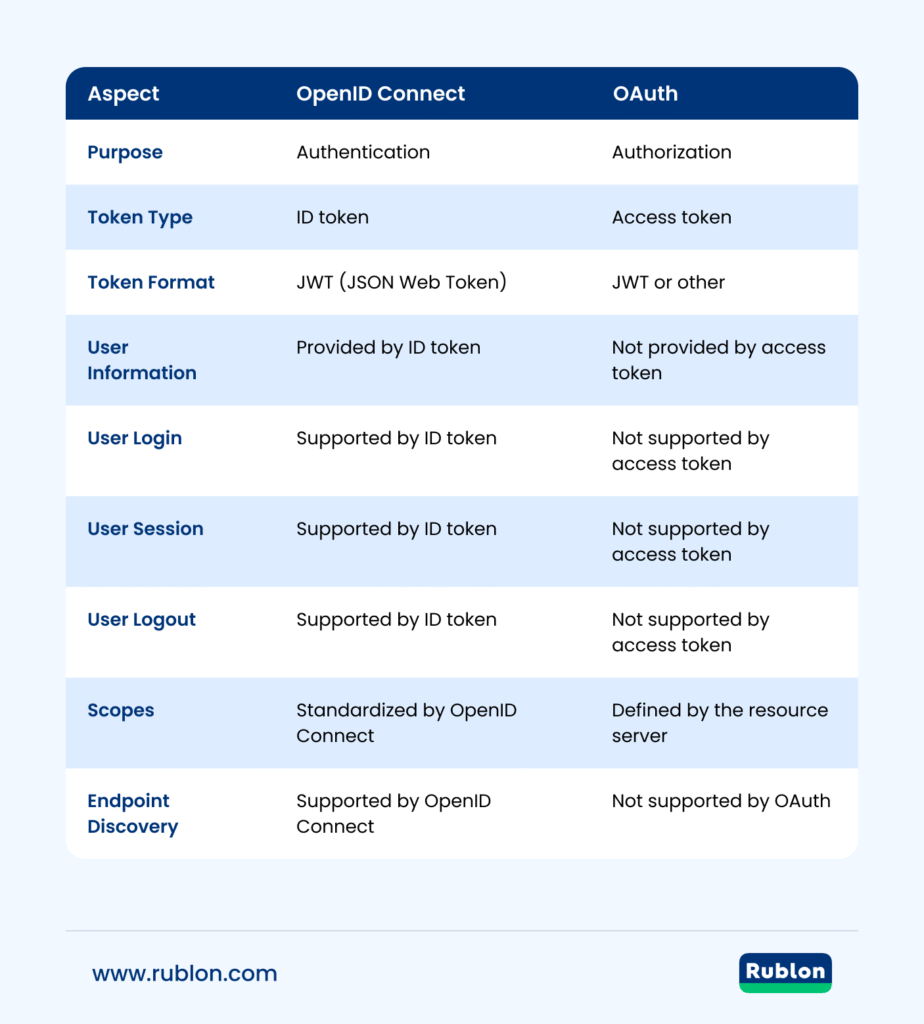
| Aspect | OpenID Connect | OAuth |
|---|---|---|
| Purpose | Authentication | Authorization |
| Token Type | ID token | Access token |
| Token Format | JWT (JSON Web Token) | JWT or other |
| User Information | Provided by ID token | Not provided by access token |
| User Login | Supported by ID token | Not supported by access token |
| User Session | Supported by ID token | Not supported by access token |
| User Logout | Supported by ID token | Not supported by access token |
| Scopes | Standardized by OpenID Connect | Defined by the resource server |
| Endpoint Discovery | Supported by OpenID Connect | Not supported by OAuth |
The Similarities
OpenID Connect and OAuth are both based on the same underlying protocol: OAuth 2.0. OAuth 2.0 is a delegation framework that allows third-party applications to act on behalf of a user, without the user having to share their credentials with the application. OAuth 2.0 defines four roles: the resource owner (the user), the resource server (the provider of the resources), the client (the third-party application), and the authorization server (the provider of the access tokens).
OpenID Connect is built on top of OAuth 2.0 and uses an additional JSON Web Token (JWT), called an ID token, to standardize some aspects that OAuth 2.0 leaves up to choice, such as scopes and endpoint discovery. OpenID Connect also defines a fifth role: the end-user (the person who is logged in).
Both OpenID Connect and OAuth use a similar flow to obtain tokens from the authorization server. The flow consists of four steps:
- The client sends a request to the authorization server, asking for permission to access some resources or information on behalf of the user.
- The authorization server redirects the user to a login page, where they enter their credentials and consent to the requested permissions.
- The authorization server redirects the user back to the client, along with an authorization code.
- The client exchanges the authorization code for an access token and optionally an ID token from the authorization server.
The access token and ID token are both JWTs that contain claims about the user and the authorization. The client can use these tokens to access the resources or information from the resource server or verify the user’s identity.
OAuth 2.1 vs OIDC: How OAuth 2.1 Makes OpenID Connect Stronger
OAuth 2.1 is a security-focused refinement of OAuth 2.0. While not a complete rewrite, it is a consolidation of essential best practices into a single, clearer specification.
OpenID Connect (OIDC) relies on OAuth for its core authentication flows. That’s why OAuth 2.1 matters. This is not because OAuth 2.1 changes OIDC’s purpose, but because it upgrades the security of all OIDC implementations built upon it.
Key enhancements include:
- PKCE is required for all authorization code flows, closing a common attack vector.
- Deprecated unsafe flows, such as implicit and resource owner password grants, are removed, reducing room for misuse.
- Redirect URIs must match exactly, preventing open redirect vulnerabilities.
- Refresh token rotation is recommended, limiting the impact of theft and reducing replay risks.
Together, these improvements mean that any OIDC implementation (especially those using OAuth flows) starts with stronger, safer building blocks.
Looking for a FIDO MFA Provider?
Protect Active Directory and Entra ID users from hackers with phishing-resistant FIDO security keys and passkeys.
Which One to Choose?
OpenID Connect and OAuth have different advantages depending on what kind of functionality or security you need for your application.
- OpenID Connect is advantageous if you need to:
- Authenticate users across multiple applications or domains using a single login (single sign-on).
- Verify users’ identities using a trusted provider (federated authentication).
- Display users’ information on your application’s interface (user profile).
- Manage users’ sessions and logouts (session management).
- OAuth is advantageous if you need to:
- Access users’ resources or data from different providers (cross-domain authorization).
- Delegate users’ permissions to third-party applications without sharing their credentials (secure delegation).
- Control users’ access levels and scopes (fine-grained authorization).
In practice, many organizations use both standards together: OpenID Connect for user authentication and OAuth 2.0 for authorization flows. If you want to centralize this model and enable MFA without building second-factor logic into every application, explore Rublon Identity Bridge for OAuth 2.0 and OpenID Connect applications.
OAuth and OpenID Connect: Use Cases & Practical Examples
OpenID Connect and OAuth are both widely used in various scenarios and applications. Some examples are:
- OpenID Connect and OAuth can be used to centralize login and multi-factor authentication (MFA) for business applications. For example, Rublon Identity Bridge lets OAuth 2.0 and OIDC-compatible applications connect to a centralized Authorization Server, so organizations can enforce MFA without adding a separate MFA agent, connector, or custom second-factor logic to each application.
- OpenID Connect is used by many websites and mobile apps that allow users to log in with their existing accounts from providers like Google, Facebook, Twitter, etc.
- OAuth is used by many applications that integrate with other services or platforms, such as Spotify, Instagram, Dropbox, etc.
- OpenID Connect and OAuth are both used by some applications that combine identity and authorization features, such as Microsoft Azure AD B2C, Okta, Auth0, etc.
- Identity providers like Entra ID use OpenID Connect to authenticate users and can enforce multi-factor authentication (MFA) and access policies as part of the login flow. For example, when logging into a corporate dashboard, users may be prompted to enter a password and then verify their identity using a second factor (e.g., mobile app, SMS code, or biometric). Once authentication is successful, OpenID Connect issues an ID token to the application containing verified user information
Strengthening Authentication with Multi-Factor Verification (MFA)
While OAuth delegates access and OpenID Connect verifies identity, combining MFA with OIDC strengthens trust. For example, in sensitive scenarios like logins to applications in critical industries like financial or healthcare, OpenID Connect can verify a user’s credentials and then ask for an additional factor, like a mobile verification code, biometric scan, or hardware token.
This layered strategy aligns with NIST guidelines on high-assurance authentication and helps mitigate credential compromise. NIST requires MFA for digital identity systems operating at Authenticator Assurance Level 2 (AAL2) and Level 3 (AAL3), especially when accessing sensitive resources such as personal data.
Conclusion
OpenID Connect and OAuth are two standards that have different purposes and features but share some similarities and advantages. OpenID Connect is an identity layer on top of OAuth that provides information about the user who is logged in, while OAuth is a framework for authorization that provides access to the user’s resources. Both standards are based on the OAuth 2.0 protocol and use a similar flow to obtain tokens from the authorization server. Both standards are also widely used in various scenarios and applications that require authentication and/or authorization functionality.
FAQ
Is OpenID Connect better than OAuth2?
They serve different purposes. OAuth 2.0 handles authorization (granting apps access to resources) while OpenID Connect adds authentication, providing a verified identity layer. Choosing one over the other depends on whether you need access control or user login verification.
Can OIDC be used without OAuth?
No. OpenID Connect is built on top of OAuth 2.0 and relies on its authorization mechanisms. You cannot use OIDC independently, but you can use OAuth alone if all you need is delegated access without identity.
Does Google use OAuth or OpenID?
Google uses both. Their APIs support OAuth 2.0 for authorizing access and conform to the OpenID Connect standard for authentication, making them OpenID Certified and capable of handling both login and resource access securely.
Is OAuth2 obsolete?
Not at all. OAuth 2.0 remains the modern authorization standard. It’s being refined (OAuth 2.1 is emerging with improved security defaults), but OAuth 2.0 is still widely used and foundational to today’s identity systems.