
Rublon MFA comprises:
- Cloud-hosted MFA platform for central authentication logic and management
- Customer-side components for technologies that require local or on-premises integration
- Flexible deployment model based on the protected system and authentication method
- Support for cloud, on-premises, and hybrid environments within one MFA architecture
- Protection for VPNs, Windows Logon, RDP, web apps, Linux, custom applications, and more
“Rublon MFA separates cloud platform services from customer-side integration components, making it possible to protect different technologies without imposing a single rigid deployment model. This gives organizations a practical way to extend MFA across cloud, on-premises, and hybrid environments while preserving the identity systems, authentication flows, and infrastructure they already use.”

Patryk Suchorowski
IT Architect at RublonRublon MFA Architecture Diagram
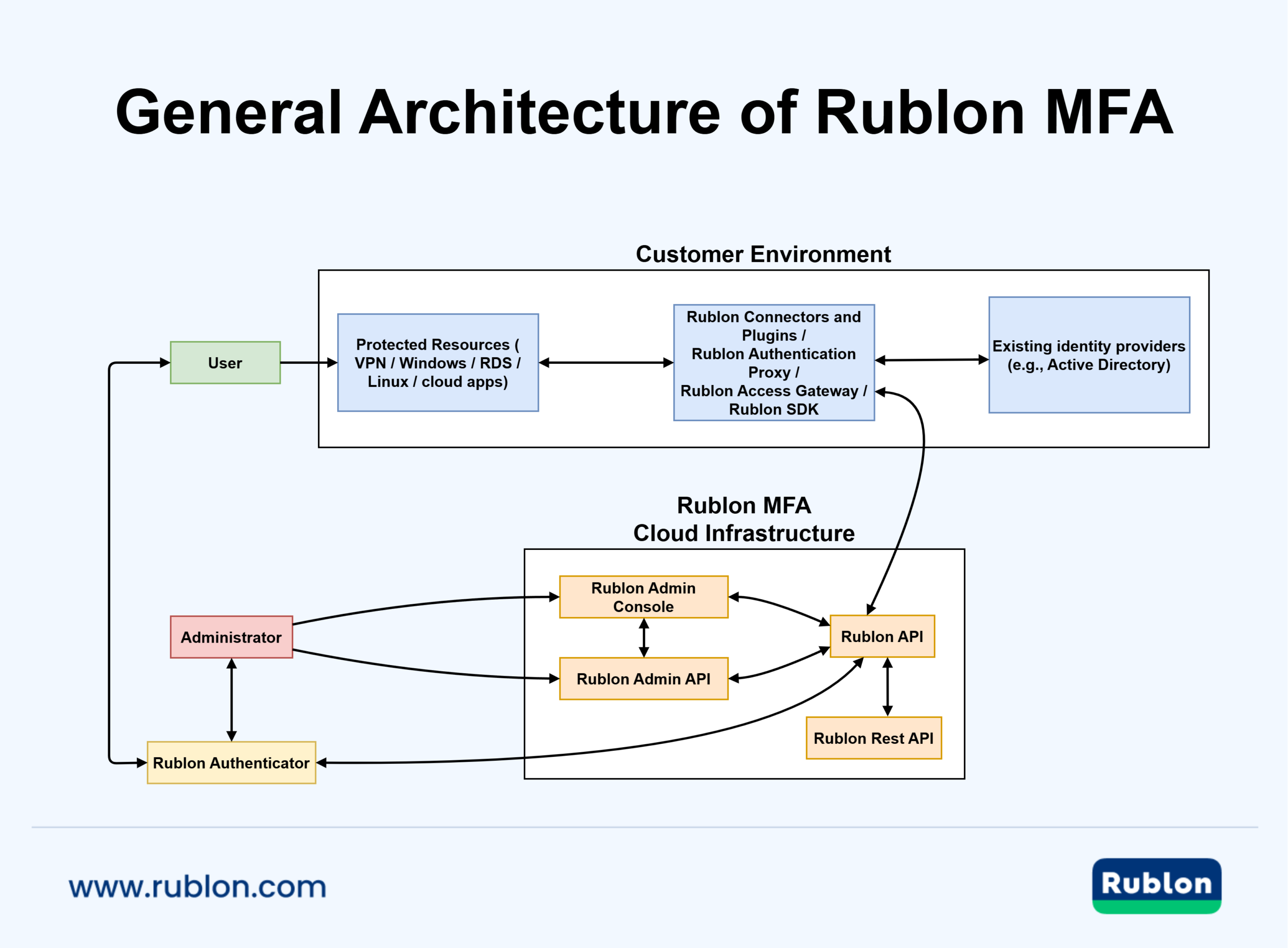
How Rublon MFA Is Deployed
Rublon MFA is designed as a platform that adds multi-factor authentication to existing IT environments rather than replacing the customer’s identity source. Rublon MFA uses a split deployment model: cloud-hosted platform services provide the central MFA and management layer, while customer-side integration components are deployed wherever local integration is required.
For example, Rublon Authentication Proxy is an on-premises RADIUS and LDAP proxy server and is not an identity provider itself. It works with an external identity source already used by the customer, like Active Directory or FreeRADIUS.
Rublon MFA Deployment Model: Cloud vs. On-Premises Components
The easiest way to understand Rublon MFA’s deployment model is to first look at where each component runs.
| Location | Typical Rublon Components | Role |
| Rublon MFA cloud infrastructure | Rublon API, Rublon REST API, Rublon Admin Console, Rublon Admin API | Central MFA logic, administration, platform-side services |
| Customer environment | Rublon Authentication Proxy, Rublon Access Gateway, connectors, plugins, and custom code that calls the Rublon REST API | Local integration with protected technologies, protocols, and authentication flows |
| End-user device | Rublon Authenticator | User-side mobile MFA methods |
What Runs in the Cloud
The following components are cloud-hosted by Rublon:
Rublon API
The Rublon API acts as the central platform component used by administrative and integration elements. It is the core service layer behind the Rublon MFA platform and its integrations.
Rublon REST API
Rublon Admin Console
The Rublon Admin Console is the management interface used to configure and manage the organization, applications, users, access policies, and settings in Rublon MFA.
Rublon Admin API
What Runs in the Customer Environment
The customer-side part of the deployment model depends on the protected technology.
Connectors and Plugins
Rublon MFA connectors and plugins serve as the customer-side or app-side integration layer for specific protected technologies. The most popular Rublon MFA connectors and plugins include:
- Rublon MFA for Windows Logon & RDP: Enables multi-factor authentication for Windows sign-ins and Remote Desktop Protocol (RDP) connections.
- Rublon MFA for RD Gateway: Enables MFA for Remote Desktop Gateway logins.
- Rublon MFA for RD Web: Adds MFA to Remote Desktop Web Access, Remote Desktop Web Client, and Remote Desktop Web Feed.
- Rublon MFA for AD FS: Enables MFA for Active Directory Federation Services (AD FS) logins and allows MFA integration with Office 365 and other applications that authenticate through AD FS.
- Rublon MFA for Outlook Web App (OWA): Secures logins to Outlook Web App (OWA) and Exchange Control Panel (ECP) with modern multi-factor authentication.
- Rublon MFA for WordPress: Adds an extra layer of security to WordPress websites through multi-factor authentication.
- Rublon MFA for Linux SSH: Provides secure SSH logins to Linux systems using multi-factor authentication.
- Rublon MFA for Veritas NetBackup: Adds a second authentication factor to Veritas NetBackup logins.
- Rublon MFA for Jira & Confluence: Adds a second authentication factor to Jira and Confluence logins.
- Rublon MFA for Roundcube: Enables multi-factor authentication for Roundcube logins.
Rublon Authentication Proxy
Rublon Authentication Proxy is an on-premises RADIUS and LDAP proxy server. It can be used to enable MFA for services that support RADIUS or LDAP authentication. This makes it a typical choice for protecting technologies such as VPNs, firewalls, network devices, and other systems that support RADIUS and LDAP. Because it is installed in the customer’s internal environment, the Auth Proxy bridges local authentication flows with Rublon MFA.
Rublon Access Gateway
Rublon Access Gateway is an on-premises web application for Windows Server and Linux that enables MFA for applications that support SAML integration. It introduces Single Sign-On (SSO) capabilities, which are particularly relevant for protecting cloud apps and other services where SAML is the preferred integration method.
Custom app code using SDKs or direct REST API calls
For custom applications, MFA is integrated in the application itself by calling the Rublon REST API directly or through one of the Rublon SDKs. In this model, the Rublon REST API remains part of the Rublon MFA cloud platform, while the customer’s integration code runs wherever the protected application is deployed. The SDKs are development libraries that simplify communication with the API rather than standalone infrastructure components.
What Runs on the End-User’s Device
Rublon Authenticator
Rublon Authenticator is the end-user mobile app used for Mobile Push, Passcode, and QR Code MFA methods. While it is not an on-premises server component, it runs on users’ mobile devices and communicates with the Rublon MFA ecosystem as part of the authentication flow.
Deployment by Technology
The easiest way to understand Rublon MFA’s deployment model is by looking at the protected technology.
VPNs and Services Using RADIUS or LDAP
For VPNs and services that support RADIUS or LDAP, the customer-side integration component is Rublon Authentication Proxy, installed on‑premises or customer‑hosted cloud. The proxy connects the protected system to the Rublon MFA platform while relying on the customer’s existing identity source.
SAML-Compliant Cloud Applications
For cloud applications and other systems that support SAML, the integration component is Rublon Access Gateway, which the customer deploys on Windows Server or Linux. In this scenario, the protected application is cloud-based, while the Rublon Access Gateway integration component remains customer-managed (on‑premises or customer‑hosted cloud).
Windows, RDP, RDS, OWA, AD FS, Linux, and Similar Access Scenarios
These deployments use a customer-side connector installed in the protected environment that communicates with the Rublon API for MFA handling. This model applies to technologies such as Windows Logon and RDP, Remote Desktop Services (RDS), OWA, AD FS, and Linux SSH, where MFA must be integrated directly into the local authentication flow.
Custom Applications
For custom applications, MFA is integrated in the application itself by calling the Rublon REST API directly or through one of the Rublon SDKs. In this model, the Rublon REST API remains part of the Rublon MFA cloud platform, while the customer’s integration code runs wherever the protected application is deployed.
One MFA Solution for Cloud, On-Premises, and Hybrid Environments
Rublon MFA’s deployment model allows organizations to extend MFA across cloud, on-premises, and hybrid environments without replacing their existing identity infrastructure.
Start your free Rublon MFA trial and see how it will work in your environment: