• Skip to primary navigation
  • Skip to main content
  • Skip to primary sidebar
  • Skip to footer

Company Â· Blog Â· Newsletter Â· Events Â· Partner Program

Downloads Support
  • English
Login
Rublon

Rublon

Secure Remote Access

  • Product
    • Regulatory Compliance
    • Use Cases
    • Rublon MFA Reviews
    • Deployment Model
    • What is MFA?
    • User Experience
    • Authentication Methods
    • Rublon Authenticator
    • Rublon App Shield
    • Rublon Identity Bridge
    • Remembered Devices
    • Logs
    • Single Sign-On
    • Access Policies
    • Directory Sync
  • Solutions
    • MFA for Remote Desktop
    • MFA for Remote Access Software
    • MFA for Windows Logon
    • MFA for Linux
    • MFA for On-Premise Active Directory
    • MFA for LDAP
    • MFA for RADIUS
    • MFA for SAML
    • MFA for RemoteApp
    • MFA for Workgroup Accounts
    • MFA for Entra ID
    • MFA for Windows Server Core
  • Customers
  • Industries
    • Financial Services
    • Investment Funds
    • Retail
    • E-Commerce
    • Technology
    • Healthcare
    • Legal
    • Education
    • Government
    • Utilities
    • Manufacturing
  • Pricing
  • Docs
Contact us Free Trial

Rublon Log Sync

Export Rublon MFA audit, authentication, and phone logs to your SIEM system

July 30, 2026 By Rublon Authors

Overview

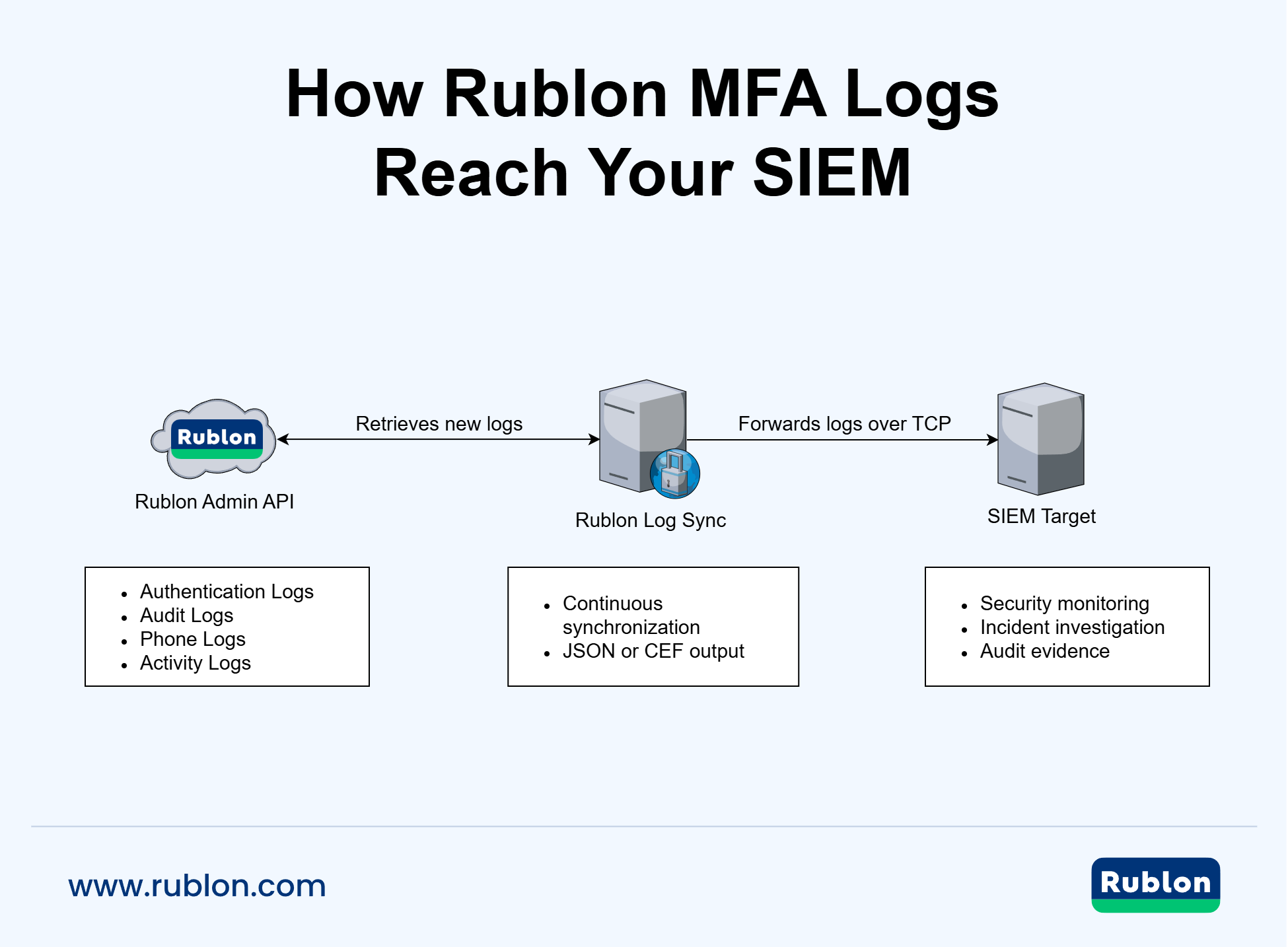
Rublon Log Sync is a Linux application that retrieves logs from the Rublon Admin API and forwards them to a Security Information and Event Management (SIEM) system.

You can use Rublon Log Sync to continuously export the following types of Rublon MFA logs:

  • Audit Logs
  • Authentication Logs
  • Phone Logs

Rublon Log Sync supports multiple independent synchronization jobs. Each job can retrieve one or more log types and forward them to a configured SIEM target over TCP.

The application can send records as compact JSON or Common Event Format (CEF) version 1 messages. JSON and CEF payloads can be sent without a syslog envelope, with a shortened syslog prefix, or with a complete RFC 5424 syslog envelope.

How Does Rublon Log Sync Work?

Rublon Log Sync performs the following operations:

  1. Connects to the Rublon Admin API using the System Token and Secret Key of an application of type Admin API.
  2. Retrieves records from the configured audit, authentication, and phone endpoints.
  3. Converts the records to the configured output format.
  4. Sends the resulting messages to the configured SIEM target over TCP.
  5. Stores checkpoint cursors when checkpointing is enabled.
  6. Uses the saved checkpoints to continue synchronization from the last successfully processed position.

Two modes are available:

  • In continuous mode, every synchronization job runs repeatedly according to its configured interval.
  • In one-shot mode, the application runs one synchronization cycle and then exits.

Each SIEM message is sent as one UTF-8 line over TCP. One produced batch opens one TCP connection to the configured target. Empty batches do not open a TCP connection.

Log Sync Diagram

Rublon Log Sync diagram showing how Rublon MFA logs reach the SIEM

Supported Logs

Rublon Log Sync supports the following Rublon Admin API log endpoints:

Endpoint TypeRublon Log TypeMaximum API Lookback
auditAudit Logs365 days
authenticationAuthentication Logs180 days
phonePhone Logs365 days

The maximum lookback determines how far into the past a new synchronization job can retrieve records when no compatible checkpoint exists.

Supported Output Formats

Rublon Log Sync supports the following SIEM payload formats:

FormatDescription
jsonPreserves the complete Rublon Admin API record as compact, strict JSON.
cefConverts the record to Common Event Format version 1 (CEF:1) according to the endpoint-specific mapping rules described in the CEF Mapping section.

The payload can use one of the following envelopes:

EnvelopeDescription
bareSends the serialized JSON or CEF payload without a syslog envelope.
partial_syslogAdds a shortened syslog prefix containing <PRI>, syslog version 1, a timestamp, and a hostname.
rfc5424Wraps the payload in a complete RFC 5424 syslog envelope.

The selected envelope is independent of the selected JSON or CEF payload format.

Before You Start

Before installing Rublon Log Sync:

  1. Create a Rublon MFA organization if you do not already have one.
  2. Ensure that your organization uses a paid Rublon MFA plan that includes access to the Rublon Admin API.
  3. Create an application of type Admin API in the Rublon Admin Console and copy its System Token and Secret Key.
  4. Prepare a Linux server on which Rublon Log Sync will run as a systemd service.
  5. Prepare a SIEM target that can receive newline-delimited messages over TCP.
  6. Ensure that the Linux server can connect to the configured Rublon API server over HTTPS and to the SIEM target on the configured TCP port.

Create a Rublon MFA Organization

To use Rublon Log Sync, you need a Rublon MFA organization in the Rublon Admin Console.

If you do not have an organization yet, refer to Rublon Admin Console – Rublon Account Registration for instructions.

Get a Paid Rublon MFA Subscription

Rublon Log Sync retrieves logs through the Rublon Admin API. The Admin API is available with paid Rublon MFA subscription plans and is not available with Rublon MFA Free or Rublon MFA Trial.

Refer to How do I start a Rublon MFA Business subscription? for instructions.

Get the Admin API Credentials

  1. Sign in to the Rublon Admin Console.
  2. Go to Applications.
  3. Click Add Application.
  4. Enter a name for the application, for example, Rublon Log Sync.
  5. Set Type to Admin API.
  6. Click Save.
  7. Copy the System Token and Secret Key from the API Credentials section. You will use these values in the Rublon Log Sync configuration.

Important

Treat the System Token and Secret Key as sensitive credentials. Do not include them in tickets, screenshots, log files, or support bundles.

Prepare the SIEM Target

Before configuring Rublon Log Sync, prepare the following information:

  • SIEM target hostname or IP address
  • TCP port
  • Required payload format: JSON or CEF
  • Required envelope: bare, partial syslog, or RFC 5424

Rublon Log Sync currently supports TCP as the SIEM transport protocol.

Installing Rublon Log Sync

Rublon Log Sync can be installed from the standalone Linux package as a systemd service.

The service runs as a dedicated, unprivileged system user. The installer separates application files, configuration, runtime state, and operational logs into standard Linux directories.

Install the Package

1. Download the latest Rublon Log Sync Linux package from Rublon Downloads.

The package downloaded from Rublon Downloads is a ZIP archive containing the Rublon Log Sync `.tar.gz` installation package.

2. Extract the package:

unzip rublon-log-sync-linux-<version>.zip
tar -xzf rublon-log-sync-<version>-linux-<arch>.tar.gz

Note: Replace <version> and <arch> with the appropriate values for your package.

3. Go to the extracted directory:

cd rublon-log-sync-<version>-linux-<arch>

4. Run the installer:

sudo bash scripts/install-linux.sh --artifact bin/rublon-log-sync

The --artifact value must point to the executable that will be installed as:

/opt/rublon-log-sync/bin/rublon-log-sync

By default, the installer:

  • creates the rublon-log-sync system user and group if they do not exist;
  • creates the application, configuration, runtime state, and log directories;
  • copies the example configuration to /etc/rublon-log-sync/config.example.yaml;
  • does not create or overwrite /etc/rublon-log-sync/config.yaml;
  • installs the systemd service unit;
  • reloads the systemd manager configuration;
  • does not start or enable the service automatically.

File Layout

PathPurpose
/opt/rublon-log-syncApplication installation directory.
/opt/rublon-log-sync/bin/rublon-log-syncRublon Log Sync executable.
/etc/rublon-log-sync/config.yamlProduction configuration file.
/etc/rublon-log-sync/config.example.yamlExample configuration installed with the package.
/etc/rublon-log-sync/rublon-log-sync.envOptional environment file for secrets.
/var/lib/rublon-log-sync/checkpointsCheckpoint state directory.
/var/log/rublon-log-syncApplication log directory.
/etc/systemd/system/rublon-log-sync.serviceInstalled systemd service unit.

After installing Rublon Log Sync, create the production configuration file and configure access to the Rublon Admin API and your SIEM target. Refer to the Configure Rublon Log Sync section for instructions.

Configure Rublon Log Sync

Rublon Log Sync reads its settings from a YAML configuration file.

The Linux service uses:

/etc/rublon-log-sync/config.yaml

After changing the configuration, restart the service for the new settings to take effect:

sudo systemctl restart rublon-log-sync

Create the Configuration File

1. Create the configuration file used by the service:

sudo install -o root -g rublon-log-sync -m 0640 \
  /etc/rublon-log-sync/config.example.yaml \
  /etc/rublon-log-sync/config.yaml

2. Then, open the file for editing:

sudo editor /etc/rublon-log-sync/config.yaml

3. Configure access to the Rublon Admin API, synchronized log endpoints, SIEM targets, application logging, proxy settings, and checkpoint behavior. Refer to the Configuration Sections for more information on each section.

Minimal Configuration Example

log:
  debug: false
  log_files_count: 7
  syslog_enabled: false

global:
  secret_source: env

rublon:
  api_server: https://core.rublon.net
  system_token: "RUBLON_ADMIN_API_SYSTEM_TOKEN"
  secret_key: "RUBLON_ADMIN_API_SECRET_KEY"

sync_jobs:
  - id: "main"
    checkpoint_enabled: true
    rublon_endpoints:
      - type: audit
      - type: authentication
      - type: phone
    interval: 60
    per_page: 100
    target:
      hostname: "127.0.0.1"
      port: 1514
      protocol: TCP
      format: json
      envelope: bare

Store Admin API Credentials in Environment Variables

For production deployments, we recommend loading the Rublon Admin API credentials from environment variables.

1. Create an environment file:

sudo touch /etc/rublon-log-sync/rublon-log-sync.env
sudo chown root:rublon-log-sync /etc/rublon-log-sync/rublon-log-sync.env
sudo chmod 0640 /etc/rublon-log-sync/rublon-log-sync.env

2. Edit the file:

sudo editor /etc/rublon-log-sync/rublon-log-sync.env

3. Add the credentials:

RUBLON_ADMIN_API_SYSTEM_TOKEN=your-system-token
RUBLON_ADMIN_API_SECRET_KEY=your-secret-key

4. Create a systemd drop-in override:

sudo systemctl edit rublon-log-sync

5. Add:

[Service]
EnvironmentFile=/etc/rublon-log-sync/rublon-log-sync.env

6. Reload systemd:

sudo systemctl daemon-reload

7. Configure the following values in /etc/rublon-log-sync/config.yaml:

global:
  secret_source: env

rublon:
  api_server: https://core.rublon.net
  system_token: "RUBLON_ADMIN_API_SYSTEM_TOKEN"
  secret_key: "RUBLON_ADMIN_API_SECRET_KEY"

Note: When secret_source is set to env, the system_token and secret_key values are environment variable names, not the credentials themselves.

Configuration Sections

The configuration file contains the following top-level sections:

  • log
  • global
  • rublon
  • sync_jobs

Section: log

The optional log section controls Rublon Log Sync operational logging.

FieldRequiredDefaultDescription
debugNofalseEnables debug-level application logging.
log_files_countNo7Number of archived daily log files to retain. Must be a positive integer.
syslog_enabledNofalseSends application diagnostics to the local Linux syslog service when available.

Example:

log:
  debug: false
  log_files_count: 7
  syslog_enabled: false

Application diagnostics are written to rublon-log-sync.log in the configured logs directory. In the Linux service installation, the file is located at:

/var/log/rublon-log-sync/rublon-log-sync.log

Warnings and errors are also written to stderr and collected by journald when the application runs as a systemd service.

Section: global

The optional global section contains settings shared by the application.

FieldRequiredDefaultDescription
secret_sourceNoplainDetermines how rublon.system_token and rublon.secret_key are resolved. Allowed values: plain, env.
proxy_urlNononeProxy server used for outbound Rublon Admin API requests.

If the global section is omitted, Rublon Log Sync behaves as if the following configuration were present:

global:
  secret_source: plain

Secret Source

With secret_source: plain, the rublon.system_token and rublon.secret_key values are treated as literal credentials stored in the YAML file.

With secret_source: env, they are treated as environment variable names. The application will not start if either variable is missing or empty.

For production deployments, use secret_source: env whenever possible.

Proxy Server

Use global.proxy_url to configure one proxy server for all outbound Rublon Admin API requests.

You can use the host:port shorthand:

global:
  proxy_url: "proxy.example.com:8080"

The shorthand is interpreted as:

http://proxy.example.com:8080

You can also use an explicit HTTP or HTTPS URL:

global:
  proxy_url: "http://proxy.example.com:8080"
global:
  proxy_url: "https://proxy.example.com:8443"

The scheme defines the connection between Rublon Log Sync and the proxy. The connection to the Rublon Admin API still uses HTTPS.

Proxy credentials can be included in the URL:

global:
  proxy_url: "https://user:password@proxy.example.com:8443"

Important

Proxy credentials are secrets. Restrict access to the configuration file and remove the credentials before sharing configuration snippets or diagnostics.

The proxy value must contain only the proxy server address. Do not add a path, query string, or fragment.

If proxy_url is omitted, Rublon Log Sync connects directly to the Rublon Admin API and does not use operating system proxy settings.

Remember to remove secrets before sending the configuration and/or log files for troubleshooting.

Section: rublon

The required rublon section configures access to the Rublon Admin API.

FieldRequiredDescription
api_serverYesRublon API server base URL. It must use HTTPS and contain only a scheme, hostname, and optional port.

Do not include an endpoint path, query string, username, or password.
system_tokenYesAdmin API System Token or environment variable name, depending on global.secret_source.
secret_keyYesAdmin API Secret Key or environment variable name, depending on global.secret_source.

Example:

rublon:
  api_server: https://core.rublon.net
  system_token: "RUBLON_ADMIN_API_SYSTEM_TOKEN"
  secret_key: "RUBLON_ADMIN_API_SECRET_KEY"

Section: sync_jobs

The required sync_jobs section is a non-empty list of synchronization jobs.

Each synchronization job retrieves one or more Rublon MFA log types and sends the records to one SIEM target.

FieldRequiredDefaultDescription
idYesnoneUnique, non-empty synchronization job identifier.
checkpoint_enabledNotrueSaves synchronization progress and resumes from the saved position.
rublon_endpointsYesnoneNon-empty list of Rublon MFA log endpoints.

Endpoint types must be unique within one job.

Supported endpoint types: audit, authentication, phone
intervalNo60Polling interval in seconds in continuous mode.

Minimum: 1
per_pageNo100Number of records requested per API page.

Allowed range: 15 to 1000
from_datetimeNononeInitial lower timestamp bound in %Y-%m-%d %H:%M:%S format. It must not be in the future.
targetYesnoneSIEM target configuration.

Example with two independent synchronization jobs:

sync_jobs:
  - id: "security-logs"
    checkpoint_enabled: true
    rublon_endpoints:
      - type: audit
      - type: authentication
    interval: 60
    per_page: 100
    target:
      hostname: "siem.example.com"
      port: 1514
      protocol: TCP
      format: cef
      envelope: rfc5424

  - id: "phone-logs"
    checkpoint_enabled: true
    rublon_endpoints:
      - type: phone
    interval: 300
    per_page: 100
    target:
      hostname: "siem.example.com"
      port: 1515
      protocol: TCP
      format: json
      envelope: bare

Note

An endpoint definition can contain a filter field, but endpoint filtering is not supported in the current version.

from_datetime and API Lookback Limits

from_datetime specifies the initial lower timestamp bound when an endpoint does not have a compatible checkpoint cursor.

The Rublon Admin API applies the following maximum lookback periods:

EndpointMaximum Lookback
audit365 days
authentication180 days
phone365 days

For a new job, from_datetime must be within the lookback limit of every configured endpoint.

When a job contains multiple endpoint types, the most restrictive limit applies to the entire job. For example, a job containing audit, authentication, and phone is limited to 180 days because the Authentication Logs endpoint has a 180-day lookback limit.

If from_datetime exceeds the limit for one endpoint and that endpoint does not have a compatible checkpoint, the entire job fails to start. Rublon Log Sync does not partially start only the endpoints whose limits are satisfied.

When a compatible checkpoint exists, synchronization resumes from the checkpoint and from_datetime is not used for that endpoint.

To retrieve Audit Logs or Phone Logs over a longer initial period while retrieving Authentication Logs over a shorter period, create separate synchronization jobs with different from_datetime values.

Section: target

Every synchronization job requires one target object.

FieldRequiredDefaultDescription
hostnameYesnoneSIEM target hostname, IPv4 address, or IPv6 address.
Do not include a URL scheme or port.
portYesnoneSIEM target TCP port.
Allowed range: 1 to 65535
protocolYesnoneSIEM transport protocol.
Currently, only TCP is supported.
formatNojsonPayload format.
Allowed values: json, cef
envelopeNobarePayload envelope.
Allowed values: bare, partial_syslog, rfc5424

Example:

target:
  hostname: "siem.example.com"
  port: 1514
  protocol: TCP
  format: cef
  envelope: partial_syslog

Payload Envelopes

  • The bare envelope sends only the serialized JSON or CEF payload.
  • The partial_syslog envelope adds the following shortened prefix: <PRI>1 TIMESTAMP HOSTNAME PAYLOAD
    • partial_syslog is an application-specific shortened envelope accepted by some SIEM systems. It is not a separate syslog standard.
  • The rfc5424 envelope wraps the payload in a complete RFC 5424 syslog message.

Configuration Changes and Checkpoints

Checkpoint files are associated with a synchronization job identity.

Changing source-identifying settings can prevent an existing checkpoint from being reused. These settings include:

  • synchronization job id
  • rublon.api_server
  • rublon_endpoints
  • from_datetime

If a checkpoint is no longer compatible, restore the previous configuration or stop the application and remove the checkpoint for the affected job.

Removing a checkpoint causes the job to start again from from_datetime. If from_datetime is not configured, the job can retrieve records from the maximum lookback window allowed by the endpoint. This can cause records that were already sent to the SIEM target to be sent again.

Running Rublon Log Sync

Continuous Synchronization

Continuous synchronization is the normal operating mode for service deployments.

Start the service:

sudo systemctl start rublon-log-sync

In this mode, each synchronization job runs repeatedly according to its configured interval.

Enable automatic startup at boot:

sudo systemctl enable rublon-log-sync

One-Shot Synchronization

Use one-shot mode for manual tests, smoke tests, and controlled backfills.

Stop the service before manually running the same configuration:

sudo systemctl stop rublon-log-sync

Run one synchronization cycle:

sudo -u rublon-log-sync \
  /opt/rublon-log-sync/bin/rublon-log-sync \
  --config-file-path /etc/rublon-log-sync/config.yaml \
  --logs-dir-path /var/log/rublon-log-sync \
  --checkpoints-dir-path /var/lib/rublon-log-sync/checkpoints \
  --once

Note

If global.secret_source is set to env, make the configured environment variables available to the manual process. An EnvironmentFile configured for the systemd service is not automatically loaded when you run the executable directly.

In one-shot mode, Rublon Log Sync:

  1. runs every configured synchronization job once;
  2. retrieves available records;
  3. sends the records to the configured SIEM targets;
  4. saves checkpoints when enabled;
  5. exits.

Configuration Source

You can load the configuration:

  • from a specific YAML file using --config-file-path;
  • from a directory containing config.yaml or config.yml using --config-dir-path.

Directory mode must contain exactly one supported configuration file. If both config.yaml and config.yml exist in the selected directory, the application will not start.

Runtime Command-Line Options

The following options apply when you start the Rublon Log Sync executable manually or customize the command used by the systemd service. They are not installation options.

OptionDescription
--config-file-path PATHLoads a specific YAML configuration file. Cannot be used together with --config-dir-path.
--config-dir-path PATHLoads config.yaml or config.yml from a directory. Cannot be used together with --config-file-path.
--logs-dir-path PATHSets the directory for application log files. The Linux service uses /var/log/rublon-log-sync.
--checkpoints-dir-path PATHSets the directory for checkpoint files. The Linux service uses /var/lib/rublon-log-sync/checkpoints.
--onceRuns one synchronization cycle and exits. Without this option, the application runs continuously.

Managing the Service

Check the service status:

systemctl status rublon-log-sync

Start the service:

sudo systemctl start rublon-log-sync

Stop the service:

sudo systemctl stop rublon-log-sync

Restart the service:

sudo systemctl restart rublon-log-sync

Enable automatic startup:

sudo systemctl enable rublon-log-sync

Disable automatic startup:

sudo systemctl disable rublon-log-sync

Application Logs

Rublon Log Sync operational logs are separate from the Rublon MFA records forwarded to the SIEM target.

Application logs can include:

  • startup and shutdown events
  • selected synchronization mode
  • synchronization job cycle status
  • produced and consumed batch counts
  • SIEM delivery counts
  • checkpoint saves
  • Admin API retry and failure information
  • configuration and runtime errors

The Linux service writes the main application log to:

/var/log/rublon-log-sync/rublon-log-sync.log

Rublon Log Sync creates daily archived log files in the same directory. By default, it retains seven archived daily files in addition to the current log file. Change the retention using log.log_files_count.

Warnings and errors are also sent to stderr and collected by journald.

View service diagnostics:

journalctl -u rublon-log-sync

Follow diagnostics in real time:

journalctl -u rublon-log-sync -f

View diagnostics from the current boot:

journalctl -u rublon-log-sync -b

Treat application logs as sensitive operational data. They should not contain Rublon Admin API credentials, but they can include job identifiers, endpoint types, hostnames, ports, retry information, and error details.

Checkpoints

Checkpointing is enabled by default for every synchronization job.

Checkpoint files store synchronization progress and allow Rublon Log Sync to resume from the last saved position during a later run.

The Linux service stores checkpoints in:

/var/lib/rublon-log-sync/checkpoints

Important

Do not delete the checkpoint directory or individual checkpoint files unless you intentionally want to reset synchronization progress.

Deleting a checkpoint can cause records that were already delivered to the SIEM target to be retrieved and sent again.

CEF Mapping

When target.format is set to cef, Rublon Log Sync converts each Admin API record to a CEF version 1 event.

The following sections describe the endpoint-specific mappings.

Common Mapping Rules

A source value is treated as missing when:

  • the field is not present
  • the value is null
  • the value is an empty string after leading and trailing whitespace is removed

Optional CEF extension fields are omitted when their source value is missing.

A label such as cs1Label is included only when its paired value field, such as cs1, is included.

  • Text values are converted to strings.
  • Numeric CEF fields are emitted as integers.
  • Objects and arrays are serialized as compact JSON with deterministic key ordering when the endpoint mapping explicitly allows it.
  • Nested objects are not automatically flattened.

Timestamp Mapping

The createdAt value is mapped to the CEF rt field as UTC epoch milliseconds.

Example:

2023-07-26T08:40:03.365Z -> 1690360803365

If createdAt is missing or cannot be parsed, rt is omitted.

Common Extension Fields

CEF ExtensionSourceRule
externalIdidOmitted when missing.
rtcreatedAtUTC epoch milliseconds. Omitted when missing or invalid.
catendpoint typeAlways rublon.<endpoint>.
actendpoint-specific actionevent for Audit Logs; status for Authentication Logs and Phone Logs. Omitted when missing.

Audit Logs

CEF Event Fields

CEF Event FieldMapping
Event Class IDUses event when present. Otherwise, uses audit.
NameUses activity when present. Otherwise, uses event. If both are missing, uses Rublon audit event.
SeverityDetermined according to the Audit Severity table.

Audit Log Extension Fields

Fields are emitted in the following order:

OrderCEF ExtensionSourceRule
1externalIdidOmitted when missing.
2rtcreatedAtUTC epoch milliseconds.
3catendpoint typeAlways rublon.audit.
4acteventOmitted when missing.
5suseractor.email, actor.name, actor.idUses the first available value in the listed order.
6srclocation.ipOmitted when unavailable.
7cs1actor.idOmitted when missing.
8cs1LabelconstantactorId, included only with cs1.
9cs2actor.typeOmitted when missing.
10cs2LabelconstantactorType, included only with cs2.
11cs3actor.roleOmitted when missing.
12cs3LabelconstantactorRole, included only with cs3.
13cs4affectedConverted to text. Omitted when missing.
14cs4Labelconstantaffected, included only with cs4.
15cs5locationSerialized as compact JSON. Omitted when missing or empty.
16cs5Labelconstantlocation, included only with cs5.
17cs6details, changesUses details when present; otherwise, uses changes. Objects and arrays are serialized as compact JSON.
18cs6Labelconstantdetails or changes, matching the source used for cs6.

Audit Severity

Rules are evaluated in the following order:

  1. Exact matches
  2. Prefix or suffix matches
  3. Fallback severity 4
SeverityRule
6Exact Administrator.Authentication.Fail
6Exact User.DirectorySynchronization.Fail
5Event ends with .Delete
5Event ends with .Password.Reset
5Event ends with .Password.Update
5Exact System.Tenant.UpdateSettings
5Exact System.Admin.SignInSettings.Update
5Exact System.Data.Import.Users
5Exact User.DirectorySynchronization.Configuration.Delete
5Exact System.Billing.Subscription.Cancel
4Exact Administrator.Authentication.Bypass
4Exact Administrator.Authentication.Cancel
4Event ends with .Create
4Event ends with .Update
4Event ends with .Assign
4Event ends with .Unassign
4Event ends with .Remove
4Event ends with .Add
4Event ends with .MovedToTop
4Event starts with System.Data.Export.
4Exact User.DirectorySynchronization.Start
4Exact User.DirectorySynchronization.Connection.Create
4Exact User.DirectorySynchronization.Configuration.Create
4Exact User.DirectorySynchronization.Configuration.Update
3Exact Administrator.Authentication.Success
3Event ends with .Complete
3Event ends with .Sent
3Event ends with .Made
3Event starts with System.Billing.InvoiceDetails.
3Exact System.Billing.PhoneCredits.Add
3Exact System.Billing.Subscription.Activate
3Event starts with System.Communication.
4Missing or unknown event

Authentication Logs

For severity calculation, the status value is trimmed and converted to lowercase. The original trimmed value is used in the Event Class ID, Name, and act fields.

CEF Event Fields

CEF Event FieldMapping
Event Class IDUses authentication.<status> when status is present. Otherwise, uses authentication.unknown.
NameUses Rublon authentication <status> when status is present. Otherwise, uses Rublon authentication unknown.
SeverityDetermined according to the Authentication Severity table.

Authentication Log Extension Fields

OrderCEF ExtensionSourceRule
1externalIdidOmitted when missing.
2rtcreatedAtUTC epoch milliseconds.
3catendpoint typeAlways rublon.authentication.
4actstatusOmitted when missing.
5suseruser.email, user.username, user.loginUsedUses the first available value in the listed order.
6srcdevice.location.ipOmitted when unavailable.
7requestapplication.urlOmitted when missing.
8requestClientApplicationdevice.userAgentOmitted when missing.
9cs1methodOmitted when missing.
10cs1Labelconstantmethod, included only with cs1.
11cs2stepOmitted when missing.
12cs2Labelconstantstep, included only with cs2.
13cs3application.nameOmitted when missing.
14cs3LabelconstantapplicationName, included only with cs3.
15cs4application.typeOmitted when missing.
16cs4LabelconstantapplicationType, included only with cs4.
17cs5device.osNameOmitted when missing.
18cs5LabelconstantosName, included only with cs5.
19cs6device.browserOmitted when missing.
20cs6Labelconstantbrowser, included only with cs6.

Authentication Severity

StatusSeverity
granted3
bypassed4
denied6
Missing or unknown4

Phone Logs

The context, method, and status values are trimmed before the Event Class ID and Name are created. A missing component is replaced with unknown.

CEF Event Fields

CEF Event FieldMapping
Event Class IDphone.<context>.<method>.<status>, with unknown used for missing components.
NameRublon phone <context> <method> <status>, with unknown used for missing components.
SeverityDetermined according to the Phone Severity table.

Phone Log Extension Fields

OrderCEF ExtensionSourceRule
1externalIdidOmitted when missing.
2rtcreatedAtUTC epoch milliseconds.
3catendpoint typeAlways rublon.phone.
4actstatusOmitted when missing.
5suseruser.email, user.username, user.nameUses the first available value in the listed order.
6cs1contextOmitted when missing.
7cs1Labelconstantcontext, included only with cs1.
8cs2methodOmitted when missing.
9cs2Labelconstantmethod, included only with cs2.
10cs3numberOmitted when missing. The phone number is not mapped to duser.
11cs3LabelconstantphoneNumber, included only with cs3.
12cs4application.nameOmitted when missing.
13cs4LabelconstantapplicationName, included only with cs4.
14cs5application.typeOmitted when missing.
15cs5LabelconstantapplicationType, included only with cs5.
16cs6user.statusOmitted when missing.
17cs6LabelconstantuserStatus, included only with cs6.
18cn1creditsIncluded only when the value is an integer or a string containing an integer.
19cn1Labelconstantcredits, included only with cn1.

Phone Severity

StatusSeverity
success3
sent3
completed3
failed6
error6
denied6
Missing or unknown4

Security Best Practices

  • Run the service as the dedicated, unprivileged rublon-log-sync user.
  • Store application files under /opt/rublon-log-sync.
  • Store configuration under /etc/rublon-log-sync.
  • Store checkpoint state under /var/lib/rublon-log-sync.
  • Store operational logs under /var/log/rublon-log-sync.
  • Prefer environment variables instead of storing Admin API credentials directly in YAML.
  • Restrict read access to configuration and environment files that contain credentials.
  • Treat credentials included in global.proxy_url as secrets.
  • Remove credentials before sharing configuration snippets, screenshots, diagnostics, or support bundles.
  • Protect the network path between Rublon Log Sync and the SIEM target according to your organization’s security requirements.
  • Do not delete checkpoints unless you intentionally want to reset synchronization progress.
  • Use NoNewPrivileges=true and an empty CapabilityBoundingSet= in the service definition when the application does not require elevated Linux capabilities.

Troubleshooting

Check the Service Status

systemctl status rublon-log-sync

Check Application Logs

/var/log/rublon-log-sync/rublon-log-sync.log

Temporarily enable additional diagnostic information when required:

log:
  debug: true

Restart the service after changing the configuration:

sudo systemctl restart rublon-log-sync

Do not leave debug logging enabled longer than necessary because it can increase the amount of operational information stored in log files.

Check systemd Diagnostics

journalctl -u rublon-log-sync -b

Follow new messages:

journalctl -u rublon-log-sync -f

Reset a Failed Service

If the service fails repeatedly, systemd can stop restarting it because of start-limit protection.

After correcting the cause, reset the failure state and start the service:

sudo systemctl reset-failed rublon-log-sync
sudo systemctl start rublon-log-sync

Common Startup Issues

If Rublon Log Sync does not start, verify that:

  • the selected configuration file or directory exists
  • the YAML file is valid and not empty
  • exactly one of config.yaml or config.yml exists when directory mode is used
  • the Rublon Admin API credentials are present
  • required environment variables exist and are not empty when secret_source is set to env
  • rublon.api_server is an HTTPS base URL without an endpoint path, query string, username, or password
  • every synchronization job has a unique, non-empty id
  • every job contains at least one supported endpoint
  • endpoint types are not duplicated within a job
  • from_datetime is valid, is not in the future, and falls within the applicable API lookback limit
  • the SIEM target hostname, port, protocol, payload format, and envelope are valid
  • the service user can read the configuration
  • the service user can write to /var/lib/rublon-log-sync and /var/log/rublon-log-sync
  • the executable exists and has execute permissions
  • the Linux server can reach the Rublon API server and SIEM target

Duplicate Records

If records that were already delivered are sent again, check whether:

  • a checkpoint file was deleted;
  • the checkpoint directory was removed;
  • the synchronization job id changed;
  • rublon.api_server, rublon_endpoints, or from_datetime changed;
  • the application started with a different checkpoints directory.

Restore the previous source-identifying configuration to reuse a compatible checkpoint. Otherwise, accept that the affected job will start without the previous saved position.

No Records Arrive at the SIEM Target

Verify that:

  • the target hostname and TCP port are correct;
  • the target is listening for TCP connections;
  • the firewall allows the connection;
  • the target expects the selected JSON or CEF payload;
  • the target accepts the selected envelope;
  • the configured endpoints contain records within the synchronization time range;
  • the application log does not report API or delivery errors.

I have a different issue

If you continue to experience issues, contact Rublon Support. Include a detailed issue description and relevant diagnostic logs, but remove all credentials and other sensitive information before sending them.

Related Posts

  • Rublon Log Sync – Release Notes
  • Rublon Admin API
  • Rublon Admin API Endpoints
  • Rublon MFA Logs
  • Rublon Downloads

Filed Under: Documentation

Primary Sidebar

Contents

  • Overview
  • How Does Rublon Log Sync Work?
  • Log Sync Diagram
  • Supported Logs
  • Supported Output Formats
  • Before You Start
    • Create a Rublon MFA Organization
    • Get a Paid Rublon MFA Subscription
    • Get the Admin API Credentials
    • Prepare the SIEM Target
  • Installing Rublon Log Sync
    • Install the Package
    • File Layout
  • Configure Rublon Log Sync
    • Create the Configuration File
    • Minimal Configuration Example
    • Store Admin API Credentials in Environment Variables
    • Configuration Sections
    • Section: log
    • Section: global
      • Secret Source
      • Proxy Server
    • Section: rublon
    • Section: sync_jobs
      • from_datetime and API Lookback Limits
    • Section: target
      • Payload Envelopes
    • Configuration Changes and Checkpoints
  • Running Rublon Log Sync
    • Continuous Synchronization
    • One-Shot Synchronization
    • Configuration Source
    • Runtime Command-Line Options
    • Managing the Service
  • Application Logs
  • Checkpoints
  • CEF Mapping
    • Common Mapping Rules
    • Timestamp Mapping
    • Common Extension Fields
    • Audit Logs
      • CEF Event Fields
      • Audit Log Extension Fields
      • Audit Severity
    • Authentication Logs
      • CEF Event Fields
      • Authentication Log Extension Fields
      • Authentication Severity
    • Phone Logs
      • CEF Event Fields
      • Phone Log Extension Fields
      • Phone Severity
  • Security Best Practices
  • Troubleshooting
    • Check the Service Status
    • Check Application Logs
    • Check systemd Diagnostics
    • Reset a Failed Service
    • Common Startup Issues
    • Duplicate Records
    • No Records Arrive at the SIEM Target
    • I have a different issue
  • Related Posts
Try Rublon MFA for Free
Start your 30-day Rublon MFA Trial to secure your employees using multi-factor authentication.
No Credit Card Required
Rublon 5 star reviews on Gartner Peer Insights

Footer

Product

  • Regulatory Compliance
  • Rublon MFA Reviews
  • Use Cases
  • Deployment Model
  • What is MFA?
  • User Experience
  • Authentication Methods
  • Rublon Authenticator
  • Rublon App Shield
  • Rublon Identity Bridge
  • Remembered Devices
  • Logs
  • Single Sign-On
  • Access Policies
  • Directory Sync

Solutions

  • MFA for Remote Desktop
  • MFA for Windows Logon
  • MFA for Remote Access Software
  • MFA for Linux
  • MFA for On-Premise Active Directory
  • MFA for LDAP
  • MFA for RADIUS
  • MFA for SAML
  • MFA for RemoteApp
  • MFA for Workgroup Accounts
  • MFA for Entra ID
  • MFA for Windows Server Core

Industries

  • Financial Services
  • Investment Funds
  • Retail
  • E-Commerce
  • Technology
  • Healthcare
  • Legal
  • Education
  • Government
  • Utilities
  • Manufacturing

Documentation

  • 2FA for Windows & RDP
  • 2FA for RDS
  • 2FA for RD Gateway
  • 2FA for RD Web Access
  • 2FA for SSH
  • 2FA for OpenVPN
  • 2FA for SonicWall VPN
  • 2FA for Cisco VPN
  • 2FA for Office 365

Support

  • Knowledge Base
  • FAQ
  • System Status

About

  • About Us
  • AI Info
  • Blog
  • Events
  • Careers
  • Co-funded by the European Union
  • Contact Us

  • Facebook
  • GitHub
  • LinkedIn
  • Twitter
  • YouTube

© 2026 Rublon · Imprint · Legal & Privacy · Security