
Last updated on September 28, 2026
Multi-factor authentication (MFA) protects access to critical systems, but the value of MFA does not end when an authentication request is approved or denied. Every authentication attempt, administrative change, and authenticator-related event can provide useful security information.
Sending MFA logs to a Security Information and Event Management (SIEM) system allows security teams to analyze MFA platform-related events together with logs from applications, endpoints, VPNs, firewalls, directory services, and other parts of the IT environment.
How to Send MFA Logs to SIEM
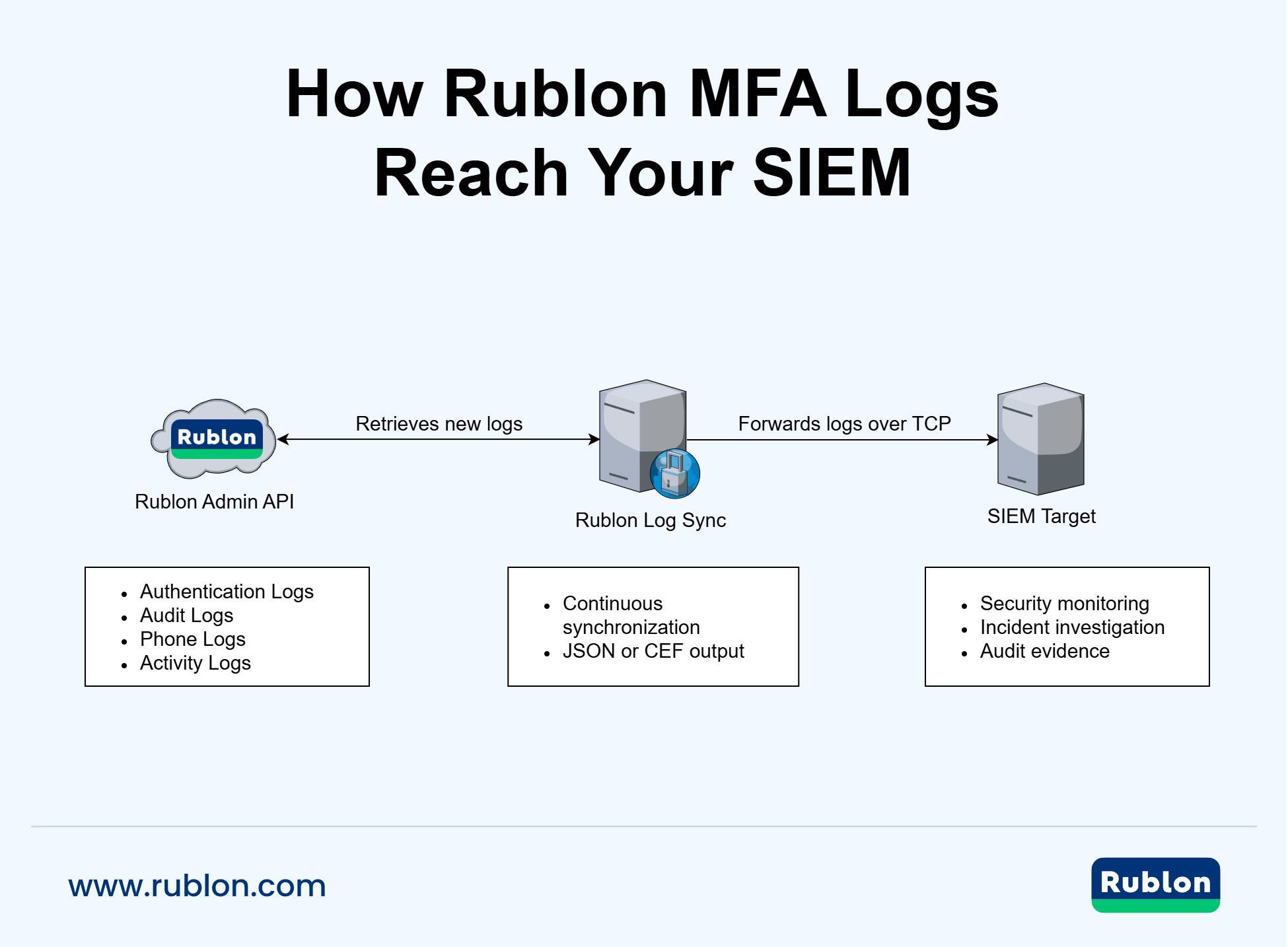
To export MFA logs to a SIEM, an organization needs to retrieve authentication and administrative events from its MFA solution, convert them to a SIEM-compatible format, and forward them continuously to the external system. Rublon MFA supports this workflow through Rublon Log Sync, which retrieves logs from the Rublon Admin API and sends them to a configured SIEM target.
Why Send MFA Logs to a SIEM?
An MFA solution can record information that is difficult to interpret in isolation. A denied authentication request may be a harmless user error. Or it may also be part of a password attack, an MFA fatigue campaign, or an attempt to access an account from an unauthorized device.
A SIEM provides the additional context needed to distinguish between these scenarios.
For example, a security team can correlate a denied MFA request with:
- repeated password failures recorded by a VPN
- a sign-in from an unusual IP address
- activity from a previously unseen endpoint
- changes to a user’s authenticators
- an administrative policy change
- access attempts involving several applications
- alerts generated by endpoint or network security tools
Without centralized MFA logging, these events may remain separated across different consoles and systems. This makes investigations slower and increases the risk that suspicious activity will be overlooked.
Robust MFA Logs With SIEM Export
Interested? Try our multi-factor authentication for 30 days for free and see how simple it is.
MFA Logs Improve Auditability
Auditability means being able to reconstruct what happened, when it happened, who initiated the action, and what the result was.
MFA logs can help answer questions such as:
- Which user attempted to access an application?
- When did the authentication attempt occur?
- Was access granted, denied, or bypassed?
- Which authentication method was used?
- Which application was involved?
- What was the source IP address?
- Which administrator changed a policy or user setting?
- Which object or account was affected?
- Was a phone-based authentication attempt completed successfully?
These details can support internal security reviews, external audits, incident response, and compliance reporting.
MFA logs alone do not guarantee compliance with a regulation or security standard. However, they can provide evidence that authentication activity and administrative changes are recorded, attributable to specific users, and available for review.
Which MFA Logs Should Be Sent to a SIEM?
A complete MFA monitoring strategy should include more than failed authentication attempts. Successful authentications, administrative activity, and changes to security settings can be equally important during an investigation.
Rublon Log Sync can retrieve four categories of logs from the Rublon Admin API.
| Log Type | What It Records | Why It Matters |
| Authentication Logs | MFA attempts, their status, authentication method, application, user, device, and source information | Helps identify denied requests, unexpected approvals, bypasses, unusual methods, and suspicious access patterns |
| Audit Logs | Administrative actions, system events, configuration changes, and affected objects | Provides accountability and helps detect unauthorized or high-risk administrative changes |
| Phone Logs | Events related to SMS messages and phone-based authentication methods | Helps investigate delivery failures, phone authentication activity, credit usage, and possible abuse |
| Activity Logs | Authenticator-related actions performed by users and administrators, such as registering or removing authenticators | Helps investigate suspicious authenticator changes and correlate them with authentication and administrative events |
Sending all relevant log categories to a SIEM gives the security team a more complete view than collecting authentication outcomes alone.
Authentication Logs and Audit Logs Are Not the Same
Authentication Logs describe attempts to verify a user’s identity. They answer questions about the user, application, authentication method, device, source IP address, and result of the authentication attempt.
In contrast, Audit Logs describe actions performed by administrators, users, or system processes. They can show changes to policies, applications, users, authenticators, synchronization settings, billing settings, and other administrative objects.
Both log types are important.
Authentication Logs help determine whether access activity is suspicious, while Audit Logs help determine whether someone changed the security environment before, during, or after that activity.
For example, a successful authentication may appear legitimate until it is correlated with an earlier administrative change that weakened an authentication policy or modified an account.
What Can a SIEM Detect Using MFA Logs?
The exact detections depend on the information available in the logs and the correlation rules configured in the SIEM. Common monitoring scenarios include the following.
Repeated Denied Authentication Attempts
A series of denied requests for one account may indicate that someone has obtained the user’s password but cannot complete MFA.
The same pattern across many accounts may indicate password spraying or another broader attack.
MFA Fatigue and Push Bombing
Repeated authentication requests followed by an approval can indicate an MFA fatigue attack, especially when the user did not initiate the original sign-in attempt.
Correlating MFA events with application, VPN, device, and IP address logs can help identify the source and scope of the activity.

Unexpected MFA Bypasses
A bypass does not always indicate malicious activity, but it should be visible and explainable.
A SIEM should alert security teams when bypass events occur for sensitive applications, privileged users, unexpected locations, or outside approved maintenance windows.
Suspicious Administrative Changes
Audit Logs reveal changes to authentication policies, administrator settings, users, applications, and other security-relevant objects.
Security teams can use these events to detect unauthorized changes and investigate whether a configuration change contributed to an incident.
Activity From Unusual Devices or Locations
Authentication Logs can provide device, operating system, browser, user agent, or IP address information, depending on the event.
A SIEM can compare this data with historical activity and other telemetry to identify anomalies.
Suspicious Phone Authentication Activity
An unexpected increase in SMS or phone authentication events may indicate delivery problems, user confusion, abuse, or an attack targeting phone-based methods.
Phone Logs can help the security team understand what occurred and whether authentication messages or calls were completed successfully.
Unusual Authentication Methods
A user who normally signs in with a phishing-resistant authentication method may suddenly use a different method. This does not automatically indicate compromise, but it can justify additional investigation when combined with other risk signals.
Unexpected Authenticator Changes
Activity Logs record actions such as registering or removing authenticators. A newly registered authenticator followed by a suspicious sign-in can warrant investigation, especially when the user does not recognize the change.
Tip
For high-risk environments, it is a good idea to enable an access policy that blocks access from an unusual device or location. For example, enabling the Authorized Networks policy or the Geolocation policy can significantly bolster the organization’s defenses against unauthorized access.
Why Successful MFA Events Should Also Be Collected
It may be tempting to send only failed or denied authentication events to the SIEM. This reduces log volume, but it also removes information that may be essential during an investigation.
A successful MFA event can still be suspicious when:
- it follows many denied requests
- it originates from an unusual IP address
- it involves an unexpected application
- it uses a different authentication method than usual
- it occurs shortly after an authenticator or policy change
- it appears alongside endpoint or network alerts
Collecting successful and unsuccessful events makes it possible to reconstruct the full authentication sequence instead of seeing only isolated failures.

MFA Logs Support Incident Investigation
During an incident, security teams often need to establish a timeline.
A centralized SIEM can help investigators determine:
- when the first suspicious authentication attempt occurred
- which account and application were targeted
- whether MFA was granted, denied, or bypassed
- which authentication method was used
- where the request originated
- whether an administrator or user changed any relevant settings
- what happened in the protected application after authentication
This timeline is much harder to build when MFA data must be reviewed separately in another console or manually exported after the incident has already occurred.
Continuous synchronization makes the information available in the SIEM before it is needed.
Popular SIEM Platforms for MFA Log Monitoring and Audit
Organizations use SIEM and log management platforms to analyze MFA events alongside application, endpoint, network, and identity data. The examples below show how these platforms can support authentication monitoring and incident investigation.
Rublon Log Sync has been tested with Graylog and Wazuh. The other platforms below are included as general examples of SIEM use cases. To discuss compatibility with your SIEM and its ingestion requirements, contact Rublon Support.
Graylog
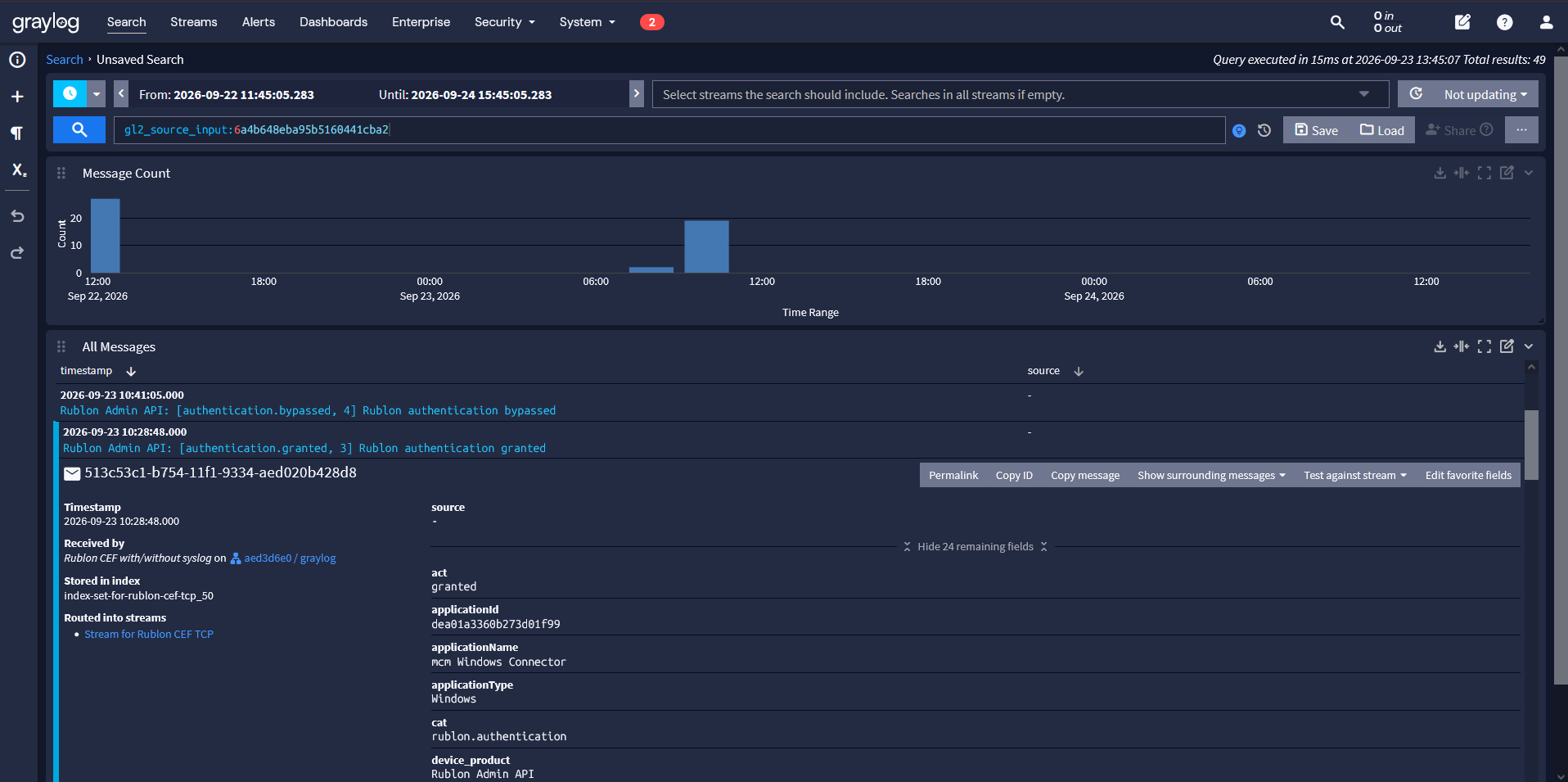
Graylog centralizes log data and provides search, dashboards, and alerts. For MFA monitoring, security teams can use these tools to track authentication failures, review authenticator changes, and investigate activity associated with a particular user or source IP address.
Wazuh
Wazuh is an open-source security platform with SIEM and XDR capabilities. Its decoders and detection rules can turn collected MFA events into searchable fields and alerts, helping security teams investigate authentication failures and suspicious changes alongside endpoint security events.
Splunk
Organizations using Splunk can analyze MFA events alongside VPN, endpoint, application, directory, and network data. This can help security teams investigate repeated authentication failures, unexpected approvals, authentication bypasses, and activity involving unusual users, applications, or source addresses.
Tip
It is a good idea to secure access to Splunk with multi-factor authentication.
Microsoft Sentinel
Organizations using Microsoft Sentinel can include MFA activity in their broader cloud and identity monitoring processes. Correlating MFA events with identity, device, application, and network data can help investigators build a more complete timeline of suspicious access.
IBM QRadar
Organizations using IBM QRadar can centralize MFA events together with security data collected from the rest of the environment. Authentication outcomes and administrative changes can provide additional context for correlation rules, offenses, investigations, and compliance reporting.
Elastic Security
Organizations using Elastic Security can index and search MFA events together with other operational and security data. Structured authentication and audit records can support dashboards, event analysis, custom detection rules, and incident investigations.
Other SIEM Platforms
The same benefits apply to other SIEM and log management platforms. The important requirement is that the selected platform can receive, parse, normalize, and retain the format in which the MFA logs are delivered.
The exact ingestion architecture depends on the SIEM platform and the organization’s environment. It may require a TCP listener, syslog collector, log forwarder, parser, custom field mapping, or another ingestion component configured according to the SIEM vendor’s documentation.
JSON, CEF, and Syslog: What Is the Difference?
SIEM integrations often use terms such as JSON, CEF, and syslog interchangeably, even though they describe different parts of the log delivery process.
JSON
JSON preserves structured event data as key-value pairs. It is flexible and can retain the complete source record, but the SIEM must know how to parse and normalize the fields.
JSON can be a good choice when the receiving platform supports custom parsing or when retaining the original event structure is important.
CEF
Common Event Format, or CEF, normalizes security events into a defined structure with standard fields such as the event timestamp, user, source IP address, action, severity, and event category.
CEF can simplify ingestion by SIEM systems that already understand this format.
Syslog
Syslog defines how event messages can be wrapped and transported. It is not the same as JSON or CEF.
A JSON or CEF payload can be sent without a syslog envelope or placed inside a syslog message. The receiving SIEM determines which combination is required.
Rublon Log Sync supports JSON and CEF version 1 payloads. These payloads can be sent:
- without a syslog envelope;
- with a shortened syslog prefix;
- with a complete RFC 5424 syslog envelope.
This makes it possible to adapt the output to different SIEM ingestion requirements without changing the underlying Rublon log source.
How Rublon MFA Exports Logs to a SIEM
Rublon MFA uses Rublon Log Sync to retrieve records from the Rublon Admin API and forward them to an external SIEM target.
The process consists of the following stages:
- Rublon MFA records an authentication, administrative, phone-related, or authenticator-related event.
- Rublon Log Sync retrieves new records from the relevant Rublon Admin API endpoints.
- The application converts each record to compact JSON or CEF.
- The resulting messages are sent to the configured SIEM target over TCP.
- Synchronization progress is saved so that later cycles can continue from the last recorded position.
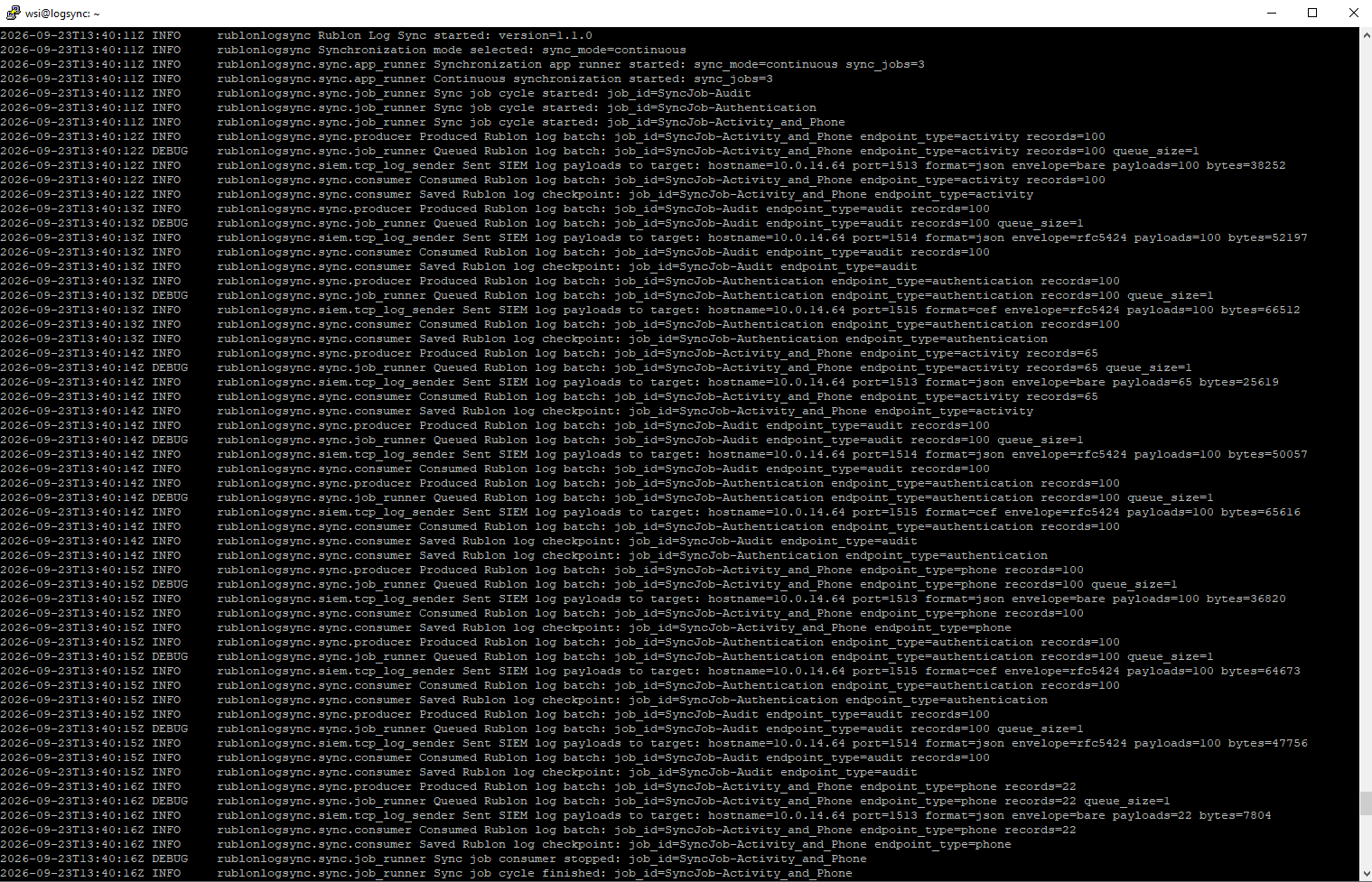
Rublon Log Sync supports multiple independent synchronization jobs. An organization can use separate jobs for different log categories, SIEM targets, polling intervals, or initial time ranges.
The application can run continuously for regular log collection or perform one synchronization cycle for testing and controlled exports.
For complete installation and configuration instructions, refer to the Rublon Log Sync documentation.
Export and Sync MFA Logs With SIEM
Protect your IT infrastructure, collect authentication and audit logs and then sync them with your SIEM.
Benefits of Exporting Rublon MFA Logs to SIEM
- Centralized Security Visibility: Security teams can analyze MFA events alongside logs from VPNs, endpoints, applications, directory services, firewalls, and other systems.
- Faster Incident Response: Investigators do not need to switch between multiple consoles or perform a manual export before analyzing authentication activity.
- Improved Audit Readiness: Authentication results, administrative actions, timestamps, users, applications, and affected objects can be retained in a central system and made available for review.
- Better Threat Detection: The SIEM can correlate MFA activity with network, endpoint, identity, and application events to identify patterns that would be difficult to detect using MFA logs alone.
- Flexible SIEM Output: Rublon Log Sync supports JSON and CEF output with multiple envelope options, allowing it to work with SIEM systems that accept compatible messages over TCP.
- Continuous Synchronization: Configured jobs retrieve new records at regular intervals, removing the need for recurring manual exports.
- Reliable Synchronization State: Checkpoints store synchronization progress and allow jobs to continue from a saved position after a restart or later synchronization cycle.
- Separate Log Routing: Multiple synchronization jobs can send different Rublon MFA log categories to different destinations or use separate schedules and time ranges.
MFA Log Export, Forwarding, and Synchronization
These terms describe related but slightly different workflows.
- Log export is a general term that can mean either automatic or manual export. The latter would be manually downloading a file or requesting a set of records for a specific period.
- Log forwarding means sending events from one system to another, usually without requiring a person to download and upload files.
- Log synchronization means repeatedly retrieving new records while tracking which events have already been processed.
Manual log export is possible from within the Rublon Admin Console:
- How to export authentication logs
- How to export audit logs
- How to export phone logs
- How to export activity logs
Automatic log export can be achieved using Rublon Log Sync, which provides synchronization and forwarding. It retrieves new records from the Rublon Admin API, tracks synchronization progress, converts the records to the selected format, and sends them to the SIEM target.
Rublon Log Sync removes much of the work involved in developing and maintaining a custom Admin API collector.
Best Practices for Sending MFA Logs to SIEM
- Export both successful and unsuccessful authentication attempts: A successful event may be the most important event in an account takeover investigation.
- Include Audit Logs and Activity Logs in addition to Authentication Logs: Administrative, configuration, and authenticator changes can provide essential context.
- Protect the credentials used to access the logging API: Do not include API secrets in tickets, screenshots, diagnostics, or shared configuration samples.
- Preserve event timestamps: Use a consistent time zone so that MFA events can be accurately correlated with other sources.
- Test SIEM parsing before production deployment: Confirm that important fields such as users, actions, results, applications, source IP addresses, and severity values are extracted correctly.
- Monitor the health of the synchronization process: A silent interruption in log delivery can create a visibility gap.
- Restrict access to MFA logs: Authentication events can contain usernames, email addresses, IP addresses, device information, application names, and other sensitive operational data.
- Define a retention period: Based on security, legal, regulatory, and organizational requirements.
- Avoid resetting synchronization checkpoints: Unless reprocessing previously retrieved records is intentional.
Export Rublon MFA Logs to Your SIEM
Centralized MFA logging helps security teams move beyond reviewing individual authentication attempts. It provides the context needed to correlate identity activity, investigate incidents, detect suspicious behavior, and demonstrate that important security events are recorded and reviewable.
Rublon Log Sync allows organizations to retrieve Rublon Authentication Logs, Audit Logs, Phone Logs, and Activity Logs and forward them to a compatible SIEM system in JSON or CEF format.
Read the Rublon Log Sync documentation to learn how to install and configure the application.
You can also explore the Export Rublon MFA Logs to a SIEM System use case.
Frequently Asked Questions
Can MFA logs be exported to a SIEM?
Yes. An MFA solution can provide authentication and administrative events via an API, a log forwarding service, or a dedicated collector. The events can then be converted to a format supported by the SIEM and sent to the external system.
For example, Rublon Log Sync retrieves Rublon MFA logs from the Rublon Admin API and sends them to a configured SIEM target.
Which Rublon MFA logs can be sent to a SIEM?
Rublon Log Sync can synchronize Authentication Logs, Audit Logs, Phone Logs, and Activity Logs.
Authentication Logs describe MFA attempts and their context. Audit Logs describe administrative and system activity. Phone Logs contain events related to SMS and phone-based authentication methods. Activity Logs record authenticator-related actions performed by users and administrators, such as registering or removing authenticators.
What is the difference between MFA authentication logs and audit logs?
Authentication Logs record attempts to verify a user’s identity, including the authentication status, method, application, user, device, and source information. In contrast, Audit Logs record administrative actions, configuration changes, system events, and affected objects. Both log types should be collected because they provide different parts of the security timeline.
Should successful MFA attempts be sent to a SIEM?
Yes. Successful authentication attempts can be important during incident investigations. A successful event may become suspicious when it follows repeated denied requests, originates from an unusual IP address, uses an unexpected method, or occurs after a security-relevant configuration change.
Can MFA logs help detect MFA fatigue attacks?
Yes, provided the logs contain enough information and the SIEM has suitable detection rules. Repeated authentication requests, multiple denied prompts, and a later approval can indicate MFA fatigue or a push-bombing attack.
The SIEM should correlate these events with account, application, IP address, device, VPN, and endpoint activity.
Does Rublon Log Sync support JSON and CEF?
Yes. Rublon Log Sync can send compact JSON or Common Event Format version 1 messages.
The payload can be sent without a syslog envelope, with a shortened syslog prefix, or with a complete RFC 5424 syslog envelope.
How does Rublon Log Sync prevent the same records from being processed repeatedly?
Rublon Log Sync can store checkpoint cursors for each synchronization job. A checkpoint records synchronization progress and allows the job to continue from the saved position during later cycles.
Deleting or invalidating a checkpoint can cause previously delivered records to be retrieved and sent again.
Can MFA logs be used as audit evidence?
MFA logs can support an audit by showing authentication attempts, results, timestamps, users, applications, administrative actions, and affected objects.
Whether they satisfy a particular audit or regulatory requirement depends on the applicable framework, retention policy, access controls, log integrity, and the organization’s broader compliance processes.
How long should MFA logs be retained?
There is no single retention period suitable for every organization. The period should be based on internal security policies, incident investigation requirements, legal obligations, contractual requirements, and applicable regulations.
The SIEM retention policy should also account for the volume and sensitivity of authentication data.
Do MFA logs contain sensitive information?
They can. MFA logs may include usernames, email addresses, IP addresses, device information, browser or user agent data, application names, phone numbers, administrative actions, and event details.
Access to these logs should be restricted, and retention and processing should follow the organization’s security and privacy requirements.