
A pass-the-hash attack lets an attacker sign in with stolen credential material without ever learning the victim’s actual password. That is what makes it so effective after an initial compromise. After an endpoint is breached, an attacker may reuse a captured hash to access other systems, impersonate legitimate users, and move deeper into the environment. MITRE ATT&CK classifies Pass the Hash with the unique ID T1550.002 and places it under techniques used for lateral movement.
Pass-the-hash is most closely tied to Windows environments and legacy authentication paths that still rely on NTLM. Microsoft has been steadily moving customers away from NTLM because it increases exposure to credential replay, relay, and pass-the-hash activity, as explained in Microsoft’s guidance on disabling NTLM by default in Windows. For security teams, that makes pass the hash more than a legacy concept. It is still a practical risk anywhere credential material can be stolen and reused.
Key Takeaways
- A pass-the-hash (PtH) attack allows an attacker to authenticate with stolen credential material without knowing the original password.
- The technique is most closely associated with Windows environments where NTLM is still enabled.
- Pass‑the‑hash works because possession of the hash is enough to authenticate in NTLM authentication.
- Pass-the-hash is dangerous because it supports lateral movement, privilege escalation, and broader identity compromise after the initial breach.
- Detection depends on correlating unusual NTLM activity, suspicious host behavior, and abnormal account use across systems.
- Response should focus on fast containment, credential protection, scope investigation, and recovery that treats the incident as both an endpoint and identity compromise.
- The best defense is layered: reduce NTLM exposure, protect credentials on endpoints, limit privilege, secure remote access, and reduce reliance on reusable passwords.
- Key Takeaways
- What Is a Pass-The-Hash Attack?
- How Does A Pass-The-Hash Attack Work?
- Who Is Vulnerable To Pass-The-Hash Attacks?
- How to Detect Pass-The-Hash Attacks?
- How to Respond to Pass-The-Hash Attacks?
- Pass-The-Hash Prevention And Mitigation Strategies
- Pass-the-Hash vs. Related Identity Attacks
- Why Pass-The-Hash Still Matters In Modern Cyber Security
- Frequently Asked Questions About Pass-The-Hash
- Final Thoughts On Pass-The-Hash Defense
What Is a Pass-The-Hash Attack?
A pass-the-hash attack is a technique in which an attacker steals a password hash and uses it to authenticate as a legitimate user. The attacker does not need the plaintext password. If the target system accepts the stolen hash during authentication, the hash can be enough to open a new session and extend access across the network.
In real-world incidents, this often turns a single compromised device into a much larger problem. Once an attacker gains a foothold, stolen hashes can help them reach file servers, remote administration tools, and higher-value accounts. That is why pass-the-hash is so closely associated with lateral movement, privilege abuse, and Active Directory compromise.
ELI5: Pass-The-Hash Explained
- You log into a Windows domain (not just your PC).
- Windows stores your login proof (the hash) in memory.
- An attacker who gets into your PC can copy that hash.
- That same hash works on other computers in the same domain, because they all trust the same central server (Active Directory).
- So the attacker can now log into those other machines as you, without your password or MFA.
Getting into one computer is usually low‑value.
The attacker wants to reach the important stuff: servers, admin accounts, file shares, backups, and domain controllers.
Your hash is the key that lets them move from your PC to those systems.
Why Pass The Hash Matters
Pass‑the‑hash is dangerous because it breaks the assumption that protecting plaintext passwords is enough. Even if an organization never exposes the original password, attackers can still reuse credential material that Windows stores after a successful login. If that material is accessible on a compromised system, it becomes a reusable authentication token.
The risk goes beyond any single tool or malware family. Attackers do not need to crack a password when they can replay what the operating system already trusts. In environments with broad administrative rights, shared local administrator credentials, or weak endpoint protections, this can lead to rapid lateral movement after the first compromise.
Organizations that reduce credential exposure on endpoints and limit where privileged accounts can log in are in a much stronger position to contain this technique. Controls such as multi‑factor authentication help protect the initial login, but the real impact comes when MFA is combined with endpoint hardening, credential isolation, and tighter privilege controls.
What Hashing a Password Actually Means
Hashing transforms a password into a fixed-length value using a one-way mathematical function. When a user signs in, the system hashes the submitted password and compares it with the stored value. If the values match, access is granted.
Hashing is designed for verification, not recovery. Unlike encryption, it is not meant to be reversed to reveal the original password. That distinction matters here. In a pass-the-hash scenario, the attacker usually does not need to recover the password itself. The problem is that the environment may still accept the stolen hash or the authentication material derived from it as proof of identity.
A strong password storage strategy still matters. Modern password hashing methods such as Argon2id, bcrypt, scrypt, and PBKDF2 are designed to slow down offline cracking and better protect stored credentials. Even so, secure storage alone does not eliminate the risk of pass the hash if attackers can extract reusable credential material from endpoints or memory.
Password Hash Formats in Context
Some hash strings include prefixes such as $1$, $5$, or $6$. These markers are commonly associated with Unix-style crypt formats.
- $1$ is associated with MD5-based crypt.
- $5$ indicates SHA-256 crypt.
- $6$ indicates SHA-512 crypt.
These details are useful background for understanding password storage formats, but they are not the core of a classic Windows pass-the-hash attack. Windows uses NTLM hashes, and those hashes can be replayed directly, making pass‑the‑hash possible. PtH is primarily a problem of credential reuse in enterprise authentication, especially in environments where legacy Windows authentication methods remain in the path.
Is Hashing Passwords Safe?
Hashing passwords is both safe and essential when it is done correctly. Passwords should never be stored in plaintext. A secure password‑storage process uses modern hashing algorithms, unique salts, and slow, computationally expensive settings that make brute‑force cracking far more difficult.
However, password hashing protects only the stored password database. If attackers compromise an endpoint and extract reusable authentication material from memory, such as NTLM hashes used by Windows, they can still authenticate without knowing the original password. This is why pass‑the‑hash defense requires more than strong storage practices. It depends on reducing credential exposure on endpoints, limiting where privileged accounts can log in, and enforcing tighter privilege controls.
For organizations securing remote access and internal resources, phishing‑resistant authentication methods help reduce reliance on credentials that are easier to steal or replay. Combined with endpoint hardening and strong privilege management, these controls significantly limit an attacker’s ability to move laterally after the first compromise.
Why This Attack Still Shows Up in Modern Environments?
Pass the hash remains relevant because many organizations still operate with a mix of legacy protocols, aging applications, broad administrative access, and inconsistent endpoint hardening. A single compromised workstation can become a launch point for wider access if credential material is exposed and the network trusts it too broadly.
The risk increases in environments that still depend on NTLM, shared administrative practices, or flat internal access paths. Microsoft’s push away from NTLM reflects that reality. The underlying issue is not only old technology. It is also the persistence of architectures that makes credential reuse easier than it should be.
That is why pass-the-hash remains a current cybersecurity concern rather than a historical footnote. It sits at the intersection of identity, endpoint protection, and lateral movement. In practice, it often reveals broader weaknesses in how the environment handles trust, privilege, and authentication.
How Does A Pass-The-Hash Attack Work?
A pass-the-hash attack begins after an attacker has already gained access to a device, account, or session inside the environment. From there, the attacker looks for reusable credential material that can help them authenticate to other systems without knowing the victim’s actual password.
According to MITRE ATT&CK, pass the hash is a lateral movement technique because it allows adversaries to reuse stolen password hashes to bypass normal access controls and expand their foothold.
The Typical Attack Chain
In most environments, the attack unfolds in stages.
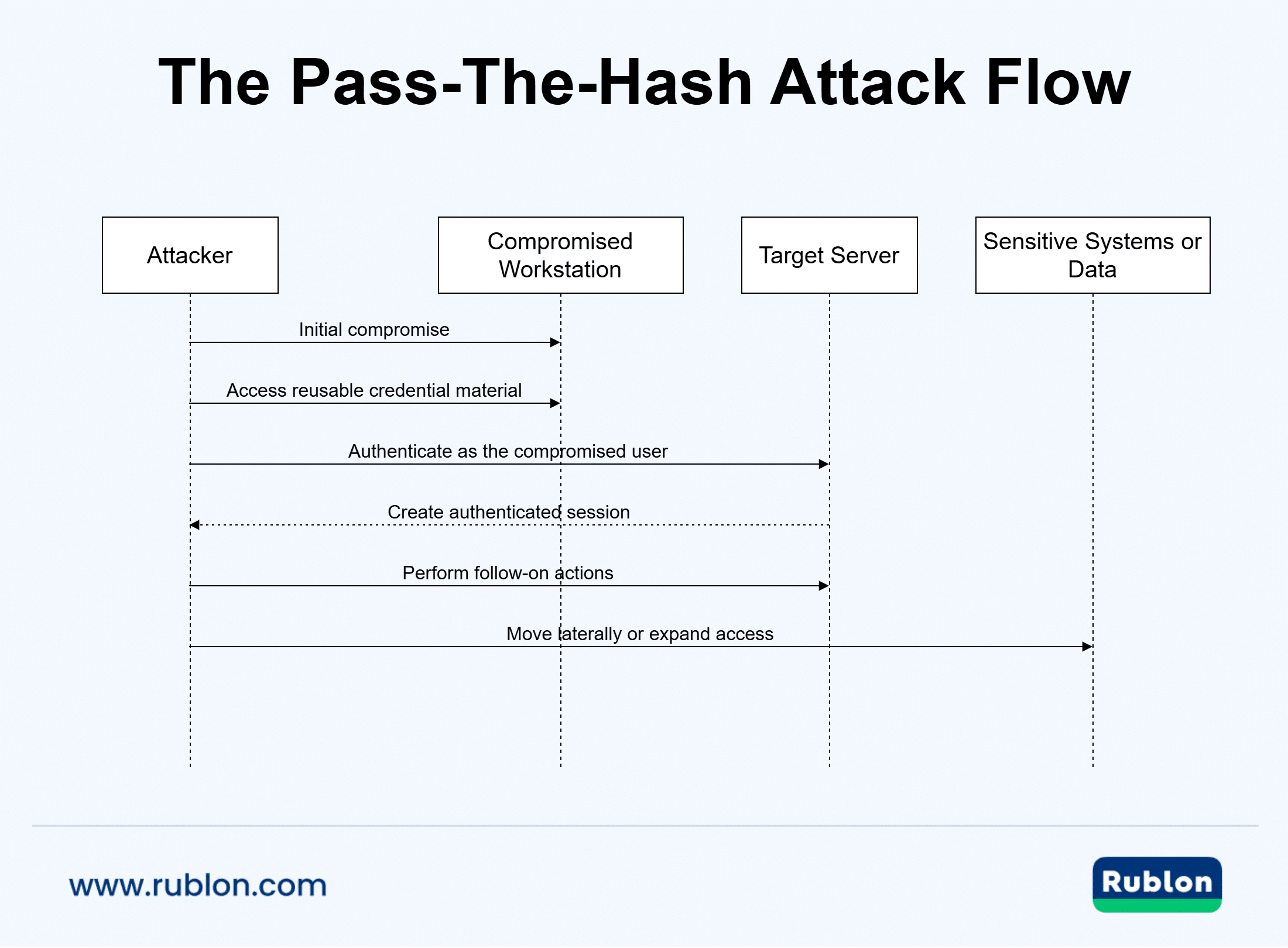
Initial Compromise
The attack rarely begins with a hash replay. The attacker first needs a foothold that they gain through phishing, malware, an exposed remote access service, or a compromised account. Once they control a workstation or server, they begin profiling the environment: which users log in, what privileges exist, and where authentication activity occurs. This reconnaissance sets up the search for credential material.
Credential Material Exposure
After establishing a foothold, the attacker looks for systems where usable authentication secrets might be present. In Windows environments, this often means machines where privileged users have recently signed in or where sensitive credential material is stored in memory. In their Credential Guard overview, Microsoft notes that NTLM password hashes and other secrets are high‑value targets because unauthorized access to them enables credential replay techniques such as pass‑the‑hash and pass‑the‑ticket. The attacker’s goal at this stage is simple: obtain a credential artifact that can be reused elsewhere.
Authentication Without The Plaintext Password
This is the pivotal moment. Instead of cracking the password, the attacker uses the stolen hash directly in an NTLM authentication flow. Because NTLM treats the hash as proof of identity, any system that still trusts that authentication path will accept the attacker as the legitimate user. The attacker can now open new sessions, access resources, and perform actions under the victim’s identity. This is what makes pass‑the‑hash so dangerous: a single stolen artifact becomes immediate, portable access.
Lateral Movement
With successful authentication, the attacker begins moving across the environment. They target systems that offer broader access, administrative tooling, and more valuable data. Even a moderately privileged account, such as a help desk user, server operator, or service account, can dramatically expand the attacker’s reach if its hash is reused across multiple machines.
Privilege Escalation and Expansion
As the attacker moves, they seek higher‑value accounts and infrastructure. Domain controllers, management servers, file servers, and remote administration systems become prime targets because compromising them unlocks wider control over the environment. Each new credential or system expands the attacker’s operational freedom and increases the blast radius of the initial hash theft.
Why the PtH Technique Works?
Pass the hash works because NTLM authentication flows accept proof derived from the password hash rather than requiring the plaintext password itself. In a well-defended environment, that exposure is reduced. In a legacy or weakly segmented environment, it can be enough to let attackers move across multiple systems.
This is one reason Microsoft is pushing organizations to reduce reliance on NTLM. In its guidance on advancing Windows security by disabling NTLM by default, Microsoft highlights pass-the-hash as one of the risks tied to continuing NTLM use.
What Does the Password Hash in NTLM Actually Represent?
A Windows NTLM password hash is a one‑way mathematical transformation of the password. It cannot realistically be reversed to recover the original password. But attackers do not need to reverse it because possession of the hash is enough to authenticate in NTLM authentication. This is the core weakness PtH exploits.
Why Can Attackers Use the Hash Without Knowing the Password?
NTLM authentication works by proving you know the hash, not the password. When a system challenges a user, the authentication process uses the hash to compute a response. If the response matches what the server expects, access is granted.
So if an attacker steals the hash from computer1, they can:
- Present that hash to another system (computer2)
- Compute the correct challenge response
- Be accepted as the legitimate user
All without ever knowing the actual password.
This is why PtH is so dangerous: it bypasses password complexity, MFA on the password itself, and anything that protects the plaintext password.

How Does a Hash from Computer1 Help Access Computer2?
1. Because the hash belongs to a user account, not the computer
When an attacker extracts a password hash from a machine, they are usually stealing the hash of:
- a local user account on that machine, or
- a domain account that logged into that machine.
Those accounts may also be valid on other systems.
2. Local accounts are often reused across machines
In many environments, administrators use the same local Administrator password on many endpoints. That means:
- computer1 → local admin password = P@ssw0rd
- computer2 → local admin password = P@ssw0rd
If the password is the same, the hash is also the same, so the attacker can authenticate to computer2 using the hash stolen from computer1.
This is one of the most common real‑world PtH paths.
3. Domain accounts are valid everywhere in the domain
In a domain, the same password hash works across all machines where that account has access.
If both machines are joined to an Active Directory domain, then:
- A domain user logs into computer1.
- Their domain password hash is cached or present in memory.
- The attacker steals that hash.
- The same domain account can authenticate to computer2.
This works because the domain controller validates the hash, not the individual machine.
When the hash wouldn’t work on another machine
There are cases where a stolen hash from computer1 is useless on computer2:
- The local admin passwords are unique (e.g., LAPS).
- The account whose hash was stolen has no rights on computer2.
- The environment uses protections that prevent hash replay.
This is why modern hardening focuses on credential isolation and unique local passwords.
Where Mimikatz Fits In?
Mimikatz is one of the best-known tools linked to credential theft in Windows environments. It is often mentioned in discussions of Pass the Hash because it helped demonstrate how attackers can extract or access credential material from compromised systems and use it for lateral movement.
Its importance is not just about the tool itself, but about what it revealed to defenders: if password hashes or other authentication secrets are exposed on an endpoint, attackers may be able to reuse them without knowing the plaintext password. That is why Mimikatz remains a common reference point in guidance around credential protection, administrative hardening, and reducing lateral movement.
Why Privileged Accounts Make the Risk Worse?
A stolen standard user hash is already a problem. A stolen administrator hash is far worse.
Privileged accounts can give attackers access to:
- remote administration paths
- server management tools
- sensitive file shares
- directory infrastructure
- security controls themselves
That is why pass-the-hash mitigation is closely tied to privileged access hygiene, endpoint hardening, and stronger login protections for Windows systems. For organizations that want to reduce exposure around administrator and workstation sign-ins, Windows Logon MFA adds an extra verification step at a point attackers often try to exploit.
How Pass The Hash Differs From Other Credential Attacks?
Not every credential attack works the same way.
Pass the Hash vs. Credential Stuffing
Credential stuffing relies on stolen usernames and plaintext passwords that are replayed across different services. In contrast, pass-the-hash relies on stolen password hashes or closely related authentication material inside an environment.
Pass the Hash vs. Password Spraying
Password spraying is a guessing attack. The attacker tries a small number of common passwords across many accounts to avoid lockouts. Pass-the-hash is different because the attacker is not guessing. They are reusing valid authentication material that was already stolen.
Pass the Hash vs. Pass the Ticket
Pass the ticket focuses on stolen Kerberos tickets. In contrast, pass-the-hash is more closely tied to NTLM-based authentication. Both enable lateral movement, but they rely on different artifacts and different parts of the authentication stack.
Why PtH Detection Is So Difficult?
One reason this technique remains effective is that it often blends in with normal activity. The attacker is not always triggering obvious password failures or noisy brute-force patterns. Instead, they may appear to be a legitimate user connecting to legitimate systems.
MITRE’s Pass the Hash detection strategy recommends correlating logon session creation, NTLM authentications, and suspicious process or service activity to identify possible use of stolen password hashes. That kind of correlation is important because a single event may not look malicious on its own.
What Happens During a Transitional Attack?
In hybrid environments, pass-the-hash can become part of a broader identity pivot. An attacker may start with a compromised endpoint on the corporate network, reuse on-premises credential material to expand access, and then target identity infrastructure that connects on-premises services with cloud resources.
The technique itself is still rooted in local and network authentication abuse, but the business impact can spread far beyond one workstation. Once attackers reach synchronization services, remote access systems, privileged consoles, or identity management infrastructure, a local compromise can turn into a much wider incident.
Who Is Vulnerable To Pass-The-Hash Attacks?
Pass-the-hash attacks are most effective in environments where attackers can steal credential material from one system and reuse it somewhere else. That risk is highest in Windows estates that still rely on NTLM, expose privileged credentials too broadly, or allow the same local administrator secret to exist on many machines. Microsoft still documents NTLM as a supported authentication protocol in Windows, especially for compatibility scenarios, even though Kerberos is the preferred option in domain environments.
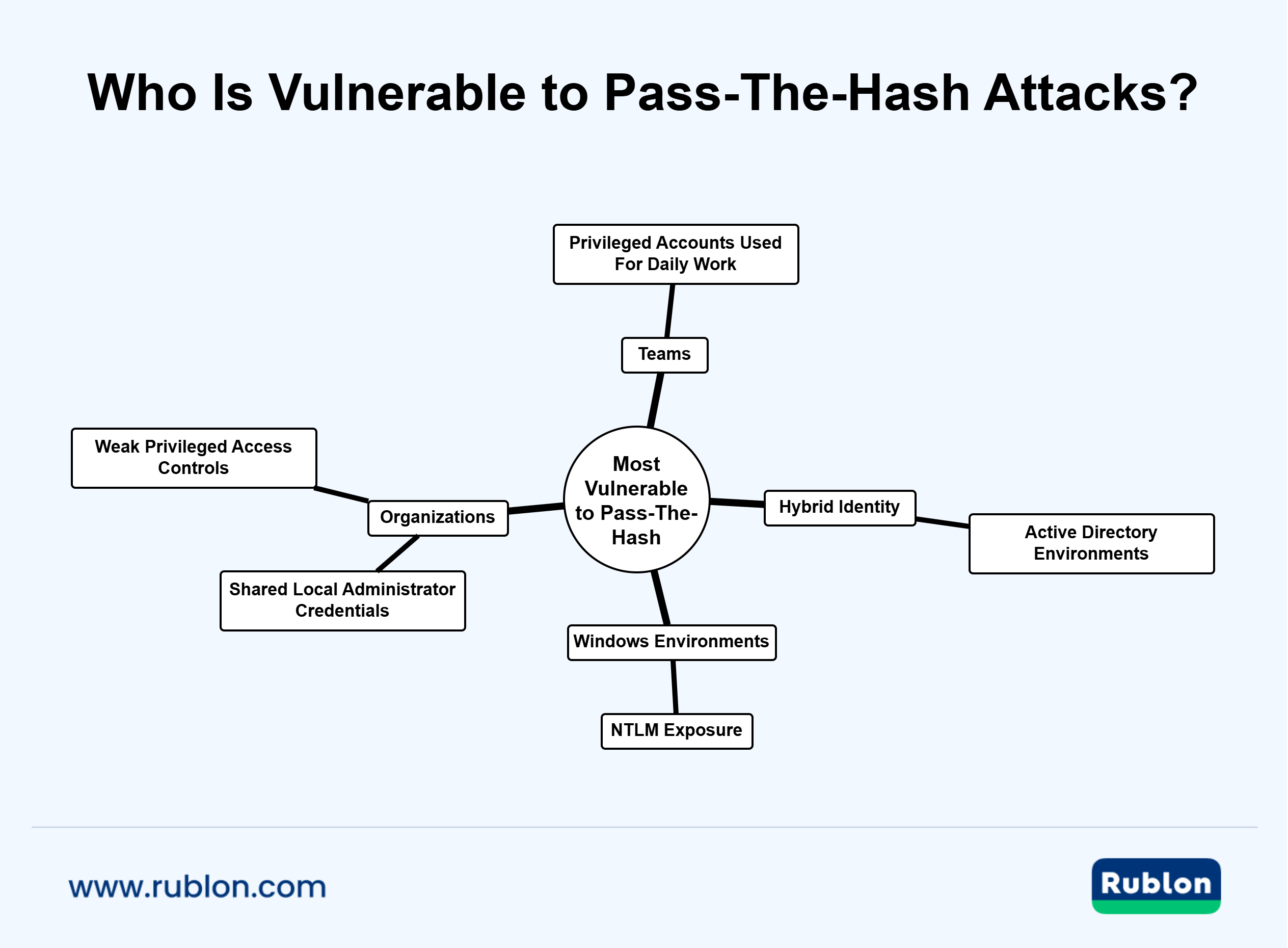
Windows Environments With NTLM Exposure
The classic pass-the-hash scenario is tied to Windows authentication. If NTLM is still active across endpoints, servers, legacy applications, or remote administration paths, an attacker has more opportunities to reuse stolen credential material instead of needing the real password. Microsoft’s NTLM overview in Windows Server and Windows authentication overview both make clear that NTLM remains part of the authentication stack, particularly where compatibility requirements still exist.
That matters because legacy support often outlives the original business need. A modern organization may think it has moved on from old authentication patterns while still using them in background services, remote access workflows, or older applications.
Organizations With Shared Local Administrator Credentials
Shared local administrator passwords create a well-known lateral movement problem. If the same privileged secret is reused across many devices, compromise on one machine can make compromise on others much easier. Microsoft positions Windows LAPS as a control for managing and rotating unique local administrator passwords, precisely because local admin reuse is a common security weakness. CISA has also highlighted how non-unique local admin passwords can facilitate lateral movement across a network.
In practice, this means organizations with cloned workstation builds, unmanaged admin account sprawl, or weak password rotation are more exposed than they appear on paper. Protecting on-premises identity infrastructure with Active Directory MFA can help reduce the impact of stolen credentials in these environments while broader hardening work is underway.
Teams That Use Privileged Accounts For Daily Work
Privilege is one of the biggest force multipliers in any pass-the-hash attack. When administrators use elevated accounts for routine browsing, email, or Windows workstation logons, they increase the chance that powerful credential material will be present on the wrong system. Microsoft’s guidance on implementing least-privilege administrative models warns that malware launched under a privileged session can inherit that level of access and extend the scope of damage far beyond a single device.
The same logic applies to service accounts, domain admins, and help desk roles with broad permissions. If a highly privileged identity signs in to a compromised host, the attacker may gain a much faster path to lateral movement and escalation.
Hybrid Active Directory Environments
Hybrid environments often carry more identity complexity than cloud-only deployments. On-premises Active Directory, synchronized identities, remote desktop infrastructure, federation services, and legacy applications can all increase the number of systems that trust reusable credential material. CISA’s guidance on detecting and mitigating Active Directory compromises stresses that identity abuse in Active Directory can enable broad compromise across an enterprise.
This does not mean every cloud-connected environment is automatically vulnerable to classic pass-the-hash in the same way. But it does mean that organizations with hybrid identity paths often have a larger attack surface and more trust relationships to secure. For remote access environments, Remote Desktop MFA can add an additional verification layer where stolen credentials are often most valuable.
Organizations Without Strong Privileged Access Controls
Least privilege is not a checkbox, but a structural defense against credential abuse. Microsoft’s guidance on least privileged access and privileged access security emphasizes reducing unnecessary permissions, protecting high-impact access paths, and limiting the blast radius of a compromise.
An environment becomes more vulnerable when it has:
- Too many standing admin rights
- Weak separation between user and admin accounts
- Broad access from standard workstations to sensitive systems
- Limited monitoring of privileged activity
While these conditions do not create pass the hash by themselves, they make the consequences far more severe.
Are Cloud-Only Organizations At Risk?
A cloud-only organization is generally less exposed to classic pass-the-hash attacks than a Windows estate built around NTLM and on-premises authentication. Still, the broader lesson remains relevant. Any environment that leaves reusable authentication artifacts exposed on compromised systems is giving attackers a foothold they may be able to extend.
That is one reason many organizations are moving toward stronger login models that reduce dependence on passwords altogether. Approaches such as passwordless MFA for Windows Hello logins aim to reduce the value of stolen password-based credentials in day-to-day access workflows.
How to Detect Pass-The-Hash Attacks?
Pass-the-hash detection is difficult because the attacker uses valid authentication material. This means the activity can look legitimate at first glance, especially in environments where NTLM is still common and administrative access patterns are noisy. MITRE notes in its detection strategy for Pass the Hash that defenders should correlate logon session creation, NTLM authentication, and suspicious process or service activity rather than rely on a single event.
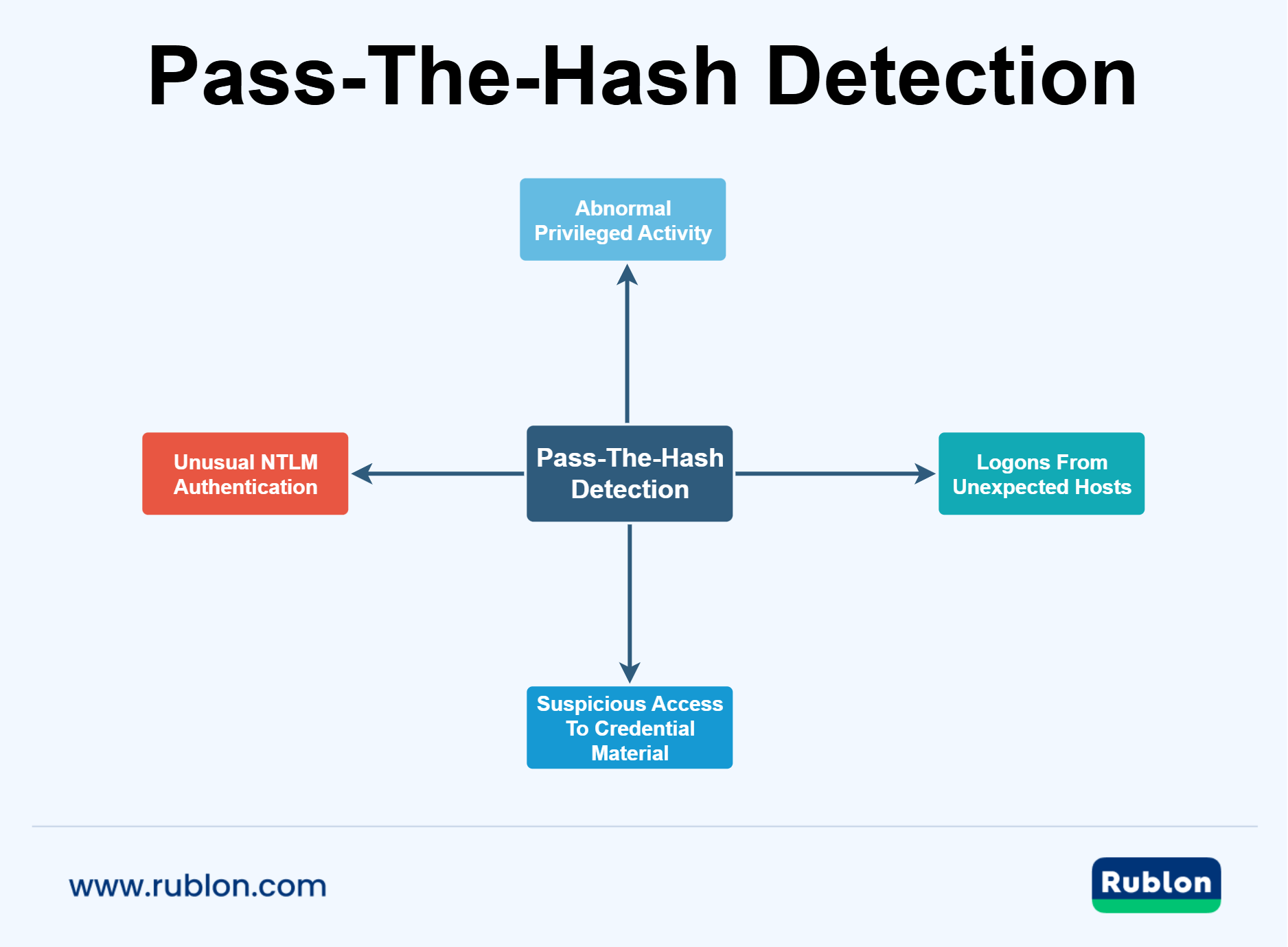
Why Pass-The-Hash Is Hard to Spot?
A successful pass-the-hash attack often avoids the signals that security teams expect from password attacks.
There may be:
- no obvious brute-force activity
- no burst of failed logons
- no password reset event
- no clear sign that the user typed a password at all
Instead, the attacker may appear as a real user connecting to a real system with working credentials. That is why pass-the-hash detection depends on context, sequence, and correlation more than on one isolated alert.
The Most Important PtH Detection Signals
Strong detection starts with the combination of identity, endpoint, and authentication telemetry.
Unexpected NTLM Authentication
If a user or system normally authenticates with Kerberos but suddenly falls back to NTLM, that change deserves attention. Microsoft’s suspicious activity guidance for identity theft using Pass-the-Hash highlights unusual use of a user’s NTLM hash from a computer they do not normally use as a meaningful indicator of compromise.
Logons From the Wrong Host
A hash stolen from one endpoint is often reused on another. When an account begins authenticating from systems it does not typically access, especially administrative systems, that pattern can signal lateral movement rather than normal work.
Suspicious Access to Credential Material
Pass‑the‑hash typically begins with access to credential material, so early signals often appear before lateral movement starts. Activities such as interacting with LSASS, reading SAM/SECURITY hives, invoking credential‑dumping tooling, or tampering with security controls can indicate that an attacker is preparing to extract hashes. These behaviors form some of the most important early warnings for a potential PtH attack.
Privileged Activity That Does Not Fit The User
An ordinary user account authenticating to servers, management consoles, or remote admin paths can be a warning sign. So can a help desk or service account that suddenly reaches systems outside its normal scope.
What to Review in Windows Telemetry?
Native Windows logs can help, but they become much more valuable when they are correlated across hosts.
Focus on:
- Successful network logons that look out of place.
- Account use across multiple systems in a short period.
- Authentication events tied to NTLM, where Kerberos would be expected.
- Process creation and service activity around remote execution.
- Endpoint events that suggest credential dumping or access to protected memory.
Microsoft also recommends auditing NTLM use so defenders can identify where the protocol is still active and where fallback behavior may create exposure. Its guidance on auditing NTLM traffic and identifying applications that use NTLM is useful when building visibility into where pass-the-hash activity may blend in with normal operations.
Behavioral Analytics Matter
Single-event detection is rarely sufficient. The stronger approach is to look for connected anomalies across user behavior, host behavior, and authentication flow.
That includes cases where:
- A user signs in from a device they do not normally use.
- The same account touches several systems in quick succession.
- A privileged account appears on a workstation that should not host it.
- Remote execution follows unusual authentication activity.
- Endpoint telemetry and identity telemetry point to the same timeline.
This is where EDR, SIEM correlation, and identity-aware analytics become much more valuable than log review alone. If your organization is tightening protection around remote authentication paths, RDP MFA can help reduce the value of stolen credentials in one of the places attackers often target after the initial compromise.
What a Mature Detection Strategy Looks Like?
A mature pass-the-hash detection program does not depend on one rule that fires on every case. It combines several layers:
- Identity Monitoring – Track who is authenticating, from where, to which systems, and with which protocol.
- Endpoint Monitoring – Watch for signs of credential theft, suspicious process access, remote execution tools, and unusual service creation.
- Privileged Access Monitoring – Pay close attention to high-value accounts, especially domain admins, server admins, and service accounts with broad reach.
- Baseline Deviation – Measure what is normal for users, endpoints, and administrative activity so suspicious changes stand out faster.
The multi-agency guidance in Detecting and Mitigating Active Directory Compromises reinforces this broader view. Active Directory compromise is rarely just one event. It is usually a chain of credential abuse, privilege escalation, and lateral movement that has to be detected across multiple systems.
Common Detection Mistakes
Detection programs often miss pass-the-hash because they focus too narrowly on the wrong signals.
Common mistakes include:
- Treating all successful logons as low risk.
- Ignoring NTLM because it is still considered normal in legacy environments.
- Monitoring privileged accounts without monitoring where they sign in.
- Relying only on antivirus alerts.
- Investigating isolated events without building a timeline across hosts.
These gaps make it easier for a transitional attack to grow from one compromised machine into a broader identity incident.
How to Respond to Pass-The-Hash Attacks?
A pass-the-hash incident should be handled as a live credential compromise, not just an isolated endpoint infection. If an attacker is already reusing stolen authentication material, the priority is to stop further movement, protect privileged identities, and prevent the incident from spreading into directory services, remote access systems, and critical servers. CISA’s Cybersecurity Incident and Vulnerability Response Playbooks frames response around identification, coordination, containment, eradication, and recovery, which fits this type of identity-driven attack especially well.
Contain the Attack First
The first goal is to slow or stop lateral movement by isolating compromised hosts, restricting affected accounts, and limiting the attacker’s ability to authenticate elsewhere. If the intrusion involves privileged credentials, time matters even more because a stolen admin hash can rapidly expand the blast radius. Microsoft describes automated containment in Microsoft Defender XDR automatic attack disruption, which is designed to contain attacks in progress and reduce impact while security teams complete remediation.
Isolate Impacted Systems
Remove compromised endpoints and servers from normal network communication as early as possible. If the attacker can still reach other hosts, the incident is still growing. Isolation decisions should focus on systems tied to suspicious authentication, unusual admin activity, and possible credential theft. CISA’s recent lessons learned from an incident response engagement also stress rapid containment, centralized logging, and practiced response procedures to limit escalation during active intrusions.
Restrict or Disable Compromised Accounts
If you have enough confidence that an account has been abused, restrict it immediately. That can mean disabling the account, forcing a password reset, removing sessions, or temporarily blocking access to sensitive systems. Microsoft documents these actions in Defender for Identity remediation actions, including disabling accounts and resetting passwords for compromised users.
Investigate the Full Scope
Responding well means understanding not only which account was abused, but where the attacker started, which systems were touched, and whether higher-value credentials were exposed along the way. In pass-the-hash cases, the visible authentication event is often only one part of a much larger sequence. Microsoft’s incident response playbooks emphasize building a workflow that connects alert triage, investigation steps, prerequisites, and containment actions rather than treating signals in isolation.
Build the Timeline
Create a timeline that links together the likely initial compromise, host access, suspicious sign-ins, remote execution, and privileged activity. Focus on when the first suspicious authentication happened, which host originated it, and whether the same account or related accounts appeared on other machines soon after. This helps determine whether the incident is limited to one endpoint or whether it has already crossed into broader identity infrastructure.
Identify Every Affected Credential
Do not stop with the first visible account. Review standard user accounts, administrator accounts, service accounts, and any credential material that may have been exposed on compromised hosts. Microsoft’s guidance for securing privileged access accounts stresses strong account protection and lifecycle control because attackers who impersonate privileged identities can take over far more than one machine.
Eradicate the Root Cause
While containment buys time, eradication removes the conditions that made the attack possible in the first place. If the attacker gained access through malware, a vulnerable remote access path, or an already compromised administrator session, that issue must be fixed before normal operations resume. Otherwise, the same adversary may return with the same foothold. CISA’s playbooks place eradication before full recovery for exactly this reason.
Reset Credentials in the Right Order
Password resets should be deliberate, especially when privileged and service accounts are involved. If the attacker still has access to key systems, resetting accounts too early can create confusion without actually removing the threat. Start with the accounts most likely to be abused again, then expand through the rest of the exposed identity chain. Where administrative access is involved, stronger sign-in protections such as Remote Access MFA can reduce the chance that a stolen credential immediately turns into another foothold.
Rebuild Or Remediate Compromised Systems
If a host shows signs of credential theft, remote execution, or deep compromise, do not assume a simple cleanup is enough. Reimage or rebuild when needed, validate security tooling, and confirm the attacker no longer has persistence. Microsoft’s Windows security guidance notes in its advanced credential protection that controls, such as Credential Guard, help protect secrets from theft, including attacks like pass the hash and pass the ticket.
Recover With More Monitoring Than Usual
Recovery does not begin when the first infected host is cleaned. It begins when you can verify that stolen credential material is no longer being reused and that sensitive accounts are not still active in suspicious ways. For a period after remediation, increase visibility on authentication events, admin activity, endpoint behavior, and attempts to reach critical systems. Microsoft’s security alerts overview for Defender for Identity highlights how identity alerts can help investigators track suspicious activities, involved users, and impacted computers during ongoing investigation and remediation.
Watch For Follow-On Identity Abuse
After a pass-the-hash incident, attackers may pivot to other identity techniques rather than repeat the same move. That can include privileged account abuse, ticket theft, persistence through directory changes, or suspicious login attempts against newly valuable systems. CISA’s Eviction Strategies Tool entry on suspicious login attempts recommends tightening protections around likely targets, tuning detection tools, and using stronger protections for users and devices that may face continued targeting.
Pass-The-Hash Prevention And Mitigation Strategies
The best defense against pass-the-hash attacks is not a single product or setting. The best protection is a layered security model that reduces credential exposure, limits administrative reach, and makes stolen authentication material far less useful. In Windows environments, this starts with hardening the systems where credentials live and shrinking the number of places where reusable secrets can be abused.
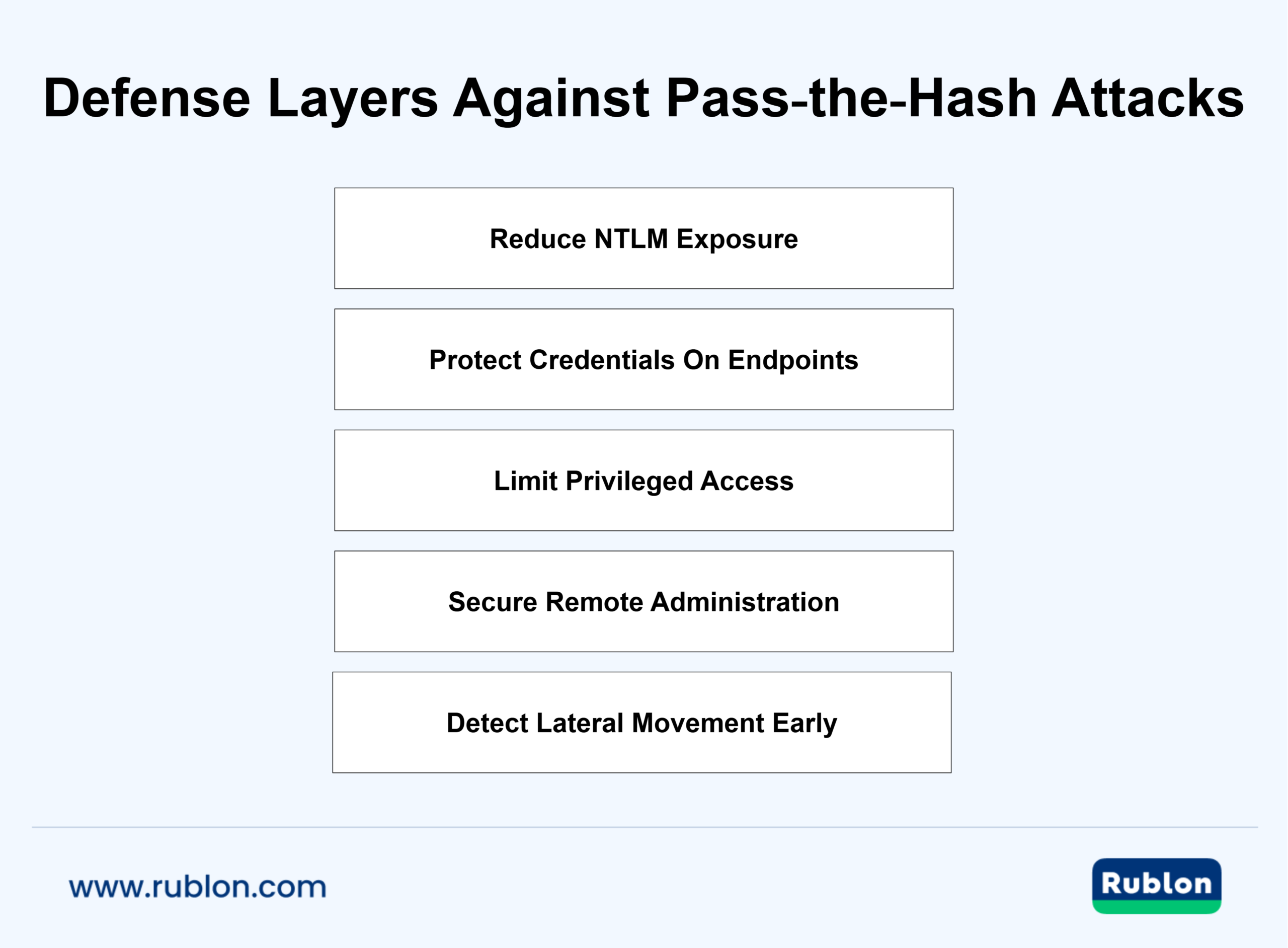
Reduce Credential Exposure On Endpoints
If attackers cannot extract usable credential material, pass-the-hash becomes much harder to execute.
Enable Credential Guard
Microsoft recommends Credential Guard configuration to isolate secrets with virtualization-based security and reduce exposure to credential theft. This is one of the most important technical controls for limiting attacks that depend on stolen hashes.
Add Protection For LSA
The Local Security Authority process is a high-value target because it handles authentication secrets. Microsoft’s guidance on configuring additional LSA protection helps block code injection and other abuse that can expose credentials on compromised hosts.
Go Beyond One Setting
Credential Guard is powerful, but it is not a complete answer by itself. Microsoft’s additional mitigations for Credential Guard makes clear that attackers can still abuse privileges, management tools, or previously stolen credentials if the rest of the environment remains weak.
Limit The Value Of Administrative Credentials
Pass-the-hash becomes far more dangerous when privileged identities are widely used across workstations and servers.
Separate Administrative Accounts From Daily User Accounts
Administrators should not use high-privilege identities for email, web browsing, or routine endpoint work. Microsoft’s guidance on protected accounts is built around this principle and includes controls that help reduce exposure of privileged credentials.
Secure Local Administrator Accounts
Local administrator accounts can still become a major lateral movement path if they are enabled broadly or managed poorly. Microsoft’s guidance on securing local administrator accounts and groups explains why these accounts need careful control in environments where pass-the-hash attacks are a concern.
Use Unique Local Admin Passwords
A shared local administrator password turns one compromised device into a launch point for many others. Unique local admin credentials reduce that chain reaction. For organizations modernizing workstation access, Windows MFA can strengthen sign-ins at the endpoint level where credential abuse often begins.
Reduce Reliance On Reusable Passwords
The more an environment depends on reusable passwords, the more attractive stolen hashes remain.
Move Toward Stronger Authentication Methods
Microsoft notes in its Credential Guard considerations that organizations should move away from passwords where possible and adopt stronger authentication methods such as Windows Hello for Business, smart cards, or FIDO2 security keys.
Strengthen Access To Critical Systems
High-value systems should not rely on password-only access, especially for administrators and remote access users. Stronger factors can make it much harder for attackers to turn a stolen credential into full access. That is one reason many organizations adopt FIDO2 security keys for accounts that need stronger phishing resistance and tighter identity assurance.
Harden Remote Administration Paths
Remote administration is often where credential theft turns into lateral movement.
Use Remote Credential Protections
Microsoft’s Remote Credential Guard helps reduce the need to expose reusable credentials to remote hosts. That matters in environments where administrators connect to sensitive systems from standard workstations or jump hosts.
Consider Restricted Admin For RDP Scenarios
Microsoft also documents Restricted Admin mode as a way to connect to remote systems without sending reusable credentials to the target host. This is especially relevant for privileged remote access workflows where a compromised server could otherwise harvest admin secrets.
Reduce Lateral Movement Opportunities
Passing the hash is effective because it helps attackers move. Any control that limits movement reduces the damage that stolen hashes can do.
Segment Administrative Access
Administrative systems, servers, and identity infrastructure should not be reachable from every workstation. Restricting paths between user devices and high-value assets reduces the number of places where a stolen hash can be reused successfully.
Limit Standing Privilege
The fewer accounts with broad rights, the fewer high-impact targets an attacker has. Reducing standing privilege also lowers the chance that powerful credentials will be present on compromised devices for long periods.
Review Trust Relationships And Legacy Dependencies
Old applications, legacy protocols, and compatibility exceptions often keep NTLM alive longer than expected. Removing those dependencies closes authentication paths that attackers still exploit.
Support Prevention With Stronger Operational Controls
Technical protections are most effective when they are backed by disciplined operational security.
Monitor For Early Signs Of Credential Abuse
Prevention is not only about blocking the first theft. It is also about noticing when sensitive accounts appear on the wrong systems, when privileged sessions become too common, or when remote administration behavior changes in suspicious ways.
Practice Response Before An Incident
CISA’s countermeasure guidance for refreshing authenticators after Pass the Hash activity highlights the importance of planning, sequencing, and ensuring that the attacker cannot simply steal fresh credentials again. Good prevention includes preparation for fast containment and recovery.
Align Controls Across Identity And Endpoint Teams
Pass-the-hash mitigation sits between identity security, endpoint protection, and administrative design. When those teams work in isolation, gaps remain. When they align, it becomes much harder for attackers to steal, reuse, and expand access with credential material.
What The Best Defense Looks Like In Practice
The best defense against pass-the-hash attacks combines several controls at once:
- Protected credentials on endpoints.
- Tightly controlled privileged accounts.
- Unique local admin passwords.
- Safer remote administration.
- Reduced password dependence.
- Limited lateral movement paths.
- Fast detection of abnormal authentication activity.
Organizations that want stronger access control for remote users, administrators, and internal applications often combine these changes with identity and access management improvements so authentication, privilege, and endpoint protections work together instead of as separate projects.
Pass-the-Hash vs. Related Identity Attacks
Pass the hash is often grouped with other credential abuse techniques because they all help attackers impersonate legitimate users after an initial compromise. The differences matter. Each technique relies on a different kind of authentication artifact, and each one points defenders toward a slightly different set of controls.
| Attack | What Is Stolen or Reused | Typical Context | Main Risk |
| Pass-The-Hash | Password hash or equivalent authentication material | Windows environments where NTLM is still present | Lateral movement without knowing the plaintext password |
| Pass-The-Ticket | Kerberos ticket | Active Directory environments using Kerberos | Impersonation and lateral movement with stolen tickets |
| Credential Stuffing | Stolen usernames and plaintext passwords | Internet-facing apps and reused credentials across services | Account takeover across multiple systems |
| Password Spraying | Common passwords tried against many accounts | External login portals, VPNs, Microsoft 365, web apps | Low-noise password guessing that avoids lockouts |
| Replay Attack | Captured authentication data or session material | Any environment vulnerable to repeated authentication reuse | Unauthorized access through retransmitted valid data |
Pass-the-Hash vs. Pass-the-Ticket
A pass-the-hash attack relies on a stolen password hash in environments where NTLM is still part of the authentication path. In contrast, a pass-the-ticket attack relies on a stolen Kerberos ticket. MITRE’s Pass the Ticket entry describes it as another form of using alternate authentication material for lateral movement.
Microsoft explains in its Kerberos authentication overview that Kerberos uses tickets to support authentication in domain environments. That is one reason pass the ticket and pass the hash are related, but not interchangeable. One abuses NTLM-linked credential material. The other abuses Kerberos-issued tickets.
In practical terms:
- Pass-the-hash is most closely tied to NTLM credential reuse.
- Pass-the-ticket is tied to stolen Kerberos tickets.
- Both can support lateral movement.
- Both become more dangerous when privileged identities are exposed.
Pass-the-Hash vs. Replay Attacks
Relative to pass-the-hash, a replay attack is a broader concept. NIST defines a replay attack as the capture of authentication or access control information followed by retransmission to gain unauthorized access or cause an unauthorized effect.
Pass-the-hash shares some of that logic because the attacker is reusing valid authentication material instead of proving identity from scratch. Still, pass-the-hash is more specific. Rather than a replay of credential data, pass-the-hash is the use of stolen password-hash-based material to authenticate as a real user inside an environment that still trusts it.
That distinction matters for defense. Preventing generic replay may involve session protections, nonce handling, and protocol safeguards. Preventing pass-the-hash requires stronger credential protection, reduced NTLM exposure, and tighter endpoint security.
Pass-the-Hash vs. Credential Stuffing
Credential stuffing depends on stolen usernames and plaintext passwords, usually taken from earlier breaches and tried against other services. Pass-the-hash is different because the attacker may never know the real password at all.
This is an important line between external account abuse and internal identity abuse. Credential stuffing is often aimed at internet-facing applications. In contrast, pass-the-hash is usually part of the post-compromise movement inside an enterprise network.
Pass-the-Hash vs. Password Spraying
Password spraying is a guessing technique. The attacker tries a small number of common passwords against many accounts to avoid lockouts and detection.
Pass the hash is not guessing. It is the reuse of already stolen authentication material. That makes it quieter and more dangerous after a foothold has been established, especially when the stolen material belongs to an administrator or service account.
Pass-the-Hash vs. Transitional Attack
A transitional attack describes a broader pivot between trust environments. Pass-the-hash is one credential abuse technique that can help an attacker make that pivot after the initial compromise.
But that does not mean every transitional attack is a pass-the-hash attack. Rather, it means that pass-the-hash can be one of the techniques that helps the attacker move from local compromise to wider identity control.
Organizations trying to reduce that kind of pivot often strengthen authentication across the points where trust shifts between devices, remote sessions, and applications. Support for FIDO2 passkeys can help reduce reliance on password-based logins in places where credential theft has traditionally been too valuable.
Why These Distinctions Matter
It is easy to treat all credential attacks as variations of the same problem. In reality, the artifact being abused tells you a lot about the environment and the right response.
If attackers are reusing password hashes, focus on:
- NTLM exposure
- endpoint credential protection
- privileged account hygiene
- lateral movement controls
If attackers are reusing Kerberos tickets, focus more heavily on:
- ticket theft visibility
- domain trust paths
- privileged logon hygiene
- Kerberos-specific monitoring
If attackers are guessing or replaying credentials from outside the environment, the defensive priorities shift again.
That is why strong identity security depends on more than one control. Organizations that move toward passkey enrollment for MFA and other phishing-resistant MFA methods are reducing one of the root problems behind many identity attacks: too much trust in reusable secrets.
Why Pass-The-Hash Still Matters In Modern Cyber Security
Pass-the-hash is sometimes described as an old attack, but that framing misses the real issue. The technique stays relevant because many organizations still have the same conditions that make it effective: reusable credentials, privileged accounts on general-purpose endpoints, legacy authentication paths, and broad internal trust. Microsoft makes this point in its guidance on developing a privileged access strategy, which links the rise of modern credential theft to attacks such as pass-the-hash and explains why privileged access remains a primary target.
It Is Not Just a Legacy Problem
The underlying idea behind pass-the-hash is simple. If an attacker can steal authentication material that a system still trusts, the attacker may be able to move without ever knowing the original password.
That problem is not limited to one tool, one operating system version, or one headline technique. It reflects a broader identity weakness. When powerful credentials are exposed on ordinary workstations, when legacy protocols remain enabled for compatibility, or when administrative access is too easy to reuse, the environment is still vulnerable.
Microsoft’s overview of securing privileged access emphasizes that privileged accounts and workstations are especially attractive because they can give attackers rapid, broad access to business assets. That is exactly why pass-the-hash continues to matter. It turns one credential exposure event into a path toward a larger compromise.
Why Attackers Still Benefit From It
Attackers value pass-the-hash for the same reason defenders struggle with it. It is efficient.
A successful pass-the-hash attack can allow an intruder to:
- bypass the need to crack a password
- authenticate with material the environment already trusts
- move quietly between systems
- escalate from one compromised endpoint to higher-value infrastructure
That makes it particularly useful in real intrusions where time, stealth, and privilege matter more than novelty.
Why Modern Identity Strategy Has To Address It
A strong identity program is no longer only about password complexity or basic sign-in checks. It has to account for credential theft after compromise, not just credential guessing before compromise.
NIST’s current Digital Identity Guidelines and Authentication and Authenticator Management guidance push organizations toward stronger, phishing-resistant authentication because reusable secrets remain a persistent risk. That guidance does not focus only on the pass-the-hash attack, but it speaks directly to the same underlying problem: if an attacker can steal and replay what proves identity, the organization needs stronger controls than passwords alone.
The Real Lesson for Defenders
The lesson is not simply that pass-the-hash is dangerous. The lesson is that identity trust must be narrowed and protected.
In practice, that means:
- keeping privileged accounts off standard endpoints
- reducing reliance on reusable password-based credentials
- protecting credential material on hosts where administrators sign in
- limiting where high-impact accounts can authenticate
- tightening controls around remote access and administrative workflows
Organizations that are moving toward passwordless authentication are addressing this problem at the root by reducing the value of secrets that can be stolen and reused.
Why This Matters In Hybrid Environments
The risk is often highest in environments that sit between older and newer identity models. Hybrid estates tend to carry more exceptions, more trust relationships, and more administrative complexity. A single compromised endpoint can become a bridge to file servers, management infrastructure, directory services, or remote access systems if the wrong credential material is exposed.
That is why pass-the-hash remains a serious cyber security concern even as identity stacks evolve. The technique survives wherever trust in reusable secrets survives.
Frequently Asked Questions About Pass-The-Hash
What is pass-the-hash in simple terms?
Pass the hash is a way for an attacker to sign in with stolen credential material instead of the real password. The attacker does not need to crack the password first. If the environment still trusts the stolen hash, that can be enough to authenticate and move to another system. MITRE defines Pass the Hash as a sub-technique of using alternate authentication material for lateral movement.
How does a pass-the-hash attack work without the real password?
The attack works because some authentication flows accept proof derived from the password hash rather than requiring the user to type the plaintext password each time. In Windows environments, that has traditionally been most relevant where NTLM is still present. Microsoft’s current NTLM phaseout guidance reflects the long-standing risk tied to credential reuse attacks of this kind.
Is pass-the-hash only a Windows problem?
Classic pass-the-hash is most closely associated with Windows and NTLM-based authentication. That is where the technique is most commonly discussed and where the defensive guidance is most mature. The broader lesson, however, applies more widely. Any environment that leaves reusable authentication material exposed after compromise is creating a similar risk, even if the specific mechanics differ. Microsoft’s NTLM transition roadmap is a strong signal that older authentication dependencies still matter in real environments.
Who is most vulnerable to pass-the-hash attacks?
The highest-risk organizations are those with overlapping identity weaknesses rather than one isolated flaw. That includes environments with legacy NTLM usage, shared local administrator passwords, broad admin privileges, poorly segmented networks, and hybrid Active Directory infrastructure. The joint guidance in Detecting and Mitigating Active Directory Compromises stresses that Active Directory abuse often enables wide compromise across an enterprise when credential theft and privilege abuse combine.
Does multi-factor authentication stop pass-the-hash?
Multi-factor authentication helps reduce risk, but it is not a universal fix for every pass-the-hash scenario. If an attacker is already operating inside a legacy authentication path that still trusts stolen credential material, MFA may not fully remove that exposure on its own. The strongest results come from combining MFA with endpoint hardening, privilege separation, and reduced reliance on reusable passwords. Organizations building that broader identity posture often pair stronger sign-in controls with risk-based authentication and Zero Trust principles.
What is the best defense against pass-the-hash attacks?
The best defense is layered. Reduce or remove NTLM where possible, protect credential material on endpoints, use unique local administrator passwords, keep privileged accounts off standard workstations, and limit lateral movement paths. Microsoft’s long-running guidance in Mitigating Pass-the-Hash Attacks and Other Credential Theft emphasizes that no single control is enough and that effective defense requires a holistic strategy across identity, endpoints, and administration practices.
How can security teams detect pass-the-hash earlier?
Early detection depends on correlating multiple weak signals rather than waiting for one loud alert. Useful indicators include unusual NTLM use, sign-ins from unexpected hosts, rapid movement between systems, suspicious access to credential stores, and privileged activity that does not fit the account’s normal behavior. Teams that also focus on account takeover prevention tend to improve visibility into the kinds of identity misuse that often appear before or during pass-the-hash activity.
How should an organization respond after detecting pass-the-hash?
Treat it as both an endpoint incident and an identity incident. Isolate affected systems, contain abused accounts, investigate the full scope, and assume the attacker may try to move again using related credentials or higher-value identities. The joint Active Directory compromise guidance from CISA and partner agencies recommends containment, privileged account review, credential hygiene improvements, and architectural hardening to prevent repeat abuse.
What happens in a transitional attack that involves pass-the-hash?
In a hybrid environment, pass-the-hash can become part of a larger pivot. An attacker may start with one compromised endpoint, reuse on-premises credential material to expand access, then target systems that connect internal identity infrastructure with remote access, management tooling, or cloud-connected services. The technique itself is still grounded in credential reuse, but the business impact can extend well beyond one workstation. This is one reason many organizations strengthen risk-based controls with authentication policies so access decisions can adapt to context instead of trusting the same signals everywhere.
Why does pass-the-hash still matter if NTLM is being phased out?
Because legacy dependencies do not disappear overnight. Many organizations still need time to identify where NTLM is in use, replace older workflows, and harden privileged access paths. Microsoft’s current roadmap makes clear that the goal is to disable NTLM by default in future Windows releases. But it also recognizes that enterprises need a phased transition. Until that work is done, pass-the-hash remains a practical attack path in many environments.
Final Thoughts On Pass-The-Hash Defense
Pass-the-hash remains effective wherever stolen credential material can still be trusted.
To reduce the risk:
- Protect secrets on endpoints.
- Keep admin privileges tightly controlled.
- Phase out NTLM where possible.
- Secure remote access and admin workflows.
- Detect abnormal authentication activity quickly.
The goal is simple: make a stolen hash far less useful after compromise.