
Active Directory often serves as the source of truth for users, account status, and group memberships. When connected systems rely only on scheduled AD synchronization, important changes such as onboarding, account updates, or offboarding may not be reflected until the next sync.
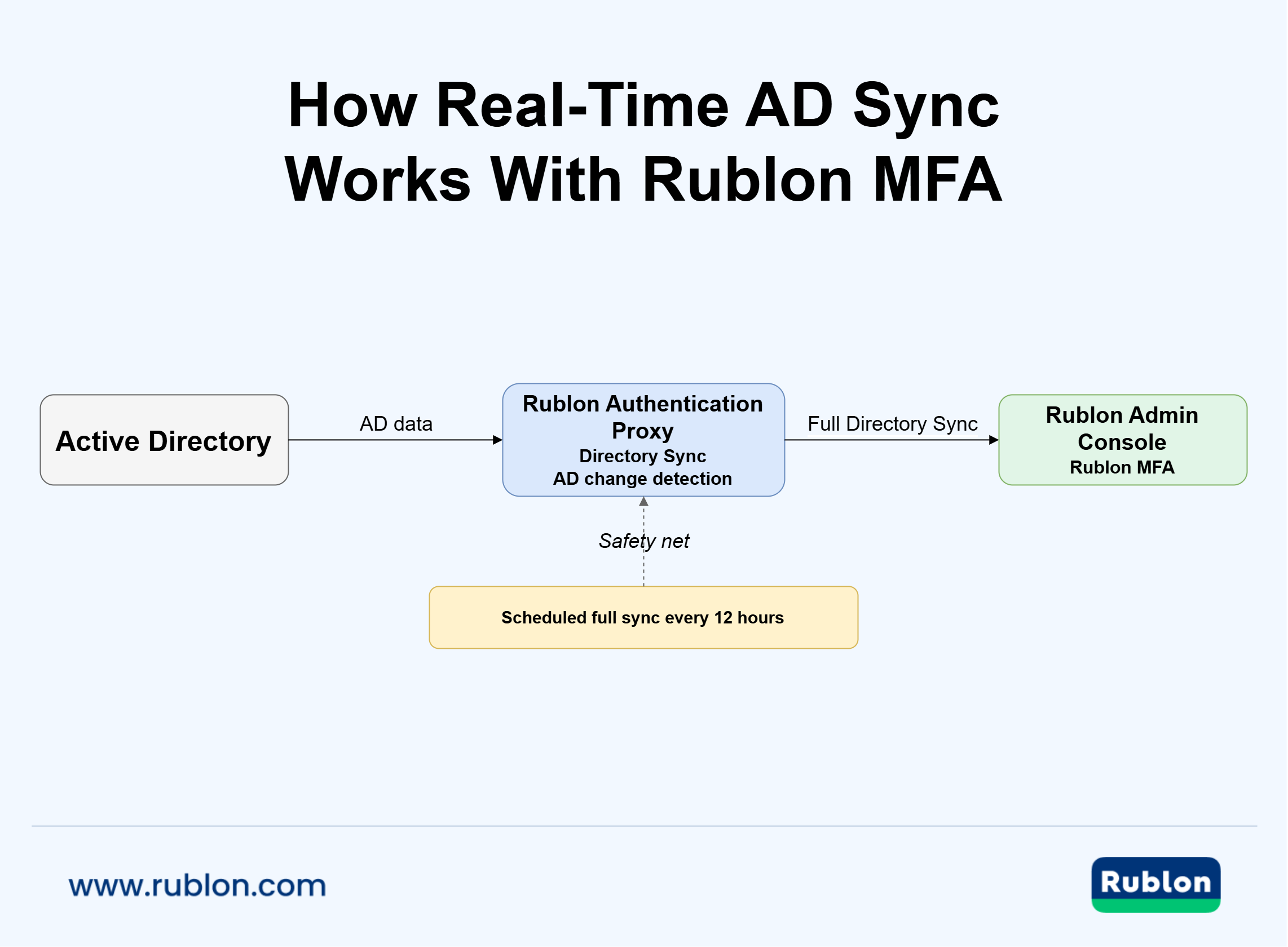
Real-time AD sync reduces this delay by responding to directory changes sooner. Real-time Active Directory synchronization can use different mechanisms, including change detection, polling, incremental synchronization, or just-in-time updates. Rublon MFA uses change detection to trigger additional synchronization when Active Directory changes are detected.
Real-Time Active Directory Sync for MFA
Interested? Use Rublon MFA’s Directory Sync for free and see how easy it is.
For organizations using Active Directory with multi-factor authentication, AD synchronization helps keep MFA identity data closer to the current directory state. Rublon MFA provides Active Directory synchronization through Directory Sync in the Rublon Authentication Proxy.
See the Directory Sync configuration guide for Real-Time AD Sync setup details.
- What Is Active Directory Synchronization?
- What Is Real-Time Active Directory Synchronization?
- How Does Real-Time Active Directory Sync Work?
- What Are the Benefits of Real-Time AD Sync?
- Why Real-Time AD Sync Matters for MFA
- Real-Time AD Sync in Cloud and Hybrid Environments
- Is Active Directory Replication the Same as AD Sync?
- How to Implement Real-Time AD Synchronization
- What Are the Best Practices for Real-Time Active Directory Sync?
- How to Evaluate Real-Time Active Directory Sync Solutions?
- How Rublon MFA Supports Real-Time AD Sync
- Real-Time AD Sync Use Cases
- How to Check Whether Active Directory Synchronization Is Working
- Common Real-Time AD Sync Challenges
- Frequently Asked Questions About Real-Time AD Sync
- Conclusion: Keep MFA Identity Data Closer to Active Directory
What Is Active Directory Synchronization?
Active Directory synchronization is the process of transferring identity data from Active Directory and maintaining it in another directory, identity platform, cloud service, security system, or business application.
However, the goal is not simply to copy users once. Synchronization keeps information aligned as identities change over time. Microsoft describes directory synchronization as a process that can create an object, keep it updated, and remove it when the relevant conditions are no longer met.
In a typical implementation, Active Directory acts as an authoritative identity source. A synchronization mechanism reads selected information from AD and updates the destination platform according to predefined rules.
For example:
Active Directory → Synchronization Service → MFA Platform
If a new employee is created in Active Directory, synchronization can create the corresponding identity in the destination. If the employee’s information changes, synchronization can update it. If the source account is disabled or deleted, the destination system can take the appropriate action supported by its synchronization logic.
AD synchronization is widely used across identity and access management, cloud services, SaaS platforms, security products, and MFA solutions. Microsoft 365, for example, supports synchronizing users, groups, and contacts from on-premises Active Directory Domain Services to Microsoft Entra ID as part of its hybrid identity model.
The exact direction and scope depend on the product. Many implementations are one-way, with Active Directory serving as the source and the connected platform as the destination.
What Data Can Active Directory Synchronization Keep Updated?
Active Directory synchronization can maintain different types of identity information depending on the destination platform and its synchronization capabilities.
Common examples include:
- user accounts
- usernames and user identifiers
- display names and contact information
- account status
- groups
- group memberships
- selected directory attributes
- newly created users
- modified users
- disabled accounts
- deleted users
Not every synchronization product imports all of these attributes or handles them in the same way. Some solutions synchronize entire directory objects, while others deliberately import only the attributes required by the destination system.
For an MFA platform, for example, the relevant data may include usernames, email addresses, phone numbers, account status, user aliases, and group membership rather than every attribute stored in Active Directory.
This selective approach can reduce unnecessary data processing while keeping the information required for authentication and user management current.
Free Trial of AD Sync in Rublon MFA →
Why Do Organizations Need AD Synchronization?
Without AD synchronization, administrators may need to maintain the same identities independently in Active Directory and every connected platform.
That creates several problems. A new employee might have an Active Directory account but still require manual creation in another system. A name, email address, or group change may be updated in one place but forgotten elsewhere. When someone leaves, administrators may need to remember every separate system where the account exists.
Synchronization reduces this duplication by making directory changes part of an automated identity lifecycle.
What are the Benefits of Active Directory Synchronization?
The benefits of AD synchronization can include:
- More consistent identity information. Connected systems receive updates based on the authoritative directory instead of relying on separate manual records.
- Faster onboarding. New Active Directory users can be transferred to connected systems through an automated synchronization process.
- More reliable offboarding. Disabled or deleted accounts can be reflected in destination systems according to their synchronization policies.
- Less administrative work. IT teams do not have to recreate the same user records manually in multiple platforms.
- Fewer stale identities. Regular updates reduce the likelihood that destination systems continue using outdated user information.
- Centralized identity lifecycle management. Administrators can make important identity changes in Active Directory and allow synchronization processes to propagate them where appropriate.
These advantages become more significant as the number of users, groups, applications, and connected security systems grows.
What Are the Key Components of AD Synchronization?
At a high level, Active Directory synchronization can be represented as:
Source Directory → Synchronization Mechanism → Destination Platform
Several components determine how reliably and quickly this process works:
- Identity source. Active Directory contains the source user and group information that the synchronization system reads.
- Connection account. A service or access account allows the synchronization mechanism to query the required directory information. Its permissions should match the data that the solution actually needs to read.
- Synchronization logic. The platform determines which users, groups, and attributes are synchronized and what should happen when an identity is created, modified, disabled, or deleted.
- Schedule or change detection. Traditional synchronization runs at defined intervals. More responsive implementations can detect changes and initiate synchronization without waiting for the next regular cycle.
- Destination platform. This is the system that receives the synchronized identity information, such as an identity provider, cloud directory, SaaS platform, security service, or MFA solution.
- Monitoring and logging. Administrators need visibility into successful synchronizations, errors, skipped objects, permission problems, and other conditions that could leave identity information inconsistent.
These components are common across many implementations, although the underlying architecture and synchronization frequency can differ substantially between products.
What Is Real-Time Active Directory Synchronization?
Real-time Active Directory synchronization is an AD synchronization model that responds to directory changes without depending solely on a long, fixed synchronization schedule.
Instead of waiting several hours for the next scheduled import, a real-time AD sync solution detects or otherwise responds to changes and updates the connected platform sooner. This can make identity information more responsive to events such as user creation, profile modification, group membership changes, account disabling, and deletion.
The exact mechanism varies.
Some systems process events generated by directory changes. Others use frequent polling to detect modifications. Some perform incremental synchronization that processes only data changed since the previous run, while others use just-in-time synchronization when a user interacts with the destination service.
For example, in Rublon MFA’s implementation, the Rublon Authentication Proxy can poll Active Directory for changes and trigger an additional full Directory Sync when a relevant change is detected.
This is why real-time AD synchronization should be understood as a category of responsive synchronization rather than a single technical protocol. The business objective is straightforward: reduce the time during which the source directory and the connected platform operate with different identity states.
Is Real-Time AD Sync Really Instant?
Not necessarily.
“Real-time” is frequently used to describe synchronization that reacts to changes substantially sooner than a traditional scheduled process. It does not automatically mean that every change reaches every destination with zero latency.
Synchronization time can depend on factors such as:
- how changes are detected
- the polling or event-processing architecture
- directory size
- the number of pending changes
- network availability
- processing time in the destination platform
- whether the solution performs an incremental update or a full synchronization
Different vendors also use the term differently. A just-in-time system may update a user’s information when that user signs in. A change-detection system may continuously check the directory and start synchronization after detecting an update.
For this reason, claims such as “instant directory synchronization” should be evaluated against the actual implementation and documented behavior of the product.
A more useful question is whether an organization must wait for the next long scheduled interval before an important Active Directory change can reach the connected system.
How Does Real-Time AD Sync Differ From Scheduled AD Sync?
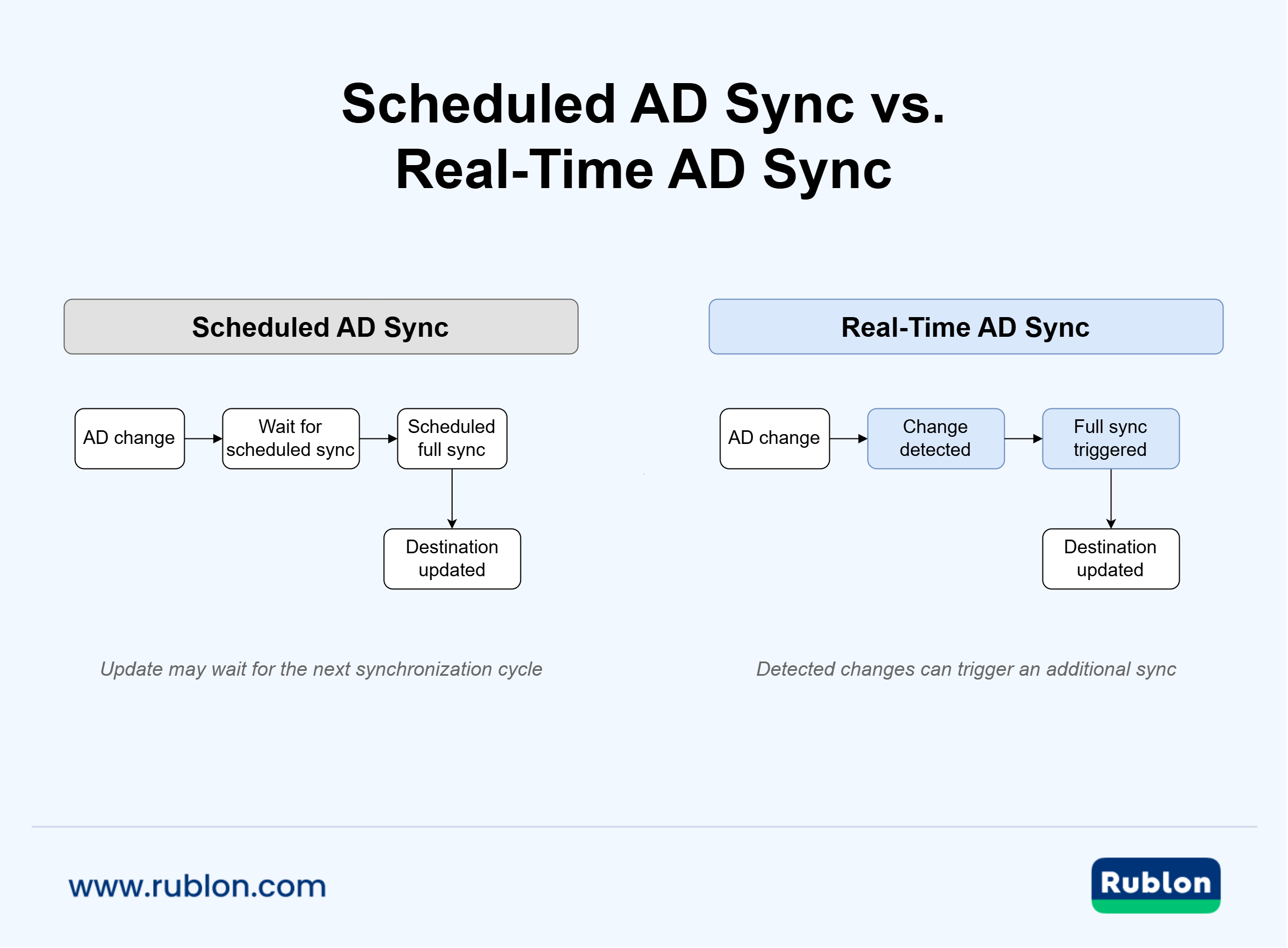
Scheduled synchronization and real-time AD synchronization solve the same fundamental problem but differ in when updates are initiated.
| Scheduled AD Sync | Real-Time or Change-Driven AD Sync |
| Runs periodically | Responds to detected changes |
| Changes may wait for the next cycle | Changes can trigger additional synchronization |
| Uses a predictable operational schedule | Provides a more responsive identity state |
| Works well for periodic reconciliation | Works well for time-sensitive identity changes |
| Can serve as a baseline or safety net | Can complement scheduled full synchronization |
Scheduled AD sync is not obsolete. In fact, combining change-driven updates with periodic full synchronization can provide a useful balance between responsiveness and reconciliation.
A change-driven process handles important updates sooner, while a scheduled full synchronization provides another opportunity to reconcile the source and destination if an individual change was not detected or processed as expected.
Rublon MFA uses this hybrid model. When Active Directory change detection is enabled, additional full synchronizations can run after changes are detected, while the regular 12-hour scheduled synchronization continues to operate as a safety net.
See the Directory Sync configuration guide for Real-Time AD Sync setup details.
How Does Real-Time Active Directory Sync Work?
The exact architecture depends on the product, but real-time Active Directory sync generally follows a simple business process.
- A change occurs in Active Directory. An administrator might create a user, modify account information, change a group membership, disable an account, or delete a user.
- The synchronization system becomes aware of the change. This may happen through events, polling, change tracking, an incremental synchronization mechanism, or another vendor-specific method.
- The system determines whether the change is relevant. Synchronization rules may limit processing to selected users, groups, organizational units, or attributes.
- Identity data is synchronized. The system transfers the relevant information or initiates a synchronization process.
- The destination platform updates its identity state. The result depends on its own synchronization rules. It may create a user, update information, change account status, or remove an identity.
- Periodic reconciliation can still occur. A scheduled full synchronization can serve as a fallback to keep the source and destination aligned over time.
The important distinction is that the destination does not have to depend exclusively on a fixed scheduled interval before it can learn about a directory change.
This is particularly useful when Active Directory supplies identity information to security systems. If an organization already treats AD as its source of truth, reducing synchronization delays helps other systems work with a more current representation of those identities.
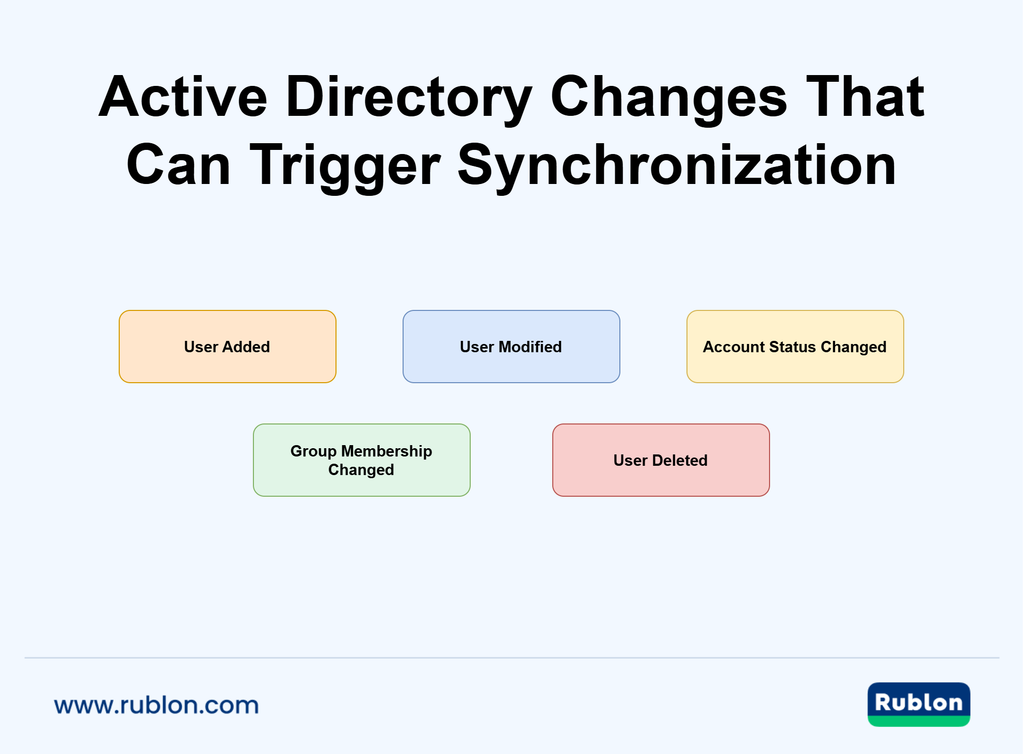
What Types of Active Directory Changes Can Trigger Synchronization?
The changes supported by real-time AD sync depend on the platform.
Depending on the implementation, synchronization may respond to:
- creation of new users
- modifications to existing user attributes
- account status changes
- group membership changes
- disabled accounts
- deleted users
It is important to verify exact product behavior rather than assume that all real-time synchronization tools process every change type.
For example, Rublon MFA’s Directory Sync can detect Active Directory additions and modifications when change_detection is enabled. Detection of deleted users can also be enabled, but it requires the configured Active Directory access account to have read and list permissions for CN=Deleted Objects. If those permissions are unavailable, Rublon MFA logs a warning, continues detecting additions and modifications, and relies on the scheduled synchronization to reconcile deleted users.
Disabled users are handled separately. By default, disabled Active Directory users are synchronized to the Rublon Admin Console with the Denied status. Administrators can instead configure Directory Sync to skip disabled accounts so they are not sent to the Admin Console. The Rublon MFA Active Directory Sync FAQ documents how these account states are mapped.
Does Real-Time AD Sync Replace Full Synchronization?
Not necessarily. Real-time synchronization improves responsiveness, but periodic full synchronization can still provide an important reconciliation mechanism.
Consider a temporary connectivity problem. A directory change might occur while the synchronization service cannot communicate with Active Directory or the destination platform. A later full synchronization gives the system another opportunity to compare the current state of the directory and bring the destination back into alignment.
This is why some implementations combine the two approaches rather than choosing one.
With Rublon MFA, Active Directory change detection does not replace scheduled Directory Sync. When change_detection is enabled, detected changes can trigger additional full synchronizations, while the regular synchronization still runs every 12 hours as a safety net.
That model provides faster response to directory changes without abandoning periodic reconciliation.
Real-Time AD Sync of Users and Groups
Use Rublon MFA’s Directory Sync to synchronize Active Directory users, aliases, and groups in real time.
How Often Does Active Directory Sync?
There is no universal default interval for Active Directory synchronization.
The frequency is determined by the software that synchronizes AD with the destination system. Different products can use very different schedules and architectures.
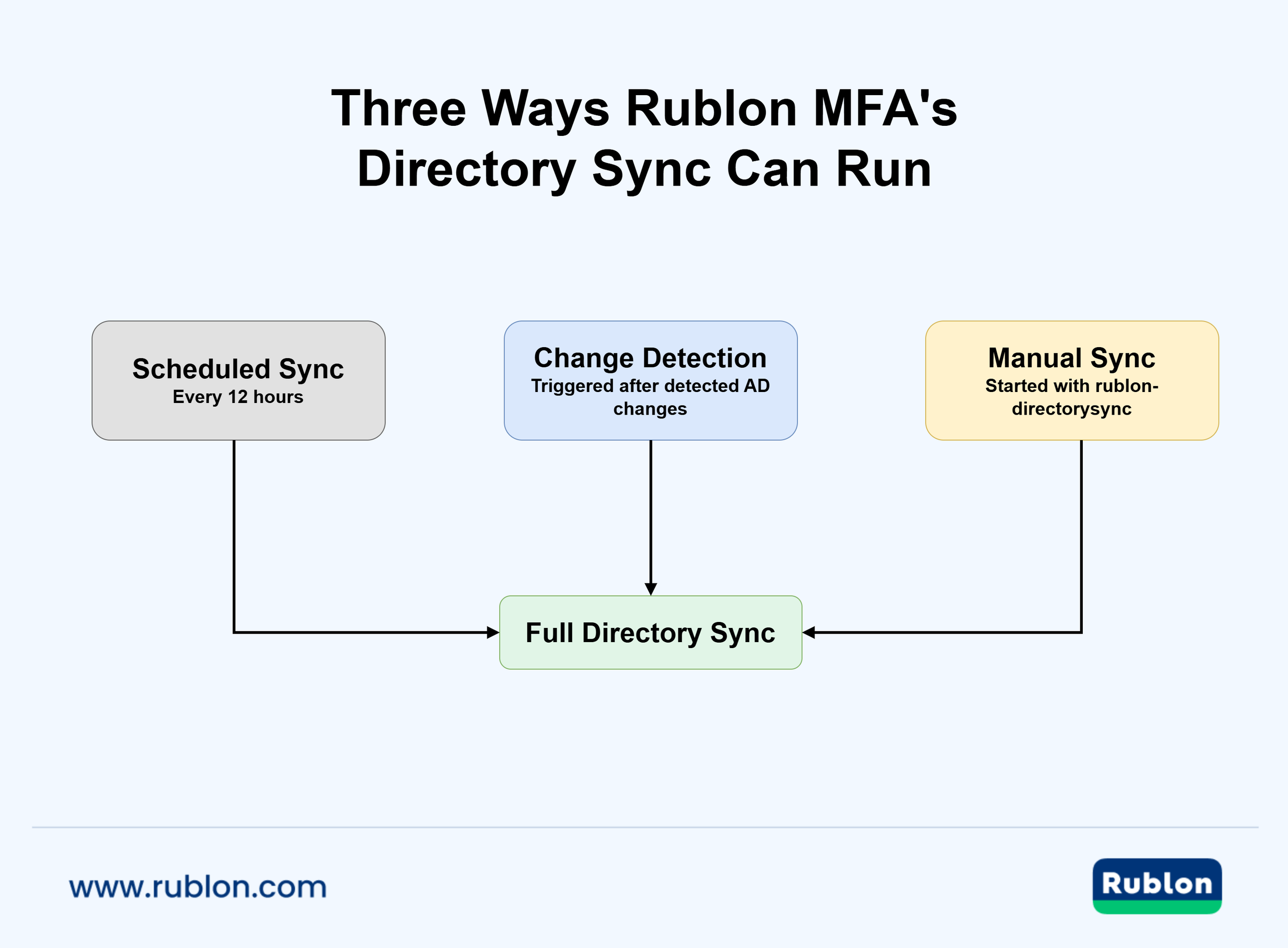
For instance, Rublon Directory Sync performs a scheduled full synchronization every 12 hours when automatic synchronization is enabled. Starting with Rublon Authentication Proxy 3.11.0, administrators can also enable Active Directory change detection. Relevant changes can then trigger additional full synchronizations before the next scheduled run.
The practical synchronization frequency is therefore determined not by Active Directory itself, but by the synchronization platform connected to it.
How Long Does It Take for Active Directory to Sync?
There is no single answer to how long Active Directory synchronization takes.
Several variables influence synchronization latency:
- the synchronization mechanism
- the interval used for change detection
- the size of the directory
- the number of users or changes being processed
- network connectivity
- Active Directory availability
- destination platform performance
- whether a full or incremental synchronization is required
A scheduled system may intentionally wait until the next synchronization window. A real-time or change-driven implementation may begin processing sooner, but the total time before the destination reflects the change still depends on its architecture.
For this reason, “real-time” should not be interpreted as a promise of a specific number of seconds unless the vendor publishes such a guarantee.
What Are the Benefits of Real-Time AD Sync?
The business value of real-time AD sync comes from reducing the period during which Active Directory and connected platforms hold different identity information.
In a scheduled-only environment, an administrator may already have completed an important change in AD while downstream systems continue operating with the previous state. The longer the interval, the larger that window can become.
More responsive synchronization helps organizations make identity lifecycle processes faster and more consistent. It can also reduce manual intervention when administrators need a destination platform to reflect an AD change before its next scheduled import.
How Does Real-Time AD Sync Improve Security?
Real-time AD sync can improve security by shortening the period during which security systems depend on stale identity information.
Consider an account that has been disabled because an employee left the organization. If another security platform has not yet synchronized that change, its local representation of the user may still reflect the previous directory state.
Change-driven synchronization can reduce this inconsistency by propagating security-relevant identity changes sooner.
Potential security benefits include:
- faster reflection of disabled or deleted accounts
- more current user and group information
- a shorter stale-data window between Active Directory and connected systems
- reduced dependence on administrators manually forcing synchronization
- better alignment between identity lifecycle events and downstream access systems
Real-time AD sync should not be presented as an access control or authentication mechanism by itself. It does not replace MFA, authorization policies, account disabling, or secure offboarding procedures.
Instead, synchronization supports those controls by helping connected systems operate with current identity data.
For organizations that use Active Directory as an identity source for MFA, this is particularly relevant. MFA for on-premises Active Directory can protect access using additional authentication factors, while synchronization helps maintain the user information that the MFA platform uses for administration and identity lifecycle management.
How Does Real-Time AD Sync Improve Employee Offboarding?
Offboarding illustrates the difference between scheduled and real-time synchronization particularly well.
| With scheduled AD sync: Employee leaves → account changed in AD → destination waits for scheduled sync → destination identity state is updated | With change-driven AD sync: Employee leaves → account changed in AD → change detected → synchronization triggered → destination identity state is updated |
The second model reduces the amount of time the destination system may continue holding an outdated representation of the user.
This does not mean directory synchronization should be the only offboarding control. Organizations should still disable accounts, terminate active sessions where required, revoke credentials and devices, remove access privileges, and follow their established identity lifecycle procedures.
Real-time AD synchronization improves the process by helping downstream systems learn about the directory change sooner.
How Does Real-Time AD Sync Improve Onboarding?
The same responsiveness can improve onboarding.
When a new employee is created in Active Directory, a system that depends entirely on a scheduled synchronization may not import that user until its next cycle. An administrator may have to wait, manually trigger synchronization, or create the account separately in the destination platform.
Real-time AD sync reduces that dependency on timing.
Once the new identity is detected and synchronized, the connected platform can process it according to its own onboarding workflow. This can mean:
- faster availability of new user accounts
- fewer manual synchronization requests
- less duplicate administration
- more predictable onboarding
- better consistency between AD and destination platforms
For systems supporting continuous user provisioning, this model helps make Active Directory changes part of an ongoing process rather than a sequence of disconnected administrative tasks.

How Does Real-Time AD Sync Help With User and Group Changes?
Employee identities rarely remain unchanged between onboarding and offboarding.
People move between teams, change responsibilities, receive new contact information, join new groups, and leave groups that are no longer relevant to their role. These “mover” events are a major part of identity lifecycle management.
If a destination platform uses information synchronized from Active Directory, long synchronization intervals can cause it to work with outdated user or membership data.
More responsive synchronization can reduce this delay for:
- department or role changes
- username and attribute modifications
- group membership updates
- account status changes
- other supported directory modifications
Exact behavior still depends on the destination product. A synchronization system can only update attributes and objects that it is designed and configured to manage.
What Are the Core Benefits of Instant Directory Synchronization?
The term instant directory synchronization is often used to describe real-time or near-real-time identity updates. In practice, organizations should focus less on the word “instant” and more on how quickly and reliably the system responds to relevant changes.
The core benefits are:
- Responsiveness. Important identity changes do not have to wait exclusively for a long scheduled synchronization cycle.
- Consistency. Connected systems can maintain a state that more closely reflects the authoritative directory.
- Reduced stale identity data. User, account, and group information spends less time out of date.
- Automation. Routine identity lifecycle changes can flow between systems with less administrator intervention.
- Operational efficiency. IT teams spend less time manually triggering synchronizations or recreating identity changes.
- Stronger lifecycle management. Onboarding, role changes, disabling, and deletion can become part of a more continuous identity management process.
Real-Time AD Sync for MFA
For security platforms such as Rublon MFA, the value is straightforward: when Active Directory is the organization’s identity source, faster AD synchronization helps the MFA platform maintain a more current view of the users it protects.
Why Real-Time AD Sync Matters for MFA
Multi-factor authentication does not operate in isolation. In many enterprise environments, Active Directory remains the authoritative source for users, groups, and account status, while the MFA platform relies on synchronized identity data for administration and policy enforcement.
This makes AD synchronization for MFA an important part of keeping identity information consistent. If the synchronization process is delayed, the MFA platform may temporarily hold an older representation of the directory.
For example:
- a newly created employee may not yet appear in the MFA platform
- changes to a user’s attributes may not yet be reflected
- a disabled account may still be represented using its previous synchronized state
- administrators may need to trigger synchronization manually when a change cannot wait
Real-time AD sync reduces these delays by allowing directory changes to reach the synchronization process without relying solely on the next scheduled cycle.
This does not mean that AD synchronization performs authentication or replaces access controls. Its role is narrower but important: keeping identity information used by connected systems closer to the current state of Active Directory.
Organizations using multi-factor authentication with users synchronized from Active Directory can therefore combine two distinct capabilities: AD manages the underlying identities, while MFA adds a verification step when those identities access protected resources.
Why Should an MFA Platform Use Current Active Directory Data?
An MFA platform works best when the identities administrators see and manage accurately reflect the organization’s authoritative directory.
Consider a new employee. Their Active Directory account may already exist, but if the MFA platform has not synchronized recently, the employee might not yet be represented there. That can delay enrollment or require additional administrative work.
The same principle applies when an existing employee changes roles. If relevant identity information changes in AD but remains stale elsewhere, administrators can temporarily see different information depending on which system they are using.
Offboarding is more security-sensitive. If an account is disabled or deleted in Active Directory, downstream systems should learn about that change according to their configured identity lifecycle rules.
Real-time Active Directory synchronization helps shorten these periods of inconsistency.
It is still important to distinguish synchronization from enforcement. Disabling an account in AD, revoking sessions, applying access policies, and requiring MFA are separate security controls. AD sync supports these processes by keeping connected identity data current.
How Does AD Synchronization Support User Lifecycle Management for MFA?
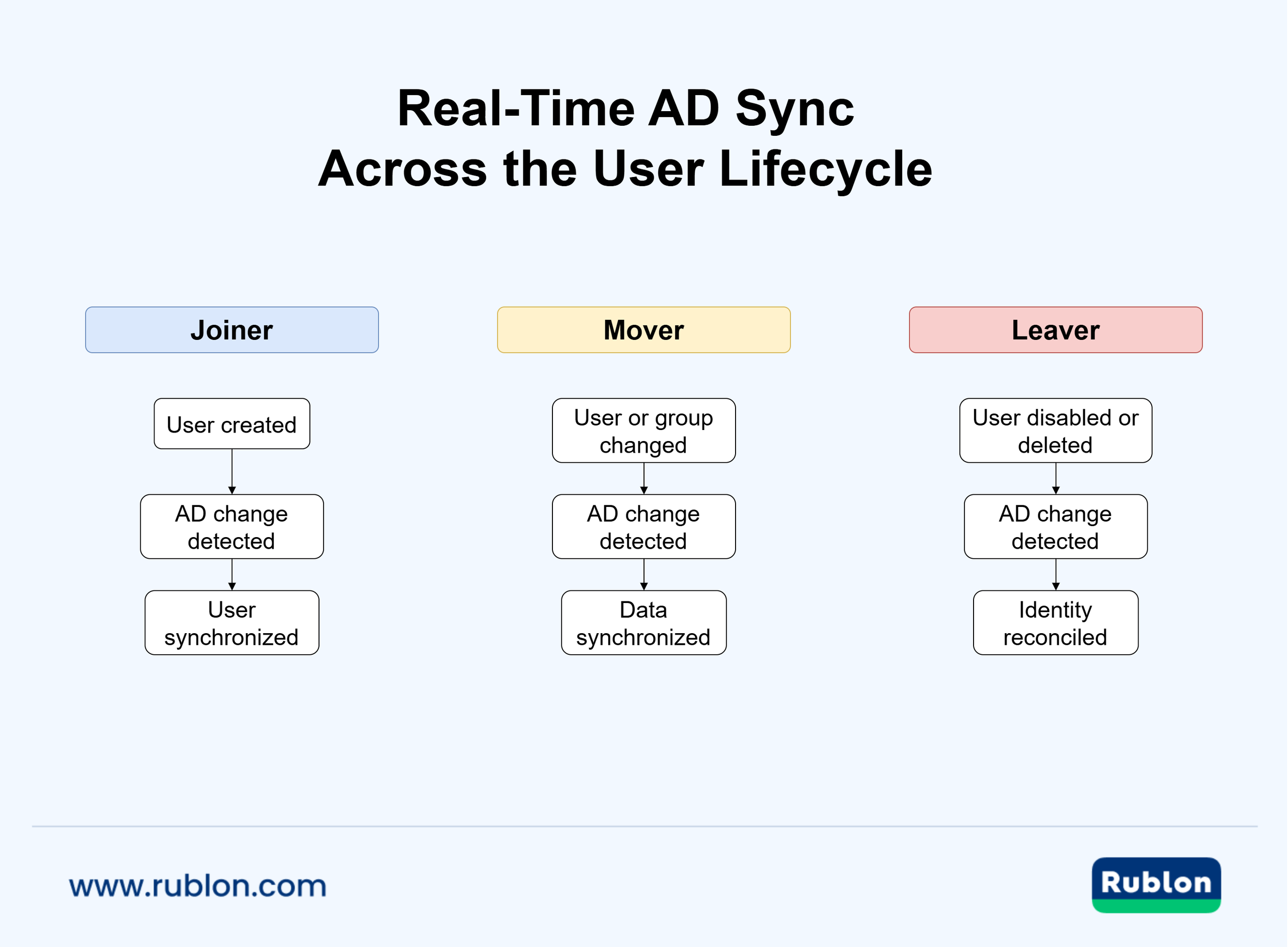
AD synchronization can support the full joiner, mover, and leaver lifecycle.
- Joiner: A new employee account is created in Active Directory. Synchronization transfers the relevant identity information to the MFA platform so the user can be managed there without requiring a separate manual account creation process.
- Mover: An employee changes department, role, group membership, username, or another synchronized attribute. AD synchronization can propagate supported changes to the MFA platform.
- Leaver: An employee’s AD account is disabled or deleted. Synchronization updates the MFA-side representation according to the behavior and configuration of the synchronization platform.
This lifecycle model becomes more effective when important changes do not have to wait many hours for the next synchronization window. Rublon Directory Sync is designed to synchronize users and groups from external identity sources into Rublon MFA, reducing the need to maintain the same identity records separately.
Is AD Sync the Same as MFA?
No. AD sync and MFA solve different problems:
- AD synchronization transfers and updates identity information between Active Directory and another platform.
- Multi-factor authentication verifies a user’s identity during authentication by requiring multiple independent authentication factors.
An organization can use AD synchronization without MFA, and it can deploy MFA without real-time AD synchronization. When both are used together, synchronization helps maintain current identity information while MFA strengthens the authentication process itself.
This distinction is important when evaluating Active Directory MFA architectures. Real-time AD sync improves identity data freshness, but it is not an authentication factor and does not independently determine whether a login should be allowed.
Real-Time AD Sync in Cloud and Hybrid Environments
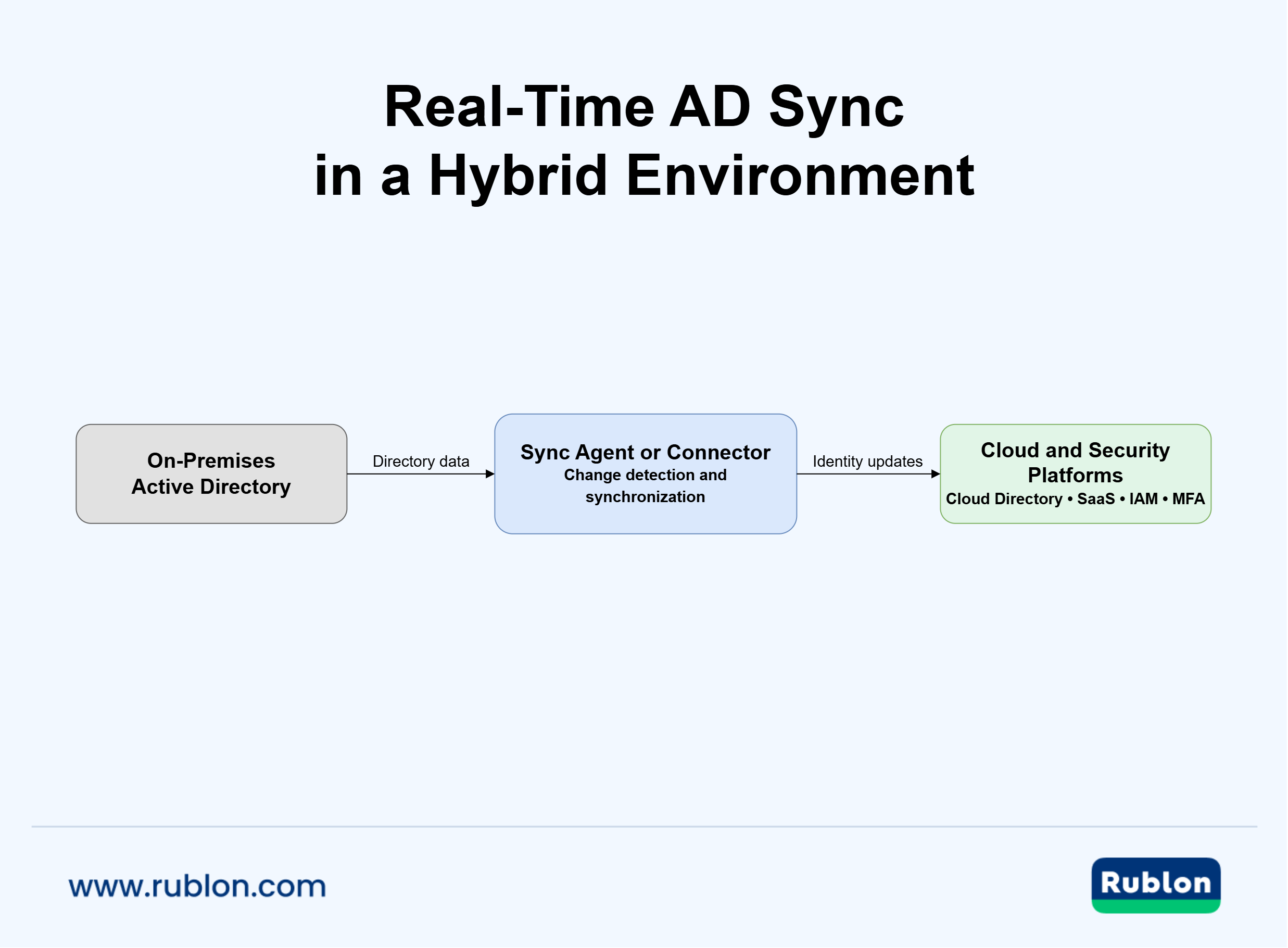
Real-time Active Directory synchronization is particularly useful in hybrid environments, where an on-premises AD domain remains an important identity source while applications and security services operate in the cloud.
The synchronization layer connects these environments. Depending on the product, this may involve an on-premises agent, directory connector, hybrid identity service, or third-party platform that can securely read selected directory data and transfer the required changes to its destination.
How Can I Implement Real-Time Active Directory Sync for Cloud Applications?
A reliable implementation starts with the identity architecture rather than the synchronization switch itself.
A typical process is:
- Identify the authoritative identity source. Determine whether on-premises Active Directory is the system where relevant users and groups are managed.
- Define the destination. Identify the cloud application, directory, IAM platform, MFA platform, or other service that requires AD identity data.
- Select the synchronization mechanism. Determine whether the platform uses an agent, connector, cloud service, change detection, incremental synchronization, or another method.
- Understand how changes are detected. Confirm which events can trigger updates and what synchronization latency the vendor documents.
- Configure appropriate directory permissions. Grant the synchronization service access to the directory information it actually needs.
- Define scope and mappings. Decide which users, groups, and attributes should be synchronized.
- Test lifecycle events. Verify new users, modifications, account disabling, group changes, and deletion behavior.
- Retain reconciliation where appropriate. Periodic synchronization can provide a fallback if individual changes are missed.
- Monitor synchronization health. Logs and alerts should make failed or incomplete synchronization visible.
How Do You Synchronize On-Premises Active Directory With Cloud Directories?
Several architectures can synchronize an on-premises Active Directory environment with a cloud directory:
- A directory synchronization agent runs inside the organization’s environment and communicates with both AD and a cloud service.
- A cloud connector may maintain an outbound connection from the organization’s network to a hosted identity platform.
- A hybrid identity service can coordinate identities across on-premises and cloud environments while providing synchronization, provisioning, and identity management capabilities.
- A third-party identity platform may import AD users and groups for a specific purpose, such as access management, SaaS provisioning, or MFA.
The appropriate architecture depends on what is being synchronized and why. Synchronizing on-premises AD identities into Microsoft Entra ID is not the same use case as synchronizing selected AD users into an MFA platform.
Organizations should therefore evaluate synchronization in the context of the destination system rather than assuming that one Active Directory sync mechanism covers every cloud application.
How Do You Set Up Real-Time Active Directory Synchronization Across Multiple Sites?
Multi-site environments introduce an additional dependency: the synchronization service can only work with the directory information available to the domain controller it reaches.
Before introducing live directory integration across several locations, consider:
- which domain controllers the synchronization service contacts
- whether Active Directory replication is healthy
- network connectivity between sites
- regional latency
- high availability of synchronization components
- whether multiple synchronization instances could process the same identities
- how failures and delayed updates are monitored
Active Directory Replication and Synchronization
Microsoft explains that Active Directory site topology controls how directory changes are replicated between domain controllers, including differences between replication within a site and replication between sites.
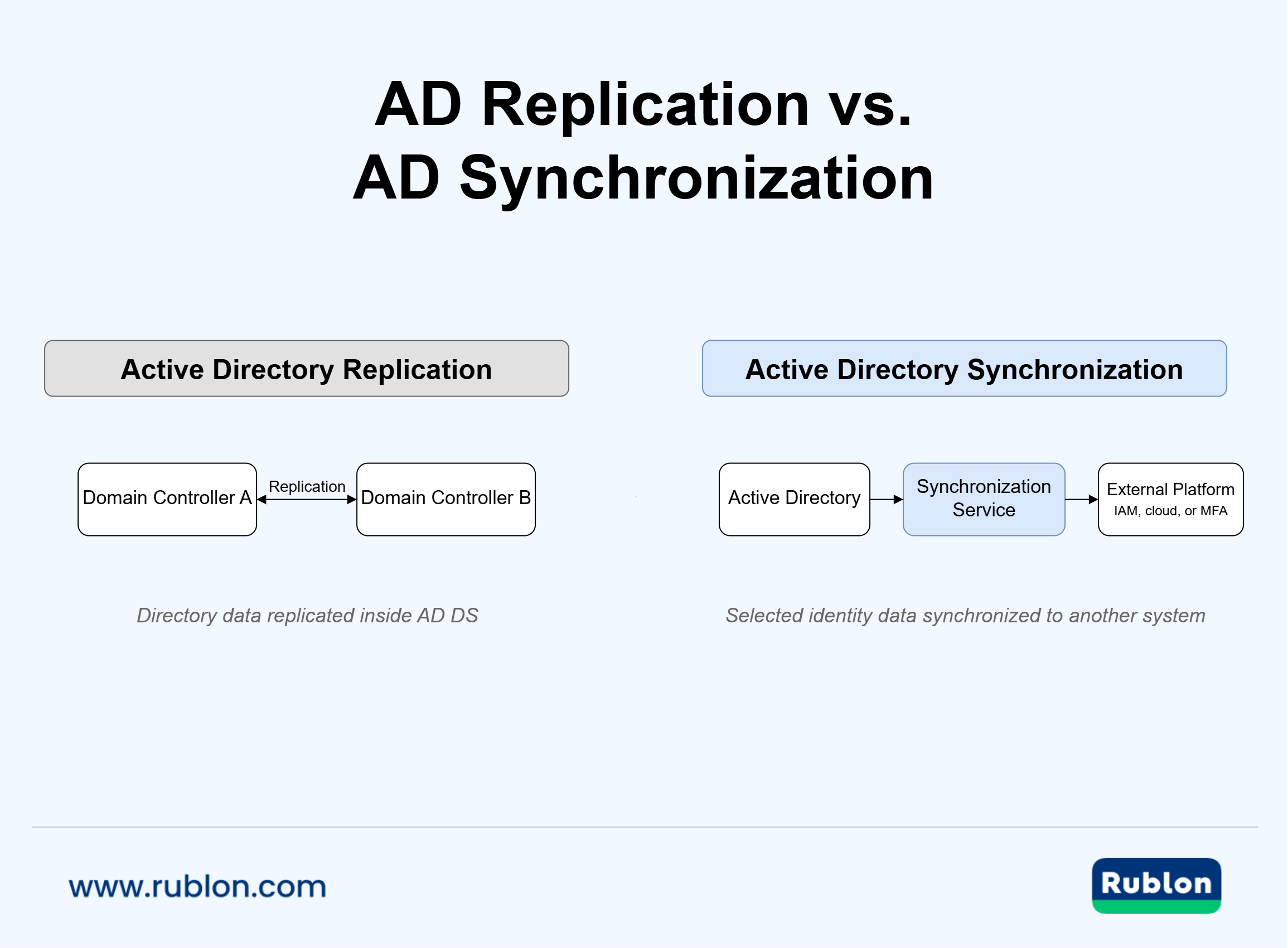
This creates an important distinction. Active Directory replication distributes AD data between domain controllers. AD synchronization transfers identity data from AD into another system.
If a directory change has not yet replicated to the domain controller queried by a synchronization service, that service may not yet see the new state. Multi-site AD sync planning should therefore account for both processes.
Is Active Directory Replication the Same as AD Sync?
No. Active Directory replication maintains directory data across domain controllers. It is an internal AD DS process. In contrast, AD synchronization connects Active Directory with a different system and transfers selected identity information according to that system’s synchronization rules.
How to Implement Real-Time AD Synchronization
A successful real-time Active Directory synchronization deployment starts with clear identity lifecycle rules. Define the authoritative directory, synchronization scope, account handling, recovery process, and monitoring before enabling real-time updates.
Step 1: Define the Source of Truth
Identify where authoritative identity changes are made. In many environments, that source is on-premises Active Directory.
A clear source of truth prevents conflicting updates across systems.
Step 2: Define Which Users and Groups Should Be Synchronized
Synchronize only the identities the destination actually needs.
Scope can include selected:
- groups
- organizational units
- attributes
- account types
For MFA, this may mean synchronizing only users who access protected applications.
Rublon MFA’s Active Directory Sync configuration guide explains how to scope AD users and groups.
Step 3: Choose Between Scheduled, Incremental, and Change-Driven Synchronization
Choose the model based on how quickly changes must propagate.
- Scheduled synchronization runs at fixed intervals.
- Incremental synchronization processes recent changes.
- Change-driven synchronization reacts to detected directory updates.
These approaches can be combined. Change detection improves responsiveness, while scheduled full synchronization provides reconciliation.
Step 4: Configure Least-Privilege Directory Access
Use a dedicated synchronization account with only the permissions required.
The NIST definition of least privilege recommends granting only the minimum access necessary.
Additional permissions should be added only when specific features require them, such as access to deleted Active Directory objects.
Use Least Privilege for Directory Sync
NIST defines least privilege as limiting access to the minimum resources and authorizations required to perform a function. Directory synchronization accounts should follow the same principle.
For deleted-user detection, Microsoft documents specific permissions for non-administrator accounts that need to view CN=Deleted Objects. Grant only the directory permissions required by the synchronization features you enable.
Step 5: Decide How to Handle Disabled and Deleted Users
Define in advance what happens when an account is disabled or deleted.
Depending on the platform, disabled accounts may be denied, excluded, or handled through another workflow. Deleted users may require separate directory permissions or detection logic.
Step 6: Keep a Scheduled Reconciliation Process
Real-time synchronization should not eliminate periodic reconciliation.
Network failures, permission issues, or service interruptions can cause individual changes to be missed. A scheduled full sync provides another opportunity to restore consistency.
Step 7: Test the Full User Lifecycle
Test more than user creation.
Verify:
- creation
- modification
- group changes
- disabling
- deletion
- connectivity failures
- recovery after outages
The goal is to confirm both normal behavior and failure handling.
Step 8: Monitor Synchronization Health
Monitor successful runs, connection failures, permission warnings, skipped objects, and deletion processing.
Logs should make it possible to verify whether the destination reflects the expected Active Directory state.
For MFA environments, Rublon MFA’s administrative model combines identity management with centralized application, policy, and authentication administration.
Real-Time Does Not Mean Zero Delay
“Real-time” describes a responsive synchronization model, not a universal latency guarantee. For example, Microsoft documents that Microsoft Entra Cloud Sync runs provisioning every two minutes.
Compare the documented change-detection method, update timing, and reconciliation behavior instead of assuming that “real-time” means instant.
What Are the Best Practices for Real-Time Active Directory Sync?
Real-time AD synchronization should prioritize reliability as much as speed. A good implementation should remain secure, observable, and recoverable when connectivity or directory conditions change.
1. Use Active Directory as a Clearly Defined Source of Truth
Define which identity system is authoritative for synchronized data such as usernames, account status, and group membership.
Avoid editing the same synchronized attributes independently in multiple systems unless bidirectional synchronization and conflict handling are explicitly supported.
2. Apply Least Privilege to Synchronization Accounts
Use a dedicated synchronization account and grant only the permissions required by the enabled features.
Avoid broad privileges such as Domain Admin access unless they are genuinely necessary. Review additional permissions, such as access to deleted objects, periodically.
3. Synchronize Only the Users and Groups You Need
Limit synchronization to relevant users, groups, organizational units, or attributes.
Exclude unnecessary test, service, or system accounts when they do not belong in the destination platform.
4. Plan Explicitly for Disabled and Deleted Accounts
Define what should happen when an account is:
- disabled
- re-enabled
- deleted
- moved outside the synchronization scope
Test these cases before relying on synchronization for production identity lifecycle management.
5. Keep Scheduled Synchronization as a Safety Net
Change detection improves responsiveness, but scheduled synchronization remains useful for reconciliation.
It can recover from missed changes, temporary connectivity issues, and other conditions that prevent a real-time update from being processed.
6. Monitor Synchronization Failures and Warnings
Monitor problems such as:
- unreachable Active Directory
- authentication failures
- missing permissions
- skipped objects
- failed deletion detection
- synchronization errors
Warnings should be treated as operational signals that may require investigation.
7. Test Network and Directory Failure Scenarios
Test more than the normal path. Verify recovery after connectivity loss, missing permissions, and unavailable domain controllers. If the platform supports redundant synchronization components, test failover as well.
8. Document the Expected Synchronization Behavior
Document the source directory, synchronization scope, schedule, change-detection behavior, account permissions, logging, and recovery process.
This makes troubleshooting easier when Active Directory, IAM, and security systems are managed by different teams.
9. Avoid Assuming “Real-Time” Means Zero Delay
“Real-time” does not necessarily mean instant synchronization. Products may use polling, events, incremental updates, or just-in-time synchronization. Evaluate the actual detection method, documented latency, and recovery behavior rather than relying on the label alone.
How to Evaluate Real-Time Active Directory Sync Solutions?
Choose a solution based on the identity source, destination system, lifecycle requirements, deployment model, and expected responsiveness. A tool for AD-to-cloud synchronization may not fit the same use case as an MFA platform that needs current AD users.
Which Features Should a Real-Time AD Sync Tool Support?
Evaluate support for:
- user creation, modification, disabling, and deletion
- group and membership synchronization
- change detection
- scheduled reconciliation
- secure AD connectivity
- least-privilege accounts
- logging and error handling
- high availability
- on-premises and hybrid deployment
How Should Enterprises Compare Continuous User Provisioning Solutions?
| Requirement | What to Evaluate |
| Responsiveness | How quickly changes are detected |
| User lifecycle | Add, modify, disable, delete |
| Reliability | Reconciliation and recovery |
| Security | Least privilege and secure connectivity |
| Observability | Logs, warnings, and errors |
| Deployment | Cloud, on-premises, or hybrid |
| Scale | Directory size and change volume |
| Integrations | IAM, MFA, SaaS, and cloud support |
Also check how the platform handles failures, deleted users, missing permissions, and temporary outages.
For MFA use cases, focus on how quickly AD changes reach the MFA platform, how disabled and deleted accounts are handled, and whether scheduled reconciliation remains available.
How Rublon MFA Supports Real-Time AD Sync
Rublon MFA uses Directory Sync in the Rublon Authentication Proxy to synchronize Active Directory users and groups with the Rublon Admin Console.
Since version 3.11.0, the Rublon Authentication Proxy can detect AD changes and trigger an additional full sync without waiting for the regular 12-hour schedule.
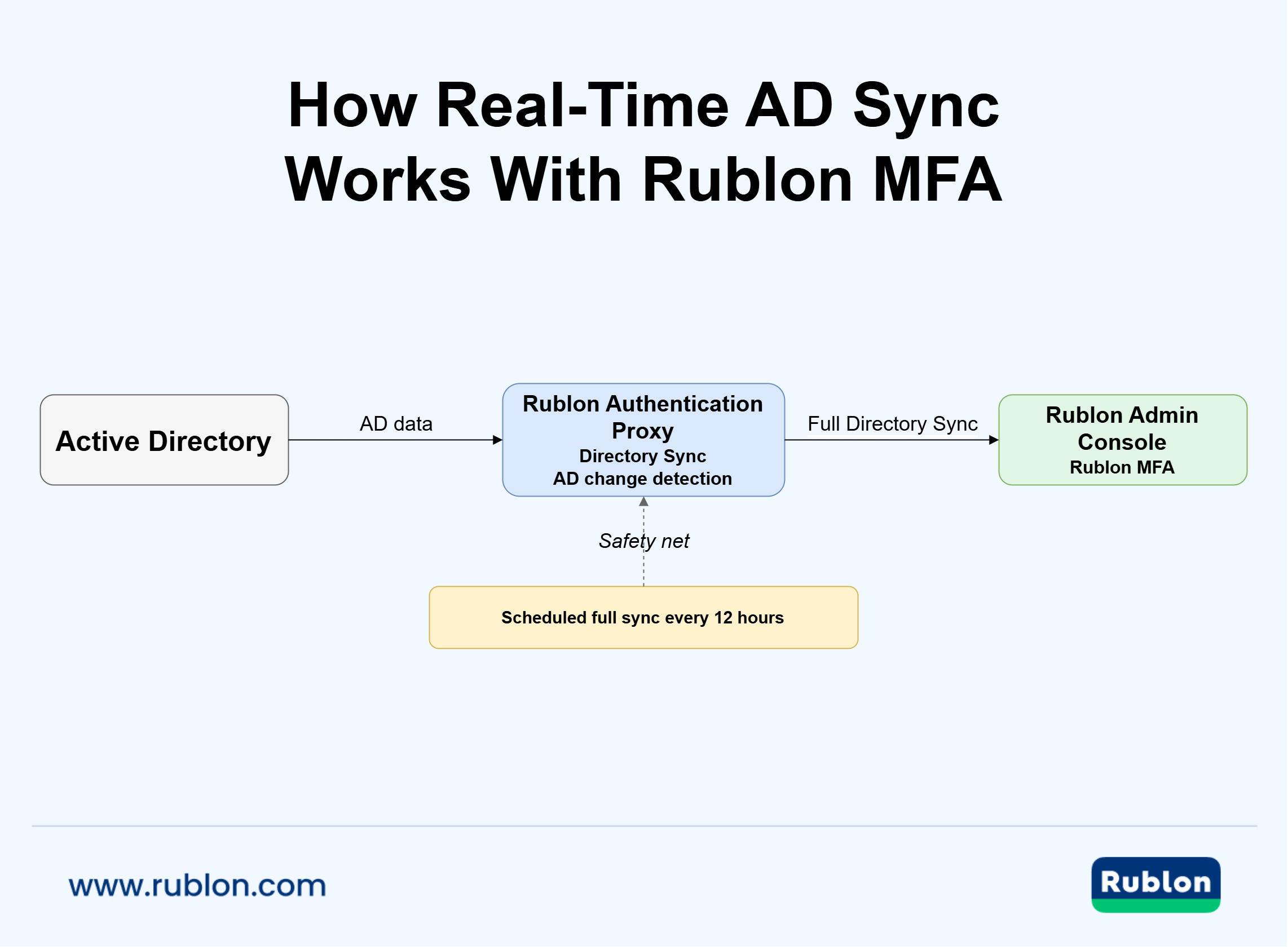
How Does Rublon Real-Time AD Sync Work?
With change_detection: true, Rublon MFA can detect:
- additions
- modifications
- optionally, deletions
A detected change triggers a full Directory Sync. The regular 12-hour sync remains active as a safety net.
Keep Active Directory Data Up to Date in Rublon MFA
Use Rublon MFA’s Directory Sync to keep Active Directory identity data more current with scheduled synchronization and change detection.
What Happens When a User Is Added or Modified in Active Directory?
A detected addition or modification can trigger an additional full Directory Sync, helping Rublon MFA receive updated AD user information sooner.
What Happens When an Active Directory User Is Deleted?
Deletion detection requires detect_deletes and read and list access to CN=Deleted Objects.
If the required permission is missing, Rublon logs a warning, continues detecting additions and modifications, and relies on the scheduled sync to remove deleted users.
What Happens to Disabled Active Directory Users?
With exclude_disabled_users: false, disabled users are synchronized with the Denied status.
With exclude_disabled_users: true, disabled users are skipped.
Does Rublon MFA Still Perform Scheduled AD Sync?
Yes. When automatic Directory Sync is enabled, a full synchronization runs every 12 hours. This scheduled synchronization continues to run when change detection is enabled and acts as a reconciliation safety net.
Does Rublon MFA’s Real-Time AD Sync Work With OpenLDAP?
No. change_detection is supported only for Active Directory. With OpenLDAP, it is ignored and a warning is logged.
Does Change Detection Affect Manual AD Sync?
No. Manual synchronization with rublon-directorysync ignores change_detection.
Real-Time AD Sync Use Cases
Real-time AD sync is most valuable when Active Directory changes frequently and connected systems need current identity data.
Employee Onboarding
A newly created AD account can trigger Directory Sync, helping the user appear in Rublon MFA sooner.
Employee Offboarding
Disabled users can be synchronized as Denied or skipped, depending on configuration. Deleted users can also trigger synchronization when deletion detection is enabled.
User Role or Group Changes
Changes to user attributes can trigger a new sync, so Rublon MFA receives the updated AD state. Group membership changes are reflected during a full Directory Sync.
Large Organizations With Frequent Directory Changes
Change-driven synchronization reduces reliance on manual syncs and long scheduled intervals in environments with frequent user changes.
Hybrid Environments Using AD as the Identity Source
Organizations can keep Active Directory on premises while using Rublon Authentication Proxy to synchronize identities with cloud-based Rublon MFA.
How to Check Whether Active Directory Synchronization Is Working
Verify that expected AD changes appear in the destination and review synchronization logs for warnings or failures.
How Can I Check if Active Directory Is in Sync?
Change a test user, confirm that synchronization runs, and verify the resulting state in the destination.
How Can I Manually Sync Active Directory?
Rublon MFA administrators can run rublon-directorysync to start Directory Sync manually.
Common Real-Time AD Sync Challenges
Connectivity, permissions, identity matching, and recovery behavior remain important even with real-time synchronization.
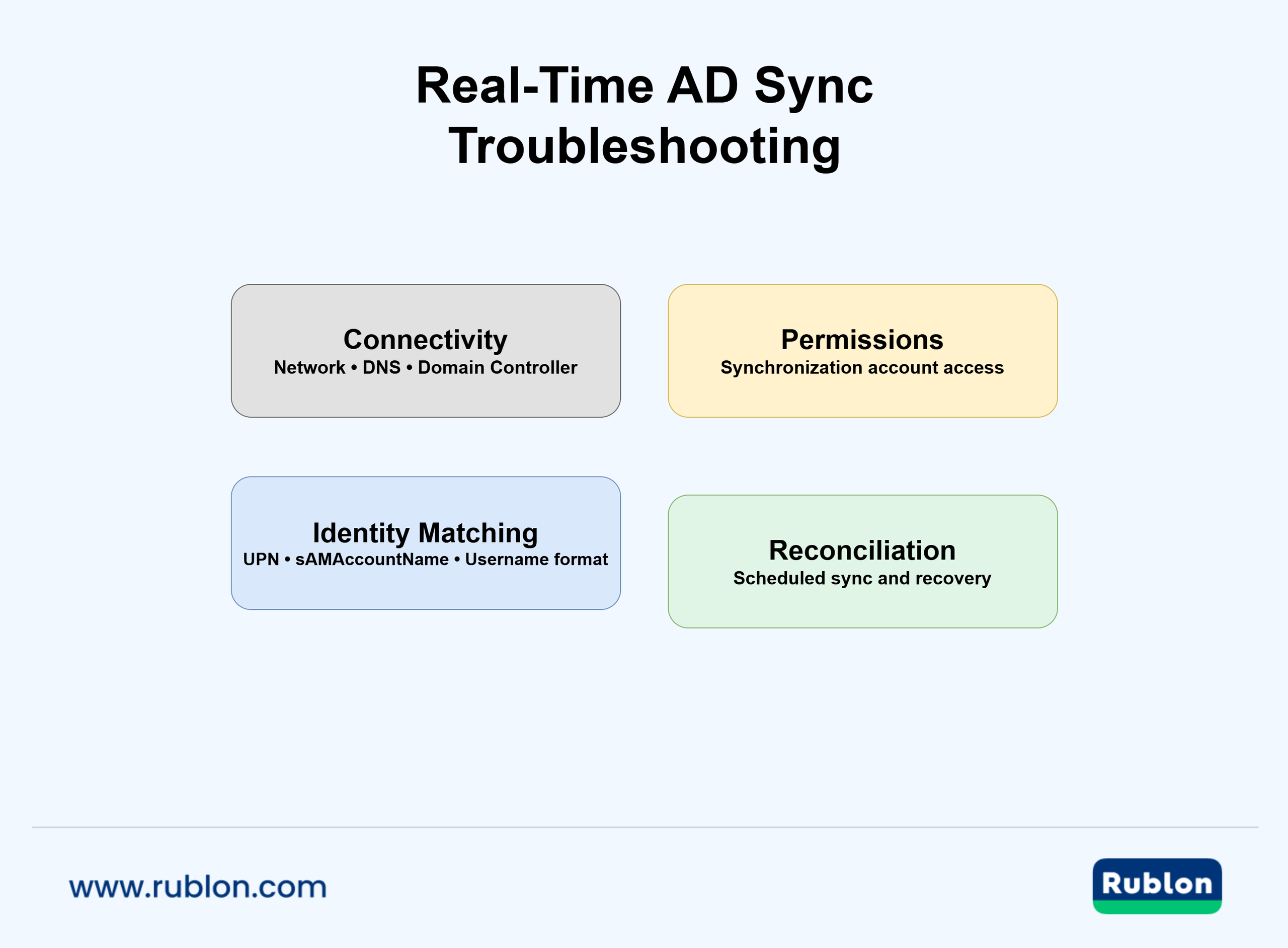
What Happens if Active Directory Cannot Be Reached?
Synchronization cannot retrieve current AD data. Logs should expose the problem, while scheduled synchronization can help reconcile identities after connectivity returns.
What Happens if Change Detection Misses an Update?
Scheduled reconciliation provides a fallback. Rublon MFA keeps its regular 12-hour full sync even when change_detection is enabled.
What Happens if the Synchronization Account Has Insufficient Permissions?
Missing permissions can block specific operations. For example, without access to CN=Deleted Objects, Rublon MFA cannot detect deleted users but can continue detecting additions and modifications.
Can Real-Time AD Sync Create Duplicate Users?
Duplicate identities can appear when systems use inconsistent username formats such as UPN, sAMAccountName, or down-level logon names. Use a consistent identifier strategy.
Can Real-Time AD Sync Replace Identity Governance?
No. AD sync keeps identity data current, while identity governance determines who should have access and how that access is reviewed and controlled.
Frequently Asked Questions About Real-Time AD Sync
What is real-time Active Directory synchronization?
Real-time Active Directory synchronization responds to directory changes without relying only on a fixed schedule. Depending on the platform, it may use polling, change notifications, incremental synchronization, or another responsive mechanism.
What is the difference between AD sync and real-time AD sync?
AD sync is the general process of synchronizing Active Directory data with another system. Real-time AD sync reacts to changes sooner, without waiting only for the next scheduled cycle.
What are the benefits of AD synchronization?
AD synchronization reduces manual identity management, improves data consistency, and supports onboarding and offboarding. Real-time sync also reduces the delay between an AD change and its reflection in connected systems.
How does instant AD sync improve security?
Faster synchronization reduces the time connected systems may hold stale identity data, such as outdated disabled or deleted accounts. It complements, but does not replace, MFA, authorization, and other access controls.
How often does AD synchronization run by default?
There is no universal default. The interval depends on the platform. In Rublon MFA, automatic Directory Sync is disabled by default. When enabled, it performs a full synchronization every 12 hours and can trigger additional full syncs when AD changes are detected if change detection is also enabled.
How long does Active Directory synchronization take?
It depends on the synchronization architecture, directory size, network conditions, change volume, and destination platform. “Real-time” does not necessarily mean zero delay.
How do I manually sync Active Directory?
The method is product-specific. With Rublon MFA, administrators can start Directory Sync manually using rublon-directorysync.
How can I check if Active Directory is in sync?
Compare a known AD object with its destination record, review recent synchronization activity and logs, and test a controlled directory change.
Can Active Directory synchronize users with an MFA platform?
Yes. Rublon MFA uses Directory Sync to synchronize Active Directory users and groups with the Rublon Admin Console.
Does real-time AD sync work across multiple Active Directory sites?
Yes, but AD replication must also be considered. A synchronization service can only read the directory state available through the domain controller it contacts.
Does real-time AD sync replace scheduled synchronization?
Not necessarily. Change detection improves responsiveness, while scheduled synchronization provides reconciliation.
Is Active Directory synchronization the same as Active Directory replication?
No. AD replication distributes directory data between domain controllers. AD synchronization transfers identity data from Active Directory to another platform such as an IAM, cloud, SaaS, or MFA system.
Conclusion: Keep MFA Identity Data Closer to Active Directory
Real-time AD sync reduces the time Active Directory and connected security platforms may hold different identity states.
With Rublon Authentication Proxy, Rublon MFA can detect AD changes and trigger additional full Directory Sync runs while retaining the regular 12-hour synchronization as a safety net.
Configure Directory Sync in the Rublon Authentication Proxy today and start a Free Trial of Rublon MFA: