• Skip to primary navigation
  • Skip to main content
  • Skip to footer

Company · Blog · Newsletter · Events · Partner Program

Downloads Support
  • English
    • Deutsch
    • Polski
Login
Rublon

Rublon

Secure Remote Access

  • Product
    • Regulatory Compliance
    • Use Cases
    • Rublon MFA Reviews
    • Deployment Model
    • What is MFA?
    • Authentication Methods
    • Rublon Authenticator
    • Rublon App Shield
    • Rublon Identity Bridge
    • Rublon Endpoint Shield
    • Remembered Devices
    • Logs
    • Single Sign-On
    • Access Policies
    • Directory Sync
  • Solutions
    • MFA for Remote Desktop
    • MFA for Remote Access Software
    • MFA for Windows Logon
    • MFA for Linux
    • MFA for macOS
    • MFA for On-Premise Active Directory
    • MFA for LDAP
    • MFA for RADIUS
    • MFA for SAML
    • MFA for RemoteApp
    • MFA for Workgroup Accounts
    • MFA for Entra ID
    • MFA for Windows Server Core
  • Customers
  • Industries
    • Financial Services
    • Investment Funds
    • Retail
    • E-Commerce
    • Technology
    • Healthcare
    • Legal
    • Education
    • Government
    • Utilities
    • Manufacturing
  • Pricing
  • Docs
Contact us Free Trial

MFA for macOS

MFA and 2FA for macOS Login

MFA for macOS helps protect company Mac computers by requiring users to verify their identity with more than a password. Rublon MFA delivers multi-factor authentication for macOS through methods such as Mobile Push, helping reduce the risk of unauthorized access when credentials are compromised. IT teams manage protection for Mac users through the same centralized platform they use for other Rublon MFA integrations.

Protect Mac Logins With MFA

Add MFA for macOS to help protect company computers when passwords are compromised. Let employees verify their identity with Mobile Push and manage authentication centrally. Try Rublon MFA free for 30 days.

Start Free Trial No Credit Card Required

Secure Mac Logins With Multi-Factor Authentication for macOS

Rublon MFA for macOS adds a second authentication step to sign-ins on employees’ MacBook laptops and desktop Mac computers. Employees keep their familiar macOS credentials and complete an additional identity check using an authentication method enabled by their organization.

With Mobile Push, employees verify their identity using a smartphone they already carry. A protected macOS console login follows three simple steps:

  1. Sign in with your macOS account and password.
  2. Select Mobile Push in the Rublon Prompt.
  3. Review the request in Rublon Authenticator on your phone and tap Approve. If you did not initiate the request, tap Deny.

This combines two authentication factors: the password the user knows and the registered mobile device the user has. When MFA is required by the organization’s policy, knowing the password alone is not enough to complete the protected login.

Key Features of Rublon MFA for macOS

  • Mac login protection: Add a second identity verification step to supported macOS sign-ins.
  • Mobile Push authentication: Let employees approve or deny login requests using Rublon Authenticator on a registered smartphone.
  • A choice of authentication methods: Use Mobile Push or other supported methods, including Passcode, QR Code, and YubiKey OTP.
  • Centralized administration: Manage Rublon MFA users and integrated applications through the Rublon Admin Console.
  • Authentication visibility: Review Rublon MFA authentication logs to support troubleshooting and investigate unexpected authentication activity.

Your Mac deployment becomes part of the same Rublon MFA environment used for other integrated systems, giving IT teams a central place to administer protection.

The current macOS connector protects local console logins. See the supported scenarios and limitations in the macOS documentation for the current scope of protection.

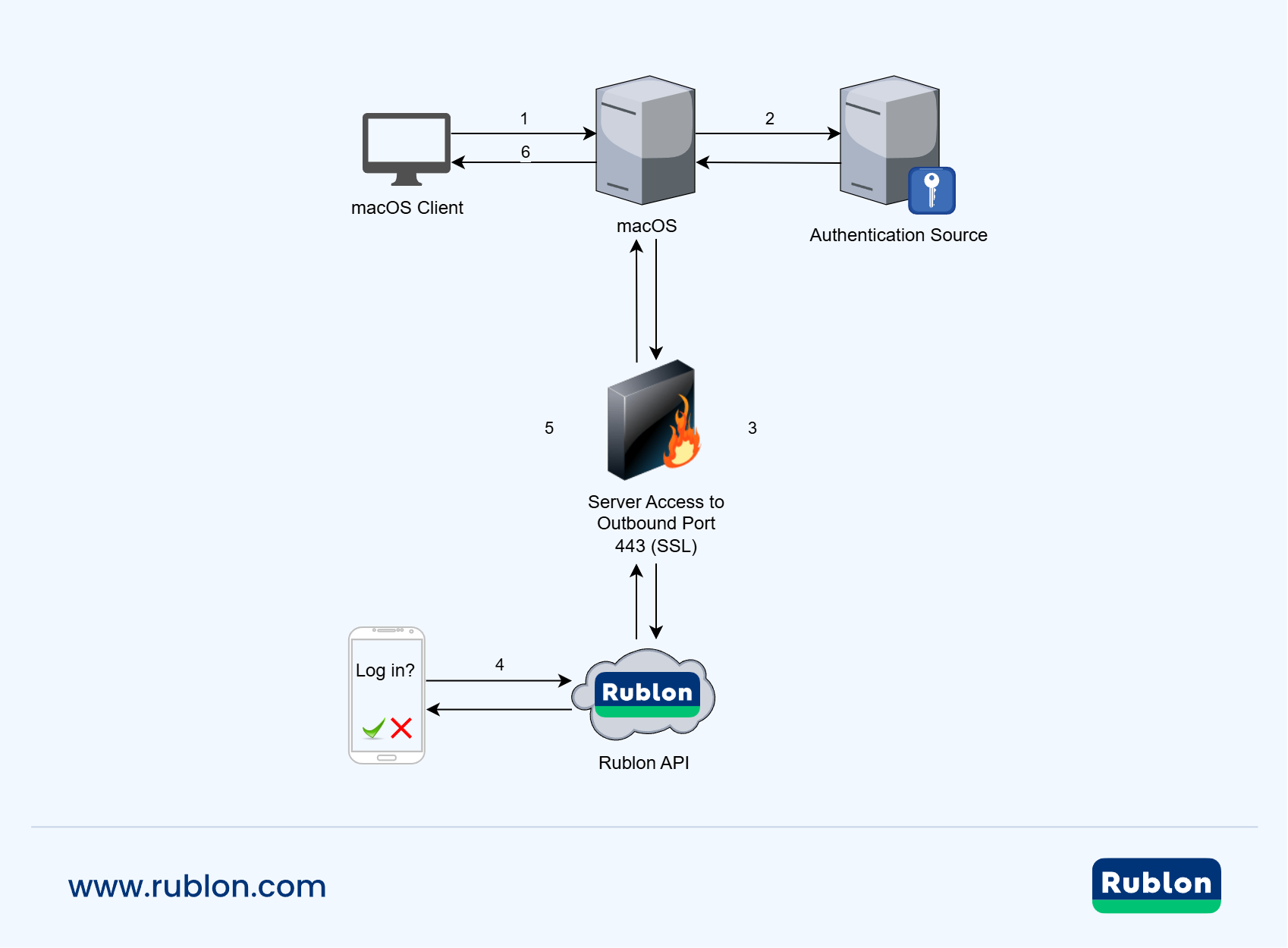
Diagram showing MFA for macOS
The user starts a macOS login (1), macOS verifies the credentials with the authentication source (2), and the connector initiates MFA through the Rublon API over HTTPS on port 443 (3). The user approves the Mobile Push request (4), the API returns the authentication result (5), and macOS grants access (6).

Benefits of MFA for macOS

Help Prevent Unauthorized Mac Access

A password can be exposed through phishing, reuse, or accidental disclosure. Adding MFA to macOS login reduces the risk that a compromised password alone will let someone sign in to an employee’s computer. This helps protect access to work files and other resources available through the user’s desktop session.

Keep Everyday Authentication Simple

Employees can approve a login request on their phone without manually entering a verification code. Rublon Authenticator is available for iOS and Android, so using a Mac does not require an iPhone for Mobile Push authentication. Users who already use Rublon MFA for other company applications can use the same mobile app to confirm their Mac logins.

Support Cyber Insurance and Security Requirements

If your organization’s cyber insurance requirements or internal security standards include MFA for workstation logins, protecting Mac devices can help address those requirements alongside your Windows and Linux systems. The required coverage and accepted authentication methods depend on the specific policy or standard. Confirm that your deployment matches those requirements, including the login scenarios that must be protected.

Add 2FA for macOS. Start your free 30-day Rublon MFA Trial →

Why Add MFA to macOS Login if You Already Protect Your VPN?

MFA for VPN and MFA for cloud applications verify users when they access those services. However, these checks do not automatically add a second authentication factor to the macOS login. Signing in to a company Mac is a separate access point that also needs protection.

Desktop MFA for macOS helps organizations extend multi-factor authentication to their Mac computers. With Rublon MFA, IT teams can manage Mac login protection alongside existing integrations for VPNs and business applications.

MFA for macOS Without an Apple ID

Rublon MFA adds 2FA for macOS without requiring employees to sign in to an Apple Account, formerly called an Apple ID, on their Mac. This is useful when company policy restricts personal Apple Accounts on business devices, employees do not use iCloud for work, or IT provisions Mac user accounts independently of Apple services.

For organizations, the advantage is direct control over Mac login protection. IT teams manage MFA users, authentication policies, and authentication logs through the Rublon Admin Console. Employees do not need to create an Apple Account on their Mac just to use this protection, and they can approve Mobile Push requests on either an Android phone or an iPhone.

Apple Account’s two-factor authentication secures access to Apple services. In contrast, Rublon MFA addresses the business requirement to protect Mac sign-ins and manage that protection alongside Windows, Linux, and other integrated services and applications.

See MFA for macOS in Action

Test multi-factor authentication for macOS with Mobile Push and centralized administration. Evaluate the login experience for your employees, review authentication activity, and see how Rublon MFA fits your organization during a free 30-day trial.

Start Your Free Trial (No Credit Card Required)

Deploy MFA for macOS Across Your Organization

Bring Mac computers into your organization’s MFA deployment with the Rublon MFA connector for macOS. Choose interactive installation for individual computers or Microsoft Intune deployment for managed Mac fleets, while administering MFA users and integrated applications through the Rublon Admin Console.

For system requirements, installation procedures, supported authentication methods, and configuration options, refer to the Rublon MFA for macOS installation and configuration documentation.

Centralized MFA for Windows, macOS and Linux

Manage multi-factor authentication for macOS, Windows, and Linux through one centralized platform. Rublon MFA helps IT teams extend authentication protection across a mixed operating system environment while managing MFA users and integrated applications in the Rublon Admin Console.

MFA for Windows Logon protects sign-ins on Windows workstations and servers. For supported Linux authentication scenarios, including SSH, explore MFA for Linux.

Try Rublon MFA for Free

Start your 30-day Rublon MFA Trial and evaluate MFA for macOS in your organization.

Start Free Trial

Related Posts

Rublon MFA for macOS – Documentation

Try Rublon MFA for Free
Start your 30-day Rublon MFA Trial to secure your employees using multi-factor authentication.
No Credit Card Required
Rublon 5 star reviews on Gartner Peer Insights

Footer

Product

  • Regulatory Compliance
  • Rublon MFA Reviews
  • Use Cases
  • Deployment Model
  • What is MFA?
  • User Experience
  • Authentication Methods
  • Rublon Authenticator
  • Rublon App Shield
  • Rublon Identity Bridge
  • Rublon Endpoint Shield
  • Remembered Devices
  • Logs
  • Single Sign-On
  • Access Policies
  • Directory Sync

Solutions

  • MFA for Remote Desktop
  • MFA for Windows Logon
  • MFA for Remote Access Software
  • MFA for Linux
  • MFA for macOS
  • MFA for On-Premise Active Directory
  • MFA for LDAP
  • MFA for RADIUS
  • MFA for SAML
  • MFA for RemoteApp
  • MFA for Workgroup Accounts
  • MFA for Entra ID
  • MFA for Windows Server Core

Industries

  • Financial Services
  • Investment Funds
  • Retail
  • E-Commerce
  • Technology
  • Healthcare
  • Legal
  • Education
  • Government
  • Utilities
  • Manufacturing

Documentation

  • 2FA for Windows & RDP
  • 2FA for RDS
  • 2FA for RD Gateway
  • 2FA for RD Web Access
  • 2FA for SSH
  • 2FA for OpenVPN
  • 2FA for SonicWall VPN
  • 2FA for Cisco VPN
  • 2FA for Office 365

Support

  • Knowledge Base
  • FAQ
  • System Status

About

  • About Us
  • AI Info
  • Blog
  • Events
  • Careers
  • Co-funded by the European Union
  • Contact Us

  • Facebook
  • GitHub
  • LinkedIn
  • Twitter
  • YouTube

© 2026 Rublon · Imprint · Legal & Privacy · Security