• Skip to primary navigation
  • Skip to main content
  • Skip to primary sidebar
  • Skip to footer

Company Â· Blog Â· Newsletter Â· Events Â· Partner Program

Downloads Support
  • English
    • Deutsch
    • Polski
Login
Rublon

Rublon

Secure Remote Access

  • Product
    • Regulatory Compliance
    • Use Cases
    • Rublon MFA Reviews
    • Deployment Model
    • What is MFA?
    • Authentication Methods
    • Rublon Authenticator
    • Rublon App Shield
    • Rublon Identity Bridge
    • Rublon Endpoint Shield
    • Remembered Devices
    • Logs
    • Single Sign-On
    • Access Policies
    • Directory Sync
  • Solutions
    • MFA for Remote Desktop
    • MFA for Remote Access Software
    • MFA for Windows Logon
    • MFA for Linux
    • MFA for macOS
    • MFA for On-Premise Active Directory
    • MFA for LDAP
    • MFA for RADIUS
    • MFA for SAML
    • MFA for RemoteApp
    • MFA for Workgroup Accounts
    • MFA for Entra ID
    • MFA for Windows Server Core
  • Customers
  • Industries
    • Financial Services
    • Investment Funds
    • Retail
    • E-Commerce
    • Technology
    • Healthcare
    • Legal
    • Education
    • Government
    • Utilities
    • Manufacturing
  • Pricing
  • Docs
Contact us Free Trial

Multi-Factor Authentication (2FA/MFA) for macOS

Multi-Factor (MFA) and Two-Factor Authentication (2FA) for macOS

October 28, 2026 By Rublon Authors

Overview of MFA for macOS

Rublon MFA for macOS integrates with the standard macOS login window and adds a second authentication step after the user’s password has been verified. The connector protects local console logins.

After successful MFA, macOS starts the user’s desktop session. Login may also be permitted by an applicable bypass policy.

MFA for macOS – Diagram

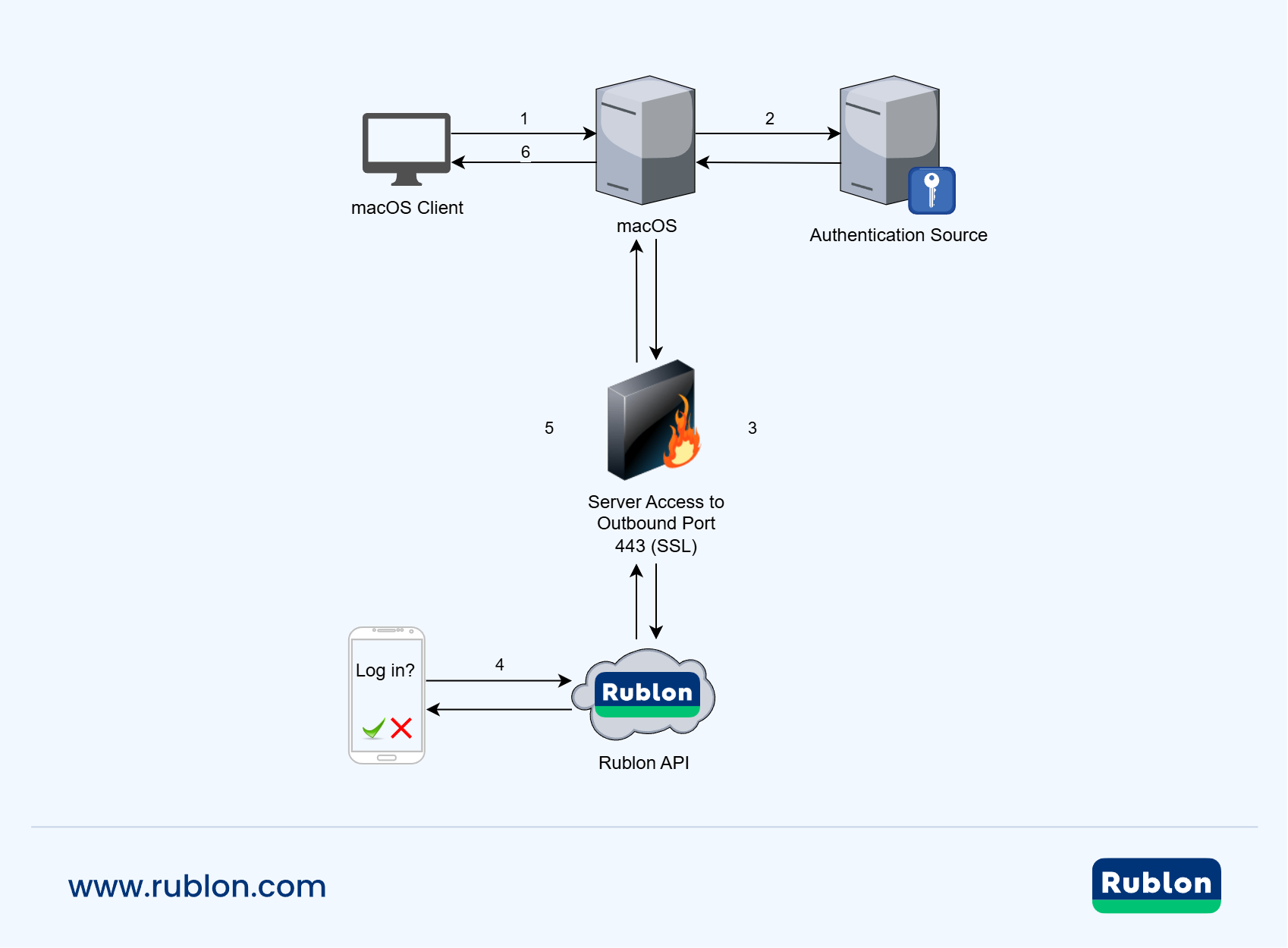
Diagram showing MFA for macOS
The user starts a macOS login (1), macOS verifies the credentials with the authentication source (2), and the connector initiates MFA through the Rublon API over HTTPS on port 443 (3). The user approves the Mobile Push request (4), the API returns the authentication result (5), and macOS grants access (6).

MFA for macOS – Deployment Planning Assistance & Benefits

This connector is coming soon. For assistance with deployment planning, contact Rublon Support. Include the macOS version, processor architecture, and sign-in scenarios you need to protect.

What Are the Business Benefits of MFA for macOS?

Learn how Rublon MFA can help reduce the risk of unauthorized access using stolen passwords and simplify MFA management across your organization’s Macs.

Explore Features and Benefits

Related Posts

MFA for macOS – Features and Benefits

Filed Under: Documentation Tagged With: SSH

Primary Sidebar

Contents

  • Overview of MFA for macOS
  • MFA for macOS – Diagram
  • MFA for macOS – Deployment Planning Assistance & Benefits
  • Related Posts
Try Rublon MFA for Free
Start your 30-day Rublon MFA Trial to secure your employees using multi-factor authentication.
No Credit Card Required
Rublon 5 star reviews on Gartner Peer Insights

Footer

Product

  • Regulatory Compliance
  • Rublon MFA Reviews
  • Use Cases
  • Deployment Model
  • What is MFA?
  • User Experience
  • Authentication Methods
  • Rublon Authenticator
  • Rublon App Shield
  • Rublon Identity Bridge
  • Rublon Endpoint Shield
  • Remembered Devices
  • Logs
  • Single Sign-On
  • Access Policies
  • Directory Sync

Solutions

  • MFA for Remote Desktop
  • MFA for Windows Logon
  • MFA for Remote Access Software
  • MFA for Linux
  • MFA for macOS
  • MFA for On-Premise Active Directory
  • MFA for LDAP
  • MFA for RADIUS
  • MFA for SAML
  • MFA for RemoteApp
  • MFA for Workgroup Accounts
  • MFA for Entra ID
  • MFA for Windows Server Core

Industries

  • Financial Services
  • Investment Funds
  • Retail
  • E-Commerce
  • Technology
  • Healthcare
  • Legal
  • Education
  • Government
  • Utilities
  • Manufacturing

Documentation

  • 2FA for Windows & RDP
  • 2FA for RDS
  • 2FA for RD Gateway
  • 2FA for RD Web Access
  • 2FA for SSH
  • 2FA for OpenVPN
  • 2FA for SonicWall VPN
  • 2FA for Cisco VPN
  • 2FA for Office 365

Support

  • Knowledge Base
  • FAQ
  • System Status

About

  • About Us
  • AI Info
  • Blog
  • Events
  • Careers
  • Co-funded by the European Union
  • Contact Us

  • Facebook
  • GitHub
  • LinkedIn
  • Twitter
  • YouTube

© 2026 Rublon · Imprint · Legal & Privacy · Security