
Windows authentication protects the point where a user signs in. But once the desktop session is active, sensitive applications and administrative tools may still be only a click or command away.
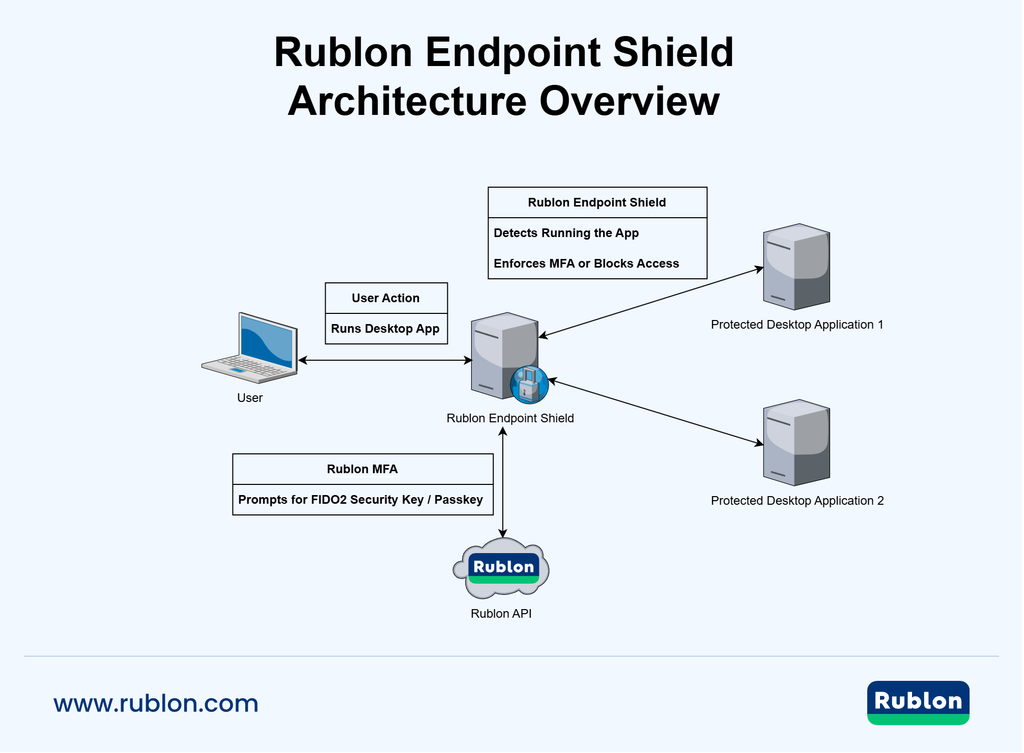
Rublon Endpoint Shield provides centralized application launch control for Windows endpoints. Administrators can require multi-factor authentication via Rublon MFA before selected desktop applications open, block them from running, or monitor their launches. Protection applies when a user attempts to start an application within a Windows session, without modifying the protected application or adding MFA to its sign-in flow.
Protect Command Prompt, PowerShell, Registry Editor, RSAT administration tools, and other sensitive Windows applications. Require phishing-resistant MFA before access is granted, without redesigning the protected application.
Rublon Endpoint Shield enables you to:
- Require multi-factor authentication via Rublon MFA before selected Windows desktop applications launch
- Add step-up authentication inside an already authenticated Windows session
- Centrally define application protection rules for Windows endpoints at the domain level
- Monitor, block, or protect application launches according to security requirements
- Protect administrative tools such as Command Prompt, PowerShell, Registry Editor, and RSAT applications
- Use phishing-resistant MFA authentication, including FIDO2 security keys
- Extend MFA beyond Windows Logon and Remote Desktop into sensitive application access
- Reduce the risk associated with unattended, compromised, or misused Windows sessions
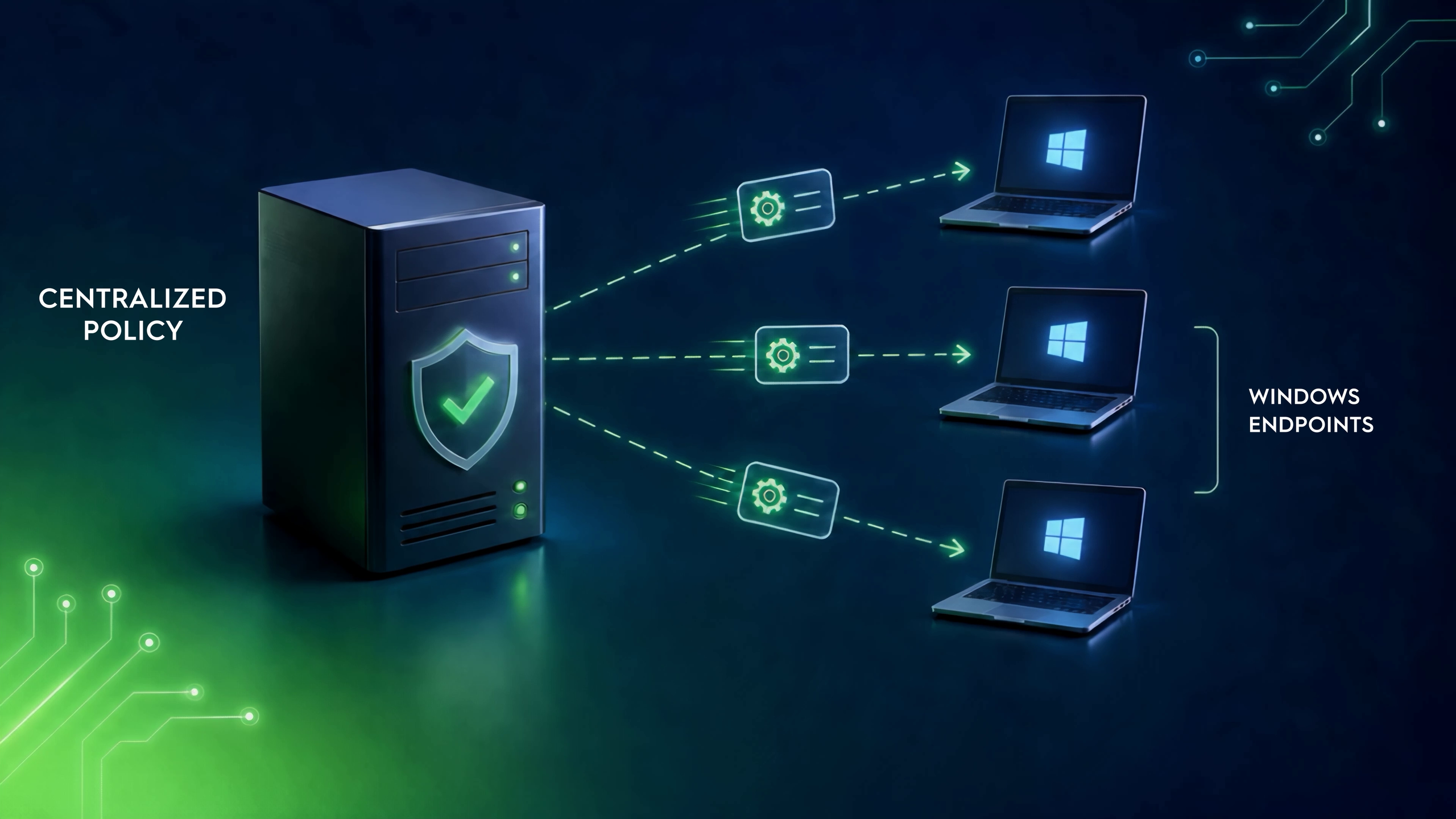
Rublon Endpoint Shield Architecture Diagram
What Is Rublon Endpoint Shield?
Rublon Endpoint Shield is an application protection component of Rublon MFA that adds identity-based security to Windows desktop application launches.
Instead of relying solely on the authentication performed when a user signs in to Windows, organizations can create protection rules for selected applications. When a protected application is launched, Rublon Endpoint Shield can require another identity verification step through Rublon MFA before allowing the application to open.
The result is application-level MFA for Windows endpoints.
A user can sign in to Windows, work normally, and access ordinary applications without interruption. When they attempt to open a sensitive application covered by an Endpoint Shield rule, however, Rublon MFA can require fresh authentication.
Endpoint Shield introduces stronger identity assurance closer to the activity that carries the risk.
Why Require MFA Before Opening Sensitive Windows Applications?
Traditional endpoint authentication creates a security boundary around the Windows login. Once that boundary has been crossed, the active session may provide access to many different applications, including tools with very different levels of security impact.
A web browser, calculator, administrative console, PowerShell session, and Registry Editor should not necessarily carry the same level of trust simply because they are available on the same desktop.
This becomes particularly important when:
- A workstation is left unlocked
- An authenticated session is taken over
- A privileged user performs both routine and administrative work on the same endpoint
- Sensitive management tools are locally available
- An attacker gains access after the initial Windows authentication has already taken place
- Organizations need additional identity assurance for high-impact administrative workflows
Rublon Endpoint Shield introduces a new authentication checkpoint inside the Windows session. Instead of treating the successful Windows login as sufficient for everything that follows, organizations can require Rublon MFA again when access to a protected application is requested.
Interested in protecting application sign-ins instead?
If your goal is to add MFA for user sign-ins, explore our documentation:
Go Beyond MFA at Windows Sign-In
MFA for Windows Logon protects the point where a user enters a Windows workstation or server.
That is a critical security layer, but it solves a different problem from application-level protection.
Consider an administrator who signs in successfully at 8:00 AM and continues using the workstation throughout the day. Several hours later, they open a powerful administration tool. From a traditional session-based perspective, the identity decision was already made at sign-in.
Rublon Endpoint Shield allows the organization to make another decision.
Before a protected application opens, the user can be asked to verify their identity again. The authentication takes place at the moment sensitive access is requested rather than relying entirely on a login that may have happened hours earlier.
This is step-up authentication applied directly to Windows desktop applications.
How Rublon Endpoint Shield Works
Rublon Endpoint Shield is installed on a domain controller and allows administrators to centrally define application protection rules for Windows endpoints.
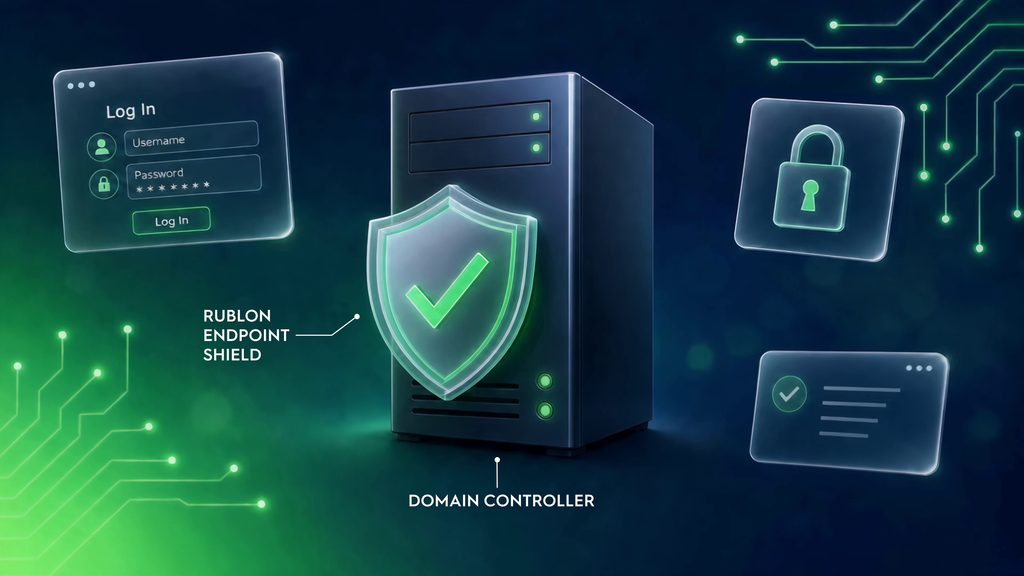
Each rule determines what should happen when a selected application is launched.
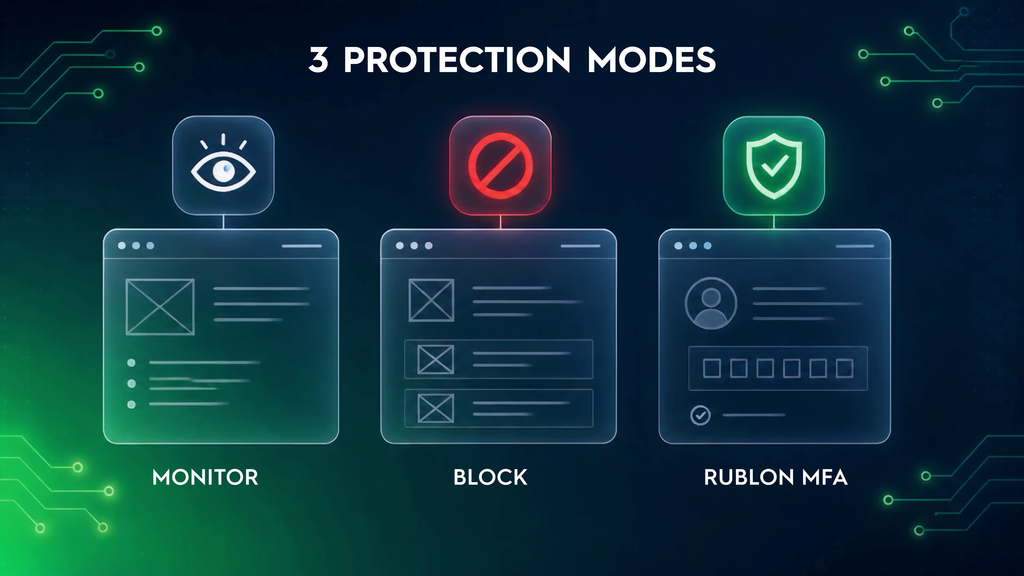
Monitor Application Launches
For applications where visibility is required without interrupting the user, administrators can configure monitoring.
This helps organizations identify how selected applications are being accessed before deciding whether stronger controls should be introduced.
Block Selected Windows Applications From Running
Some applications may not be appropriate for particular endpoints or users.
Rublon Endpoint Shield can prevent applications covered by blocking rules from launching, giving security teams another way to reduce access to tools that should not be available in a given environment.
Require Rublon MFA Before Application Launch
For sensitive applications that users still need to access, administrators can require multi-factor authentication instead of blocking them.
Rublon Endpoint Shield can enforce MFA before application execution for selected Windows desktop applications. When a user attempts to launch an application covered by an MFA rule, they have to provide their login and password, after which the Rublon Prompt requests second-factor identity verification. The application opens only after successful multi-factor authentication.
This creates a practical middle ground between unrestricted access and a complete application block: access remains available, but it requires stronger identity assurance.
Business Benefits of Rublon Endpoint Shield
Rublon Endpoint Shield gives organizations a practical way to extend strong authentication into Windows application access.
Extend MFA Beyond Traditional Entry Points
MFA does not need to stop at Windows Logon, Remote Desktop, or VPN access. Endpoint Shield adds another control point inside the Windows desktop.
Protect High-Risk Applications Without Blocking Them
Security teams can require stronger authentication for applications that users legitimately need instead of choosing between unrestricted access and a complete block.
Reduce Application-Specific Integration Work
The protected desktop application does not need to implement its own MFA flow. This makes it easier to extend strong authentication to Windows applications that lack native MFA support.
Apply Stronger Security to Privileged Workflows
Administrative tools can receive additional protection without forcing the same level of authentication friction onto every application in the user’s session.
Introduce Phishing-Resistant Authentication
Rublon MFA supports FIDO2 security keys and other authentication methods, allowing security teams to strengthen identity assurance for sensitive application access.
Support Defense in Depth
Rublon Endpoint Shield complements Windows permissions, EDR, application allowlisting, endpoint privilege management (EPM), and privileged access management (PAM). It adds MFA before selected desktop applications launch; successful authentication does not itself grant additional Windows permissions.
Build More Consistent MFA Coverage
Organizations can bring another class of previously difficult-to-protect resources into their broader Rublon MFA strategy: Windows desktop application launches.
Typical Use Cases for Rublon Endpoint Shield
Sensitive Windows Administrative Tools
Require Rublon MFA before users open applications that provide powerful system administration capabilities.
Command-Line and Scripting Environments
Add step-up authentication before protected Command Prompt or PowerShell applications launch.
Active Directory and Server Administration
Protect selected RSAT administration applications used to manage identities, Group Policy, servers, and other Microsoft infrastructure.
Privileged Access Workstations
Add another authentication checkpoint around high-impact applications on endpoints dedicated to privileged administration.
Shared or High-Risk Windows Environments
Reduce reliance on possession of an active Windows session by requiring fresh identity verification before selected applications open.
Applications Without Native MFA
Extend strong authentication to Windows desktop applications that were not designed to support their own MFA mechanisms.
Step-Up MFA at the Moment It Matters
Not every action on a Windows endpoint presents the same level of risk.
Opening an everyday productivity application is different from opening a tool that can change system configuration, execute administrative commands, manage domain resources, or affect large numbers of users.
Rublon Endpoint Shield allows organizations to reflect that difference in their authentication model.
Instead of requiring the same authentication behavior for every application, security teams can introduce strong authentication around selected high-impact tools. Users work normally until they reach an application where an additional identity check is justified.
This reduces unnecessary authentication friction while strengthening access at more sensitive points in the workflow.
Phishing-Resistant MFA for Sensitive Windows Applications
Administrative applications are particularly strong candidates for phishing-resistant MFA authentication.
Rublon MFA supports the FIDO standard, including FIDO2 security keys. Organizations can therefore configure protected application access around authentication methods that provide stronger resistance to credential phishing.
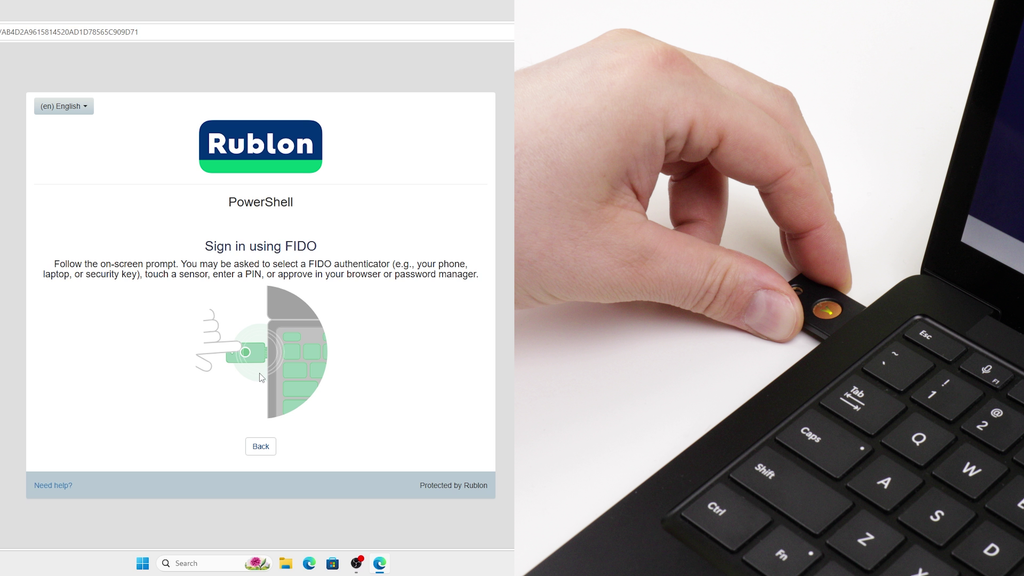
A typical phishing-resistant Endpoint Shield authentication flow can look like this:
- The user attempts to launch a protected Windows application.
- Rublon Endpoint Shield detects that the application is covered by an MFA protection rule.
- After the user provides their login and password, the Rublon Prompt requests second-factor identity verification.
- The user selects FIDO authentication.
- The user inserts their FIDO2 security key.
- They enter the security key PIN and touch the key to confirm physical presence.
- Rublon MFA verifies the authentication.
- The protected application launches.
Rublon MFA also supports other authentication methods, allowing organizations to match authentication requirements to different users and security scenarios.
Require MFA Before Opening Command Prompt (cmd.exe)
Windows Command Prompt provides direct access to a powerful command-line environment.
Administrators, support teams, and advanced users rely on cmd.exe for legitimate management and troubleshooting tasks. At the same time, access to a command shell can become valuable to someone who gains unauthorized control of an active Windows session.
Rublon Endpoint Shield can require multi-factor authentication via Rublon MFA before Windows Command Prompt launches.
Rublon Endpoint Shield adds an identity checkpoint directly before access to the Windows command shell without changing Command Prompt itself.

Require MFA Before Launching PowerShell
PowerShell offers extensive administration and automation capabilities across Windows environments.
Depending on the user’s privileges and available modules, PowerShell can be used to manage files, processes, services, Active Directory, remote systems, server configuration, and many other parts of the infrastructure.
Rublon Endpoint Shield can add step-up authentication before protected PowerShell applications launch.
An administrator can continue using the Windows workstation normally but must complete Rublon MFA when attempting to open a PowerShell application covered by the protection policy.
Application-level MFA does not inspect individual PowerShell commands or determine what scripts the user may execute. Instead, it verifies identity before access to the protected PowerShell application is granted.
That distinction makes Endpoint Shield complementary to PowerShell logging, application control, EDR, least privilege, and other Windows security controls.
Require MFA Before Opening Registry Editor (regedit.exe)
Windows Registry Editor provides direct interactive access to configuration data used by Windows and installed applications.
For users with sufficient permissions, registry changes can affect system behavior, application configuration, services, security settings, and other important parts of the operating environment.
Rublon Endpoint Shield can require Rublon MFA before regedit.exe opens.
This does not claim to prevent every possible Windows Registry modification. Registry changes can also be performed through command-line tools, PowerShell, scripts, applications, and Windows APIs. Instead, Endpoint Shield places an additional identity verification boundary around direct access to the protected Registry Editor application.
Require MFA Before Opening Selected RSAT Administrative Tools
Remote Server Administration Tools give administrators powerful interfaces for managing Windows Server infrastructure.
RSAT environments may include tools used for Active Directory, Group Policy, server management, DNS, PowerShell-based administration, and other privileged tasks.
Rublon Endpoint Shield can help organizations introduce application-level MFA around selected RSAT administration tools.
Before a protected administration application opens, the user must complete the required multi-factor authentication via Rublon MFA.
This is especially valuable on administrator and privileged access workstations, where one active Windows session may provide access to multiple tools capable of making organization-wide infrastructure changes.
Because RSAT is a collection of administration technologies rather than a single executable, organizations should identify the applications and launch paths they want to protect and define Endpoint Shield rules accordingly.
MFA for Privileged Windows Administrative Tools
The applications with the greatest business impact are often used by a relatively small number of highly privileged users.
System administrators, domain administrators, infrastructure teams, developers, and support personnel may work with applications that can:
- Change system configuration
- Administer identities and groups
- Modify Group Policy
- Manage servers
- Execute scripts and commands
- Configure services
- Access sensitive infrastructure
- Perform actions affecting many users or systems
Protecting the Windows account is important. Protecting the transition into these privileged workflows adds another layer.
Rublon Endpoint Shield allows organizations to introduce that layer without forcing users through additional MFA during every ordinary desktop action.
Centrally Manage Windows Application Launch Rules
Protecting applications one workstation at a time becomes difficult to manage as the number of endpoints grows.
Rublon Endpoint Shield provides centralized desktop application control through rules that determine whether selected applications are monitored, blocked, or allowed to launch after successful MFA.
Administrators determine which Windows applications require additional security and choose how their launches should be handled. Instead of creating an entirely separate authentication mechanism for each application, organizations can apply a more consistent security model across endpoints.
This improves operational scalability and helps security teams move away from fragmented, application-by-application controls.
The same principle supports broader centralized MFA management across the organization: stronger authentication becomes part of a coordinated identity security strategy rather than a collection of disconnected implementations.
Add MFA Without Modifying the Protected Desktop Application
Many Windows desktop applications were never designed to include their own MFA mechanism.
Built-in Windows utilities are an obvious example, but the same challenge can exist with older administrative software and other applications where adding MFA directly inside the program would be impractical.
Rublon Endpoint Shield moves the authentication decision outside the protected application.
The application itself does not need to display the MFA interface or implement Rublon MFA logic. Endpoint Shield controls access at application launch and invokes Rublon MFA when a protection rule requires additional verification.
That makes it possible to add stronger identity assurance around applications that were not built with application-level MFA in mind.
Extend MFA Deeper Into the Windows Endpoint
MFA strategies often begin with the most obvious entry points:
Those controls remain essential, but attackers do not necessarily stop at the initial authentication boundary.
Once access to an endpoint has been established, sensitive local applications may provide additional routes toward valuable systems, credentials, configuration, or administrative capabilities.
Rublon Endpoint Shield helps organizations reduce the attack surface by implementing MFA for desktop application launches and pushes identity verification closer to the applications where sensitive work actually takes place.
Complement EDR, Application Control, and Least Privilege
Rublon Endpoint Shield controls selected Windows application launches through monitoring, blocking, or MFA. It complements endpoint detection and response, application allowlisting, Windows authorization, malware protection, and privileged access management.
These controls solve different problems.
Rublon MFA answers: Is the person attempting to open this protected application able to verify their identity?
Windows permissions answer: What is this user authorized to do?
Application control answers: Which software is permitted to execute?
EDR answers: Is endpoint activity showing malicious or suspicious behavior?
Privileged access controls answer: How should elevated permissions be granted and governed?
Combining these layers creates a stronger defense-in-depth model than relying on any one control alone.
Reduce the Risk of Compromised Active Sessions
A successful Windows login does not guarantee that the same legitimate user controls the session for its entire lifetime.
Workstations may be left unattended. Sessions may be compromised after sign-in. Credentials or session access may be abused. An attacker who reaches an active desktop may then attempt to use tools already installed on the system.
Application-level MFA introduces another hurdle.
When a sensitive application is protected by Rublon Endpoint Shield, access to the desktop alone is not sufficient. The person attempting to open the protected tool must satisfy the additional Rublon MFA requirement.
This helps organizations strengthen protection against scenarios where the initial Windows security boundary has already been crossed.
For a broader identity security strategy, explore how Rublon MFA helps prevent account takeover attacks.
Improve Security Without Blocking Legitimate Administration
Security teams often face a trade-off when dealing with powerful administrative tools.
Leaving them unrestricted increases risk. Blocking them completely can prevent administrators from doing legitimate work.
Rublon Endpoint Shield provides another option.
Organizations can keep a sensitive application available while requiring stronger authentication before it launches. Administrators retain access when they need it, but possession of the active Windows session alone is no longer enough.
This can provide a more practical security model for applications that remain necessary but deserve tighter access controls.
Rublon Endpoint Shield and Windows Logon MFA
Rublon Endpoint Shield is designed to complement, not replace, Windows Logon MFA.
With Rublon MFA for Windows, users verify their identity when entering a Windows workstation or server.
With Rublon Endpoint Shield, organizations can require another verification later when the user attempts to open a selected desktop application.
Together, the authentication model becomes more granular:
- Verify identity when the Windows session begins.
- Allow normal work inside the authenticated session.
- Require step-up MFA when the user enters a higher-risk application or administrative workflow.
Different Rublon MFA Components for Different Application Types
Organizations rarely operate only one type of application.
Some applications run directly on Windows endpoints. Others are browser-based, self-hosted systems. Modern applications may support OAuth 2.0 or OpenID Connect.
Rublon MFA provides different integration approaches for these different environments.
Windows Desktop Applications
Use Rublon Endpoint Shield to protect selected Windows desktop application launches with Rublon MFA.
Self-Hosted Web Applications
For browser-based applications that need MFA without code changes, Rublon App Shield introduces a protection layer in front of the application.
OAuth 2.0 and OpenID Connect Applications
For applications that support modern OAuth 2.0 or OIDC identity flows, Rublon Identity Bridge provides a centralized authorization layer.
Rublon Endpoint Shield FAQ
What is Rublon Endpoint Shield?
Rublon Endpoint Shield is a component of Rublon MFA that enables organizations to centrally protect selected Windows desktop applications. Application launches can be monitored, blocked, or configured to require Rublon MFA before access is granted.
Can I require MFA before a Windows application opens?
Yes. Rublon Endpoint Shield can require Rublon MFA when a user attempts to launch a selected Windows desktop application. The application opens only after successful authentication.
This protects the application launch itself, including applications without a sign-in screen or native MFA support.
Can Rublon Endpoint Shield add MFA to Windows desktop applications?
Yes. Rublon Endpoint Shield can require Rublon MFA before Windows desktop applications covered by configured protection rules are allowed to launch.
This makes it possible to introduce MFA around applications that do not provide their own native MFA mechanism.
Which applications can Rublon Endpoint Shield protect?
Rublon Endpoint Shield is designed to protect selected Windows desktop applications according to configured application protection rules.
Typical scenarios include Command Prompt, PowerShell, Windows Registry Editor, and Windows administration applications such as RSAT tools.
Organizations should identify the applications and launch paths relevant to their environment when defining protection rules.
Can Rublon Endpoint Shield protect PowerShell?
Yes. Organizations can configure Endpoint Shield protection rules for PowerShell applications and require Rublon MFA before the protected application launches.
Protecting an executable such as powershell.exe should not be interpreted as blocking every possible PowerShell execution path. Broader PowerShell security should include appropriate Windows security controls, logging, EDR, application control, and least privilege.
Can Rublon Endpoint Shield protect Command Prompt?
Yes. A protection rule can require Rublon MFA before Windows Command Prompt (cmd.exe) launches.
The user must complete the required authentication before the protected command shell becomes available.
Can Rublon Endpoint Shield protect Registry Editor?
Yes. Rublon Endpoint Shield can require Rublon MFA before Windows Registry Editor (regedit.exe) opens.
This protects access to the Registry Editor application itself. It does not prevent every possible method of modifying the Windows Registry.
Can Rublon Endpoint Shield protect RSAT?
Rublon Endpoint Shield can protect selected Windows administration applications used in RSAT environments.
Because Remote Server Administration Tools consist of multiple applications, MMC-based tools, PowerShell modules, and command-line utilities rather than one single executable, administrators should identify the relevant applications and configure protection rules for the launch paths they want to protect.
Does Endpoint Shield replace Windows Logon MFA?
No. MFA for Windows Logon & RDP verifies identity when the user signs in to Windows. Rublon Endpoint Shield adds another authentication checkpoint when the user attempts to open a protected application from inside that session.
The two controls can be used together.
Does Endpoint Shield replace EDR or application control?
No. Rublon Endpoint Shield adds identity-based protection around selected application launches.
EDR, application control, Windows permissions, least privilege, privileged access management, and other endpoint security technologies address different risks. They are complementary controls.
Can Endpoint Shield use phishing-resistant MFA?
Yes. Rublon MFA supports phishing-resistant MFA, including FIDO authentication, such as FIDO2 security keys, enabling organizations to use phishing-resistant authentication when protecting sensitive Windows application access.
Extend MFA to the Applications Inside Your Windows Endpoints
Windows Logon protects access to the session. Rublon Endpoint Shield helps protect what happens next.
Add step-up authentication to sensitive desktop applications, strengthen privileged workflows, and require fresh identity verification before high-impact Windows tools become available.
Extend Rublon MFA beyond traditional login boundaries and bring application-level authentication to Windows endpoints.
Talk to Us About Rublon Endpoint Shield
See how Rublon Endpoint Shield can help you protect Windows desktop applications, introduce step-up MFA for sensitive administrative tools, and extend identity-based security deeper into your endpoint environment.
Contact us to discuss your Windows environment, the applications you want to protect, and your deployment goals.
Let’s talk about Rublon Endpoint Shield and desktop apps whose launches you’d like to protect.