
Last updated on September 14, 2026
Authenticating via an authentication app is an easy and safe method to access your account using Two-Factor Authentication (2FA) or Multi-Factor Authentication (MFA). Passwords remain an important security control, but passwords alone are vulnerable to phishing, reuse, credential theft, and data breaches. MFA adds another layer of protection if a password is compromised. Daily data leaks and hacks make it clear that you need an additional layer of security next to your passwords. Authenticator applications such as Google Authenticator and Rublon Authenticator provide authentication methods that can add an extra layer of security to compatible accounts and applications.
Robust Mobile App & FIDO MFA
Interested? Try our convenient multi-factor authentication for 30 days for free and see how simple it is.
Rublon Authenticator: Differentiators and Benefits
- Part of a complete enterprise MFA platform: Rublon Authenticator is not a standalone passcode generator but an integral part of Rublon MFA. Rublon MFA is a centralized multi-factor authentication solution that allows organizations to manage users, applications, authentication policies, and authenticators across cloud and on-premises systems. Using the dedicated app also reduces reliance on a separate mobile authenticator vendor and keeps authentication, administration, and support within one ecosystem.
- Flexibility without losing centralized control: Rublon MFA supports compatible third-party authenticator apps for TOTP-based authentication. Organizations can standardize on Rublon Authenticator while still accommodating users or departments that prefer another compatible app. Regardless of which app generates the passcode, the authentication attempt is recorded in the centralized Authentication Logs, preserving a unified login history and audit trail.
- More app-based authentication options: Rublon Authenticator supports one-tap Mobile Push, offline Passcode based on TOTP, and QR Code authentication, where users scan a code displayed during sign-in. Many third-party authenticator apps are primarily limited to generating TOTP passcodes.
- Visibility beyond login attempts: Rublon MFA also records authenticator-related events in Activity Logs, including registrations performed using Rublon Authenticator, Enrollment Email, or Enrollment SMS, as well as authenticator modifications and removals. Administrative actions performed in the Rublon Admin Console are recorded separately in Audit Logs. This provides greater transparency for security investigations, support, governance, and compliance. Keeping authentication events, authenticator changes, and administrative actions within the same platform also gives administrators and support teams more context when troubleshooting issues across the authentication flow.

- Admin-assisted and self-service enrollment: Users can enroll their authenticators themselves during sign-in, while administrators can send an Enrollment Email or Enrollment SMS when a user needs additional assistance. Enrollment SMS also provides an alternative when the user cannot access the email account being protected. This simplifies onboarding and reduces support friction without sacrificing administrative oversight.
- Freedom to use other authentication methods: Users are not restricted to a mobile app. Depending on the organization’s policies and the protected application, they can use other methods within the same platform, including but not limited to phishing-resistant FIDO2 security keys and passkeys, RFID authenticators, and YubiKey OTP. If a mobile device is unavailable or an app-based method is not suitable, the user can switch to another method permitted by the organization’s policy without leaving the Rublon MFA ecosystem.
- User experience designed for organizations: Users can approve or deny push requests with one tap, authenticate offline when necessary, register multiple mobile devices, and protect access to the app with a PIN or biometric lock. Enrollment and authentication are designed as parts of the same product experience, with consistent terminology and visual design throughout the process. Organizations can also display their logo in Rublon Prompt and Mobile Push authentication requests, helping users recognize that the request belongs to their organization.
- Consistent security across the organization: Because Rublon Authenticator is part of Rublon MFA, app-based authentication follows the same centrally managed policies as other authentication methods and protected applications. This allows organizations to enforce consistent authentication requirements across users, systems, and environments instead of managing mobile authentication as a separate, isolated layer.
What Is an Authentication App?
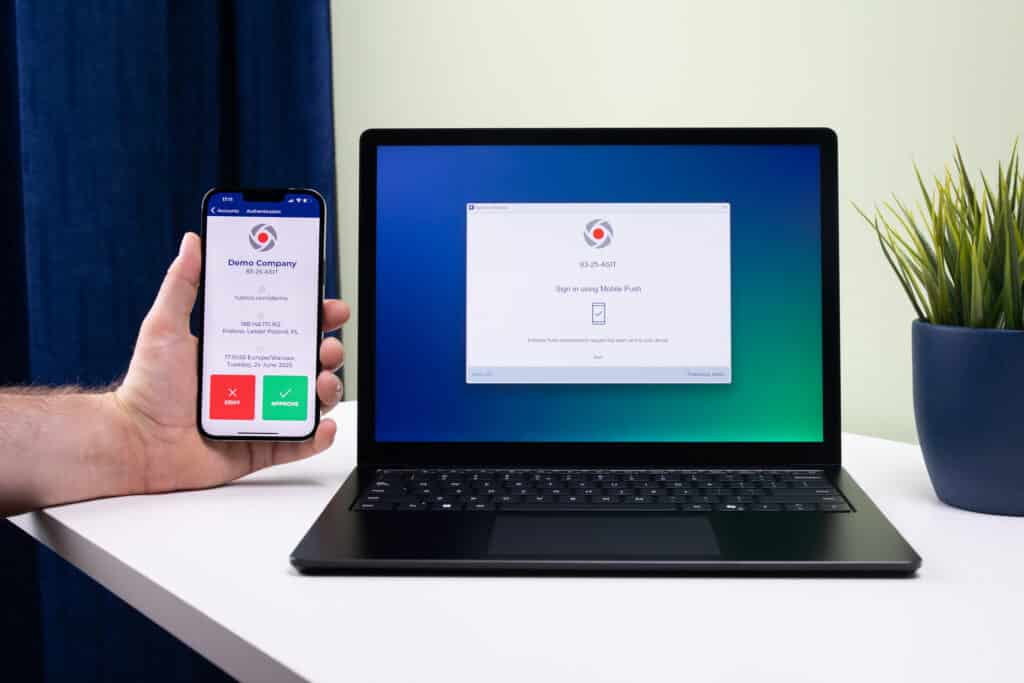
An authentication app (also called an authenticator app) is an application you can install on your mobile device and use as an extra layer of authentication to sign in to your accounts.
Authenticator apps help you be more secure on the web.
What is Google Authenticator?
Google Authenticator is an OTP authenticator that supports both time-based TOTP codes and counter-based HOTP codes for compatible accounts. After you install Google Authenticator and enroll your account, the app will start generating one-time passcodes for this account. You can also add other accounts, as long as they are compatible with Google Authenticator. Google Authenticator will generate separate authentication codes for each account.
What is Rublon Authenticator?
Rublon Authenticator is an advanced mobile authenticator app that allows you to add an additional authentication factor in the form of one of the three available authentication methods:
- Mobile Push
- Passcode (TOTP Authentication)
- QR Code
To set up an account with Rublon Authenticator, you will scan the registration QR Code. When logging in to that account again, you will enter your password and choose your second factor; e.g., a Mobile Push authentication request will be sent to your phone.
The Rublon Authenticator app is available for Android and iOS devices. You can install it on your smartphone or tablet.

Authentication App Comparison Table
Let’s compare Rublon Authenticator and Google Authenticator.
| Rublon Authenticator | Google Authenticator | |
| Push Notifications | ✔ | X |
| TOTP Authentication | ✔ | ✔ |
| TOTP Codes Initially Hidden | ✔ | X |
| QR Code Authentication Method | ✔ | X |
| Offline Mode | ✔ | ✔ |
| Android Support | ✔ | ✔ |
| iOS Support | ✔ | ✔ |
| Fingerprint Lock | ✔ (Android and iOS) | ✔ (iOS only) |
| Face Recognition Lock | ✔ (Android and iOS) | ✔ (iOS only) |
| Use With Third-Party Accounts | ✔ | ✔ |
| Tablet Support | ✔ | ✔ |
Authentication App Comparison: Rublon Authenticator vs. Google Authenticator
Here are the most important similarities and differences between Rublon Authenticator and Google Authenticator:
- Push Notifications. Rublon MFA’s Mobile Push gives you a one-tap secure method of authentication. There is no Push Notifications functionality in Google Authenticator. (The Google Prompt is not a part of the Google Authenticator app and only works for Google accounts).
- TOTP Authentication. Rublon MFA’s Passcode is a TOTP code that changes every 30 seconds. Both authenticator apps can use this form of authentication.
- TOTP Codes Initially Hidden. Google Authenticator briefly introduced a click-to-reveal feature on Android in 2022 but removed it shortly afterward. Current versions instead offer an optional Privacy Screen that locks the entire app. In Rublon Authenticator, you tap an account to display its TOTP code, which helps limit the number of codes visible at one time.
- QR Code Authentication Method. Rublon MFA’s QR Code is an authentication method during which you scan a QR Code displayed by the Rublon Prompt to sign in to your account. Google Authenticator does not have such an authentication method. QR Code Authentication Method should not be confused with scanning a QR Code during an initial setup, which is a form or account registration on both apps.
- Offline Mode. Both apps offer an offline mode. Your phone does not require Internet connectivity to perform TOTP Authentication.

- Android Support. Both apps can be installed on Android devices.
- iOS Support. Both apps can be installed on iOS devices.
- Fingerprint Lock. Rublon Authenticator allows you to enable a fingerprint lock. Every time you open the app or want to perform an important operation, you will be asked to unlock Rublon Authenticator by scanning your fingerprint.
- Face Recognition Lock. Rublon Authenticator allows you to enable a Face Recognition lock. Every time you open the app or want to perform an important operation, you will be asked to unlock Rublon Authenticator by using face recognition.
- Use With Third-Party Accounts. Google Authenticator can generate OTP codes for compatible third-party services. Rublon Authenticator is intended for accounts protected by Rublon MFA. Separately, Rublon MFA allows users to enroll compatible third-party authenticator apps and use the TOTP codes generated by those apps to access Rublon MFA-protected applications.
- Tablet Support. Both apps can be installed on a tablet.
Top 6 Rublon Authenticator Benefits
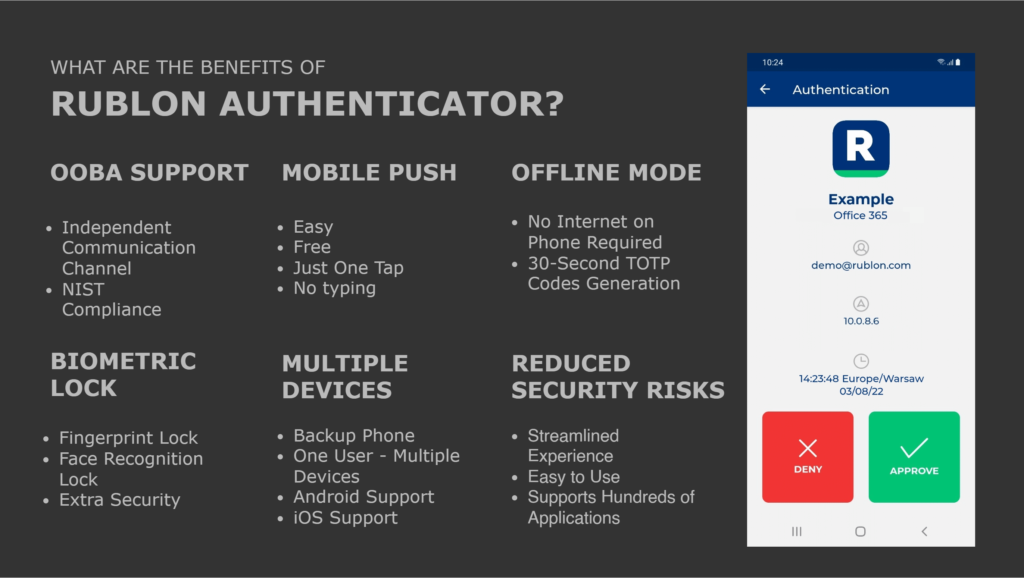
Here are the top 6 benefits of using the Rublon Authenticator app.
- Out-of-Band Authentication (OOBA) Compliance. Using Rublon Authenticator provides a second independent communication channel that abides by the requirements of Out-of-Band Authentication as defined in section 3 of the NIST SP 800-63B Digital Identity Guidelines on Authentication and Lifecycle Management.
- Mobile Push Authentication Method. Mobile Push is one of the most secure and practical authentication methods, with only FIDO and other phishing-resistant methods coming close to the level of security and convenience that push notifications provide. Push Notifications allow you easy, one-tap authentication without the need to type anything. In contrast to security keys, Mobile Push is free, making it a perfect choice for Two-Factor Authentication.
- Offline Mode. Lack of Internet connectivity on your mobile device is not an issue with Rublon MFA’s Passcode. Rublon Authenticator generates a new Passcode every 30 seconds, even when your mobile device is offline. This feature may be useful when you cannot access Wi-Fi on your phone.
- Biometric Lock Feature. If you want to be extra safe, you can secure your Rublon Authenticator app with yet another layer of security. Turn on Fingerprint or Face Recognition lock to reduce the risk that someone who gains access to your mobile device can open Rublon Authenticator or approve an authentication request.
- Multiple Devices Support. You can install Rublon Authenticator on two or more mobile devices and use them interchangeably or choose to treat the second device as a backup device. Rublon Authenticator works on smartphones and tablets with Android and iOS operating systems.
- Reduces Security Risks. Using the Rublon Authenticator app significantly reduces security risks associated with passwords, SMS 2FA, and Email Link Authentication. By adding more communication channels and security controls, Rublon Authenticator provides a streamlined, secure Two-Factor Authentication experience for all your integrated applications.
Try Rublon Authenticator Today (It’s Free!)
The Rublon Authenticator mobile app itself is free and available for Android and iOS devices.
To use the Rublon Authenticator, sign up for a free Rublon MFA Trial and integrate at least one of your applications with Rublon.