
A certificate authority is a trusted organization (or server) that issues, signs, and manages digital certificates, verifying that a public key belongs to the entity requesting it, thereby vouching for the entity’s identity. This is central to how SSL and TLS, public-key infrastructure (PKI), and secure web trust work.
Why It Matters
- Every time you see the padlock icon in your browser, a CA is behind it, confirming that the site uses encryption. But this does not guarantee the site is trustworthy, as even phishing sites can obtain that padlock.
- However, without CAs, there is no scalable way for clients to trust that public keys actually belong to the domains or services they connect to.
- Browsers and operating systems maintain built-in root CA lists to determine which digital certificates they will accept.
What You’ll Learn
- How a certificate authority works step by step, from key generation through CSR, identity validation, certificate issuance, to revocation and renewal.
- The differences between root CAs, intermediate CAs, and issuing CAs, and how the certificate authority hierarchy is structured.
- Real-world examples and vendor CAs (e.g., Amazon Certificate Authority, Microsoft CA, Palo Alto CA).
- Use cases: CA’s role in SSL / TLS, digital signatures, internal enterprise CA on domain controller, and free/open CA models.
- Risks and protections: CA compromise, certificate authority breaches, trust removal, key protection, and crypto agility.
- The “who’s behind it” side: how to ask “Which certificate authority?”, “How do you find your certificate authority?”, and when CA services are free or tied to platforms.
- Why It Matters
- What You’ll Learn
- Key Insights at a Glance
- Types of Certificate Authorities at a Glance
- Why Understanding CAs Matters
- Core Certificate Authority Concept & Role
- Types of Certificate Authority
- How Certificate Authority Works
- How to Check Which Certificate Authority Issued a Website Certificate
- How to Find the Certificate Authority in Windows and macOS Trust Stores
- How CAA DNS Records Work and How to Check Them
- How to Verify a Certificate Chain (What to Look For)
- What to Do If a CA Is Distrusted or Removed from Trust Stores
- Top Certificate Authority Use Cases
- Certificate Authority Platform & Vendor Examples
- Certificate Authority Security, Risks & Governance
- Common Questions on Certificate Authority
Key Insights at a Glance
| Insight | Why It’s Important |
| CAs don’t just sign certificates, but also define trust | A CA’s reputation, policy, and security controls are as critical as its cryptography |
| Certificate chains enforce layered trust | Root → Intermediate → Issuing provides flexibility and damage control |
| CA operations are high stakes | A root CA compromise can undermine thousands or millions of certificates |
| The CA ecosystem is evolving | Post-quantum readiness, shorter certificate lifetimes, and automation are key trends |
| Transparency and accountability matter | Root program audits, revocation transparency, and public logs reinforce trust |
Types of Certificate Authorities at a Glance
| Type | Trusted by browsers/OS by default? | Typical use | Key risk | Where managed |
| Root CA | Yes (if a publicly trusted root in a trust store) | Anchor of trust; signs intermediate CAs | Catastrophic impact if the root key is compromised | Highly controlled, often offline; strict governance |
| Intermediate CA | Indirectly (trusted via a trusted root) | Delegates issuance; signs issuing CAs or leaf certs | Broad impact if compromised; misissuance risk | CA infrastructure / managed PKI platforms |
| Issuing CA | Indirectly (via intermediate/root chain) | Issues leaf (end-entity) certificates to servers/users/devices | Operational failures (renewal/rotation), validation mistakes | Online CA services, enterprise PKI, automated enrollment |
| Public CA | Yes (if included in trust stores) | Public TLS certificates for internet-facing services | Compliance requirements; CT visibility; misissuance impact | Commercial CA providers under root programs |
| Private CA | No (must be distributed internally) | Internal PKI for employees, devices, and internal services | Trust distribution errors; weak lifecycle/revocation controls | Enterprise PKI (e.g., AD CS) or managed private CA services |
Why Understanding CAs Matters
Every secure web connection, signed email, and trusted digital identity relies on one foundational element: the certificate authority. Whether you’re a developer, sysadmin, or security enthusiast, knowing what a certificate authority is and how a CA works equips you to judge who or what to trust online.
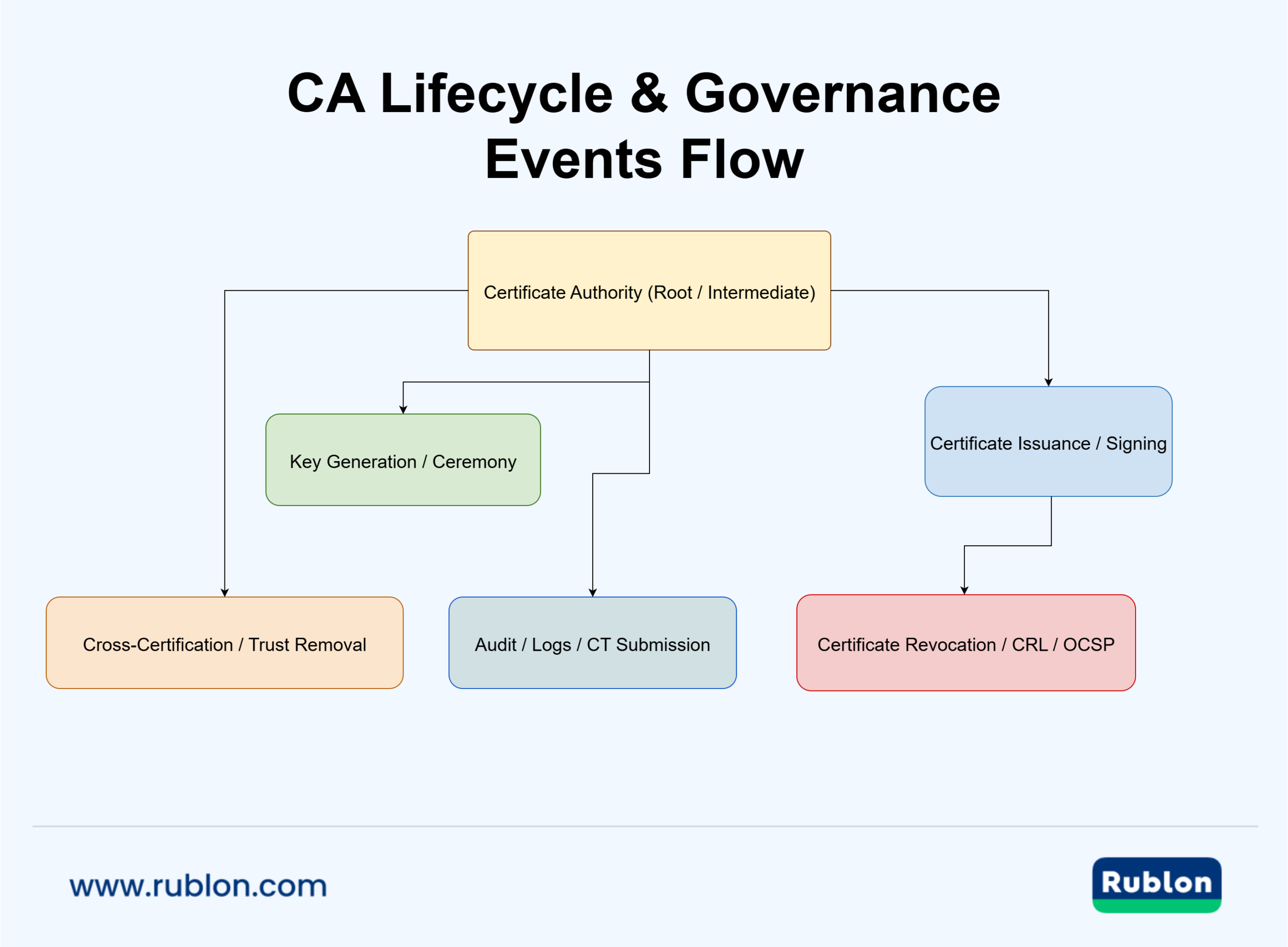
Core Certificate Authority Concept & Role
What Makes an Entity a “Certificate Authority”
- A certificate authority (CA) is a trusted third party in cryptography that issues and signs digital certificates, binding public keys to verified identities.
- The CA’s signature enables relying parties (browsers, clients, devices) to trust that a given public key belongs to the entity named in the certificate.
- In practice, a CA operates both as an organization and as a software/service (e.g., certificate authority server) that manages issuance, revocation, and lifecycle tasks. For example, Microsoft’s AD CS Certification Authority role is a canonical example of combining organizational and server facets.
Core Responsibilities of a CA
| Responsibility | Description | Why It Matters |
| Identity Validation | Verify domain ownership, organizational identity, or entity credentials | Prevents misissuance and boosts trust in the certificate |
| Certificate Issuance & Signing | Produce a signed X.509 certificate that includes the entity’s public key | Allows others to verify the chain of trust |
| Publication & Transparency | Make issued certificates or certificate metadata publicly available (AIA, CT logs, etc.) | Enables clients to discover, validate, or audit certificates |
| Revocation & Status Management | Maintain CRL or OCSP endpoints for real-time certificate status | Helps clients reject compromised or revoked certificates |
| Renewal & Expiry Management | Enforce validity periods and manage reissuance | Prevents stale or weak certificates from persisting |
| Key Lifecycle & Protection | Protect root / CA private keys (often via HSMs) | A CA’s security depends critically on safeguarding its signing keys |
Trust Anchors, Chains & the Role in PKI
- Root CA / Trust Anchor: At the top of the trust hierarchy, a root CA certificate is self-signed and trusted by clients.
- Intermediate / Subordinate CA: Issued by a root, intermediate CAs can distribute issuance risk and limit root exposure.
- Trust Chain / Certificate Authority Chain: When a client receives a certificate, it builds a chain from the leaf certificate → intermediate(s) → trusted root, validating each signature.
- This layered model (root → intermediate → issuing) is central to certificate authority hierarchy design and helps contain damage in case of CA compromise.
How CA Enables Secure Systems
- In SSL / TLS, the CA issues certificates trusted by browsers, enabling encrypted HTTPS connections.
- For digital signatures, the CA certifies identities used in signing documents or code.
- In enterprise domains, internal CAs (e.g., on domain controllers) support device authentication, VPNs, Wi-Fi, and smart cards.
- Free or open CAs (e.g., Let’s Encrypt) democratize certificate issuance for public websites, relying on their root trust in browser stores.
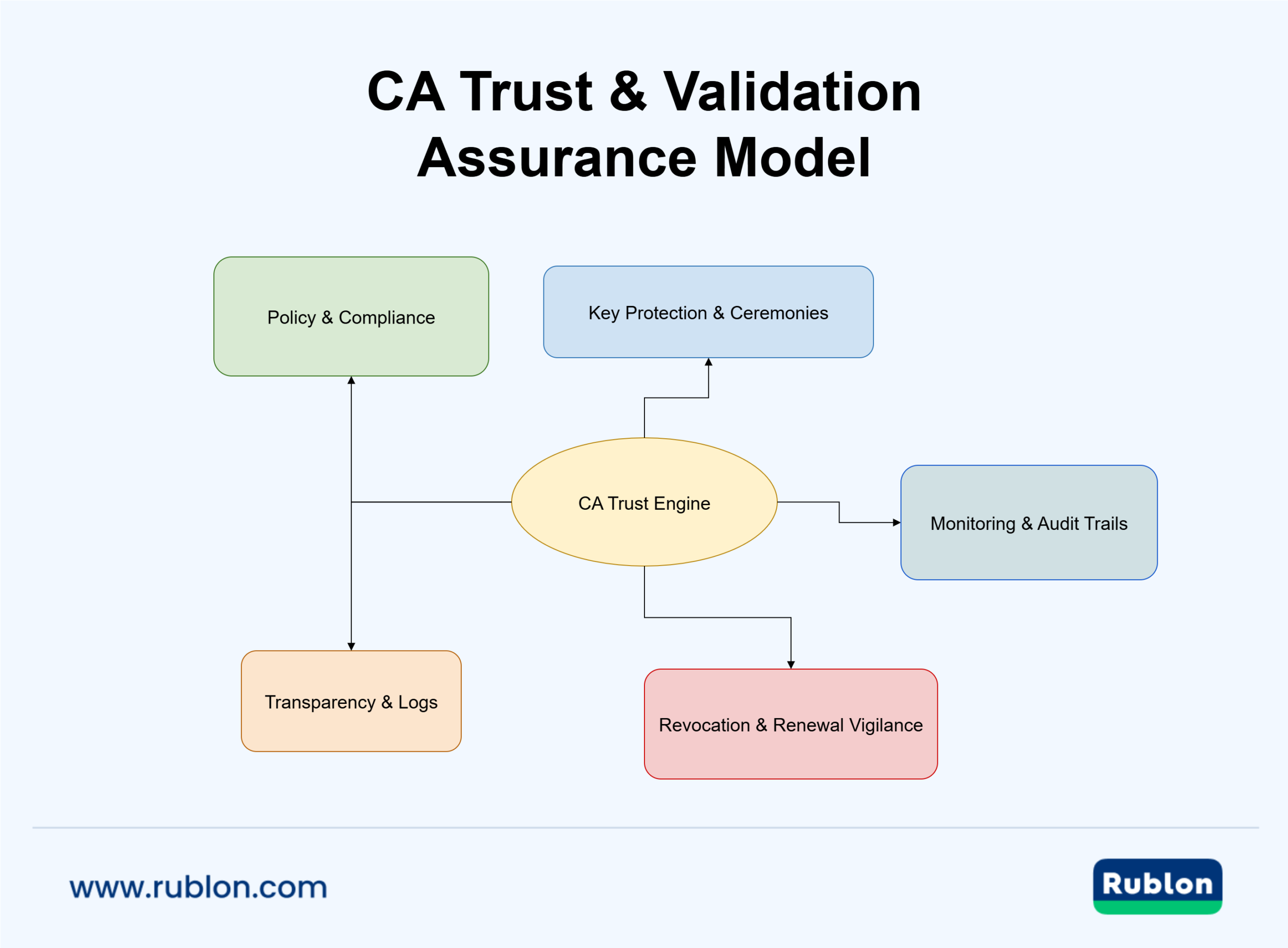
Types of Certificate Authority
Root CA / Trust Anchor
- The ultimate trusted authority whose certificate is self-signed and included in root stores (browsers, OS).
- Because root CA compromise is catastrophic, it’s often kept offline and used sparingly.
Intermediate / Subordinate CA
- Issued by a root or another intermediate CA. It bridges trust from the root to issuing CAs.
- Helps contain risk: if an intermediate is compromised, the root may survive.
Issuing CA
- The CA that issues leaf (end-entity) certificates to servers, users, and devices.
- Usually closer to the day-to-day operations of certificate issuance, renewal, and revocation.
Private / Enterprise CA
- Operated internally, trusted within a boundary (e.g., corporate network, AD domain).
- May not be trusted by public browsers, but essential for internal systems (VPN, internal apps).
Public / Root Program CA
- CAs that meet standards for inclusion in browser/OS root programs, issuing certificates valid broadly.
- Examples: Let’s Encrypt, DigiCert, GlobalSign.
Open Source / Free CA
- Projects offering zero-cost CA services or software (e.g., Let’s Encrypt, CAcert).
- Useful for public websites or learning, though subject to stricter policy and support constraints.
Deployment Models & Hierarchy Considerations for CAs
- Single-tier vs multi-tier CA deployments
- One-tier: one CA acts as root + issuing (useful for labs / small scenarios)
- Two-tier: root + issuing CA
- Three-tier or more: root → intermediate → issuing (recommended for production)
- Cross-certification & bridging CAs
- When organizations or domains need to trust each other, CA cross-certification or bridge models can connect CA domains.
- Use cases: partner PKIs, joint trust between enterprises, foreign PKI integration.
- Hybrid models
- A combination of public and internal CAs with cross-trust.
- E.g., internal CA for corporate apps + public CA for external SSL, with cross-cert relationships or mapping.
Best Practices for CA Hierarchy & Deployment (Design Considerations)
- Minimize levels: Avoid unnecessary tiers; extra layers add complexity and more points of failure.
- Isolate root CA operations: Keep root CA offline or heavily restricted, used only to sign intermediates and CRLs.
- Use constraints & limitations: Enforce path length, name constraints, and certificate policies on subordinate CAs (Basic Constraints extension).
- Segregate operational domains: Use separate issuing CA trees for different functions (e.g., internal, external, IoT) to compartmentalize risk. AWS CA guidance shows domain separation with multiple root/subordinate hierarchies.
- Plan for change and portability: Design hierarchies so you can move, terminate, or split root/CA trees when business boundaries change.
- Key protection & ceremonies: Protect CA private keys with HSMs, dual-control, secure backup, and recovery procedures.
- Revocation & validation readiness: Ensure CRL / OCSP infrastructure is properly delegated and replicated across CA tiers.
- Audit and compliance: Each CA (root, intermediate, issuing) must adhere to policies, reviews, transparency, and logging.

How Certificate Authority Works
Below is a step-by-step breakdown of how a certificate authority (CA) issues and manages certificates. Use this to anchor your understanding of CA operations, lifecycle, and revocation logic.
1. Key Generation & CSR Submission
- The entity requesting a certificate (e.g., a server or device) generates a public/private key pair locally. The private key must remain secret.
- They then create a CSR (Certificate Signing Request) containing identifying information and their public key.
- The CSR is submitted to the CA via API or certificate management interface.
2. Identity Validation / Vetting
- The CA validates that the entity is who they claim to be. For SSL, that means domain ownership or organizational validation.
- This verification involves methods such as DNS challenges, email confirmation, document verification, or enterprise directory checks.
- Only after identity is validated does the CA proceed to issuance.
3. Certificate Issuance & Signing
- The CA takes the validated CSR and issues a signed certificate (commonly an X.509 v3 certificate as defined in RFC 5280).
- The certificate asserts the identity and contains metadata and extensions (validity period, key usage, issuer fields, etc.).
- The CA signs the certificate using its private key (intermediate or root), producing a digital signature that clients can verify.
4. Publication, Chain Building & Distribution
- After issuance, the certificate authority publishes the certificate and the relevant metadata:
- AIA (Authority Information Access) URLs help clients fetch issuer or intermediate certificates.
- CRL distribution points or OCSP responder endpoints for revocation status.
- Clients receiving a certificate will build a chain (leaf → intermediate(s) → trusted root) and verify each link.
5. Revocation & Status Checking
- If a certificate must be invalidated early (for example, due to key compromise or policy changes), the CA revokes it.
- Two common revocation mechanisms:
- CRL (Certificate Revocation List): A signed list of revoked certificate serial numbers published periodically.
- OCSP (Online Certificate Status Protocol): A query/response protocol where clients ask a server (OCSP responder) about one certificate’s status.
- Many modern setups use OCSP stapling: the server “staples” a fresh OCSP response into the TLS handshake, reducing client lookups.
6. Renewal & Expiry
- When a certificate approaches its expiration (often 30, 60, or 90 days before), the entity requests renewal.
- The certificate authority may require revalidation or reuse the prior validation.
- After renewal, the old certificate is either retired or revoked.
7. Key Rollover, Auditing & Transparency
- Over time, the CA or intermediate may roll over its own signing keys, gracefully migrating clients.
- Audit logs, compliance checks, and transparency mechanisms (e.g., Certificate Transparency logs) provide accountability for CA actions.
- Some newer proposals (like postcertificates for revocation transparency) allow entities to independently request revocation via existing log infrastructure.
How to Check Which Certificate Authority Issued a Website Certificate
If you want to confirm which certificate authority (CA) issued a site’s SSL/TLS certificate, your browser can show the issuer in seconds:
- Google Chrome / Microsoft Edge: Click the padlock (or “tune” icon) in the address bar → Connection is secure → Certificate is valid. Look for Issued by (the CA) and the certificate chain (root/intermediate).
- Mozilla Firefox: Click the padlock → Connection secure → More Information → View Certificate. The Issuer field shows the CA, and the chain view shows root/intermediate issuers.
Tip: For publicly trusted certificates, the chain should lead to a root CA that exists in your browser/OS trust store.
How to Find the Certificate Authority in Windows and macOS Trust Stores
If you need to find (or verify) trusted certificate authorities on an endpoint, check the OS trust store:
- Windows: Press Win + R → type certmgr.msc (current user store) or open mmc and add the Certificates snap-in (local computer store). Browse Trusted Root Certification Authorities and Intermediate Certification Authorities.
- macOS: Open Keychain Access → select System or System Roots → filter/search for the CA name. “Trust” settings show whether the root is trusted for SSL.
This is especially useful when troubleshooting internal/private PKI, where a private root CA must be deployed into endpoint trust stores.
How CAA DNS Records Work and How to Check Them
CAA (Certificate Authority Authorization) DNS records enable domain owners to specify which certificate authorities are authorized to issue certificates for their domain. If a CA is not authorized in CAA, it should refuse issuance (for publicly trusted certificates).
- Why it matters: CAA reduces the risk of misissuance by limiting which CAs can issue certificates for your domain.
- How to check: Query your domain’s DNS for a CAA record and confirm that approved issuers match your intended CA(s).
- Operational note: Misconfigured or missing CAA records can unintentionally allow issuance by unwanted CAs or block your legitimate CA from issuing.
How to Verify a Certificate Chain (What to Look For)
To verify a certificate chain, you check whether the leaf (end‑entity) certificate can be validated through intermediate certificates up to a trusted root CA. When reviewing a certificate, pay attention to these fields and common failure points:
- Issued to (Subject): Identifies the domain, service, user, or device.
- Subject Alternative Name (SAN): For TLS, SAN must include the exact DNS names or IPs used by the service. Mismatches are a common cause of browser warnings.
- Issued by (Issuer): Indicates which CA signed the certificate. In a valid chain, the issuer should match an intermediate CA that leads to a trusted root.
- Validity period: Ensure the certificate is currently valid. Expired certificates frequently cause production outages.
- Key Usage / Extended Key Usage (EKU): Shows what the certificate is allowed to do (e.g., Server Authentication). Incorrect or missing EKU can break clients.
- Chain errors: Typical issues include missing intermediates, untrusted roots, SAN mismatches, expired certs, or revocation check failures (CRL/OCSP).
Tip: If validation fails, first confirm the server is presenting the full chain, including intermediate certificates. Missing intermediates are one of the most common configuration mistakes.
What to Do If a CA Is Distrusted or Removed from Trust Stores
If a certificate authority becomes distrusted or is removed from OS/browser trust stores, certificates chaining to it may trigger warnings or connection failures. A practical recovery checklist includes:
- Inventory impact: Identify all certificates chaining to the affected CA (domains, endpoints, apps, devices, internal services).
- Prioritize critical services: Start with public‑facing and business‑critical systems (gateways, SSO, VPN, customer portals, APIs).
- Reissue certificates: Replace affected leaf certificates using a trusted CA or a new internal chain.
- Deploy and validate: Roll out updated certificates and verify chain validation using real clients.
- Monitor after rollout: Watch for handshake errors, client failures, and unexpected dependencies (legacy clients, pinned certs, hardcoded chains).
Note: For private PKI environments, ensure root and intermediate certificates are properly distributed and governed through lifecycle processes.
Top Certificate Authority Use Cases
1. Public SSL / TLS Certificates
- One of the most visible roles of a CA is issuing SSL/TLS certificates for websites, servers, and APIs, enabling encrypted HTTPS connections that users trust.
- Browsers accept these certificates because they chain up to public root CAs included in their trust stores.
- The certificate authority’s validation (domain ownership, potential organization checks) ensures you’re connecting to the real site.
- This is often the first scenario people mean when they ask “certificate authority for SSL.”
2. Digital Signatures & Code Signing
- A certificate authority for digital signatures plays a key role in issuing certificates used to sign documents, software, and code packages, helping verify their integrity and authorship, provided the signer’s identity has been properly validated.
- For instance, signing a PDF or document with a certificate lets recipients confirm it has not been altered and that it came from a verified source.
- Likewise, software vendors use code signing certificates to show users that executables or updates are authentic and haven’t been tampered with.
3. Enterprise & Internal CA Use (Private PKI)
- Many organizations deploy private or enterprise CAs to issue certificates internally for intranet apps, device authentication, VPNs, internal APIs, or IoT.
- Advantages: full control over issuance policies, no public trust constraints, and cost savings.
- Example: Microsoft AD CS, integrated with Windows domain controllers.
- When using internal CAs, they are not automatically trusted by browsers, but clients and systems within the organization are configured to trust them.
4. Mutual TLS & Certificate-Based Authentication
- Certificate authorities (CAs) underpin client certificate authentication through mutual TLS (mTLS), where both the server and client present certificates to establish two-way trust.
- In internal networks, this model ensures that only entities with valid certificates—issued by a trusted certificate authority PKI—can connect securely.
- Many modern zero-trust and microservices architectures rely on certificate-based authentication and mTLS to verify identity and protect inter-service communication.
5. Email Security (S/MIME)
- CAs issue S/MIME certificates used to sign and encrypt email, ensuring sender authenticity and message confidentiality.
- Recipients use CA-validated certificates to verify the sender’s signature before opening attachments.
6. Devices, IoT, and Network Equipment
- CAs issue certificates for IoT devices, routers, network appliances, and hardware tokens to authenticate devices securely.
- Embedded systems often rely on lightweight certificate validation and must integrate revocation logically.
- In infrastructure provisioning, some use SCEP (Simple Certificate Enrollment Protocol) to propagate certificate requests to a CA, e.g., in Microsoft Intune with NDES + CA.
7. Free & Open CAs & Automation
- Let’s Encrypt is a leading free public CA, enabling automated issuance of domain-validated certificates at no cost.
- Open-source CA software and community-driven certificate authorities, such as CAcert, enable organizations to operate their own CA infrastructure independently.
- Automation through ACME (Automatic Certificate Management Environment) allows systems to request, renew, and revoke certificates in a hands-off fashion.
Certificate Authority Platform & Vendor Examples
Below are representative certificate authority systems and platforms, showing how real organizations run CA services, both public and private.
1. AWS Private CA (Amazon Certificate Authority)
- AWS offers a managed service, AWS Private Certificate Authority, that lets you run a private CA without building full infrastructure.
- You can create root or subordinate CAs, automate certificate issuance, and integrate with AWS services like Elastic Load Balancing, Amazon API Gateway, and IAM Roles Anywhere.
- Use cases: private PKI for internal APIs, IoT, and internal SSL chains.
- Note: AWS Private CA supports RSA and elliptic-curve key algorithms, and supports RFC 5280–style certificate profiles.
2. Active Directory Certificate Services (AD CS, Microsoft Certificate Authority)
- Windows Server supports the Certification Authority role service via Active Directory Certificate Services (AD CS).
- You can install an enterprise root or subordinate CA, link it to Active Directory for auto-enrollment, and manage certificate templates.
- Web Enrollment (via certsrv) enables CSR submission and certificate download from browsers/interfaces.
- Use cases: Organizations that want to issue internal certificates (for domain-joined machines, Wi-Fi, devices).
3. Palo Alto & Network Device Integration (Certificate Authority PKI)
- Network appliances (like Palo Alto firewalls) often support importing certificates and even acting as a light CA interface.
- Example: You can import a CA certificate or private key from an existing enterprise CA into a firewall to enable SSL decryption or VPN operations.
- In setups integrating Microsoft CA and Palo Alto, certreq.exe and CSR flows are used to provision subordinate CAs for network devices.
4. Free & Open-Source CA Platforms
- EJBCA is a well-known open-source PKI and certificate authority software. You can deploy your own CA (root, intermediate, or issuing) with customizable policies.
- CAcert is a community CA offering free domain-validated certificates; its root is not widely trusted by browsers by default.
- Let’s Encrypt is a public CA driven by the ACME protocol offering free domain-validated certificates.
- These open and free platforms are valuable reference points when discussing free, open source certificate authority alternatives and automated certificate issuance at zero cost.
5. CA Authorities in Browser & OS Root Programs
- Root certificates accepted by major browsers and operating systems originate from recognized certificate authorities that meet strict policy requirements, undergo regular security audits, and comply with CA/Browser Forum standards.
- Inclusion in root stores is a big differentiator for public CAs vs internal and private CAs.
- Example: Certificate misissuance or the removal of a compromised CA from a root program can immediately affect the trust status of previously issued certificates
Certificate Authority Security, Risks & Governance
Key Compromise & CA Breach Risks
- The private signing key of a CA (root or intermediate) is its most critical asset. If stolen or misused, attackers can issue fraudulent certificates aliasing any domain.
- Publicly trusted CAs typically protect root keys in offline HSMs, using cryptographic key ceremonies and strict controls.
- Example historic breach: the DigiNotar compromise enabled malicious certificates for many domains, leading to its removal from browser trust stores.
- Another major risk is misissuance, a situation where a certificate was issued to an entity that has not been properly validated. Even reputable CAs have made such errors, which can erode public trust.
Mitigation Strategies
- Store keys in HSMs and enforce hardware-level protection
- Secure access to CA consoles, certificate issuance portals, and HSMs with multi-factor authentication (MFA)
- Conduct regular audits and penetration testing
- Apply strict identity vetting and validation policies
- Use Certificate Transparency (CT) logs to publicly record issued certificates and detect misissuance
Revocation & Trust Decay
- Revocation mechanisms like Certificate Revocation Lists (CRLs) and Online Certificate Status Protocol (OCSP) are essential for invalidating compromised and misissued certificates. However, they are not foolproof. Delays, stale data, and fallback behaviors can allow revoked certificates to remain active.
- OCSP Stapling improves reliability by embedding a fresh validity response directly into the TLS handshake, reducing client dependence on external responders.
- Short-lived certificates, valid for days or weeks instead of months or years, minimize exposure in case of compromise.
- If a root CA is compromised or removed from trust stores, all certificates issued under it become invalid, triggering mass reissuance and potential service disruption.
Governance, Policy & Trust Oversight
- Certificate authorities must comply with governance frameworks such as the CA/Browser Forum Baseline Requirements to maintain inclusion in public trust stores.
- Major root programs run by Mozilla, Microsoft, Apple, and Google evaluate CAs based on audit reports, security posture, and incident response.
- Certificate Authority Authorization (CAA) DNS records allow domain owners to specify which CAs are permitted to issue certificates for their domain. Misconfigured or missing CAA records can open the door to unauthorized issuance.
- Transparency and auditability are critical: CAs should publish issued and revoked certificates in CT and OCSP logs.
- Emerging models like decentralized or multi-party signing (e.g., threshold cryptography or MPC) aim to reduce single points of failure and distribute trust across multiple entities.
MFA to Protect CA Management & Sensitive Operations
Multi-factor authentication (MFA) is a vital control for securing CA platforms and preventing unauthorized certificate issuance.
How MFA Enhances CA Security:
- Protects CA Admin Access: Enforces strong authentication to secure access to CA consoles, issuance portals, and HSMs.
- Mitigates Credential Theft: Adds a second layer of defense beyond passwords (e.g., tokens, biometrics, authenticator apps)
- Prevents Rogue Certificate Issuance: Requires a second authentication factor before accessing sensitive actions like issuing EV or code signing certificates
- Supports Governance & Compliance: Supports meeting regulatory requirements (e.g., PCI DSS, NIS2, CMMC) for identity management systems
- Improves Auditability: Logs authentication events for forensic and compliance purposes
MFA in Certificate Authority and PKI Environments:
- Control issuance and revocation privileges with MFA.
- Secure enrollment portals to prevent unauthorized certificate requests.
- Combine device certificates (“something you have”) with MFA (“something you are/know”) for layered identity assurance.
Strengthen CA Governance with Rublon MFA
Enforce MFA for access to sensitive certificate operations and meet CA/Browser Forum, PCI DSS, and NIS2 requirements.
Common Questions on Certificate Authority
What is a certificate authority?
A certificate authority (CA) is a trusted entity (organization or service) that issues digital certificates binding public keys to verified identities. It verifies identity, signs certificates, manages revocation, and enables trust in SSL/TLS, code signing, email, and PKI environments.
What is a Certificate Authority (CA) root certificate?
A certificate authority root certificate is the self-signed certificate at the top of a CA’s hierarchy, serving as the ultimate trust anchor. All certificate chains must trace back to a trusted root.
What are certificate authority ports?
CAs don’t have a single “standard CA port” because the ports depend on the CA product and the enrollment method. Many modern CA services expose enrollment and management via HTTPS (often 443), but enterprise PKI deployments can use different endpoints for different workflows. For example, Microsoft AD CS offers Web Enrollment (certsrv) over IIS (HTTP/HTTPS), while other environments use protocols like SCEP/NDES for device enrollment, typically over HTTP/HTTPS. The key point is that the “right port” is implementation-specific, and you should verify it based on your CA platform and the enrollment interface you’re using.
How does the certificate authority relate to PKI?
A certificate authority is a core component of PKI (Public Key Infrastructure). A CA provides identity binding and validation, while PKI covers the full system, including registration authorities, trust anchors, certificate validation, revocation, and usage.
What is the certificate authority server & certificate authority service?
A CA server or CA service refers to the software or managed platform (on-prem or cloud) providing CA capabilities (e.g., issuing, revoking, logging). Examples include Microsoft AD CS, AWS Private CA, and open-source CA services.
What is an example of a certificate authority for Microsoft Windows?
Microsoft’s Active Directory Certificate Services (AD CS) is a built-in Windows CA platform that enables internal certificate issuance, auto-enrollment, and integration with domain services.
Is there an Amazon certificate authority?
Yes. AWS Private CA is a managed certificate authority service by AWS. It lets you deploy private CA hierarchies, automate certificate issuance, and integrate with other AWS services.
What is an example of a certificate authority?
A well-known example of a free CA is Let’s Encrypt, which issues TLS certificates using the ACME protocol. Another example is a corporate CA based on Microsoft’s Active Directory Certificate Services (AD CS), commonly used to issue certificates for internal, domain-joined devices.
What is a certificate authority file?
A certificate authority (CA) file typically refers to the CA’s public certificate, often in formats like PEM (.crt) or DER (.cer). These files are installed in trust stores to establish trusted roots for verifying digital certificates. In some contexts, a CA file may also refer to the private key file (e.g., .key) used by the CA to sign certificates. This file is highly sensitive and must be securely protected.
What is a certificate authority list?
A certificate authority (CA) list refers to the set of trusted root CAs included in a system’s trust store, such as those used by browsers, operating systems, or applications. It can also refer to a directory of recognized CA providers, often maintained by industry groups or vendors to identify publicly trusted certificate authorities.
What is the Certificate Authority Browser Forum (CA/Browser Forum)?
The CA/Browser Forum is the industry body of CAs and browser vendors that sets baseline requirements and policies for publicly trusted certificates.