
Protect SSH Access With Entra ID Credentials and Rublon MFA
Use Microsoft Entra ID for primary password authentication and require Rublon MFA before users can access Debian servers over SSH.
Use Microsoft Entra ID Credentials for SSH Logins
Add MFA to SSH Password Authentication
Extend an Entra-First Identity Strategy to Linux SSH Access
What This SSH and Entra ID Integration Does
alicealice@example.comWhy Use Microsoft Entra ID Credentials for SSH Logins?
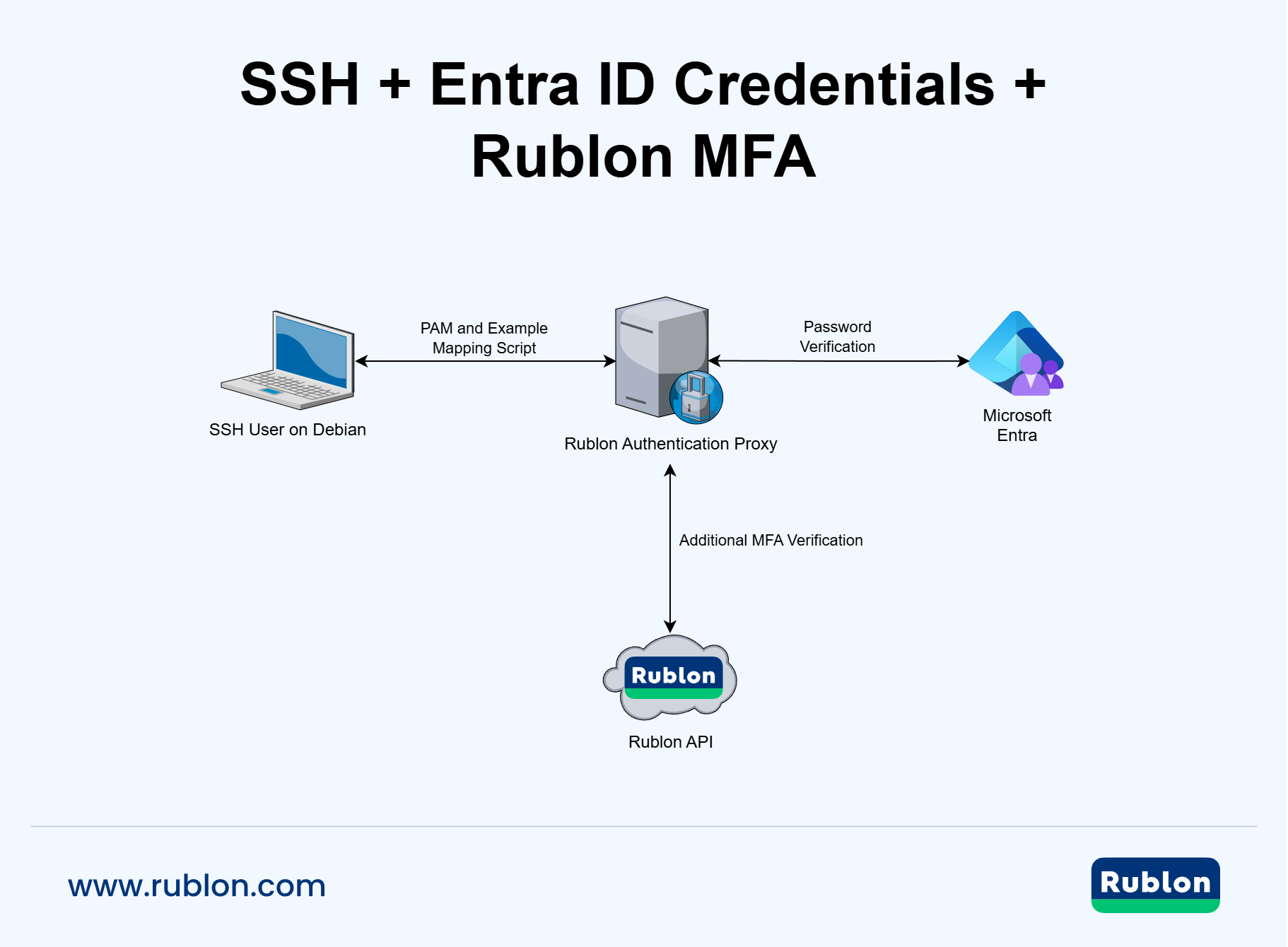
How SSH Login With Microsoft Entra ID Credentials and MFA Works
SSH Login Flow With Microsoft Entra ID Credentials and Rublon MFA Diagram
What This Configuration Changes
/etc/pam.d/sshd/etc/pam.d/common-authBefore You Start
Configure the LDAP Proxy in Rublon Authentication Proxy
alice@example.comUse LDAPS for the Connection From Debian
Protocol: LDAPS
Port: 636
Rublon Authentication Proxy host: rap.example.com
CA certificate: /etc/ssl/certs/rap-internal-ca.pemInstall the Required Packages
apt update

apt install -y \
  python3-ldap3 \
pamtestersystemctl status ssh --no-pagerCreate or Verify the Linux Account
id alicegetent passwd alicels -ld /home/aliceadduser alicealicealice@example.comPrepare an Example PAM Mapping Script
/usr/local/sbin/pam-rap-entra.py#!/usr/bin/env python3
import os
import pwd
import ssl
import sys
import syslog
from ldap3 import (
AUTO_BIND_NO_TLS,
SIMPLE,
Connection,
Server,
Tls,
)
from ldap3.core.exceptions import LDAPException
# Replace these values with settings for your environment.
RAP_HOST = "rap.example.com"
RAP_PORT = 636
RAP_CA_CERT = "/etc/ssl/certs/rap-internal-ca.pem"
UPN_SUFFIX = "example.com"
CONNECT_TIMEOUT = 10
AUTH_TIMEOUT = 90
MAX_PASSWORD_BYTES = 512
def log_error(message: str) -> None:
syslog.openlog("pam-rap-entra")
syslog.syslog(
syslog.LOG_AUTHPRIV | syslog.LOG_ERR,
message,
)
syslog.closelog()
def log_info(message: str) -> None:
syslog.openlog("pam-rap-entra")
syslog.syslog(
syslog.LOG_AUTHPRIV | syslog.LOG_INFO,
message,
)
syslog.closelog()
def main() -> int:
pam_user = os.environ.get("PAM_USER", "").strip()
pam_service = os.environ.get("PAM_SERVICE", "unknown").strip()
if not pam_user:
log_error("PAM_USER is empty")
return 1
# Debian needs a Linux account resolvable through NSS to provide
# the UID, GID, home directory, shell, file ownership,
# and process ownership.
try:
pwd.getpwnam(pam_user)
except KeyError:
log_error(
f"Local Linux user does not exist: {pam_user}"
)
return 1
# pam_exec.so with expose_authtok passes the authentication
# token to the command through standard input.
raw_password = sys.stdin.buffer.read(MAX_PASSWORD_BYTES)
try:
password = raw_password.rstrip(
b"\x00\r\n"
).decode(
"utf-8",
errors="strict",
)
except UnicodeDecodeError:
log_error(
f"Password decoding failed for user: {pam_user}"
)
return 1
if not password:
log_error(
f"Empty password received for user: {pam_user}"
)
return 1
# Map the Linux username to the Microsoft Entra ID UPN.
if "@" in pam_user:
log_error(
f"Full UPN is not accepted as the Linux username: {pam_user}"
)
return 1
entra_upn = f"{pam_user}@{UPN_SUFFIX}"
tls_config = Tls(
validate=ssl.CERT_REQUIRED,
ca_certs_file=RAP_CA_CERT,
)
server = Server(
RAP_HOST,
port=RAP_PORT,
use_ssl=True,
tls=tls_config,
connect_timeout=CONNECT_TIMEOUT,
)
connection = None
try:
connection = Connection(
server,
user=entra_upn,
password=password,
authentication=SIMPLE,
auto_bind=AUTO_BIND_NO_TLS,
receive_timeout=AUTH_TIMEOUT,
raise_exceptions=True,
)
log_info(
"Authentication successful: "
f"service={pam_service}, "
f"local={pam_user}, "
f"entra={entra_upn}"
)
return 0
except LDAPException as exc:
log_error(
"Authentication failed: "
f"service={pam_service}, "
f"local={pam_user}, "
f"entra={entra_upn}, "
f"error={exc}"
)
return 1
except Exception as exc:
log_error(
"Unexpected authentication error: "
f"service={pam_service}, "
f"local={pam_user}, "
f"entra={entra_upn}, "
f"error={exc}"
)
return 1
finally:
if connection is not None:
try:
connection.unbind()
except Exception:
pass
if __name__ == "__main__":
sys.exit(main())Adapt the Example Script
RAP_HOST = "rap.example.com"UPN_SUFFIX = "example.com"RAP_CA_CERT = "/etc/ssl/certs/rap-internal-ca.pem"Secure the Script
chown root:root /usr/local/sbin/pam-rap-entra.py
chmod 0700 /usr/local/sbin/pam-rap-entra.pypython3 -m py_compile /usr/local/sbin/pam-rap-entra.pyTest the PAM Helper Before Modifying SSH
cat > /etc/pam.d/rap-entra-test <<'EOF'
#%PAM-1.0
auth required pam_exec.so expose_authtok quiet /usr/local/sbin/pam-rap-entra.py
account required pam_permit.so
EOFpamtester rap-entra-test alice authenticatepamtester: successfully authenticated Verify the Effective OpenSSH Configuration
sshd -T | grep -E \
sshd -T | grep -E \
'^(usepam|passwordauthentication|pubkeyauthentication|kbdinteractiveauthentication|authenticationmethods|permitrootlogin|logingracetime) 'sshd -T \
-C user=alice,host=debian-server,addr=192.0.2.20 \
| grep -E \
'^(usepam|passwordauthentication|pubkeyauthentication|kbdinteractiveauthentication|authenticationmethods) 'usepam yes
passwordauthentication yes
pubkeyauthentication yes
kbdinteractiveauthentication no
authenticationmethods any
permitrootlogin prohibit-passwordsshd -tConnect the PAM Helper to SSH
cp -a \
  /etc/pam.d/sshd \
"/root/sshd-pam.before-entra-$(date +%F-%H%M%S)"/etc/pam.d/sshd@include common-authauth required pam_exec.so expose_authtok quiet /usr/local/sbin/pam-rap-entra.py# PAM configuration for the Secure Shell service
# Authenticate SSH password logins through
# Microsoft Entra ID and Rublon MFA.
auth required pam_exec.so expose_authtok quiet /usr/local/sbin/pam-rap-entra.py
account required pam_nologin.so
@include common-accountnl -ba /etc/pam.d/sshd | head -n 20Test the SSH PAM Service
pamtester sshd alice authenticate acct_mgmtpamtester: successfully authenticatedTest a Real SSH Password Login
ssh \
  -o PubkeyAuthentication=no \
  -o PreferredAuthentications=password \
  -o NumberOfPasswordPrompts=1 \
alice@192.0.2.10whoamialiceWhat Happens to SSH Public Key Authentication?
PubkeyAuthentication yesPassword-Based SSH Login
Public Key Login
Authentication Behavior After Configuration
Logs and Troubleshooting
View PAM Helper Logs
journalctl -t pam-rap-entrajournalctl -f -t pam-rap-entraView OpenSSH Logs
journalctl -u ssh -fTest the LDAPS Port
nc -vz rap.example.com 636Test the LDAPS Certificate
openssl s_client \
  -connect rap.example.com:636 \
  -servername rap.example.com \
  -CAfile /etc/ssl/certs/rap-internal-ca.pem \
</dev/nullVerify return code: 0 (ok)Repeat the PAM Tests
pamtester rap-entra-test alice authenticatepamtester sshd alice authenticate acct_mgmtCommon Problems
The Linux user cannot be resolved through NSS
getent passwd alice
id aliceRublon MFA does not start
Certificate validation fails
Public key authentication is selected instead of password authentication
-o PubkeyAuthentication=no
-o PreferredAuthentications=passwordRestore the Previous SSH PAM Configuration
ls -1t /root/sshd-pam.before-entra-* | headcp -a \
/root/sshd-pam.before-entra-YYYY-MM-DD-HHMMSS \
/etc/pam.d/sshdpamtester sshd alice authenticate