
Last updated on October 19, 2026
Overview of MFA for Windows Using Group Policy
Before You Start
Configure MFA for Windows Deployment Using Group Policy
Prepare the Deployment Share
C:\Clients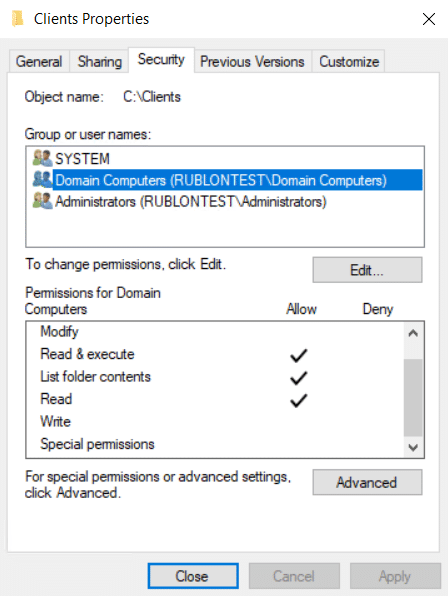
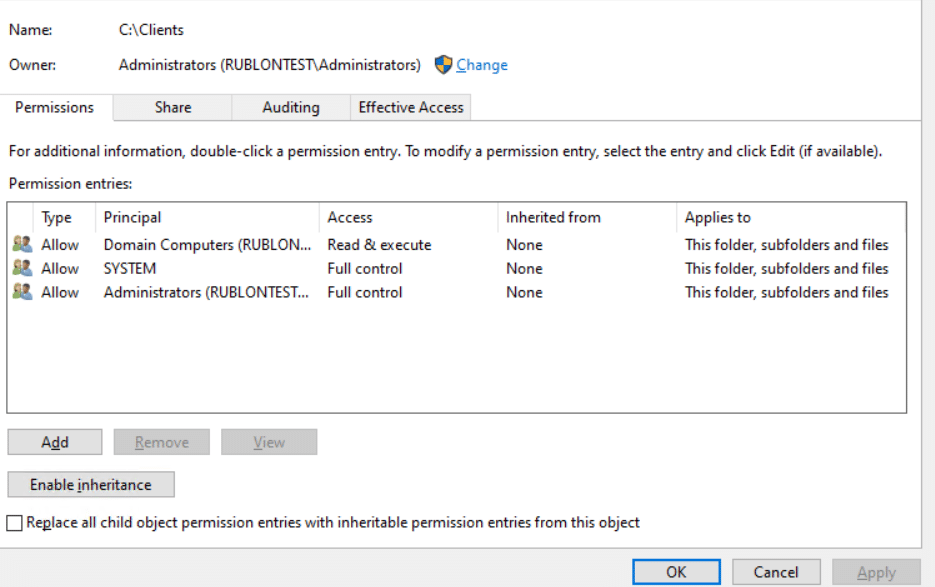
\\DC01\Clients$Create the Startup Script
@echo off
setlocal

set "VER=6.8.1"
set "SHARE=\\DC01\Clients$"
set "INSTALLED_VERSION="

for /f "tokens=3" %%A in ('reg query "HKLM\SOFTWARE\Rublon\WindowsLogon\Data" /v Version 2^>nul ^| find /i "Version"') do set "INSTALLED_VERSION=%%A"

if defined INSTALLED_VERSION (
    powershell.exe -NoProfile -NonInteractive -Command "if ([version]$env:INSTALLED_VERSION -ge [version]$env:VER) { exit 0 } else { exit 1 }"
    if not errorlevel 1 (
        endlocal
        exit /b 0
    )
)

msiexec.exe /i "%SHARE%\RublonForWindows-%VER%.msi" RUBLONCONF="%SHARE%\rublon.conf" /qn /norestart /l*vx "C:\Windows\Temp\rublon-gpo-install.log"

set "EXIT_CODE=%ERRORLEVEL%"
endlocal & exit /b %EXIT_CODE%Create and Configure the Group Policy Object
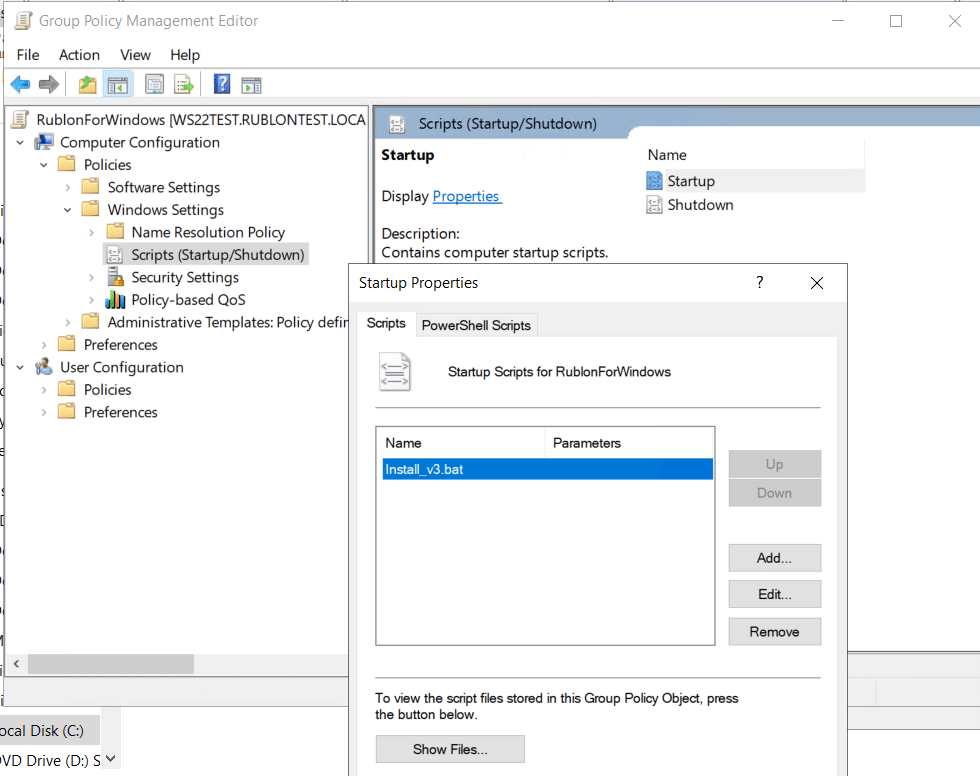
Deploy Rublon MFA to Your Windows Endpoints
gpupdate /forceOptional: Refresh Group Policy and Restart Multiple Endpoints
$ouPath = "OU=Clients,DC=contoso,DC=com"
$computers = Get-ADComputer -SearchBase $ouPath -Filter *

foreach ($computer in $computers) {
    Invoke-GPUpdate -Computer $computer.Name -Target Computer -Force -RandomDelayInMinutes 0
}$ouPath = "OU=Clients,DC=contoso,DC=com"
$computers = (Get-ADComputer -SearchBase $ouPath -Filter *).Name
Restart-Computer -ComputerName $computers -ForceTesting Deployment of Rublon MFA for Windows
$ouPath = "OU=Clients,DC=contoso,DC=com"
$computers = (Get-ADComputer -SearchBase $ouPath -Filter *).Name

Invoke-Command -ComputerName $computers -ScriptBlock {
    $data = Get-ItemProperty -Path "HKLM:\SOFTWARE\Rublon\WindowsLogon\Data" -ErrorAction SilentlyContinue

    [PSCustomObject]@{
        RublonInstalled = [bool]$data
        Version = $data.Version
    }
} | Select-Object PSComputerName, RublonInstalled, Version | Format-Table -AutoSizeUpdating the Connector
Optional: Uninstalling the Connector From Multiple Endpoints
$ouPath = "OU=Clients,DC=contoso,DC=com"
$computers = (Get-ADComputer -SearchBase $ouPath -Filter *).Name

Invoke-Command -ComputerName $computers -ScriptBlock {
    $uninstaller = "C:\Program Files\Rublon\Logon\unins000.exe"

    if (Test-Path $uninstaller) {
        Start-Process -FilePath $uninstaller -ArgumentList "/VERYSILENT", "/NORESTART" -Wait -NoNewWindow
    }
}$computers = @("WIN11-05", "WIN11-06", "WIN11-07")
Invoke-Command -ComputerName $computers -ScriptBlock {
$uninstaller = "C:\Program Files\Rublon\Logon\unins000.exe"
if (Test-Path $uninstaller) {
Start-Process -FilePath $uninstaller -ArgumentList "/VERYSILENT", "/NORESTART" -Wait -NoNewWindow
}
}