
CAC authentication (Common Access Card authentication) is a smartcard-based login method used by the U.S. Department of Defense. The CAC holds PKI certificates and, when combined with a PIN, enables two-factor authentication (2FA) for secure access to DoD networks and systems.
What You’ll Learn
- The full lifecycle of CAC: issuance, activation, renewal, revocation, replacement
- How the cryptographic logon (CLO) using CAC works
- Use cases and system integration (appliances, portals, legacy environments)
- Risks, mitigations, and best practices around CAC authentication
- Comparisons: CAC vs PIV, CAC in non-DoD contexts, alternatives
- What You’ll Learn
- Key Takeaways
- Common Access Cards in the Authentication Landscape
- How CAC Authentication Works
- CAC Lifecycle, Issuance & Management
- Common Access Card Authentication Common Use Cases
- CAC Authentication Benefits, Risks & Best Practices
- CAC vs Alternatives & Comparisons
- Common Access Card Implementation & Deployment Considerations
- Frequently Asked Questions About CAC
Key Takeaways
| Insight | Why It’s Useful |
| CAC is more than a badge | It’s a PKI smartcard driving secure logins and access |
| CAC + PIN = 2FA | “Something you have” + “something you know” |
| Certificate checks matter | OCSP, CRL, and chain validation are essential |
| Lifecycle is critical | Expiration, revocation, and replacement matter in practice |
| Be future-ready | CAC modernization (PIV-Auth alignment) is underway |
Common Access Cards in the Authentication Landscape
What Is a Common Access Card (CAC)?
The Common Access Card, or CAC, is a smartcard issued by the U.S. Department of Defense to active service members, DoD civilians, and eligible contractors. It’s roughly the size of a credit card and contains embedded chip technology that stores certificates, cryptographic keys, and identification data.
The CAC serves multiple roles:
- Visual ID for physical access
- Logical / network access credential via CAC authentication
- Digital signature and encryption tool
- Underlying trust token for secure systems within the DoD environment
Why CAC Authentication Matters
- Strong multi-factor authentication: CAC + PIN = proof of possession and knowledge.
- Secure integration with PKI: CAC stores digital certificates for authentication, signing, and encryption.
- Unified credential across domains: It bridges physical and logical access controls in the DoD’s infrastructure.
- Modernization & interoperability: DoD is aligning CAC to use the PIV-Auth certificate to reduce complexity and improve compatibility across federal systems.
How CAC Authentication Works
What Is CAC Smartcard Authentication?
CAC authentication leverages a smart card (the CAC) that stores cryptographic certificates, combined with a PIN, to securely prove identity. The CAC acts as a hardware token in a PKI system: the private key never leaves the card, and authentication requests involve a challenge signed by the card. This mechanism is used for both physical access and logical (network/app) access in DoD environments.
What Certificates Are Stored on a CAC & Why?
A typical CAC includes several certificates, such as:
- Identity / Logon Cert (for validating user identity)
- Digital Signature Cert (for signing documents)
- Encryption / Email Cert (for encrypting messages)
- PIV-Auth / Other access certs (for newer modernization)
These certificates enable multiple functions: authentication, digital signature, encryption, and access control. The CAC’s certificate hierarchy aligns with DoD’s PKI and trust anchors.
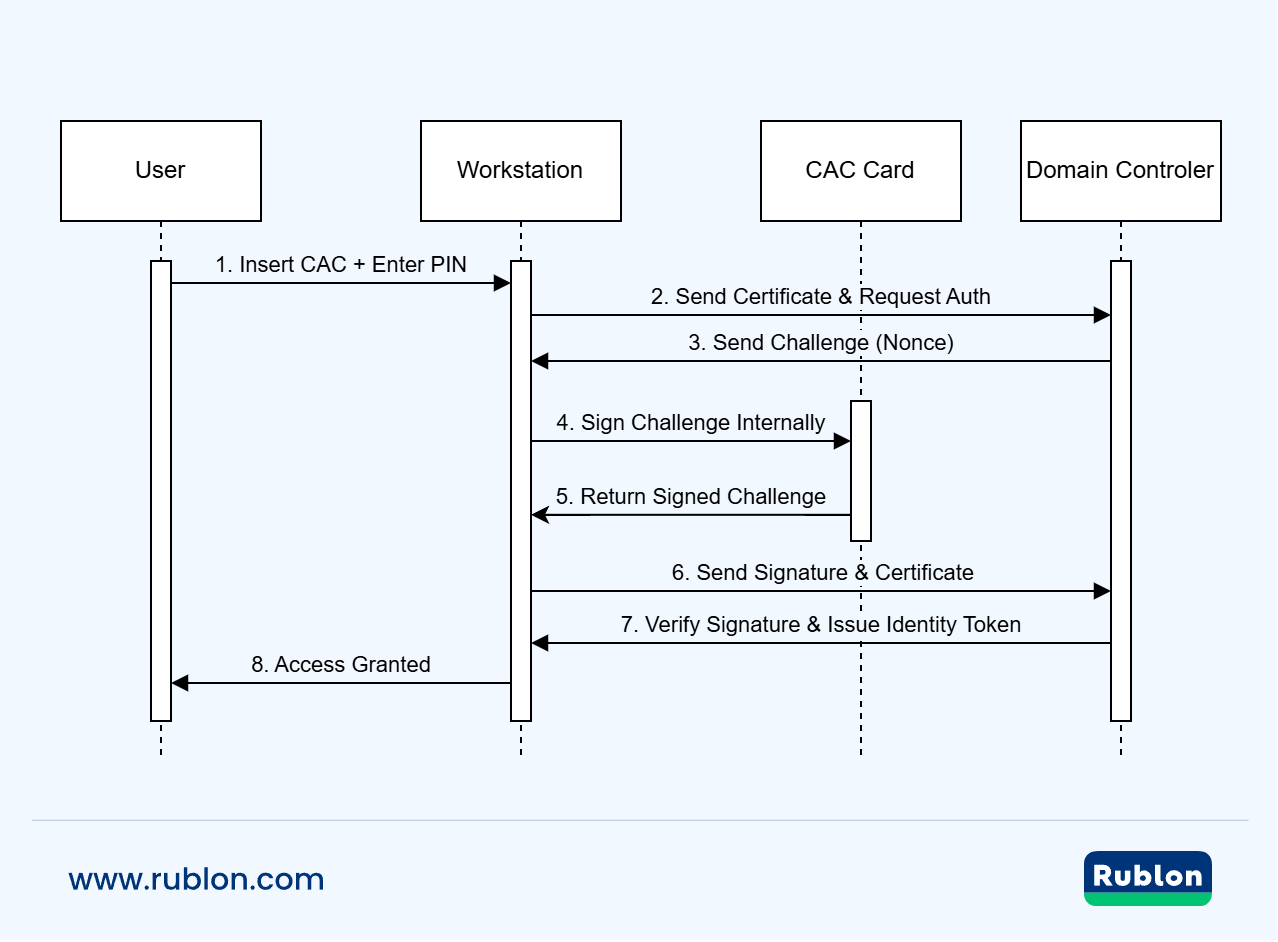
How Does Cryptographic Logon (CLO) Work with CAC?
Cryptographic Logon (CLO) replaces password-based logins in compatible systems. The flow typically is:
- Insert the CAC into a reader
- User enters PIN
- The system sends a cryptographic challenge
- The CAC signs the challenge with its private key
- The relying system validates the signature and certificate chain
This method ensures that both possession (card) and knowledge (PIN) are required.
How Are Certificates Validated & Revoked in CAC Authentication?
Even after authentication, systems must verify that the certificate is still valid and not revoked. Common strategies include:
- OCSP (Online Certificate Status Protocol) queries
- CRL (Certificate Revocation List) checks
- Validating the full certificate chain up to trusted root CAs
- Checking certificate validity periods
These certificate status checks ensure that expired, revoked, or otherwise invalid CACs cannot be misused.
Why Is CAC Authentication Considered Two-Factor?
CAC authentication inherently provides two factors:
- Something you have: the physical CAC itself
- Something you know: the PIN that unlocks the card
This combination strengthens security, reducing reliance on passwords alone.
How Does CAC Fit into PKI & What’s Its Role?
CAC is tightly integrated into public-key infrastructure (PKI): the DoD’s root and intermediate CAs issue certificates used by the CAC. The CAC becomes a secure vessel holding keys signed by trusted authorities, enabling secure authentication and encryption.
CAC Lifecycle, Issuance & Management
What Is the CAC Issuance Process?
- Sponsorship & Eligibility: Applicants must be sponsored by a DoD official or organization. The sponsor verifies the need for a CAC and ensures eligibility.
- DEERS Registration / Enrollment: The applicant’s data is registered in the Defense Enrollment Eligibility Reporting System (DEERS). This is a prerequisite before a CAC can be issued.
- Background Investigation: For CACs (versus generic DoD ID cards), a National Agency Check with Inquiry (NACI) and FBI fingerprint check are required before issuance.
- Identity & Eligibility Verification at RAPIDS: At a RAPIDS site, verifying officials inspect identity documents, capture biometrics, and confirm the applicant’s status.
- Issuance & Personalization: Once approved, the CAC is issued with embedded certificates, the user’s photo, and personalization details.
This end-to-end process ensures the CAC credential is tied reliably to a real, verified individual.
What Happens When a CAC Expires or Needs Renewal?
- CACs have expiration dates and will require renewal or reissuance before or at expiry.
- Eligibility, sponsorship, and identity verification may be rechecked during renewal.
- The DEERS / RAPIDS infrastructure supports renewal at authorized sites and may allow scheduling via the card office portal.
- If the cardholder’s status changes (e.g., separation, role change), the card may be invalidated or replaced.
What Happens If a CAC Is Lost, Stolen, or Compromised?
- The CAC must be reported promptly to the security office or issuing authority.
- The CAC’s status is revoked in DEERS / RAPIDS, and its associated certificates in the PKI are revoked via CRL / OCSP.
- A replacement card is issued after re-verification of identity and eligibility.
- Proper lifecycle management ensures that unauthorized use of lost cards is prevented.
What Role Does Middleware / Card Readers Play in CAC Management?
- Middleware (smart card middleware) acts as an intermediary between the OS/application and the CAC.
- Card readers (USB, contact, or contactless) must be compatible and trusted by the system.
- Middleware enforces PIN prompts, certificate access, and may interface with system policy for CAC authentication.

Common Access Card Authentication Common Use Cases
Where Is CAC Authentication Used in Real Life?
CAC authentication powers access in multiple domains across DoD and allied systems. Typical use cases include:
- Network/system logins: logging into desktops, laptops, enterprise systems, and secure portals using CAC + PIN.
- Appliance/console logins: routers, firewalls, proxy systems, and management consoles accepting CAC client certificates.
- SSH / CLI access: servers configured to accept CAC certificates for command line access.
- Physical access/facility entry: as a badge for secure doors, gates, and controlled access points.
- Digital signatures & encryption/email: using CAC certificates to sign or encrypt governmental messages and documents.
How to Configure CAC Authentication on Systems & Appliances
Many network and security appliances, including proxies and firewalls, support CAC authentication through certificate-based login. Below is a typical configuration workflow for enabling CAC-based access.
- Import the DoD PKI root and intermediate CA bundles to establish trust with the Common Access Card’s issuing authorities.
- Enable client certificate authentication, often referred to as X.509 certificate login mode, within the appliance’s access control settings.
- Configure revocation checking using OCSP (Online Certificate Status Protocol) or CRLs (Certificate Revocation Lists) to ensure that expired or revoked credentials are rejected.
- Map certificate attributes, such as the Subject Distinguished Name (DN) or Subject Alternative Name (SAN), to user accounts in your directory service (e.g., LDAP or Active Directory).
- Enforce certificate-based login for web interfaces and management consoles. Some systems may allow a hybrid mode that accepts both username/password and certificate-based authentication.
- Test authentication scenarios, including successful logins and failure cases (e.g., expired certificates, revoked CACs, or non-CAC users).
Example: On Trellix appliances, administrators can use CLI commands to import the CA bundle, enable certificate login, and configure OCSP parameters for real-time revocation checking.
Can CAC Be Used Outside DoD / in Cross-Agency or Civilian Systems?
Yes, with caveats. Because CAC is embedded in DoD’s PKI structure, integration into non-DoD or civilian systems depends on whether they trust the CAC CA roots and accept the certificate profiles. Some agencies accept CAC via PIV-Auth alignment and cross-trust policies.
In such environments, CAC can operate as a high-assurance credential, provided:
- The external system accepts DoD PKI root and intermediate trust chains
- Middleware and readers are supported in the target system
- The application maps certificate attributes to local authorization logic (LDAP, claims, etc.)
Common CAC Authentication Use Cases (With Supporting Sources)
Logging into management consoles/appliances (e.g., firewall UI)
Many DoD and federal systems support CAC-based certificate login for web interfaces. The CISA Capacity Enhancement Guide emphasizes strong authentication, including smart card integration for administrative access.
SSH/command line access on servers requiring client certificate auth
The IDManagement.gov guide on Smart Card Logon for SSH provides detailed instructions for using CAC credentials to authenticate via SSH on Linux servers.
Browser-based authentication / VPN portals accepting CAC certificates
CAC is widely used for web-based login to secure portals, including VPNs. The DoD CIO memo on Modernizing the CAC discusses interoperability and PKI-based access across systems.
Device/endpoint logon replacing or supplementing password logins
CAC is used for Windows smart card logon and other endpoint authentication scenarios. This is part of the broader federal push for phishing-resistant MFA, as outlined in NIST SP 800-63-3.
Document signing/encryption in DoD systems using CAC certificate functionality
CAC certificates support digital signing and encryption, especially for secure email and document workflows. This is a core PKI function referenced in DoD and federal identity standards.
CAC Authentication Benefits, Risks & Best Practices
What Are the Key Advantages of CAC Authentication?
High assurance, two-factor security
CAC authentication combines something you have (the smart card) with something you know (a PIN), aligning with multi-factor authentication principles.
Unified credential for multiple domains
The CAC supports logical access (network login), physical access (facility entry), digital signatures, and encryption, all from one credential.
Strong integration with PKI and trust chains
Certificates on the CAC are signed by DoD PKI roots and intermediates, ensuring that authentication is cryptographically verifiable and tamper-resistant.
Operational efficiency & standardization
The DoD’s modernization push toward PIV-Auth alignment helps reduce complexity, harmonize with federal systems, and lower maintenance overhead.
Resilient to password compromises
Because the private keys never leave the CAC and the card must be present, certain classes of credential theft attacks (phishing, password reuse) are mitigated.
What Are the Risks & Security Weaknesses of CAC Authentication?
Card Loss, Theft, or Unauthorized Use
A lost or stolen CAC, especially if the PIN is weak or exposed, can be misused until the card is revoked.
Certificate Expiry and Revocation Failures
If certificate status checks (OCSP, CRL) are delayed or unavailable, a revoked or expired CAC may still be accepted.
Middleware / Reader Vulnerabilities
The software layer (middleware, drivers, readers) may have bugs or misconfigurations that expose the credential flow to attacks.
Remote Access / RDP Pass-through Pitfalls
Solutions that use CAC passthrough via RDP sessions carry risk due to the broader exposure of RDP to network attacks.
The risk can be mitigated by securing RDP access with MFA, limiting RDP exposure to internal networks, and using VPN tunnels instead of direct access.
Weak PINs or Brute-Force Attacks
If PINs are weak or retry lockouts are not enforced, an attacker could guess or exploit brute force.
Cloning / Side-Channel / Card Tampering
Physical card tampering, side-channel attacks, and clone attempts may threaten card security if hardware protections are weak.
Gaps from Legacy or Unsupported Systems
Older systems might not fully support CAC or PKI standards, leading to fallback to weaker authentication or misintegration vulnerabilities.
Best Practices & Mitigations for Secure CAC Deployment
- Use strong PIN policies, retry limits, and lockout to protect against brute-force.
- Enforce mandatory certificate status checks (OCSP / CRL) in all relying systems.
- Apply strict middleware and reader security hygiene (patching, vendor vetting, sandboxing).
- Employ fast revocation propagation and monitoring to disable lost or compromised CACs quickly.
- Combine CAC with additional controls (e.g., network segmentation, zero trust) to limit the blast radius of compromised credentials.
- Train users in safe handling of CACs: always keep the card secure, never share PIN, report loss immediately.
- Conduct periodic audits, logging, and monitoring of CAC usage events to detect anomalies or misuse.
- Transition to PIV-Auth aligned certificates as part of modernization to improve interoperability and reduce complexity.
CAC vs Alternatives & Comparisons
CAC vs PIV / CAC vs PIV-Auth
- CAC is the DoD-specific smart card used by military, civilian DoD employees, and contractors; PIV is the federal standard for identity credentials across civilian agencies.
- PIV-Auth is a certificate on the CAC that aligns it more closely with PIV standards, aiding interoperability across federal systems.
- While both support certificate-based authentication and smartcard mechanisms, differences lie in root CA trust domains, certificate profiles, vetting requirements, and departmental policy.
- In practice, migrating CAC systems toward PIV-Auth compliance facilitates cross-agency access and reduces fragmentation.
CAC vs Other Smart Card and Token Systems
- Alternatives include hardware tokens (e.g., PKCS#11 tokens, YubiKeys), software certificates, and mobile credential solutions.
- Smart card tokens do not require batteries and store keys securely on hardware (offering similar benefits to CAC), but they lack the broader DoD integration for physical access and lifecycle management.
- Mobile and virtual credential alternatives may offer flexibility and convenience, but need to meet equivalent assurance levels, certificate protection, and revocation support.
When CAC Is Not the Right Tool
- For non-DoD and civilian systems that do not trust DoD’s PKI root, CAC may be incompatible unless cross-trust is established.
- In highly mobile or consumer scenarios (e.g., general business software) requiring ease of onboarding, CAC’s physical card and middleware dependencies may be burdensome.
- If an environment demands biometric-only or passwordless flows without hardware tokens, CAC may be overkill or not optimal.
Which Authentication Option Should You Choose?
- If you’re in the Department of Defense or other defense-related environments, CAC is often the required standard.
- In mixed or federal systems, ensure your solution is CAC + PIV-Auth ready or supports certificate bridging.
- For purely enterprise or consumer digital identity systems, modern token, mobile credential, or federated identity (OIDC, FIDO2) might offer greater flexibility.
- Use the comparisons section to match your environment’s trust, scale, and integration constraints.
Common Access Card Implementation & Deployment Considerations
What are the Key Deployment Challenges for CAC Authentication?
- Middleware, drivers & reader compatibility – ensuring the smart card middleware and card readers work reliably across different OS versions and platforms. Many CAC issues stem from driver mismatches or outdated firmware.
- Legacy systems & non-CAC aware applications – many enterprise or vendor systems may not support certificate-based login or smart card authentication, requiring adaptation or bridging.
- Certificate revocation/status check latency – if OCSP or CRL infrastructure is slow or unreachable, revoked CACs may still be accepted temporarily.
- User training & onboarding – unfamiliarity with how to use CAC for logon, PIN management, reader issues, etc., leads to support burden.
- Cost & infrastructure overhead – card issuance facilities, card printers, reader hardware, middleware licensing, and support operations.
- Cross-domain trust & interoperability – DoD’s modernization effort aims to align CAC with PIV-Auth so that CACs are interoperable with federal systems.
- Change management for certificate reduction – the DoD is transitioning to fewer certificates on the CAC and requiring adjustments in systems to use PIV-Auth as the primary authenticator.
What Policy, Compliance & Standards Must Be Addressed?
- “Modernizing the CAC” memorandum — directs use of the PIV-Auth certificate and reduction of legacy CAC certificates across DoD networks to improve interoperability and adherence to federal identity standards.
- CAC Developer & Implementation Guides — official DoD CAC developer resources describe middleware requirements, smart card reader specifications, token platforms, and endpoint implementation guidance.
- DoD Implementation Guide for CAC Next Generation (NG) — DoD’s end-point implementation guides define how CAC interacts with PIV interfaces and smart card endpoints.
Best Practices for Smooth CAC Deployment
- Start with a pilot program in a controlled environment to validate reader, middleware, and application integrations before full rollout.
- Ensure middleware and reader firmware are current and test with all target OS/platform versions.
- Use redundant or fallback revocation services (OCSP responders, cached CRLs) to maintain availability even if one path fails.
- Provide clear user training, documentation, and support escalation paths (especially for PIN resets, reader problems).
- Monitor and log CAC usage events and authentication failures to detect anomalies or deployment defects.
- Plan and communicate certificate reduction/modernization timelines, giving systems time to transition to PIV-Auth.
- Ensure that applications support mapping certificate attributes (subject DN, SAN) into user identity and authorization systems (e.g., LDAP).
- Apply segmentation and least privilege around systems accepting CAC authentication, so that the compromise of one system does not cascade.
Frequently Asked Questions About CAC
What Is CAC Authentication?
CAC authentication refers to the process of using a Common Access Card (CAC) as a smartcard credential for secure access. It involves a certificate stored on the CAC plus entry of the user’s PIN, enabling cryptographic proof of identity.
What Is a Common Access Card?
The Common Access Card (CAC) is a smartcard issued by the U.S. Department of Defense for military, DoD civilian, and eligible contractor personnel. It stores certificates, biometric data, and identification, and is used for both physical and logical access.
What Is CAC Smartcard Authentication?
CAC smartcard authentication is simply the use of the CAC’s embedded certificates in a smartcard-based protocol (e.g., PKI challenge/response) to authenticate users to systems. It’s the technical instantiation of “CAC authentication.”
What Certificates Does CAC Hold?
A typical Common Access Card (CAC) contains several digital certificates that serve distinct security functions. These include an identity or logon certificate, a digital signature certificate, and an encryption or email certificate. Newer CAC versions may also include PIV-Auth or access certificates. Together, these enable secure authentication, digital signing, encrypted communication, and access control across DoD systems.
How to Get CAC Authentication Setup?
To set up CAC authentication, you will need a valid Common Access Card, a compatible card reader, and the appropriate middleware installed. Begin by importing the Department of Defense PKI root and intermediate certificate authority (CA) bundles into your system. Next, enable certificate-based login within your operating system, application, or network appliance. Finally, configure certificate revocation checking using OCSP or CRL, and map certificate attributes to user accounts in your directory service.
Is CAC Two-Factor Authentication?
Yes. CAC authentication is two-factor: possession of the CAC card + knowledge of the PIN. This gives stronger assurance than a password-only login.
Can CAC Be Used in Civilian or Non-DoD Systems?
Sometimes. If a system trusts the DoD PKI root and supports the CAC certificate profile, CAC may work. But many civilian environments do not natively support DoD PKI trust chains or CAC middleware.
What Happens If CAC Expires?
When a CAC’s certificates expire or the card reaches its lifetime, it must be renewed or reissued. During expiration, access may fail for systems requiring current certificate validation.
How Secure Is CAC Authentication?
CAC authentication offers strong protection when implemented correctly. It resists phishing and credential theft. However, risks include card loss, PIN-based attacks, insecure middleware, delayed revocation, and system misconfiguration. Following best practices is essential to maintain security.