
Multi-factor authentication (MFA) cannot protect an account until the user has registered at least one authenticator. That simple dependency makes MFA enrollment one of the most important stages of an MFA rollout. If the enrollment process is confusing, inaccessible, or tied to a channel the user cannot safely access, adoption slows and support requests increase.
MFA Enrollment via SMS
Interested? Use Rublon MFA for free and see how easy it is.
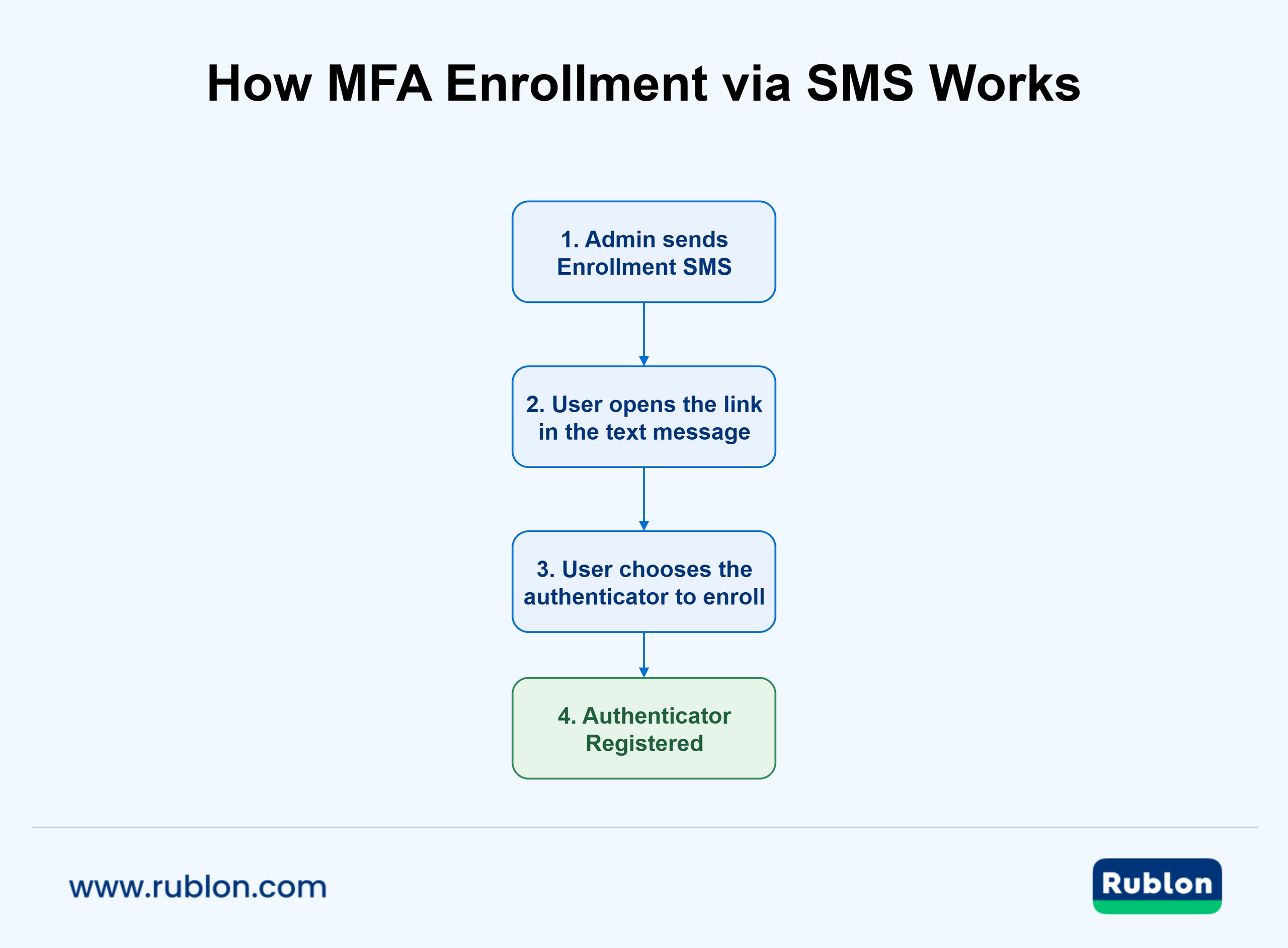
MFA enrollment via SMS gives administrators another way to start user self-service enrollment. Instead of sending the enrollment link only by email or waiting until the user signs in to a protected application, the organization can send a link to the user’s mobile phone. The user opens the SMS link and registers the authenticators permitted by organizational policy, such as a mobile authenticator app, a third-party TOTP app, a passkey, a security key, or a phone number.
The important distinction is that an Enrollment SMS is a delivery mechanism for the setup process. It is not tantamount to the SMS authentication method and does not require the user to choose SMS passcodes as their future MFA method.
How to Send an Enrollment SMS With Rublon MFA
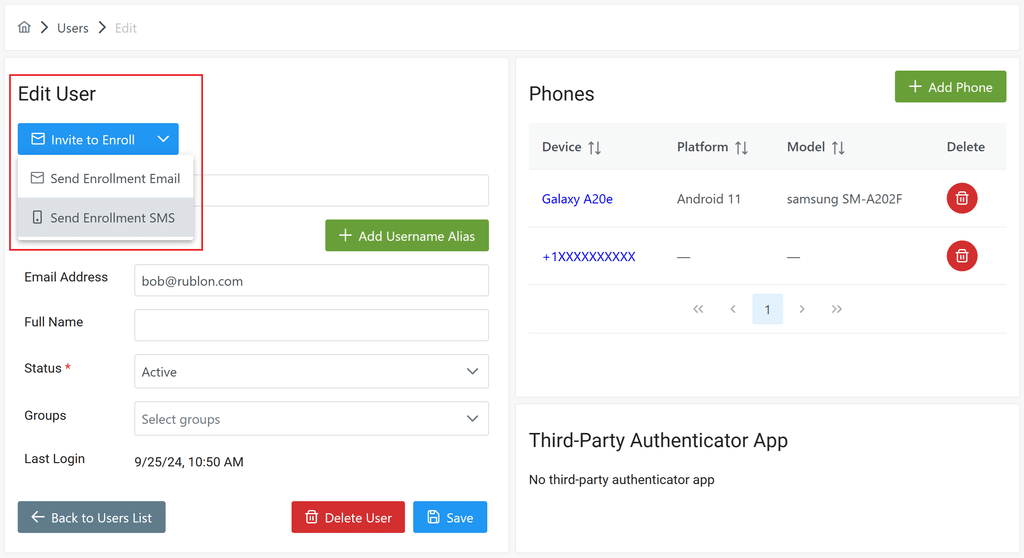
An administrator can send an Enrollment SMS from the Rublon Admin Console to a user whose profile contains a mobile phone number, provided that the organization has Phone Credits. The user receives a text message with an enrollment link, opens it, and follows the self-service flow to add an authenticator.
For the exact administrator workflow and current interface, see How to send an Enrollment SMS in the Rublon Admin Console.
What Is MFA Enrollment via SMS?
MFA enrollment via SMS is a user onboarding process in which an identity or MFA platform sends an authenticator enrollment link to a user’s mobile phone. After opening the link, the user enters a guided enrollment flow and registers an authenticator.
This workflow separates two tasks:
- Delivering access to the enrollment process. The SMS directs the intended user to the setup flow.
- Registering an authenticator. The user adds the app, passkey, security key, phone number, or other authenticator that will be used during future sign-ins.
This separation matters because the channel used to deliver an MFA enrollment link does not determine the strength of the authenticator ultimately registered. A user may receive the enrollment link by SMS and then register a phishing-resistant FIDO2 passkey or security key. Conversely, receiving the link through email does not make the resulting authenticator email-based.
Enrollment SMS vs. SMS-Based MFA
Enrollment SMS and SMS-based authentication are related to different stages of the identity lifecycle.
| Area | Enrollment SMS | SMS-based MFA |
| Primary purpose | Start authenticator registration | Verify a sign-in attempt |
| Typical content | Link to an enrollment flow | One-time passcode or approval link |
| Frequency | Usually during initial setup or re-enrollment | Potentially during every MFA challenge |
| User outcome | An authenticator is registered | An authentication attempt is approved |
| Authentication method used for future sign-ins | Any authenticator allowed by the organization and supported by the protected application | SMS Link or SMS Passcode |
This distinction prevents a common misunderstanding. Allowing users to self-enroll their authenticators through an SMS link does not mean the organization must rely on SMS OTP for ongoing authentication.
How NIST Guidance Applies to Enrollment SMS
NIST SP 800-63B classifies use of the public switched telephone network (PSTN) for out-of-band authentication as restricted. That restriction concerns using the PSTN as part of an authentication ceremony. An Enrollment SMS has a different role: it delivers a time-limited link for registering an authenticator that will be used later. This distinction does not make an enrollment link risk-free or establish compliance with NIST’s separate authenticator-binding requirements. Organizations should control the phone-number lifecycle, protect enrollment and re-enrollment processes, and encourage users to register strong authenticators supported by their applications.
How SMS Self-Service MFA Enrollment Works
The exact interface varies by platform, but a typical Rublon MFA workflow has the following steps:
- An administrator creates or synchronizes the user’s account.
- An administrator adds the user’s mobile phone number to the user’s profile.
- The administrator sends the user an SMS enrollment link.
- The user opens the link and registers a selected authenticator.
- The administrator verifies completion through Activity Logs and the authenticator appearing in the Rublon Admin Console.
The process gives the user direct control over registering their authenticator while allowing the administrator to control who receives an enrollment link and which types of authenticators are available.
Depending on the platform and policy, users may be able to register a mobile authenticator app, third-party TOTP app, FIDO2 passkey, FIDO2 security key, YubiKey OTP key, phone number, or another supported authenticator.
Free Trial of Rublon MFA →
Why Use a Separate Enrollment Channel for Webmail MFA?
Webmail is one of the clearest use cases for MFA enrollment via SMS. Suppose an organization is preparing to protect Outlook Web App, Microsoft 365, Roundcube, or another browser-based mailbox with MFA. If the organization sends the initial enrollment link only to that same mailbox, the setup process depends on the system being protected.
The user may be unable to access the mailbox after enforcement begins, and a configuration issue affecting email may also prevent delivery of the enrollment instructions. A compromised mailbox could expose the message, while new employees may need to prepare an authenticator before receiving normal access to corporate email. Users may also find an email asking them to secure that same inbox confusing or suspicious.
Sending the MFA enrollment link to a mobile number that the organization has confirmed belongs to the user establishes a separate delivery path. The user does not need to open the protected mailbox to begin authenticator registration. This reduces dependency on a single system and can make the rollout easier to explain: the text message initiates setup, while the newly registered authenticator protects future access to webmail.
Channel separation should not be confused with a guarantee of stronger identity proofing. Mobile numbers can be incorrect, recycled, reassigned, or exposed through SIM-swap and account takeover attacks. The organization still needs a trustworthy process for collecting, verifying, updating, and removing phone numbers.
When the protected application is webmail, Enrollment SMS avoids depending on the same inbox that MFA is intended to secure. See how to enroll webmail users in MFA with SMS Enrollment. For the broader deployment scenario, see how Rublon MFA helps organizations secure access to email systems with MFA
When an SMS Enrollment Link Is Useful
Although webmail is a strong example, SMS-based authenticator enrollment supports other deployment scenarios.
1. Users Cannot Yet Access Corporate Email
New hires, seasonal workers, contractors, and external collaborators may need to enroll before their mailbox or internal access is active. An SMS link can start setup without a working corporate inbox.
2. The Integration Does Not Support the Rublon Prompt
Some VPN, remote desktop, command-line, and legacy integrations do not support the Rublon Prompt. As a result, users cannot open the Manage Authenticators view during sign-in. An administrator can instead send an Enrollment Email or Enrollment SMS from the Rublon Admin Console so the user can register an authenticator before MFA is enforced. Enrollment SMS is particularly useful when email is unavailable or when the organization wants to use a channel separate from the mailbox being protected.
3. The Organization Wants a Phased MFA Rollout
Administrators can send enrollment links to a pilot group, confirm that users have registered authenticators, and then expand the deployment in stages. This helps identify delivery, policy, and support issues before MFA is enforced for the wider user population.
4. Email Delivery Is Unreliable or Inappropriate
Email filters, quarantines, full mailboxes, or delayed provisioning can interfere with email onboarding. SMS provides an alternative when verified mobile numbers and adequate coverage are available.
Enrollment Channel Comparison
No single enrollment route fits every user population. A resilient MFA rollout usually supports more than one controlled path.
| Enrollment Route | Best Suited to | Main Limitation |
| Enrollment SMS | Webmail protection, pre-enrollment, mobile-first users, users without mailbox access | Requires a correct, controlled mobile number, available Phone Credits, and reliable SMS delivery |
| Enrollment Email | Users with trusted mailbox access and established email onboarding | Depends on email availability and mailbox security |
| Self-enrollment in Manage Authenticators | Users signing in through integrations that support Rublon Prompt and Manage Authenticators | Not available in integrations that do not support Rublon Prompt |
Security Best Practices for SMS Authenticator Enrollment
Authenticator enrollment is a security-sensitive event. If an attacker can start or intercept enrollment for another user, they may be able to bind their own authenticator to the victim’s account. Treat the enrollment path as part of the authentication system, not as an ordinary marketing message.
1. Verify the Phone Number Before Sending the Link
Use a managed HR process, verified directory record, or administrator-confirmed profile. Never send an enrollment link to a number copied from an unverified support request, and control how number changes are approved.
2. Tell Users What to Expect
Before rollout, explain when the Enrollment SMS will arrive, who sends it, what domain the link opens, and what information the workflow will never request. This helps users recognize smishing.
3. Protect Enrollment and Authenticator Changes
Rublon MFA enrollment links expire after 48 hours. Users should not forward them. Before sending a new enrollment link or allowing an authenticator to be replaced, follow your organization’s approved process for verifying the user’s identity.
4. Prefer Strong Authenticators for Ongoing Access
SMS can deliver the link without becoming the long-term authentication method. For sensitive systems and privileged accounts, prioritize FIDO2 passkeys and security keys. Under NIST SP 800-63B, verifiers must offer at least one phishing-resistant authentication option at AAL2, while AAL3 requires phishing-resistant authentication with a non-exportable private key. CISA likewise recommends phishing-resistant MFA.
5. Provide Alternative Enrollment Routes
Not every user has a mobile phone, reliable coverage, or permission to use a personal device for work. Maintain alternative enrollment routes, such as Enrollment Email and self-enrollment through Manage Authenticators, for users who cannot receive an Enrollment SMS. Define a supported administrator or help-desk process for exceptions.
6. Monitor Enrollment Activity
Use Audit Logs to review administrator actions, Activity Logs to review authenticator registrations and removals, and Phone Logs to review SMS enrollment events and Phone Credit usage. Investigate repeated enrollment messages or unexpected authenticator changes.
Explore Related Email Security and MFA Enrollment Use Cases
Frequently Asked Questions
Can Users Self-Enroll MFA Authenticators via SMS?
Yes. An MFA platform like Rublon MFA can send a user an SMS link that opens a self-service authenticator enrollment flow and allows the user to register the authenticators allowed by organizational policy.
Can an SMS Enrollment Link Be Used to Register a Passkey?
Yes, if the MFA platform, browser, device, and policy support it. In Rublon MFA, the SMS opens the setup flow and the passkey can be created during that flow. Learn more about FIDO2 passkeys and security keys and how to enroll a FIDO2 passkey in Rublon MFA.
Is Enrollment SMS the Same as an SMS Passcode (SMS OTP)?
No. An Enrollment SMS starts authenticator registration. An SMS passcode is a one-time code (OTP) used to approve an authentication attempt. A user who receives an Enrollment SMS may register a mobile app, passkey, security key, or another supported authenticator instead of using SMS passcodes.
Is SMS Enrollment Better Than Email Enrollment?
SMS Enrollment should not be treated as safer than Enrollment Email. SMS is exposed to risks such as SIM swapping, number porting, message interception, and unauthorized access to the receiving phone. A well-protected mailbox with MFA may provide a stronger delivery channel. The main reason to choose Enrollment SMS is channel separation: the user cannot access email, or the mailbox itself is the resource being secured. Regardless of the delivery channel, the authenticator registered through the enrollment link determines how the user will verify future sign-ins.
Should Organizations Keep More Than One Authenticator per User?
Yes, where policy permits, registering a backup authenticator can reduce lockouts when a phone is lost, an app is unavailable, or a security key is damaged. NIST SP 800-63B recommends encouraging users to maintain at least two separate means of authentication and requires credential service providers following its requirements to permit multiple authenticators to be bound to an account.
Does Rublon SMS Enrollment Require Phone Credits?
Yes. The organization must have Phone Credits, and the user must have a mobile phone number in their Rublon Admin Console profile before an administrator can send an Enrollment SMS.
How Long Is a Rublon MFA Enrollment Link Valid?
A Rublon MFA enrollment link is valid for 48 hours. If the user opens it after it expires, the administrator must send a new Enrollment Email or Enrollment SMS.
SMS Enrollment Adds Flexibility to MFA Deployment
MFA self-service enrollment works best when users can reach the setup flow before enforcement blocks access. Sending an authenticator enrollment link via SMS gives organizations an alternative to email-only enrollment and self-enrollment through Manage Authenticators, particularly when protecting webmail, preparing users before MFA enforcement, or enrolling people who do not yet have corporate mailbox access.
The SMS channel should be used deliberately. Verify phone numbers, prepare users for the message, monitor enrollment events, provide accessible alternatives, and encourage strong authenticators for ongoing access. With these controls in place, SMS enrollment can make MFA deployment more flexible without limiting users to SMS-based authentication.