
An employee taps a badge to enter the building, sits down at a workstation, and discovers that the internet connection is down. The badge reader still works. Whether the employee can complete MFA depends on what the sign-in software can verify without the cloud.
Offline RFID MFA lets users complete multi-factor authentication with an enrolled RFID card or tag when the protected system cannot reach its online MFA service. A prepared computer verifies the RFID second factor locally, alongside the required first factor, such as a password.
For organizations that already issue RFID employee badges, this can extend a familiar physical access credential to digital sign-ins without requiring a smartphone or a separate FIDO2 security key for every user.
Rublon MFA provides a practical example through Offline Mode in its Windows connector, which supports RFID authentication for prepared Windows computers.
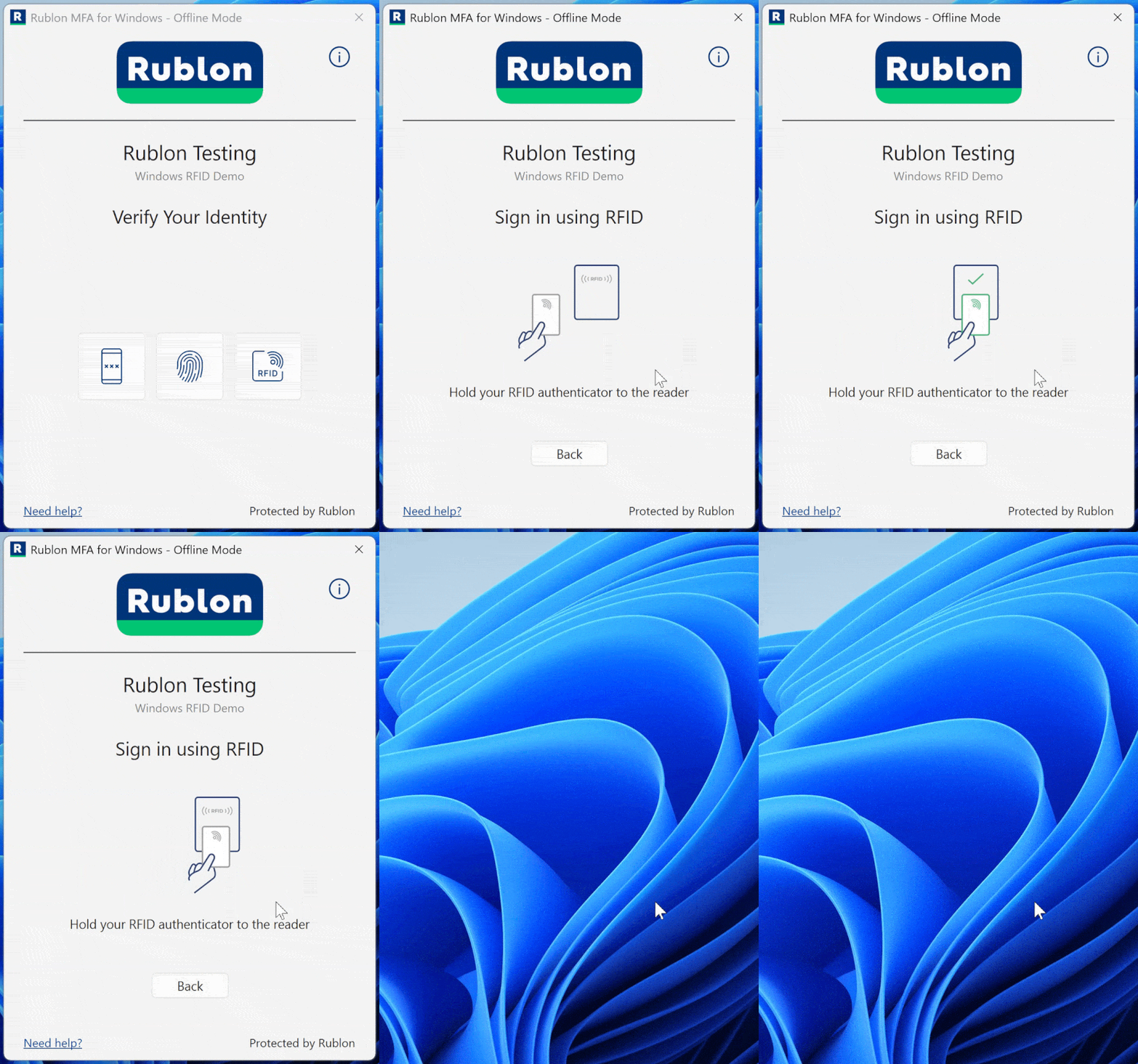
Offline Windows MFA With Employee Badges
Start Rublon MFA’s 30-Day Free Trial and protect Windows sign-ins with RFID cards and tags, even when the computer cannot reach the cloud.
What Is Offline RFID MFA?
Offline RFID MFA, also called RFID offline multi-factor authentication, is a way of identity verification that uses an RFID authenticator as one authentication factor in a sign-in without contacting the online MFA service. The other factor is usually a password. The authenticator can be a supported RFID employee badge, card, key fob, or tag.
In a typical offline RFID 2FA flow, the user first enters a password and then presents an enrolled badge to a reader. The password is something the user knows; the badge is something the user has. The system must verify both factors before granting access.
Does RFID Itself Need an Internet Connection?
No. Radio-frequency identification uses local radio communication between a tag and a reader. Reading a badge does not, by itself, require internet access. However, the software receiving that information may depend on a server to decide whether to allow access.
This distinction matters for MFA. A working reader does not guarantee a working offline sign-in. The authentication software must support local verification and already have the data required to recognize the user’s enrolled authenticator.
An on-premises authentication server reachable over an internal network is another option: it may operate without public internet access while still performing server-based verification. This article focuses on offline MFA that the prepared endpoint can verify locally.
How Does Offline Verification Differ From Cloud-Based MFA?
| Aspect | Cloud-Based RFID MFA | Offline RFID MFA |
|---|---|---|
| MFA Verification | The system contacts the cloud authentication service | The prepared computer verifies the RFID factor locally |
| Preparation | Enrollment and permitted connectivity to the MFA service | Enrollment, offline configuration, and authentication data on the computer |
| Account Changes | The service can use its current account information | The computer relies on previously received information |
| Availability | Requires access to the cloud service | Depends on local preparation and the product’s offline usage limits |
How Does Offline RFID MFA Work?
Before the computer goes offline, the MFA system links the RFID authenticator to the user and prepares the computer to verify it. During an offline sign-in, the reader communicates with the card while the local software makes the MFA decision.
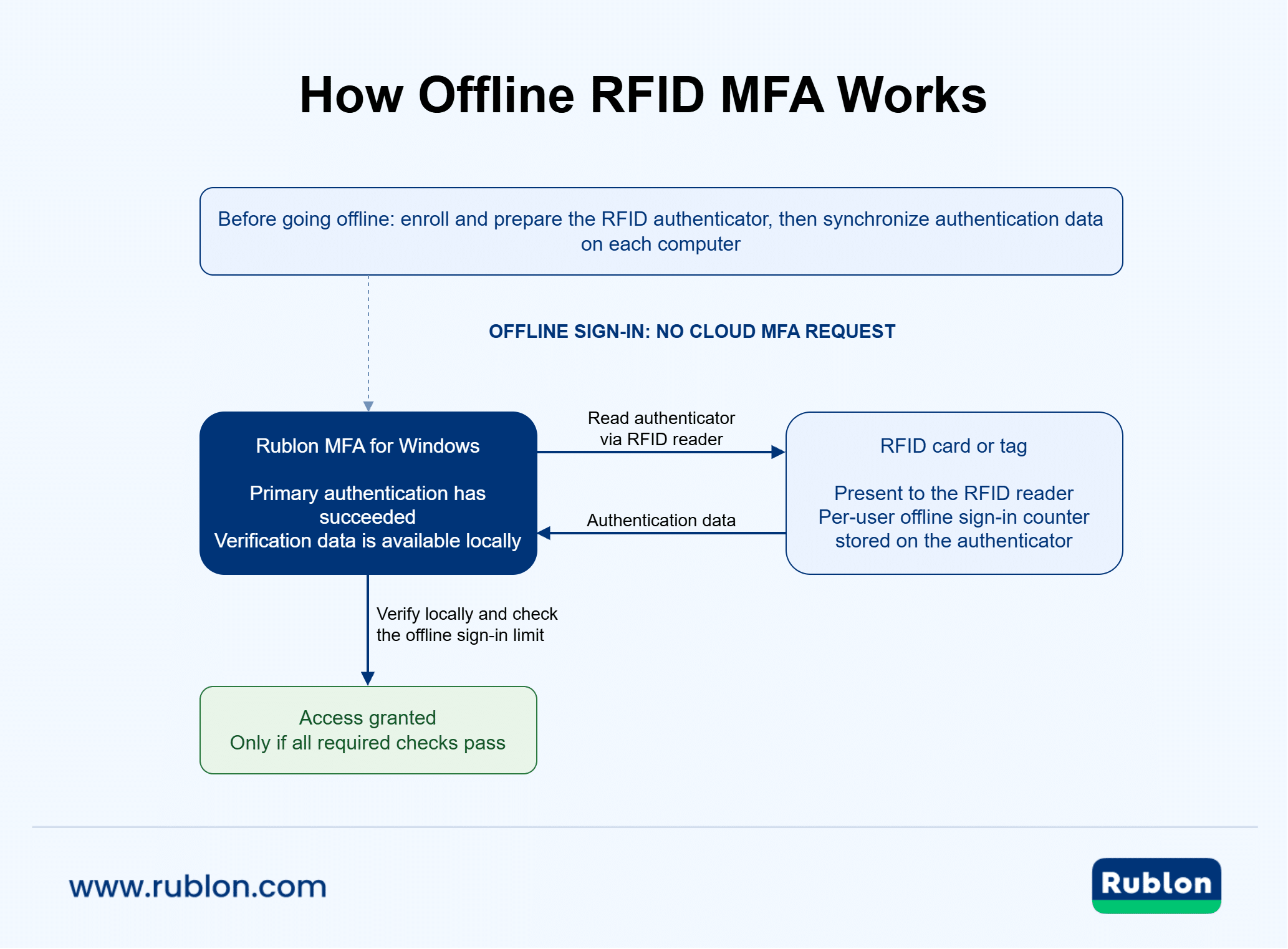
The exact setup depends on the product, but the user’s journey follows these general steps:
- Enroll your RFID authenticator. Associate a compatible card or tag with your own account in the MFA system.
- Prepare each computer for offline access. Follow the product’s setup process while connectivity is available. The software must receive the required authentication data before the computer goes offline.
- Start signing in. Complete the first authentication step, such as entering your account password.
- Present your RFID badge to the reader. When the MFA prompt requests RFID authentication, hold your enrolled card or tag near a supported reader.
- Wait for verification. The software checks the RFID factor using locally available data and applies the relevant offline restrictions. Access is granted when all required checks succeed.
Does Enrolling a Badge Prepare Every Computer?
No. Enrollment identifies which authenticator belongs to the user. Each computer also needs the data and configuration required to verify that authenticator offline. A badge that works on a prepared workstation may not yet work offline on a newly issued laptop.
On shared workstations, prepare the authentication data for every user who needs offline access. Preparing one employee’s account does not prepare the whole team.
Offline MFA Still Verifies the User
Offline MFA requires a supported second factor even when the cloud service cannot be reached. An MFA bypass skips that verification.
Configure and test the connector’s Fail Mode for situations where offline authentication is unavailable or its requirements are not met.
Where Is Offline RFID MFA Useful?
Employee Badges for Physical and Digital Access
Employees who already carry compatible building-access RFID badges may be able to use those same badges as a second factor for computer sign-ins. This reduces the need to issue another physical authenticator and keeps the interaction familiar: enter account credentials, then present the badge.
To use an existing access badge for Windows MFA, confirm that the badge and reader are supported by your MFA solution, then enroll the badge with the employee’s account. Employees can carry one RFID badge for both purposes, while administrators can manage building access and computer permissions separately.
Shared Workstations and Shift Changes
Production teams, warehouse staff, clinicians, and service-desk employees often move between shared computers. An individually assigned RFID badge can provide a practical second factor in sign-ins to shared Windows workstations without requiring users to retrieve a phone at each sign-in.
During an internet outage, employees can continue signing in with their own accounts and enrolled RFID badges. To make this possible, administrators must ensure that each employee’s authentication data has been synchronized on the shared workstations they use before those computers go offline.
Workplaces Where Smartphones Are Restricted
Some workplaces prohibit phones or make them impractical to use during a shift. RFID-based two-factor authentication (2FA) gives employees a physical authenticator they can present to a reader without opening an app, receiving a message, or entering a one-time code.
For organizations with an existing badge program, the operational benefit can be substantial: employees keep using an item they already carry, including during supported offline sign-ins.
Put Employee Badges to Work for MFA
Rublon MFA lets organizations use supported proximity cards for MFA and extend physical access control system (PACS) credentials to Windows and RDP authentication.
The same familiar badge interaction can also support offline Windows authentication once the authenticator and each computer have been prepared.
Internet Outages, Intranets, and Restricted Networks
An office, factory, or warehouse can lose its internet connection while employees still have work to do on local computers and the company intranet. Offline RFID MFA lets them sign in to prepared workstations with their account credentials and enrolled badges, without contacting the cloud MFA service.
The same approach can support computers on internal networks where internet access is restricted or available only during scheduled maintenance. Administrators prepare the computers while the MFA service is reachable, so employees can complete supported sign-ins during periods without external connectivity.
Permanently air-gapped environments require a different approach: the authentication system must also support enrollment, updates, and recovery entirely within the isolated network.
How Secure Is Offline RFID Authentication?
RFID security depends on the card technology, the way the MFA product verifies it, and the protection of the local computer. “RFID” describes a broad technology family, not a single security level.
A design that checks only a readily copied card identifier offers different protection from one that uses a card’s stronger authentication features. Going offline does not improve the underlying card technology or automatically make a credential resistant to cloning.
Choose cards and readers that the MFA product explicitly supports and that match the organization’s security requirements. Compatibility alone is not a security recommendation. Protect each RFID badge as an authentication credential and report loss promptly.
If you need a phishing-resistant MFA option for offline access, consider Offline FIDO MFA.
Why Use RFID If FIDO Is Also Available?
Unlike FIDO authentication, the RFID badge MFA described here is not phishing-resistant. Its advantages are practical: employees can reuse compatible access badges. For organizations whose existing badges meet their security requirements, this can reduce the need to purchase and distribute separate authenticators. Employees can then use a familiar card-and-reader interaction, while the organization can add a second factor to computer sign-ins.
| Consideration | RFID Badge MFA | FIDO MFA |
|---|---|---|
| Existing Credentials | Can reuse supported employee badges or tags | Requires a supported FIDO authenticator |
| User Interaction | Present the badge to a compatible reader | Use the authenticator, with touch, PIN, or biometric verification as required |
| Security Assessment | Evaluate the card technology and its implementation | Evaluate the supported phishing-resistant flow and authenticator |
| Deployment Priority | Familiar badge use and reuse of existing credentials | Phishing-resistant authentication |
The choice between RFID MFA and FIDO MFA for offline login should follow the access risk and organizational policy. NIST’s highest Authentication Assurance Level, AAL3, requires phishing resistance and a non-exportable authentication key, among other controls. Neither an RFID badge nor a product’s FIDO support establishes AAL3 compliance by itself.
Test Offline Windows MFA With Your Existing RFID Badges
Check badge compatibility, prepare a Windows workstation, and test RFID authentication before the next internet outage.
How Rublon MFA Supports Offline RFID Authentication
Rublon MFA for Windows Logon and RDP adds a second authentication step to supported Windows sign-ins. When the computer cannot reach the Rublon API, Offline Mode can verify an enrolled RFID authenticator using authentication data previously synchronized on that computer.
Employees can use the same compatible RFID badge for multi-factor authentication both online and offline. Administrators manage MFA centrally and prepare Windows computers to verify users when cloud connectivity is unavailable.
Local Windows Sign-Ins, Unlocking, and UAC
Offline RFID MFA in Rublon MFA supports local Windows sign-ins, session unlocking, and User Account Control (UAC) prompts. For example, an administrator can complete the additional authentication step for a protected elevation request by presenting an enrolled RFID authenticator while the computer is offline.
In scenarios of this kind, Windows must still validate the account and its permissions. The RFID authentication method adds identity verification, but does not replace the first authentication step or grant administrator rights.
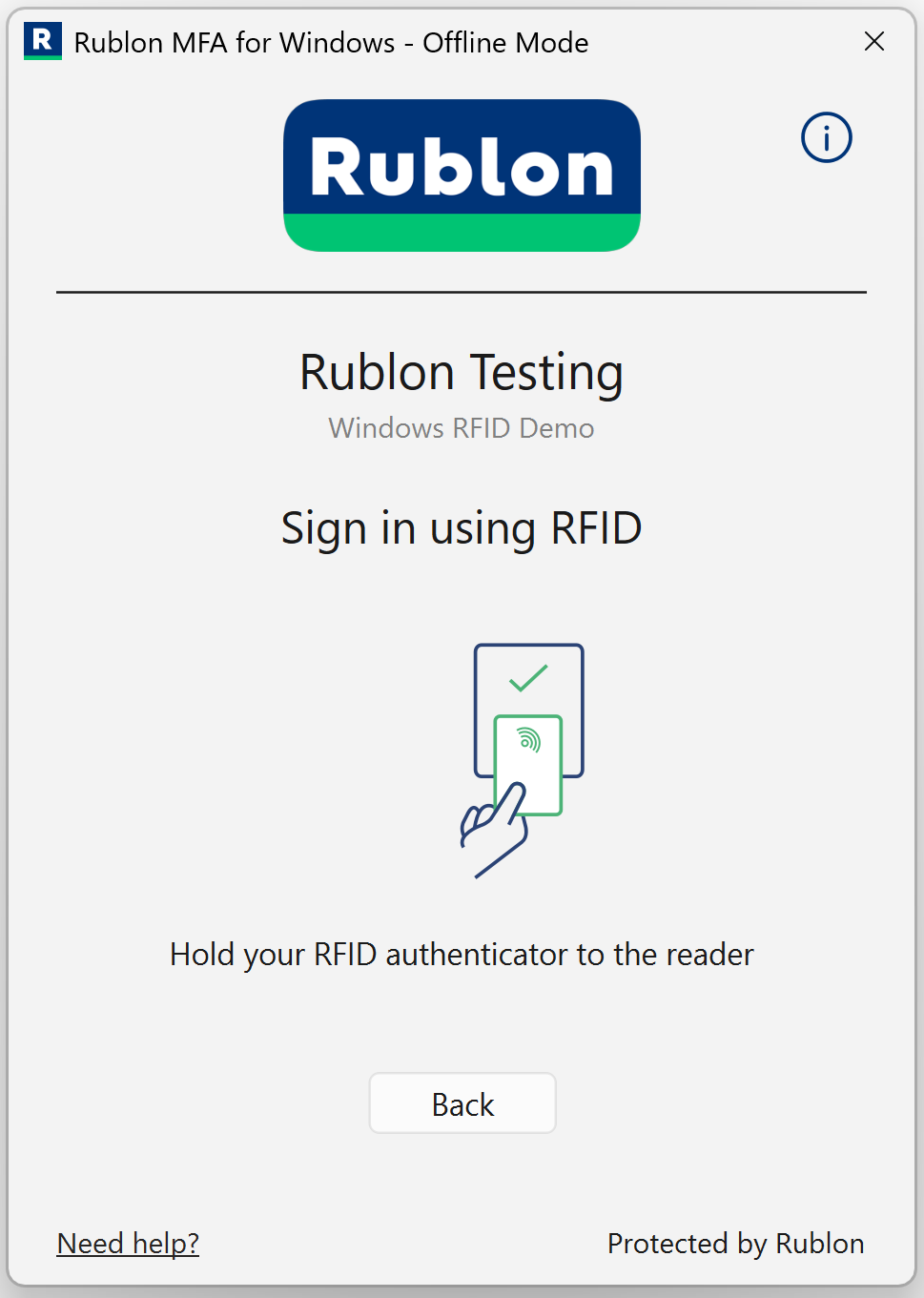
RFID MFA for RDP Without Public Internet Access
Rublon MFA also supports offline RFID authentication for RDP sign-ins. The remote Windows computer must be prepared to verify the user’s authenticator, and the RDP connection must allow the required smart card redirection.
Free Trial of Rublon MFA →
Combining RFID, FIDO, and Passcodes for Offline Login
Offline Mode in Rublon MFA for Windows supports a few authentication methods, including RFID, FIDO, and Passcode. Thanks to this, organizations can choose methods around employee workflows, security requirements, and internal policies instead of issuing the same kind of MFA authenticator to everyone.
Rublon MFA’s Authentication Methods Policy lets administrators control which methods users can select for protected applications. Where phishing resistance is required, administrators can select an appropriate FIDO flow and verify that offline behavior and recovery paths preserve that requirement.
The offline FIDO MFA guide explains the alternative based on FIDO2 security keys and local cryptographic verification.
Note
Rublon MFA combines online setup and central management with offline Windows authentication. Users prepare their authenticators and synchronize user data while the Rublon API is reachable.
This deployment model is intended for computers used both online and offline, rather than permanently air-gapped systems that cannot contact the Rublon API at any stage.
How Do You Prepare Computers for Offline RFID MFA?
Complete preparation while connectivity is available, before relying on an employee’s RFID badge for offline login:
- Check the existing RFID badge and reader. Confirm compatibility and review the security guidance for Rublon MFA’s RFID authentication method.
- Install and configure the connector. Enable Rublon MFA for Windows’ Offline Mode for the required Windows sign-in scenarios.
- Enroll and prepare the authenticator. Ask employees to follow the RFID enrollment instructions and complete any additional preparation required for previously enrolled cards.
- Synchronize each target computer. Ensure the user’s authentication data is available on every workstation they will need to access offline.
- Test the intended sign-in. With Rublon API connectivity unavailable, verify that the user can complete MFA using the enrolled RFID authenticator.
- Test limits and recovery. Confirm what users see when offline access is exhausted, or the RFID authenticator cannot be used, and verify the approved recovery procedure.
For setup instructions, RFID preparation requirements, and current offline sign-in limits, refer to:
What Should Administrators Test Before Offline RFID MFA Deployment?
Use representative users and Windows endpoints, as well as supported RFID authenticators and readers. The test should cover both normal access and the situations that would otherwise leave staff unable to work.
| Test | What to Verify |
|---|---|
| Prepared user and enrolled badge | The user completes the intended offline MFA flow |
| Missing authentication data | Access follows the approved failure behavior |
| Wrong or unregistered badge | The RFID authentication attempt is rejected |
| Shared workstation | Each required user can authenticate with their own account and enrolled badge |
| Moving between computers | Each computer is prepared; moving does not unexpectedly bypass an offline usage limit |
| Offline sign-in limit | Users receive clear instructions and can restore access through the documented online process |
| UAC and RDP | The intended elevation and remote sign-in scenarios work with the required configuration |
| Lost badge or unavailable reader | The approved recovery method is available and has been tested |
RFID and MFA Security Guidance
- NIST SP 800-98: risks and safeguards for RFID systems.
- NIST SP 800-63B-4: authentication assurance levels and authenticator requirements.
- OWASP: MFA implementation, factor selection, and recovery guidance.
Frequently Asked Questions About Offline RFID MFA
Can RFID MFA Work Without an Internet Connection?
Yes, when the MFA implementation supports offline verification, and the computer has been prepared beforehand. The RFID reader communicates locally with the card, while the software checks the RFID factor using locally available authentication data.
A working RFID authenticator reader alone does not enable offline MFA. Rublon MFA for Windows provides this capability through Offline Mode.
Can I Use My Employee Badge for Offline MFA?
Yes, but using an RFID badge to enter a building does not automatically enroll it for computer access. Some multi-factor authentication solutions like Rublon MFA support offline RFID MFA, allowing the enrollment of RFID authenticators for offline authentication.
Is Tapping an RFID Badge Alone Two-Factor Authentication?
Not by itself. Presenting a badge proves possession of one authenticator. Two-factor authentication requires a second independent authentication factor, such as a password.
In the Rublon MFA Windows sign-in flow, users complete primary authentication as always and then verify their identity with an enrolled RFID authenticator. This is an example of two-factor authentication.
What Is the Difference Between RFID and NFC Cards?
RFID is the broader family of radio-frequency identification technologies. In contrast, NFC is a specific short-range contactless technology operating at 13.56 MHz.
Not every RFID card is compatible with an NFC reader. For MFA, check the specific card technology, reader, and authentication software.
Is an RFID Badge the Same as an NFC FIDO Security Key?
No. NFC is the contactless communication technology used for the tap. It does not determine how authentication works. An NFC FIDO security key uses FIDO authentication, which ties cryptographic credentials to the intended service to help prevent phishing.
RFID badge MFA uses a different process that depends on the card technology and the MFA solution. It can include cryptographic checks rather than simply reading a card ID. Although both methods can offer a plug and tap-based sign-in, they do not provide the same security guarantees.
Can Offline RFID MFA Work With Active Directory Accounts?
Yes, when the integration supports those accounts and Windows can complete the first authentication step without internet access. For example, a computer may reach an on-premises Active Directory domain controller over the local network while public internet access is unavailable.
On a fully disconnected computer, Windows must already be able to validate the account offline, for example using cached domain logon information. Rublon MFA’s local RFID verification protects the additional MFA step, but it does not replace Windows account validation.
Can the Same RFID Card Be Used on Several Offline Computers?
Yes, provided that each computer has been prepared for that user and authenticator. However, offline limits may apply across computers.
What Happens If an Employee Loses Their RFID Badge?
They can use a previously prepared alternative authenticator or the organization’s approved recovery process, like Recovery Codes in Rublon MFA for Windows.
Try Offline RFID MFA With Rublon MFA
Put your organization’s compatible RFID badges to work for Windows security. Rublon MFA lets employees use RFID authenticators as a second factor for supported sign-ins both online and offline, without relying on a smartphone. Start your 30-day free trial and try RFID authentication in your own environment.