
Last updated on October 7, 2026
FIDO At A Glance
Key Takeaways
What is FIDO?
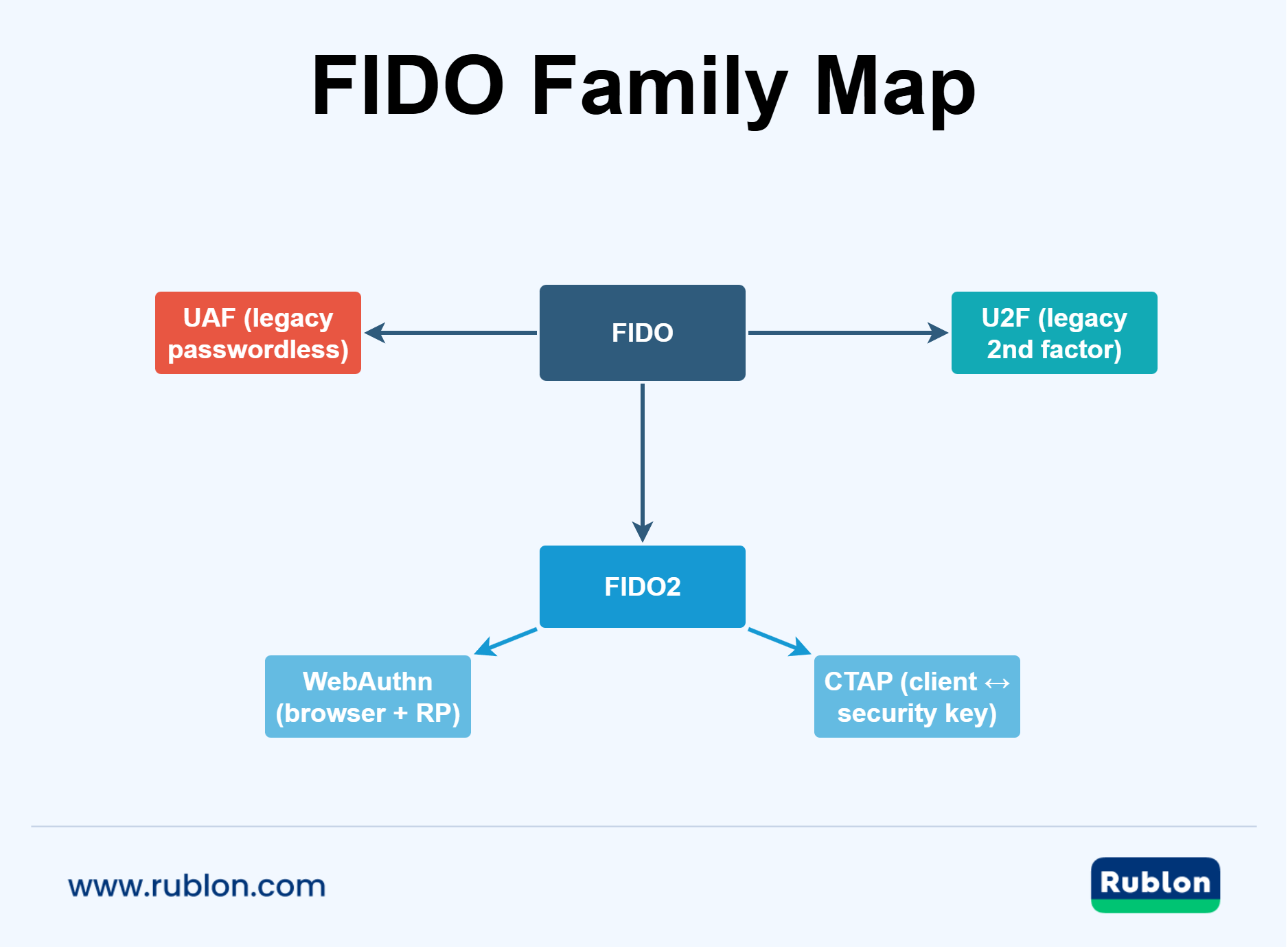
What Does FIDO Stand For?
What Is FIDO Used For?
FIDO Definition In Plain English
What Is FIDO Authentication?
The Role Of The FIDO Alliance
How Does FIDO Work?
The 30-Second Explanation
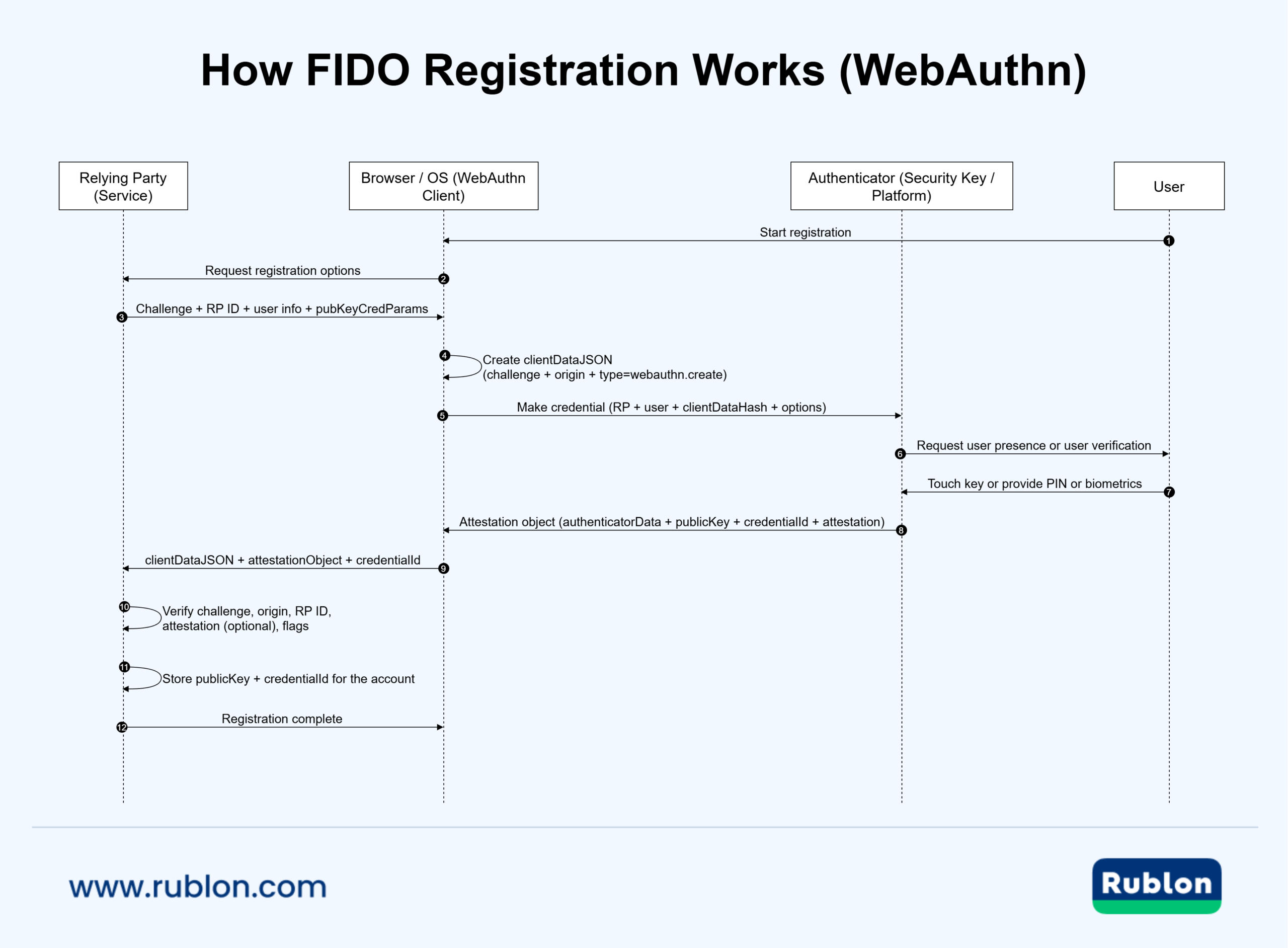
Step-By-Step: FIDO Registration
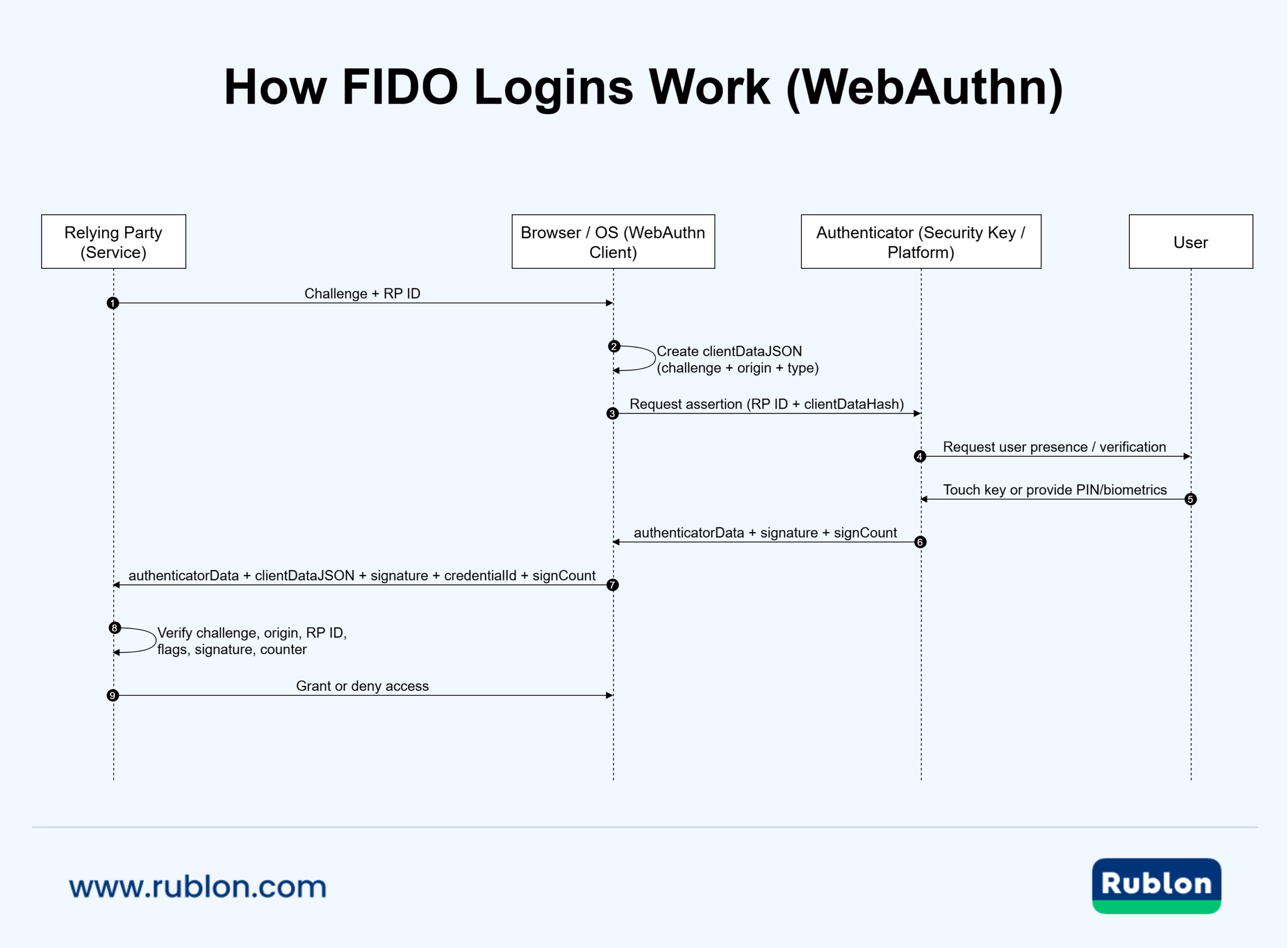
Step-By-Step: FIDO Login
FIDO Login in a Real MFA Scenario

What Makes FIDO Phishing-Resistant?
What Happens When You Use A FIDO NFC Key or FIDO NFC Card?
Where Verification Happens in a FIDO Login
FIDO Certified Authenticator Levels (L1, L2, L3) Explained
What is FIDO2 Certification?
What is the Difference Between FIDO2 L1 and L2?
What is the Difference Between FIDO2 L2 and L3?
Why FIDO Authenticator Levels Are Not the Same as NIST AALs
Is YubiKey FIDO2 Certified?
Looking for a FIDO MFA Provider?
Protect Active Directory and Entra ID users from hackers with phishing-resistant FIDO security keys and passkeys.
How FIDO Prevents Common Cyber Attack Types
Why an Attacker Cannot Replace or Alter a FIDO Assertion
How FIDO Prevents Credential Phishing
How FIDO Blocks Replay Attacks
How FIDO Protects Against Credential Stuffing
How FIDO Reduces SIM‑Swap and SMS‑Interception Risk
How FIDO Limits Server‑Side Breach Impact
How FIDO Prevents MITM Attacks

Benefits Of FIDO Authentication
Stronger Security Against Real-World Attacks
FIDO raises the bar against the attacks that routinely break password-based authentication:
- Phishing resistance by design: WebAuthn is built around origin-bound credentials, so a fake website cannot easily harvest something reusable. If you want an applied explanation of why that matters in multi-factor authentication (MFA), see What Is Phishing-Resistant MFA?.
- Reduced credential stuffing risk: there is no password reuse problem because FIDO credentials are not shared secrets.
- Fewer database breach consequences: services store public keys, not password verifiers that can be cracked and replayed elsewhere.
FIDO is one of several multi‑factor authentication methods, and its role and unique advantages become clearer when viewed alongside other MFA and 2FA methods.
Better User Experience and Higher Adoption
Security programs fail when users cannot or will not use them. FIDO helps because it replaces tiresome manual steps with a quick approval action:
- A touch on a FIDO security key
- A local PIN check
- A biometric verification on the user’s device
A quick approval flow tends to outperform OTP in adoption, especially in high-frequency workforce sign-ins.
Lower Operational Costs for IT and Helpdesk
Passwords are expensive. A significant share of helpdesk volume in many environments comes from resets, lockouts, and account-recovery friction. FIDO can reduce that burden by reducing password reliance and encouraging cleaner enrollment practices, such as requiring backup authenticators.
Interoperability and Ecosystem Flexibility
Because FIDO is standards-based, you are not buying into a single proprietary authentication scheme. This matters for long-term architecture:
- You can mix authenticator types, including platform authenticators and external keys.
- You can evolve policies over time without rebuilding authentication from scratch.
- You can reduce vendor lock-in risk because authentication relies on published specifications.
A Clear Path to Phishing-Resistant MFA
Not all MFA is equal. OTP-based approaches can still be phished, and they rely on shared secrets that can be replayed. FIDO-based MFA can be a step-change improvement, but only if implemented and enforced correctly.
- Best fit for phishing resistance: FIDO2 security key authentication and properly configured WebAuthn sign-ins.
- Good stepping stone: stronger mobile app-based authentication factors while you migrate critical users to FIDO.
- Highest risk: SMS 2FA as primary protection in high-value environments.
How to Use FIDO
Using FIDO successfully is less about “turning it on” and more about making a few smart decisions up front: which authenticators to allow, how users enroll, what happens when a device is lost, and which fallback methods are permitted. Deployed well, FIDO authentication can significantly improve sign-in security and user experience at the same time, especially when you aim for phishing resistance.
Choose Your FIDO Approach: Passwordless Or Second Factor
Most organizations use FIDO in one of these patterns:
- Passwordless sign-in: the FIDO credential is the primary way users authenticate.
- Phishing-resistant MFA: FIDO is required as an additional step for higher assurance.
Select The Right Authenticator Type For Your Users
“FIDO device” can mean different things, and that choice affects usability, cost, and assurance.
Common FIDO authenticator categories are:
- Platform Authenticator: built into a phone, tablet, or computer and protected by the device. Platform authenticators are commonly used for passkeys and passwordless sign-ins.
- Roaming Authenticator (External): a portable authenticator such as a FIDO security key used across multiple devices.
Common transports and form factors for roaming authenticators include:
- USB security key (USB-A or USB-C) for desktops and laptops.
- FIDO NFC key for tap-based use on mobile devices.
- FIDO NFC card for badge-style deployments and tap workflows.
- Bluetooth security key for situations where USB or NFC is impractical.
Practical FIDO authenticator type selection guidance:
- If your users are frequently on mobile, NFC support can matter more than USB.
- If your users are on modern laptops, USB-C support is the default requirement.
- If you protect privileged accounts, consider requiring an external security key as a high-assurance option.
Check Compatibility Before You Standardize On Hardware
This step prevents painful rollbacks later.
Make a quick compatibility checklist:
- User devices: Windows, macOS, iOS, Android, and the connector types available.
- Browsers and applications: which ones support WebAuthn sign-in flows in your environment?
- Identity provider: what policies you can enforce, such as requiring user verification.
Enroll Users With A Clear, Low-Friction Process
Enrollment is the moment where adoption either accelerates or stalls. Keep it simple and predictable:
- Provide one recommended path for most users.
- Offer a second option for edge cases, such as users without mobile devices.
- Include a short verification step that confirms the authenticator works before enforcement begins.
Enrollment best practices:
- Require at least one backup method for account recovery (a backup FIDO security key is strongly recommended).
- Encourage users to register more than one FIDO authenticator if possible.
- Avoid rolling out strict FIDO enforcement until all users have completed enrollment successfully.
Centrally managed FIDO MFA
Enforce FIDO MFA via WebAuthn/U2F security keys & FIDO2 passkeys to achieve the highest level of security and compliance.
Define Recovery and Lifecycle Rules Before Enforcement
FIDO reduces password risk, but it does not remove the need for recovery planning. The recovery policy is also where attackers often try social engineering.
Cover these scenarios explicitly:
- Lost phone or laptop
- Lost FIDO security key
- Role change (new access requirements)
- Offboarding (authenticator cleanup)
Security-minded defaults:
- Require a backup authenticator at enrollment time.
- Introduce additional security steps in the account recovery process, especially for privileged accounts.
- Monitor and log recovery events, like high-risk administrative actions.
Set Policy Guardrails That Preserve Phishing Resistance
FIDO’s security value can be weakened if users can always fall back to weaker methods during sign-in. Decide what your acceptable fallbacks are, and when they are allowed.
Policy suggestions:
- Use FIDO as the primary step or the required second step for high-risk sign-ins.
- Limit OTP and SMS fallback to exception paths with additional verification.
- Apply stricter requirements for administrators and sensitive systems.
Roll Out In Phases
A phased FIDO rollout reduces disruption and improves adoption.
A proven rollout sequence:
- Pilot with a small group, including helpdesk and administrators.
- Expand enrollment to broader teams with clear instructions.
- Enforce for high-risk apps and roles first.
- Tighten fallbacks after adoption stabilizes.
Track a few simple metrics:
- Enrollment completion rate
- Authentication success rate
- Helpdesk tickets for sign-in and recovery
- Number of sign-ins using FIDO versus fallback methods
FIDO2 Explained: Standards Stack, Authenticators, and Real-World Compatibility
FIDO2 is the modern generation of FIDO standards designed to enable strong, phishing-resistant authentication on the web and across modern platforms. In practical terms, FIDO2 is what most people mean today when they talk about signing in with a FIDO security key, a device-bound credential, or a passkey-based login flow.
At the standards level, FIDO2 combines two parts:
- WebAuthn: a W3C standard that defines how websites request and verify public key credentials using browsers and operating systems.
- CTAP: a FIDO Alliance standard that defines how external authenticators, such as a roaming security key, communicate with a client device.
You can review the official FIDO2 components in the FIDO Alliance specifications and the W3C WebAuthn specification at Web Authentication.
FIDO2 Definition in Plain Language
A clear FIDO2 definition is: FIDO2 is a set of open standards for passwordless and phishing-resistant authentication that uses public key credentials and modern web platform support.
In practice:
- A website or identity provider stores a public key for your account.
- Your authenticator keeps the private key and performs signing operations locally.
- During login, the authenticator returns a signed assertion that the server verifies.
- The credential is scoped to the legitimate site context, which helps prevent phishing.
This is why FIDO2 is widely used for high-assurance sign-ins and why it is a foundation for many passwordless initiatives.
What is the FIDO2 Standard?
The FIDO2 standard is not a single document. It is a standards stack that enables interoperable authentication across browsers, operating systems, and authenticators.
What that means for people evaluating security products:
- A FIDO2 authenticator that follows the specs can work across many services that support WebAuthn.
- The relying party verifies a signed response using the stored public key.
- You can choose between platform authenticators and external security keys depending on your assurance and usability goals.
For a practical implementation context in an MFA product, check how Rublon MFA positions its support for these methods at FIDO authentication methods in Rublon MFA.
Is FIDO2 a Physical Key?
No. FIDO2 is a standard, not a device, so FIDO2 itself is never a physical key. What can be physical is the authenticator that implements the FIDO2 standard.
Two common implementations are:
- Platform authenticator: built into a phone or computer and used for passkeys and passwordless sign-ins.
- Roaming authenticator: an external FIDO2 security key that connects over USB, NFC, or Bluetooth.
A FIDO2 security key is a category of hardware authenticator. YubiKey is one example of a security key that supports FIDO2, but “YubiKey” and “FIDO2 security key” are not the same term.
What is a FIDO2 Security Key?
A FIDO2 security key is a roaming authenticator, a portable hardware device that implements FIDO2 authentication. It can be used across multiple computers and mobile devices and is often chosen when an organization needs consistent, high-assurance authentication for sensitive access.
Typical reasons organizations choose a security key:
- High assurance for administrators and sensitive systems because the authenticator is a dedicated possession factor.
- Strong phishing resistance when FIDO-based policies are enforced, and weak fallbacks are limited.
- Reduced credential theft risk because key operations occur on the authenticator rather than relying on replayable codes.
A security key functions as a hardware-backed passkey carrier. Compared with passkeys stored only in software, hardware-backed passkeys are harder to abuse after endpoint compromise because the private key stays protected inside the device and requires a deliberate user action at authentication time. A detailed comparison is covered in Software vs. Hardware Passkeys: What’s the Difference?.
FIDO2 Security Key Biometric: What It Really Means
FIDO2 security key biometric can mean two different things:
- The security key has its own biometric sensor and does local matching on the key, like in the YubiKey Bio.
- The user authenticates with a platform biometric prompt on their device while using a FIDO2 credential, like a Windows Hello Fingerprint.
In both cases, the core idea is the same: user verification happens locally, and the private key remains protected.
FIDO2 Security Key on Microsoft and iPhone
In Microsoft-centric environments, a FIDO2 security key is commonly used for high-assurance workforce sign-ins, including passwordless and phishing-resistant authentication sign-ins to Windows 10 and Windows 11 with Microsoft Entra ID. The practical requirement is that the sign-in surface supports WebAuthn and that the chosen key matches the connectors users actually have on their endpoints.
On iPhone, the key factors are transport and workflow. Many iPhone scenarios rely on NFC or a compatible connector, and support can vary depending on whether the flow is happening in a browser, within an app, or as part of account security features.
A reliable compatibility checklist is straightforward:
- Match the key to your endpoints: USB-C for modern laptops, USB-A for legacy desktops, NFC for mobile tap workflows.
- Validate the exact sign-in path your users take, including the browser and identity provider.
- Confirm policy requirements such as user verification, especially for administrators and sensitive systems.
FIDO2 Smart Card: Is It the Same Thing?
FIDO2 smart card is a popular phrase, but it can be imprecise.
An easy way to explain it:
- Smart cards are often associated with certificate-based authentication and Public Key Infrastructure (PKI) workflows.
- FIDO2 authentication is public key-based, too, but it uses WebAuthn ceremonies and authenticator-backed keys rather than classic smart card middleware patterns.
For readers comparing these approaches, a strong explainer is PKI vs. FIDO for Passwordless Authentication: What’s the Difference?.
What is the FIDO2 Specification?
The phrase “FIDO2 specification” usually refers to the formal standards documents that define how the ecosystem works. Canonical sources are:
What is WebAuthn?
WebAuthn, short for Web Authentication, is a web standard that lets websites and identity providers authenticate users with public key credentials instead of passwords. It is published by the W3C and is a core building block of modern FIDO2 authentication. The canonical specification is Web Authentication: An API for accessing Public Key Credentials.
In practical terms, WebAuthn is the browser and operating system interface that makes it possible to sign in using a FIDO security key, a built-in device authenticator, or a passkey-style credential. On the standards side, it pairs with FIDO CTAP, which defines how external authenticators communicate with a client device.
What Does WebAuthn Do in a Login Flow?
WebAuthn defines how a website:
- Requests the creation of a public key credential during enrollment
- Requests a signed assertion during login
- Receives the result back from the browser in a verifiable format
This is why WebAuthn appears in many real-world implementations of FIDO authentication.
User Presence vs. User Verification in WebAuthn
WebAuthn supports the concepts of user presence and user verification, which affect the assurance level. User presence means the user performed an intentional action, such as touching a security key. In contrast, user verification means the authenticator performed a stronger local check, such as a PIN or biometric verification, before signing.
Why WebAuthn is Often Described as Phishing-Resistant
A major reason WebAuthn is recommended for phishing resistance is that it is designed around relying party identification and origin binding. In a correctly implemented flow, the authenticator signs a challenge in a way that is scoped to the legitimate site context, rather than producing a reusable secret that can be replayed elsewhere.
What is U2F?
U2F, short for Universal 2nd Factor, is an older FIDO standard designed to strengthen login security by adding a second authentication step using cryptography. In everyday terms, U2F is the technology that made the classic “tap your FIDO security key to approve sign-in” experience popular long before passkeys became mainstream.
U2F matters in a modern FIDO for the following reasons:
- Many organizations still have U2F-era keys, deployments, and user habits.
- Most modern FIDO2 authenticators are backward‑compatible and can operate in U2F mode, allowing them to work with applications that only support U2F.
If you want the archival background from the standards body, the FIDO Alliance maintains a practical overview at FIDO U2F & UAF Tutorial.
How U2F Authentication Works
U2F follows the same core security idea that makes FIDO compelling:
- The service stores a public key for the user.
- The user’s authenticator stores the private key.
- During login, the service sends a challenge, and the authenticator signs it.
In a typical U2F flow, the authenticator is an external hardware token, which is why many people associate U2F with a physical FIDO device like a USB security key. Some keys also support NFC.
Why U2F Was Important for Security Keys
U2F helped normalize a few security properties that are still central to modern FIDO authentication:
- No shared secrets: there is no password-like secret that can be copied and replayed.
- Challenge-response authentication: each login uses a fresh cryptographic challenge.
- User presence: the user must perform a conscious action, such as touching the key.
For many environments, this was a major improvement over SMS codes and static one-time passwords, especially when defending against phishing and credential stuffing.
U2F vs. FIDO2: What Changed
U2F is often discussed alongside FIDO2 because both relate to security keys, but the ecosystem evolved:
- U2F focused on second-factor authentication with security keys.
- FIDO2 expanded the model to cover broader web authentication use cases via WebAuthn and newer authenticator capabilities.
If you want a clear, implementation-focused explanation of how U2F relates to modern WebAuthn, refer to U2F vs. WebAuthn: What’s the Difference?.
When U2F Still Shows Up In Real Deployments
You are most likely to see U2F in these scenarios:
- Legacy deployments that standardized on security keys years ago.
- Applications or identity stacks that still label key-based second factor as “U2F”.
- Environments that want a simple “tap the key” user experience without adopting passkeys yet.
A common point of confusion is whether FIDO2 always requires a physical key. U2F typically refers to a physical security key, while FIDO2 can use either a hardware key or a built‑in device authenticator, depending on platform capabilities and policy.
What is FIDO UAF?
FIDO UAF, short for Universal Authentication Framework, is an earlier FIDO standard designed to support passwordless authentication using a registered authenticator. Instead of asking the user to type a password, UAF enables sign-in by proving possession of a device-bound credential, typically combined with local user verification such as a PIN or biometric check. For the official definition and protocol details, see the FIDO Alliance UAF specification: FIDO UAF v1.2 Specification.
UAF is still worth understanding because some systems and vendors continue to use UAF terminology, and it helps show how the FIDO ecosystem evolved into today’s web‑first FIDO2 approaches.
What Problem Was UAF Built to Solve?
UAF was designed to reduce dependence on passwords while keeping the sign-in user-friendly. It aimed to provide:
- Passwordless login using a registered device-bound credential.
- Stronger security than knowledge-based authentication alone.
- Better usability than typing passwords and codes repeatedly.
How Does FIDO UAF Work?
UAF follows the same cryptographic pattern used across the FIDO ecosystem:
- During enrollment, the authenticator generates a unique credential for the service.
- The service stores the public portion needed to verify authentication.
- During login, the service issues a challenge.
- The authenticator signs the challenge after the user approves with a local gesture, PIN, or biometric check.
The important security property is that the authenticator performs cryptographic operations locally. That reduces the risk profile compared to shared secrets, especially in scenarios where phishing and credential reuse are common.
What Types Of Authenticators Were Common With UAF?
UAF deployments often relied on authenticators integrated into user devices rather than external security keys. In today’s terminology, many would be described as built-in authenticators. You may still encounter UAF in older documentation, especially in places where mobile biometrics were originally presented as the primary user experience.
UAF vs. FIDO2: What’s The Practical Difference?
UAF and FIDO2 can both enable passwordless outcomes, but they were built for different eras:
- UAF is associated with earlier passwordless frameworks and vendor implementations that predate broad web platform standardization.
- FIDO2 is the modern, web-aligned ecosystem centered on WebAuthn and compatible authenticators.
In other words, UAF helps explain where passwordless authentication started in the FIDO world, while FIDO2 describes how it became interoperable at web scale.
Is FIDO UAF Still Used Today?
UAF can still appear in:
- Legacy deployments that adopted early FIDO passwordless designs.
- Vendor documentation that has not fully transitioned terminology.
- Environments maintaining older authenticator frameworks for compatibility reasons.
Most new projects begin with FIDO2 and WebAuthn, but UAF still appears in older documentation and vendor terminology. Knowing what UAF was designed for helps understand how the FIDO ecosystem evolved into today’s web‑first model.
Can I Meet PSD2 Requirements With FIDO?
In many cases, yes. FIDO can support PSD2 Strong Customer Authentication when it is implemented with the right policy controls and the right authenticator choices. That said, PSD2 compliance is not just “one feature.” It is a mix of authentication strength, transaction context, risk controls, exemptions, and how your payment or access flows are designed.
What PSD2 Requires in Practice
Under the PSD2 security framework, Strong Customer Authentication is based on two or more independent elements from the categories knowledge, possession, and inherence. The European Banking Authority summarizes these categories in plain terms in its guidance on SCA: EBA Opinion on the Elements of Strong Customer Authentication.
The detailed “how” is defined in the Regulatory Technical Standards, published as Commission Delegated Regulation (EU) 2018/389: Commission Delegated Regulation (EU) 2018/389.
Key takeaways:
- SCA generally expects two independent factors from different categories.
- The FIDO-compatible MFA solution must protect personalised security credentials and resist common fraud patterns.
- Many flows also need to account for transaction-related requirements and exemptions.
How FIDO MFA Maps to PSD2 SCA Factors
FIDO MFA authentication can satisfy SCA when it combines authentication factors appropriately and enforces independence.
Typical mappings:
- Possession: the user has a FIDO authenticator, such as a phone-based authenticator or a FIDO security key.
- Knowledge: a PIN that unlocks the authenticator can qualify when implemented as a separate element.
- Inherence: a biometric check can qualify when it is verified locally by the device authenticator.
Still, what matters for PSD2 compliance is not the terminology but whether your implementation keeps the factors independent and avoids weak fallback paths that could undermine SCA.
What About Dynamic Linking and Transaction Approval?
PSD2 includes rules for payment confirmation that require the authentication to be tied to specific transaction details. FIDO can support this, but it depends on how the payment flow is designed and how the transaction information is presented and approved. For regulated payment scenarios, the full flow must be checked against the PSD2 RTS requirements, especially the rules on dynamic linking.
Implementation Considerations for Regulated Payment Flows
For teams deploying FIDO in a PSD2‑regulated environment, these points help align the authentication flow with SCA expectations:
- Define which actions require SCA and which qualify for exemptions under your risk model.
- Enforce authenticator policies that meet the two‑element requirement where needed.
- Require secure enrollment and secure recovery for users and administrators.
- Limit or tightly control fallback authentication, especially for high‑risk payment actions.
- Log authentication events in a way that supports auditability and incident response.
Can I Meet GDPR Requirements With FIDO?
Often, yes. FIDO can support GDPR-aligned security outcomes because it reduces reliance on passwords and lowers the risk of credential theft, phishing, and account takeover. That said, GDPR does not mandate a specific authentication standard. GDPR requires “appropriate technical and organisational measures” based on risk, and multi-factor authentication (MFA) is one of the most common ways organizations reduce the likelihood and impact of unauthorized access.
A helpful FIDO Alliance resource on this topic is the FIDO Authentication and GDPR White Paper.
What GDPR Actually Requires From a FIDO Authentication Perspective
GDPR is risk-based. In the security context, Article 32 calls for appropriate measures to ensure a level of security appropriate to the risk. FIDO authentication fits into this because it protects access to systems that process personal data.
Why FIDO Can Strengthen GDPR Security of Processing
FIDO authentication can help because it reduces the attack surface.
Key benefits that map well to GDPR security goals:
- Less exposure to password database compromise: services store public keys rather than reusable password verifiers.
- Reduced phishing success: modern FIDO authentication resists many credential-harvesting flows because it relies on a cryptographic proof tied to the legitimate site context.
- Stronger user verification options: local PIN and biometrics can increase assurance when combined with possession of a trusted device.
FIDO and Data Minimization: What Data is Collected?
GDPR compliance questions often focus on whether an authentication method increases the amount of personal data a service must store. FIDO is designed to avoid that risk. Biometric data is processed and matched locally on the user’s device, and the server receives only a signed assertion proving that authentication succeeded. The service typically stores an account identifier and a public key credential reference rather than a shared secret or biometric template. This aligns well with GDPR’s data‑minimization and “data protection by design” principles because it reduces the amount of sensitive credential material held centrally.
Logging, Accountability, and Audits
GDPR incident response and accountability often depend on whether you can reconstruct access events.
Good practice when deploying FIDO for systems processing personal data:
- Log enrollment events such as authenticator registration and removal.
- Log sign-in events with time, application, and result codes.
- Treat account recovery as a high-risk event and log it with elevated scrutiny.
For readers who want an implementation example in an MFA context, a relevant example is Rublon MFA, where you can manage authenticators.
Limitations and Common Pitfalls
FIDO can improve security posture, but GDPR expectations can still be missed if:
- Weak fallback methods remain available for sensitive systems with minimal friction.
- Recovery processes are easily socially engineered.
- Administrators are exempted from strong authentication.
- Authentication is strong, but authorization and access reviews are neglected.
The safest framing is: FIDO is a strong authentication building block, but GDPR compliance depends on end-to-end risk management, governance, and evidence.
Can I Achieve Phishing-Resistant MFA With FIDO?
Yes, in many environments, FIDO is one of the strongest paths to phishing-resistant MFA. The reason is structural: FIDO authentication relies on public key cryptography and user-approved signing, not on reusable secrets like passwords or one-time codes that can be intercepted and replayed.
What “Phishing-Resistant” Means in Authentication
Phishing-resistant authentication means that even if an attacker tricks a user into interacting with a fraudulent site, the resulting authentication cannot be replayed or reused to log in to the legitimate service because the authentication signature is bound to the real site’s origin.
In practice, phishing-resistant MFA aims to prevent:
- Credential harvesting through lookalike login pages.
- Real-time adversary-in-the-middle relays that replay OTP codes.
- MFA fatigue patterns that rely on user confusion rather than cryptographic proof.
FIDO-based methods reduce these risks because the authenticator signs a challenge in a way that is scoped to the legitimate service context, rather than producing a code that can be typed into an attacker’s prompt.
Which FIDO Methods Are Typically Phishing-Resistant?
The highest-assurance outcomes come from modern FIDO2 deployments that enforce strong policy:
- FIDO2 security key authentication with user presence, often a physical key used as a possession factor.
- Platform authenticators that require user verification, such as a device PIN or local biometric check.
- Passkey-based sign-ins where the underlying WebAuthn flow is enforced and fallbacks are controlled.
What Can Break Phishing Resistance
Phishing-resistant MFA is not automatic. It can be weakened by deployment decisions that reintroduce replayable factors or easy bypass paths.
Common failure modes include:
- Weak fallback methods: allowing SMS codes or basic OTP as a routine alternative for the same high-risk sign-ins.
- Insecure recovery: letting an attacker reset authenticators through low-assurance helpdesk processes.
- No enforcement: supporting FIDO enrollment but not requiring it for sensitive applications and roles.
- Inconsistent user verification: accepting low-assurance authenticators without a PIN or biometric check when higher assurance is needed.
A Practical Checklist for Phishing-Resistant FIDO MFA
Use this checklist to keep a FIDO rollout aligned with phishing resistance goals:
- Require a FIDO method for privileged access and high-risk applications.
- Require user verification where appropriate, especially for administrators.
- Require at least one backup authenticator to reduce risky recovery workarounds.
- Treat recovery as a high-risk workflow with additional verification and logging.
- Restrict fallback methods and review exceptions regularly.
Check Phishing-Resistant MFA vs. Standard MFA: What’s the Difference?.
Where FIDO Fits in a Broader Security Strategy
Even with phishing-resistant MFA, modern account takeover still happens through other paths, such as session theft, endpoint compromise, and social engineering around recovery. Strong authentication should be paired with:
- Device security and patch management
- Session protection and secure cookie practices
- Conditional access based on risk and device posture
- Monitoring for anomalous sign-ins and recovery events
Phishing-resistant MFA with FIDO is a major control, but it works best as part of a layered program rather than as a single isolated requirement.
Is FIDO the Same as a Passkey?
No. FIDO is a standards ecosystem for secure authentication, while a passkey is a modern credential type built on those standards, designed to make passwordless sign-ins easier for everyday users.
A simple way to remember it:
- FIDO describes the underlying authentication approach and standards.
- Passkeys describe a user-facing credential experience implemented with those standards.
For a standards-level overview of passkeys, see the FIDO Alliance’s Passkeys.
Passkey Adoption Funnel: Share of accounts that can use passkeys, have a passkey enrolled, and actually sign in with passkeys (FIDO Passkey Index, Oct 2025).
Passkey Definition
A passkey lets you sign in without a password by using a device you already trust, like your phone, laptop, or a hardware security key. Instead of typing anything, you unlock the device the same way you normally do (with a fingerprint, face recognition, or a PIN), and the device proves to the website that it’s really you. This works because the device holds a private key that never leaves it, and the service stores only the matching public key.
Passkeys use the same FIDO cryptography that powers hardware security keys. The difference is the form factor: a passkey can live on your everyday devices, while a hardware key is a dedicated physical authenticator. Both follow the same phishing‑resistant model.
Synced Passkeys vs. Device-Bound Credentials
Passkeys can be implemented in different ways, which affects usability and assurance.
Common models include:
- Synced passkeys – These are stored on a user’s device and copied to their other devices through a platform’s secure sync system. They are designed for everyday convenience, making it easy to sign in across phones, laptops, and tablets owned by the same person.
- Device‑bound passkeys – These stay tied to a single authenticator, such as a specific phone, laptop, or hardware security key. Because they never leave that device, they are often preferred in higher‑assurance and regulated environments where tighter control over the possession factor is required.
A helpful comparison of how software‑based synced passkeys differ from hardware‑bound credentials is available in this overview of software vs. hardware passkeys. It illustrates why organizations with stricter security requirements often lean toward device‑bound credentials or enforce additional controls around enrollment, recovery, and privileged accounts.
Is FIDO2 a Physical Key If I Use Passkeys?
No. FIDO2 is a standard, and a passkey is a type of credential. Neither is a physical object.
What can be physical is the authenticator that holds the passkey:
- A passkey can be stored in a built-in authenticator on a phone or computer.
- A passkey can also be stored on a hardware security key.
So FIDO2 passkeys can be stored on FIDO2 physical keys, but the key is then a FIDO2 authenticator, not the FIDO2 standard.
Which is Better, Passkey or 2 Step Verification?
This depends on what “2-step verification” means in a specific product and whether 2FA and 2SV are treated as different. It also depends on what one means by “better”.
In general:
- A well-implemented passkey sign-in is designed to resist common phishing flows because it relies on cryptographic proof rather than a code that can be typed into a fake prompt. This makes it better than any other 2-Step Verification method that is not phishing-resistant (meaning the majority of them).
- “Two-step verification” can range from strong methods to weaker ones, depending on whether the second step is an app prompt, a time-based code, or an SMS message. But FIDO2 passkeys are more secure than all of these, so if “better” means “more secure”, then yes, passkey is better than these 2-Step Authentication methods.
Where Passkeys Fit in a FIDO Authentication Strategy
Passkeys are usually a strong fit when:
- You want passwordless sign-in for a broad user population.
- You want to reduce password resets and login friction.
- You are standardizing on modern web authentication experiences.
Security keys remain a strong fit when:
- You need high assurance for administrators or sensitive systems.
- You want a dedicated possession factor that is easy to issue, manage, and audit.
- You want a clear “something you have” control that does not depend on a user’s phone.
For a focused comparison of user experience and risk tradeoffs, see Passkey vs. Password: What’s the Difference?.
FIDO Devices: USB Security Keys, NFC Keys, and NFC Cards
FIDO devices fall into two broad groups:
- Platform authenticators are built into a phone, tablet, or computer and are the secure hardware on the device (TPM, Secure Enclave, Android Keystore/StrongBox, etc.) that holds keys and does crypto.
- Roaming authenticators, such as a FIDO2 security key and FIDO2 NFC Cards, are carried separately and used across multiple endpoints.
FIDO Roaming vs. Platform Authenticator
A platform authenticator is built into a device like a phone and tied to its secure hardware, while a roaming authenticator is an external, portable security key you can use across multiple devices.
What is a FIDO Device?
A FIDO device is the authenticator that stores your cryptographic keys and performs the secure operations needed during registration and login, whether it’s built into your device (platform) or carried separately (roaming).
Physical forms of FIDO2 authenticators:
- Built‑in modules inside phones, laptops, and tablets (TPM, Secure Enclave, Android StrongBox).
- USB security keys in stick‑style housings.
- NFC security keys shaped like small fobs or tags.
- Smartcards or card‑style NFC tokens used by tapping.
- BLE‑enabled hardware keys designed for wireless use.
The common thread is that the authenticator protects a private key and produces signed responses during login, which helps reduce reliance on passwords and replayable codes.
What is a FIDO Security Key?
A FIDO security key is an external authenticator designed for strong authentication. Most security keys are small hardware tokens that connect to user devices via USB or NFC and require a deliberate user action, such as a touch.
Security keys are often chosen for:
- Administrator and privileged access
- Access to sensitive systems where phishing resistance matters
- Environments that want a dedicated authentication device separate from a user’s phone
FIDO NFC Explained
FIDO NFC refers to using Near Field Communication as the transport between a roaming authenticator and a client device with an NFC reader (often phones, but also PCs with NFC support or an NFC reader).
What NFC is good for:
- Mobile-first environments where users rarely plug in hardware.
- Fast “tap to authenticate” workflows.
- Scenarios where users carry a key but do not want adapters.
What is a FIDO NFC Key?
A FIDO NFC key is a security key that supports Near Field Communication, so users can authenticate by tapping the key to a compatible NFC reader on a client device, such as a phone, tablet, or PC with NFC support. Many NFC keys also support USB, which makes them flexible for mixed desktop and mobile environments.
Practical considerations:
- NFC keys are especially useful for executives and mobile workers.
- USB-C support matters for modern laptops and tablets.
- Many organizations issue two keys per user: one primary and one backup.
What is a FIDO NFC Card?
A FIDO NFC card is a card-form-factor FIDO authenticator that supports tap-based authentication over NFC, and it’s commonly used in environments where badge-style credentials are operationally convenient (issuance, replacement, carrying alongside an ID badge). HID, for example, explicitly markets FIDO2-certified smart cards for passwordless access to digital resources.
Typical strengths:
- Easy to carry alongside an employee badge or to use as the employee badge itself in some deployments.
- Familiar user experience for organizations already using cards.
- Suitable for shared workstations and controlled physical environments.
Choosing the Right Form Factor
The best authenticator is the one users can reliably use every day, without introducing risky workarounds.
Use these decision points:
- USB-A: best for older desktops and legacy laptops.
- USB-C: best default for modern laptops and newer tablets.
- NFC: best for mobile-first users and fast tap workflows.
- Biometric security keys: useful when you want user verification on the key without requiring a PIN entry.
If your organization is still relying heavily on OTP code-based authenticators, it helps to be explicit about the difference between hardware-backed authentication and OTP-style methods. For example, OTP flows built around a hardware token or generator are still fundamentally code-based, which is a different security model than FIDO’s signed challenge approach. A concrete example of OTP-based hardware authentication is YubiKey OTP.
FIDO2 Security Key Compatibility: Supported Devices (Microsoft, iPhone, and More)
A FIDO2 security key rollout succeeds or fails on compatibility details. The key has to match the devices people actually use, the connector types those devices support (USB-A, USB-C, NFC, Bluetooth), and the sign-in surfaces where authentication happens. Operating system support, browser behavior, and identity policy enforcement all influence whether a supported key works smoothly in day-to-day use.
What “Supported Devices” Really Means
A FIDO2 security key can be technically compatible with a platform, yet still fail in practice if the workflow does not match how users sign in.
Check these layers:
- Operating system: Windows, macOS, iOS, Android.
- Browser and app: the sign-in surface that actually runs the WebAuthn ceremony.
- Connector and transport: USB-A, USB-C, NFC, or Bluetooth.
- Identity policy: whether the organization requires user verification, allows roaming keys, and restricts key types.
Some deployments also rely on FIDO2 security key biometric capabilities, especially when organizations require hardware‑bound credentials with built‑in fingerprint sensors. Some environments require user verification, and biometric capability can exist either on the key or on the endpoint device.
Microsoft FIDO2 Security Key: Common Workforce Scenarios
In Microsoft-centric environments, security keys are evaluated for Windows sign-in and enterprise access.
Typical scenarios include:
- Signing in to Windows with a passwordless security key flows, i.e., passwordless Windows Hello MFA
- Using a security key for high-assurance multi-factor authentication (MFA) on enterprise applications
- Protecting admin access with a hardware-based possession factor
Microsoft documents how passwordless security key sign-in to Windows works in FIDO2 security key sign-in to Windows.
If your deployment uses Windows Hello as a platform authenticator in addition to security keys, confirm how it fits your MFA policy and supported integrations using your MFA provider’s dedicated article, e.g., Does Rublon MFA support Windows Hello?.
iPhone FIDO2 Security Key: What to Know
On iPhone, FIDO support usually means support in a specific account system or app flow, not a universal “works everywhere” promise.
Two practical realities matter:
- Transport: iPhone users commonly rely on NFC or a compatible connector for the security key.
- Use case: Some platforms support security keys for account protection, rather than general website logins across all apps.
Apple explains how security keys work for Apple Account protection in About Security Keys for Apple Account and provides device-level guidance in Use Security Keys To Sign In To Your Apple Account On iPhone.
Compatibility Checklist Before You Buy FIDO Keys
Run this checklist before standardizing on a model:
- Do users primarily need USB-C, USB-A, or NFC?
- Do you have shared workstations where portability matters?
- Do you require user verification, such as a PIN, or is user presence sufficient?
- Do you need to support both desktop and mobile sign-ins with the same key?
- Do you have a defined plan for lost keys, spare inventory, and replacement?
If your procurement process requires extra assurance, verify that the model is listed in the FIDO Alliance directory of conformance-tested products at the FIDO Certified Products Directory.
Troubleshooting Patterns That Look Like Compatibility Issues
Many “not supported” reports are actually configuration or workflow issues. Common causes include:
- Users attempt enrollment in a browser that is not used for actual sign-in.
- The key is NFC-only, but users try to use it on desktops without NFC readers.
- The organization enforces user verification, but the chosen flow does not prompt for it.
- Recovery is not planned, so users fall back to weaker methods when keys are unavailable.
Using FIDO2 For SSH and Developer Workflows
SSH already uses public key cryptography, but traditional SSH private keys are usually stored as files on disk. FIDO2 SSH keeps the signing key inside a hardware authenticator, so copying the SSH key file alone is not enough to authenticate without the security key.
Yubico’s developer documentation provides a clear overview of the approach in Securing SSH with FIDO2.
What is FIDO2 SSH Authentication?
With FIDO2-enabled SSH keys, the private key material is not exported as a normal file-based secret. Instead, the SSH client uses a credential that requires the physical authenticator during authentication.
What you get:
- A stronger “something you have” control, similar to a FIDO2 security key sign-in.
- Optional user verification, depending on the authenticator and configuration.
- Reduced impact of private key theft from endpoints.
When FIDO2 SSH is Worth It
FIDO2 SSH authentication is most valuable when a compromise would be costly or hard to detect:
- Administrator access to production servers and management planes.
- Developer access to source code infrastructure and CI systems.
- Bastion hosts and jump boxes.
- High-value automation contexts where key theft would be catastrophic.
In these scenarios, the goal is not only passwordless access, but also making credential reuse and silent key exfiltration substantially harder.
Operational Considerations for Teams
FIDO2 improves security, but it also changes day-to-day operations. Planning these details early prevents downtime.
Key lifecycle and backups
- Issue a backup security key for every privileged user.
- Establish replacement steps for lost keys before enforcing the policy.
- Decide whether user verification is required for SSH operations.
Compatibility and developer experience
- Confirm the SSH client versions used across developer machines and build environments.
- Validate workflows on all supported platforms, especially if developers mix laptops, desktops, and virtual environments.
Access governance
- Treat key enrollment and key replacement as high-sensitivity events.
- Log privileged SSH access and changes to authorized keys with the same rigor as administrative console access.
Security Deep Dive: Can FIDO or YubiKey Be Hacked?
FIDO authentication significantly reduces risk from phishing and password theft, but no security control is immune to every threat. The right question is not whether a FIDO security key is hackproof, but which attack paths remain realistic and how to reduce them with policy, recovery controls, and endpoint security.
Can a YubiKey Be Hacked?
A YubiKey is a widely used hardware authenticator that can support FIDO2 and related standards, but the security posture depends on the model, the protocol being used, and how the organization configures enrollment and recovery.
Attack paths that are more realistic than “breaking the cryptography” include:
- Theft of the physical key, combined with weak or missing user verification requirements.
- Account recovery abuse, where an attacker bypasses the key by convincing support to reset authenticators.
- Endpoint compromise where malware steals sessions, tampers with the browser, or exfiltrates tokens after login.
- Misconfiguration that allows routine fallback to weaker methods, such as SMS codes for sensitive accounts.
The cryptographic core of FIDO is designed to be strong. Most successful compromises happen around it.
What FIDO Does Not Automatically Prevent?
FIDO reduces the chance of credential theft, but it does not automatically eliminate these risks:
- Session hijacking after successful authentication.
- Malware on the endpoint that manipulates the sign-in experience or steals tokens.
- Social engineering of recovery that resets authenticators or adds a new device.
- Insider abuse and mis-issued access where authentication is strong but authorization is weak.
This is why high-assurance deployments treat enrollment, authenticator changes, and recovery as high-risk events with stricter verification and logging.
How to Make a FIDO Deployment Harder to Bypass
Strong outcomes come from pairing FIDO with tight lifecycle control:
- Require user verification for high-risk access, not only user presence.
- Issue backup FIDO authenticators so recovery does not become a helpdesk shortcut.
- Restrict fallback methods for privileged roles and sensitive applications.
- Monitor and log enrollment, authenticator changes, and recovery events.
In workforce environments, reducing the attack surface often starts with governance around who can enroll authenticators and how. Centralized issuance and control can help in regulated environments and for privileged users, especially with approaches like admin-enrolled FIDO authenticators.
Physical Attacks and Hardware Risks
Hardware authenticators can be targeted with advanced techniques, but these scenarios are typically high-effort and targeted:
- Specialized equipment and time with the device.
- Attempts to extract secrets from secure hardware.
- Supply chain and counterfeit risk if purchased through untrusted channels.
In most organizations, phishing, recovery abuse, and endpoint compromise remain far more likely than a direct cryptographic break.
The Bottom Line
FIDO authentication and FIDO2 security keys substantially raise the cost of account takeover by eliminating reusable credentials and reducing the success rate of phishing. The remaining risk concentrates in recovery workflows, endpoint security, and session protection. Tight policy, disciplined enrollment, and monitored recovery turn FIDO into a durable control rather than a feature checkbox.
YubiKey and FIDO2: What People Get Wrong
YubiKey is a well-known hardware authenticator, while FIDO2 is an open standard stack. Treating them as interchangeable terms leads to purchasing mistakes, policy gaps, and inconsistent authentication outcomes.
Does YubiKey Have FIDO2?
Many YubiKey models support FIDO2 and WebAuthn, but “YubiKey” is a product family, not a single capability set. Whether a specific key supports FIDO2 depends on the model and how it is configured. Yubico summarizes FIDO2 support and the broader passwordless positioning on its standards page: FIDO2 Passwordless Authentication.
What is The Difference Between FIDO2 and YubiKey?
FIDO2 is a standards framework that defines how authentication works across browsers, operating systems, and authenticators. A YubiKey is one implementation option that can act as a FIDO2 security key.
In practical terms:
- FIDO2 defines the protocol behavior and security properties.
- YubiKey is a physical device that can implement FIDO2, along with other protocols.
This distinction matters when comparing FIDO2 security key options from multiple vendors, or when writing policies that should apply to any compliant authenticator.
What is The Difference Between YubiKey and Soft Token?
A soft token means an app-based factor that generates or approves authentication codes, such as time-based one-time passwords (TOTPs) defined in RFC 6238 or push approvals. A YubiKey used for FIDO authentication is a hardware-backed authenticator that performs cryptographic signing operations rather than generating a code meant to be typed.
Key differences that affect security and operations:
- Replay resistance: many code-based flows can be phished and relayed in real time, while FIDO-based authentication is designed around signed challenges.
- Secret handling: soft token methods rely on shared secrets stored on the server and client, while FIDO uses public key credentials where the private key remains protected by the authenticator.
- Endpoint risk: malware that can read screens or intercept codes can undermine soft token workflows more easily than hardware-backed signing.
What is The Difference Between YubiKey and Soft Token When Using MFA?
In MFA programs, both approaches can be valid, but they serve different risk profiles:
- A soft token is easier and less costly to roll out broadly.
- A security key is preferred for administrators, high-risk applications, and sensitive operations where phishing resistance is a priority.
Biometric security keys add another layer by combining possession with local biometric verification. A practical example in a workforce MFA context is described in Take Your MFA to the Next Level With YubiKey Bio.
What Country is Yubico From?
Yubico describes itself as a Swedish company founded in Sweden. Its company overview states, “Founded in Sweden in 2007,” at About Yubico. For manufacturing and programming location details, Yubico also publishes a support article explaining its manufacturing footprint in Sweden and the United States: Where are YubiKeys manufactured and shipped from?.
FIDO Implementation Playbook (Enterprise And SaaS)
A successful FIDO authentication rollout is built on policy and operations, not only on technology. The strongest results come when authenticator choices, enrollment rules, recovery, and enforcement are designed as one system.
Policy Decisions That Determine Security Outcomes
Start by defining what “good” looks like for each application and user group.
Key policy choices:
- Passwordless or Second Factor: Decide whether FIDO is the primary sign-in method or a required additional factor in multi-factor authentication. Privileged access and sensitive data systems benefit from stricter MFA enforcement.
- Allowed Authenticator Types: Define which authenticators are permitted for each risk level. Common options include platform authenticators and roaming authenticators, such as a FIDO security key. For roaming authenticators, specify which transports are allowed, such as USB, NFC, or Bluetooth, including form factors like a FIDO NFC key or FIDO NFC card.
- User Presence and User Verification Requirements: User presence confirms intentional use, such as touching a key. User verification adds a stronger local check, such as a PIN or biometric verification. The WebAuthn model defines these concepts for public key credentials in Web Authentication: An API for accessing Public Key Credentials.
- Fallback Methods and Exceptions: Phishing-resistant MFA outcomes can be weakened if routine fallbacks allow weaker methods for the same high-risk flows. CISA’s guidance summarizes common bypass risks and recommends phishing-resistant MFA as part of a Zero Trust approach.
Recovery and Lifecycle Management
Recovery is where many strong authentication programs fail. Treat enrollment changes and recovery as high-risk events with clear controls.
Operational baseline:
- Require A Backup Authenticator: A second enrolled FIDO authenticator reduces pressure to weaken recovery when a user loses their primary device.
- Define Lost Device and Lost Key Procedures: Include verification steps, escalation rules, and time-based safeguards for privileged users.
- Handle Role Changes and Offboarding: Ensure authenticators and exceptions are reviewed during role changes. Remove access promptly during offboarding, then verify that recovery channels are not left open.
- Protect Administrators With Stricter Rules: Admin accounts should have tighter enrollment requirements, stricter recovery, and reduced fallback options.
A practical way to structure these steps in an organization is to follow an implementation roadmap like the Multi-Factor Authentication (MFA) Implementation Guide, then apply FIDO-specific policies per application and group.
Handling Legacy Applications
Not every application supports modern authentication flows. Legacy does not have to block progress, but it must be handled deliberately.
Common patterns:
- Front The Application With SSO, MFA-enabled RDP, or an Access Gateway: Put strong authentication at the front door, then allow the legacy application to receive an already-authenticated session.
- Use Step-Up Authentication For Sensitive Actions: Even if the application cannot use FIDO natively, a strong second step can be enforced when risk increases, such as administrative actions or data export.
- Plan A Migration Path: Document which applications are legacy, which are candidates for modernization, and which must be retired or replaced.
Measuring Success
Measure outcomes that reflect both security and usability. This keeps the rollout grounded and helps prioritize fixes.
Security and adoption metrics:
- Enrollment Completion Rate: how many users have successfully enrolled required authenticators.
- FIDO Usage Rate: how many sign-ins use FIDO rather than fallback methods.
- Authentication Success Rate: failure rates by platform, browser, and application.
- Recovery Events: how often recovery is invoked and whether patterns indicate abuse.
- Helpdesk Load: password resets, enrollment support requests, and recovery tickets.
If the metrics show frequent fallbacks, investigate whether compatibility, user verification requirements, or recovery design is forcing users into weaker paths.
Buying a FIDO2 Security Key: Nearby, Walmart, and Procurement Questions
A FIDO2 security key purchase should start with technical requirements, not the storefront. Authenticator type, platform compatibility, and authenticity checks matter more than where a key is sold. This section focuses on what to verify, so the key works across desktops, laptops, and mobile devices, and so the deployment does not introduce counterfeit and lifecycle risks.
For a vendor-neutral baseline, the FIDO Alliance maintains a conformance directory at the FIDO Certified Products Directory.
FIDO2 Security Key Nearby: What to Verify in Any Listing
Retail listings often omit the details that determine whether the key will work in your environment.
Confirm the basics:
- Supported protocols: look for explicit FIDO2 and WebAuthn support, not only OTP features or outdated U2F.
- Connector types: USB-C, USB-A, NFC, or Bluetooth, based on your endpoints.
- Platform coverage: desktops, laptops, and mobile devices used by your users.
- User verification: whether you require PIN support or biometric verification for higher assurance.
- Form factor needs: whether an NFC-friendly option is needed for mobile-heavy use.
If your rollout includes NFC workflows, verify NFC support rather than assuming it, especially for keys marketed primarily for desktop use.
Walmart FIDO2 Security Key: Authenticity and Supply Chain Basics
Buying from a major retailer can reduce risk, but authenticity checks still matter. Counterfeit authentication devices are a real concern in security supply chains because the device itself becomes part of the trust boundary.
Good procurement hygiene:
- Prefer first-party storefronts and clearly authorized sellers.
- Avoid listings with missing model identifiers and inconsistent packaging images.
- Keep purchase records for incident response and asset tracking.
- Treat low pricing and bulk lots with unclear origin as a red flag.
Choosing the Right Key for Your Endpoints
Match the key to the devices users actually touch every day.
Quick decision guide:
- USB-C: modern laptops and many tablets
- USB-A: legacy desktops and older laptop fleets
- NFC: mobile-first workflows and shared device environments with tap authentication
- Biometric security key: useful when you want user verification on the key itself rather than relying on the endpoint
For mixed fleets, issuing a dual-interface key, such as USB-C plus NFC, can reduce exceptions.
Lifecycle and Operational Planning
A FIDO2 security key is not a one-time purchase. It becomes an asset that needs lifecycle control.
Operational essentials:
- Spare inventory: keep replacements available to avoid insecure recovery shortcuts.
- Backup strategy: issue at least one backup key for privileged users.
- Assignment and tracking: track which key is issued to which user and when it was replaced.
- Offboarding: reclaim or revoke keys and remove enrollments as part of exit workflows.
When security keys are deployed in an MFA platform, enrollment and replacement steps should be documented with the same care as password reset procedures.
Need a FIDO Key? We’ve Got You Covered.
At Rublon, we offer a wide selection of FIDO hardware keys to meet your security needs. Whether you’re looking for keys that fit your specific infrastructure or need advice on the best options for your organization, we’re here to help. Feel free to contact us at Rublon Support for personalized recommendations and support.
Frequently Asked Questions About FIDO, FIDO Authentication, and FIDO2
FIDO Glossary
Attestation
Attestation is a process where a FIDO authenticator provides verifiable information about itself during registration. Attestation is often used to restrict which authenticator models are allowed by policy.
Authenticator Transport
Authenticator transport is the method an external FIDO authenticator uses to connect to a device. Authenticator transport commonly includes USB, NFC, and Bluetooth.
Challenge-Response
Challenge-response authentication is an authentication pattern where the server sends a unique challenge and the authenticator returns a signed response. Challenge-response proves possession of the private key without revealing it.
Client To Authenticator Protocol (CTAP)
Client To Authenticator Protocol (CTAP) is a protocol family that defines how a roaming FIDO authenticator communicates with a client device. Client To Authenticator Protocol (CTAP) is commonly associated with FIDO2 security keys.
Credential
In the FIDO context, a credential is a public key-based login record created for a specific user account and relying party. The server stores the public key and uses it to verify signed authentication responses, while the private key remains protected inside the authenticator.
Credential Stuffing
Credential stuffing is an attack where stolen username and password pairs are tried across many services. Credential stuffing is less effective against FIDO authentication because FIDO does not rely on reusable shared secrets.
Device-Bound Credential
A device-bound credential is a FIDO credential whose private key is tied to a specific authenticator and is not exportable as a standard key file. A device-bound credential can still be used across devices when the authenticator itself is portable, such as a roaming security key.
FIDO (Fast IDentity Online)
FIDO (Fast IDentity Online) is a standards ecosystem for strong authentication that reduces reliance on passwords by using public key cryptography. FIDO (Fast IDentity Online) includes multiple standards and profiles, including earlier U2F and UAF and modern FIDO2.
FIDO2
FIDO2 is the modern standards stack that enables authentication on the web and across platforms using WebAuthn and CTAP. FIDO2 is commonly implemented using platform authenticators and external security keys.
FIDO Authenticator
A FIDO authenticator is a device or built-in component that creates and uses cryptographic keys for authentication. An authenticator can be a platform authenticator on a phone or laptop or an external security key.
FIDO NFC Key
A FIDO NFC key is a security key that supports Near Field Communication, so it can be used with compatible mobile devices by tapping. A FIDO NFC key often also supports USB so it can be used on desktops and laptops.
FIDO NFC Card
A FIDO NFC card is a card-shaped FIDO authenticator that supports NFC-based authentication. A FIDO NFC card is often used in badge-friendly workforce environments.
FIDO Security Key
A FIDO security key is a portable hardware authenticator used to perform cryptographic authentication. A FIDO security key can support USB, NFC, and, in some models, biometric verification.
Multi-Factor Authentication (MFA)
Multi-Factor Authentication (MFA) is a type of verifying user identity that uses two or three independent authentication factors out of something you know, something you have, and something you are.
Origin Binding
Origin binding is a property of modern web authentication where credentials are scoped to the legitimate site context. Origin binding reduces the risk that authentication can be reused on lookalike domains.
Passkey
A passkey is a public key credential used for passwordless sign-in. A passkey is designed to make FIDO-based authentication easier for users across devices.
Relying Party (RP)
A relying party (RP) is the website, application, or identity system that requests authentication and verifies the cryptographic response. A relying party (RP) stores the public key and verifies signed assertions during login.
Relying Party ID (RP ID)
A relying party ID (RP ID) is an identifier that scopes credentials to a domain context. A relying party ID (RP ID) helps prevent a credential from being used for unrelated sites.
Roaming Authenticator
A roaming authenticator is an external FIDO authenticator that can be used across multiple devices. A roaming authenticator commonly takes the form of a FIDO2 security key.
Platform Authenticator
A platform authenticator is a FIDO authenticator built into a device such as a phone or laptop. It uses secure hardware to protect private keys and relies on a PIN or biometric method for user verification.
Strong Customer Authentication (SCA)
Strong customer authentication (SCA) is a method of verifying a user with at least 2 independent factors: something you know, have, or are. So, SCA is essentially MFA designed for banking and payments. In the European Union, SCA is commonly required for many electronic payments under PSD2.
U2F (Universal 2nd Factor)
U2F (Universal 2nd Factor) is an earlier FIDO standard focused on cryptographic second-factor authentication using security keys. U2F (Universal 2nd Factor) established the “tap the key” user experience for many deployments.
UAF (Universal Authentication Framework)
UAF (Universal Authentication Framework) is an earlier FIDO standard designed to support passwordless authentication using registered authenticators. In modern implementations, UAF has largely been replaced by FIDO2, though it can still be found in legacy environments.
User Presence
User presence is a requirement that the user performs an explicit action to confirm intent. User presence is commonly satisfied by touching a FIDO security key.
User Verification
User verification is a stronger local check performed by the FIDO authenticator before using the private key. User verification is commonly implemented as a PIN or biometric verification.
WebAuthn (Web Authentication)
WebAuthn (Web Authentication) is a W3C web standard that defines how browsers and platforms create and use public key credentials for authentication. WebAuthn (Web Authentication) is a core component of FIDO2.
Conclusion
FIDO authentication replaces password-dependent security with cryptographic proof, helping organizations reduce phishing risk and credential reuse while improving the sign-in experience. FIDO2 and WebAuthn make these benefits broadly deployable across modern browsers, operating systems, and authenticators, including security keys, NFC-capable devices, and built-in platform authenticators.
The strongest outcomes come from treating FIDO as a full program: choose authenticator types that fit real workflows, require backup authenticators, lock down recovery, and enforce consistent policies for high-risk access. With those foundations in place, FIDO can deliver practical, scalable phishing-resistant authentication across workforce and customer environments.