
• Skip to primary navigation
  • Skip to main content
  • Skip to primary sidebar
  • Skip to footer

Company · Blog · Newsletter · Events · Partner Program

Downloads Support
  • English
    • Deutsch
    • Polski
Login
Rublon

Rublon

Secure Remote Access

  • Product
    • Regulatory Compliance
    • Use Cases
    • Rublon MFA Reviews
    • Deployment Model
    • What is MFA?
    • User Experience
    • Authentication Methods
    • Rublon Authenticator
    • Rublon App Shield
    • Rublon Identity Bridge
    • Remembered Devices
    • Logs
    • Single Sign-On
    • Access Policies
    • Directory Sync
  • Solutions
    • MFA for Remote Desktop
    • MFA for Remote Access Software
    • MFA for Windows Logon
    • MFA for Linux
    • MFA for On-Premise Active Directory
    • MFA for LDAP
    • MFA for RADIUS
    • MFA for SAML
    • MFA for RemoteApp
    • MFA for Workgroup Accounts
    • MFA for Entra ID
    • MFA for Windows Server Core
  • Customers
  • Industries
    • Financial Services
    • Investment Funds
    • Retail
    • E-Commerce
    • Technology
    • Healthcare
    • Legal
    • Education
    • Government
    • Utilities
    • Manufacturing
  • Pricing
  • Docs
Contact us Free Trial

Multi-Factor Authentication (2FA/MFA) for Thunderbird

Secure Thunderbird Access to Dovecot with OAuth 2.0 and Rublon Identity Bridge

October 15, 2026 By Rublon Authors

Keep Thunderbird. Keep your Dovecot mail server. Add strong MFA with Rublon Identity Bridge.

Enable users to authenticate to your Dovecot mail server from the Thunderbird desktop application using OAuth 2.0 and Rublon MFA. Rublon Identity Bridge verifies the user’s identity and requires MFA before issuing the token Thunderbird uses to access email.

Add MFA to your existing Thunderbird and Dovecot environment.


Contact us to plan your integration

Your organization can strengthen email access without migrating mailboxes to another platform or replacing the Thunderbird application installed on employees’ computers. Users sign in through Rublon Identity Bridge and complete MFA, then continue reading and sending email in the Thunderbird desktop application. The sign-in flow also enables phishing-resistant MFA with FIDO2 security keys.

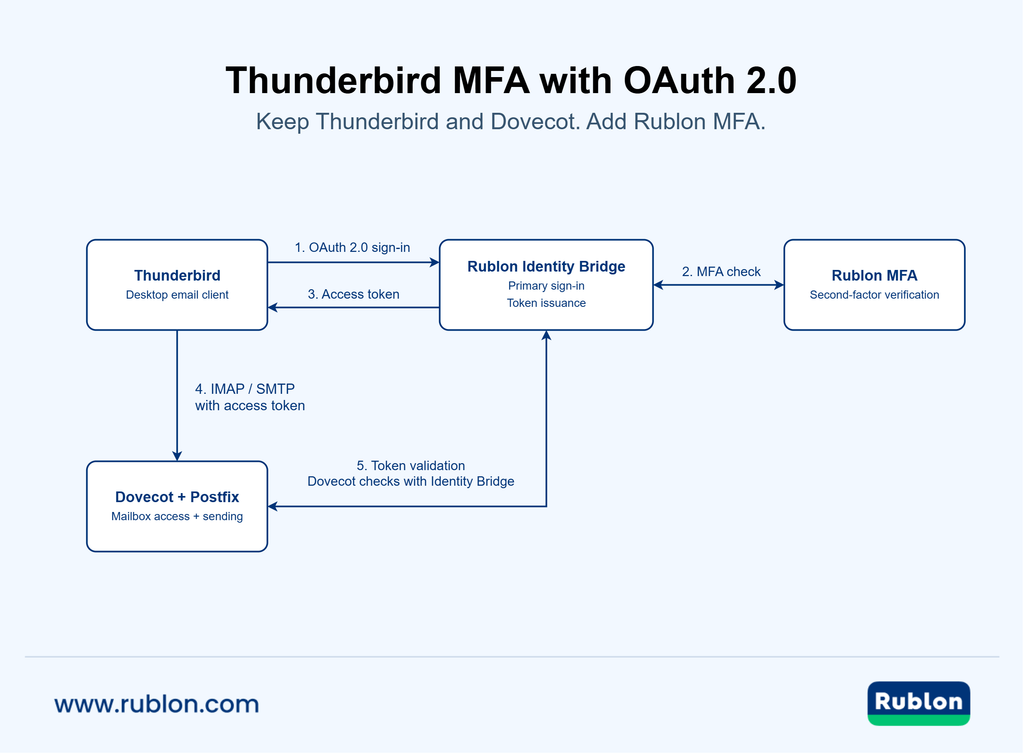
Diagram showing Thunderbird obtaining an OAuth 2.0 token through Rublon Identity Bridge and MFA, then accessing Dovecot and Postfix.
Thunderbird and Dovecot OAuth 2.0 MFA Architecture: Rublon Identity Bridge verifies the user with Rublon MFA before issuing an OAuth 2.0 token. Thunderbird uses the token for email access, while Dovecot validates it with Identity Bridge.

MFA for Thunderbird Using OAuth 2.0
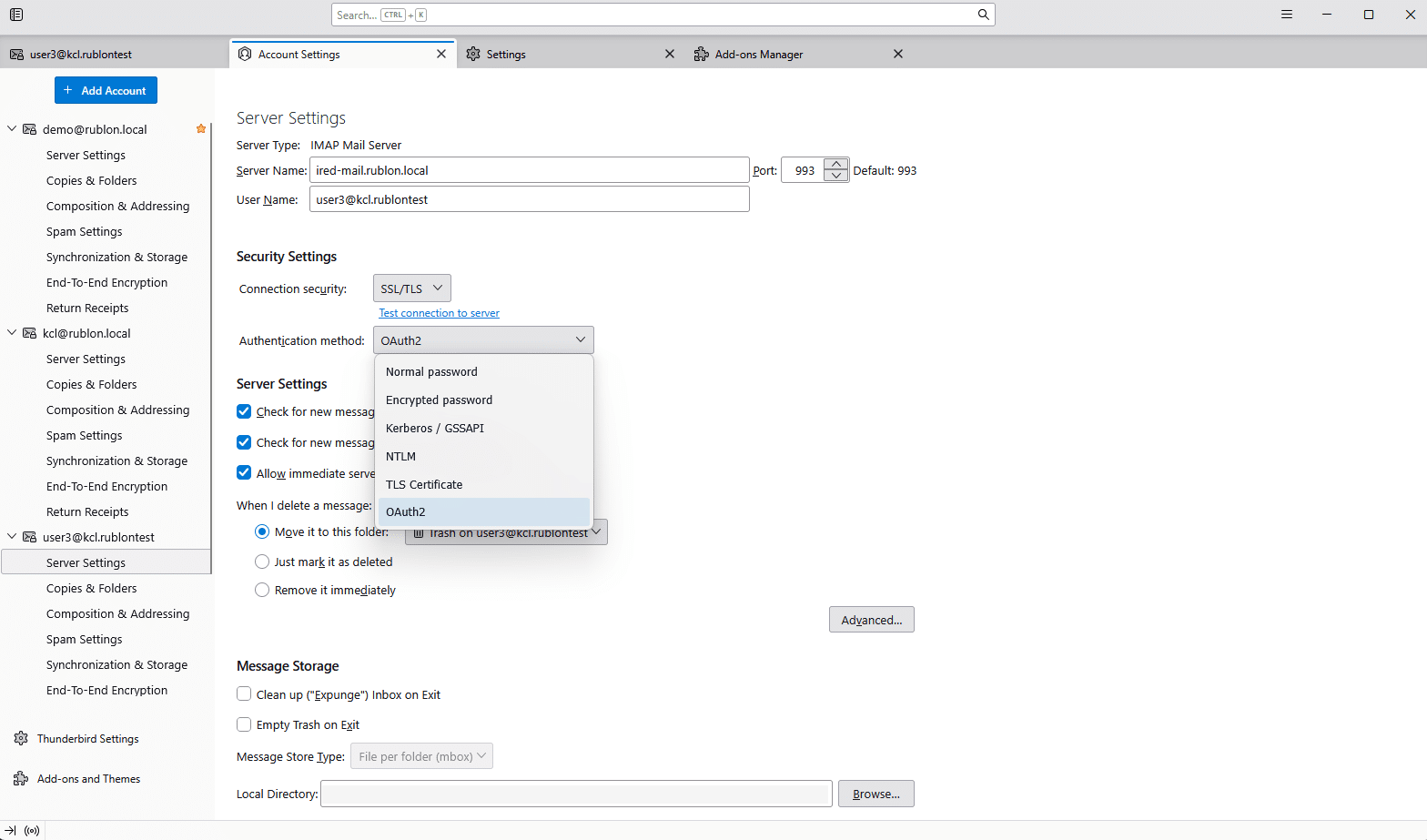
Thunderbird supports OAuth 2.0, but using it with your own mail server requires the client and server to trust the appropriate OAuth provider. Rublon Identity Bridge supplies the central sign-in and MFA flow for this setup.

Thunderbird IMAP server settings with OAuth2 selected as the authentication method.
Thunderbird configured to use OAuth 2.0 authentication for access to the Dovecot mail server.

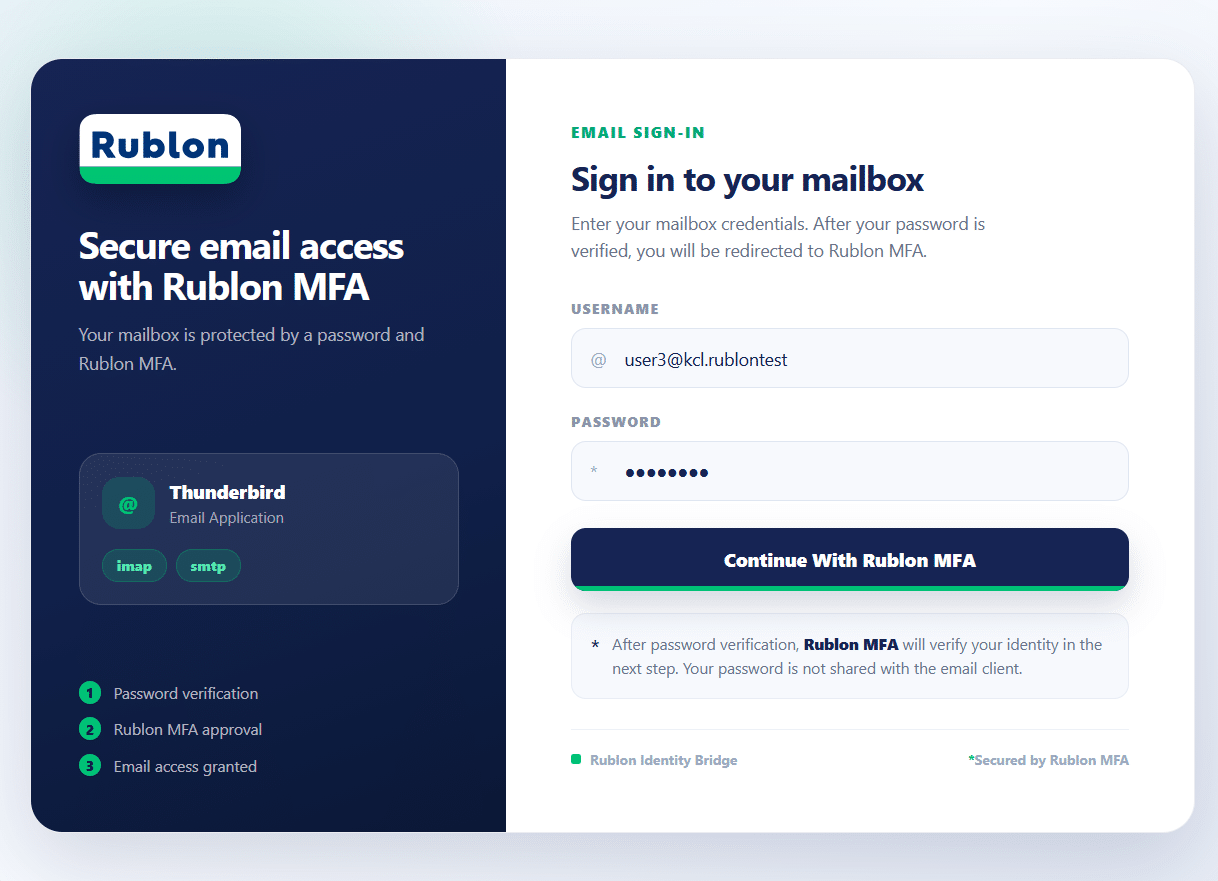
In such a configuration, Thunderbird opens its own OAuth authorization window, which displays the Rublon Identity Bridge sign-in page followed by Rublon Prompt. After successful multi-factor authentication, Thunderbird receives an OAuth 2.0 token and uses it to access the mail service. Users continue reading and sending email in the desktop application.

Rublon Identity Bridge email sign-in page for Thunderbird with username and password fields.
Users enter their credentials in Rublon Identity Bridge before proceeding to Rublon MFA.

Rublon MFA for Thunderbird with Dovecot using OAuth 2.0 and Rublon Identity Bridge brings an interactive multi-step sign-in experience to desktop email access. Employees can keep the client they know while the organization introduces strong authentication for access to its own mail environment.

Business Benefits of MFA for Thunderbird and Dovecot

  • Protect business communications. Requiring MFA before issuing an email access token helps reduce the risk that a stolen password leads to mailbox takeover, exposure of confidential messages, or impersonation of an employee.
  • Avoid a mailbox migration just to add MFA. Retain your Dovecot environment and Thunderbird clients while modernizing authentication. Security improvements can move forward without a separate email-platform replacement project.
  • Preserve familiar workflows. Employees continue reading and sending email in Thunderbird. Keeping the existing client limits the change users need to learn during rollout.
  • Authenticate email access with tokens. Rublon Identity Bridge verifies the user’s credentials against the configured identity source and requires MFA. After successful verification, Thunderbird receives an OAuth 2.0 token and uses it instead of a password to authenticate to the mail server. No separate app password is needed for this flow.
  • Centralize email access authentication. Rublon Identity Bridge coordinates sign-in and MFA and centrally manages token issuance, validation, and revocation. This gives IT a central point of control over the credentials used for OAuth 2.0 access to the mail service.

How MFA for Dovecot Using OAuth 2.0 Works
Thunderbird is the desktop client; Dovecot provides server-side mailbox access. Rublon Identity Bridge connects the sign-in process to Rublon MFA and issues the token used for email access.

  1. The user starts signing in to the email account in Thunderbird.
  2. Thunderbird initiates the sign-in flow through Rublon Identity Bridge.
  3. Rublon Identity Bridge verifies the user against the configured identity source and requires Rublon MFA.
  4. After successful authentication, Rublon Identity Bridge issues a token for email access.
  5. Thunderbird presents the token to the mail service. Dovecot checks it with Rublon Identity Bridge before granting access.
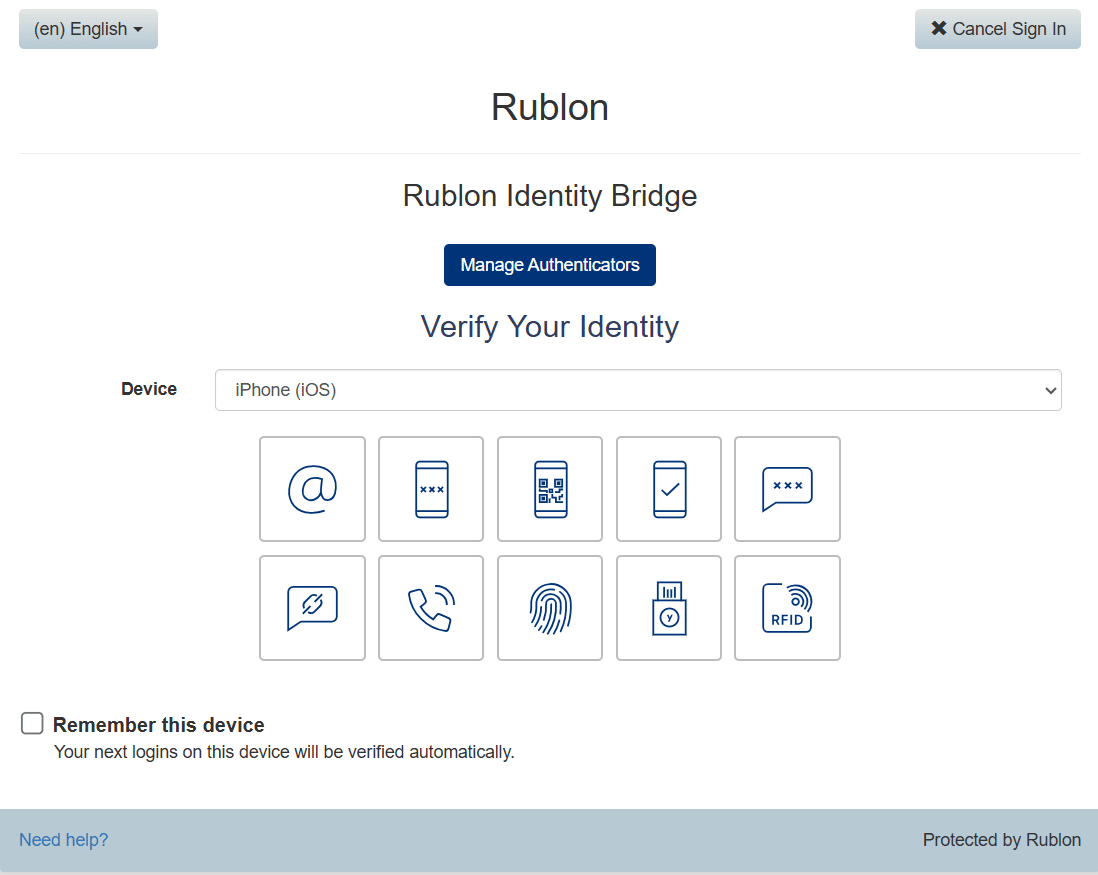
Rublon Prompt showing authentication methods during sign-in to the Dovecot email environment.
Rublon MFA prompts the user to verify their identity before an email access token is issued.

For incoming mail, Thunderbird uses the token to authenticate to Dovecot over IMAP. Outgoing mail can use OAuth 2.0 when the SMTP service is configured to authenticate through the same Dovecot-backed setup. Dovecot provides authentication; the SMTP server handles message submission.

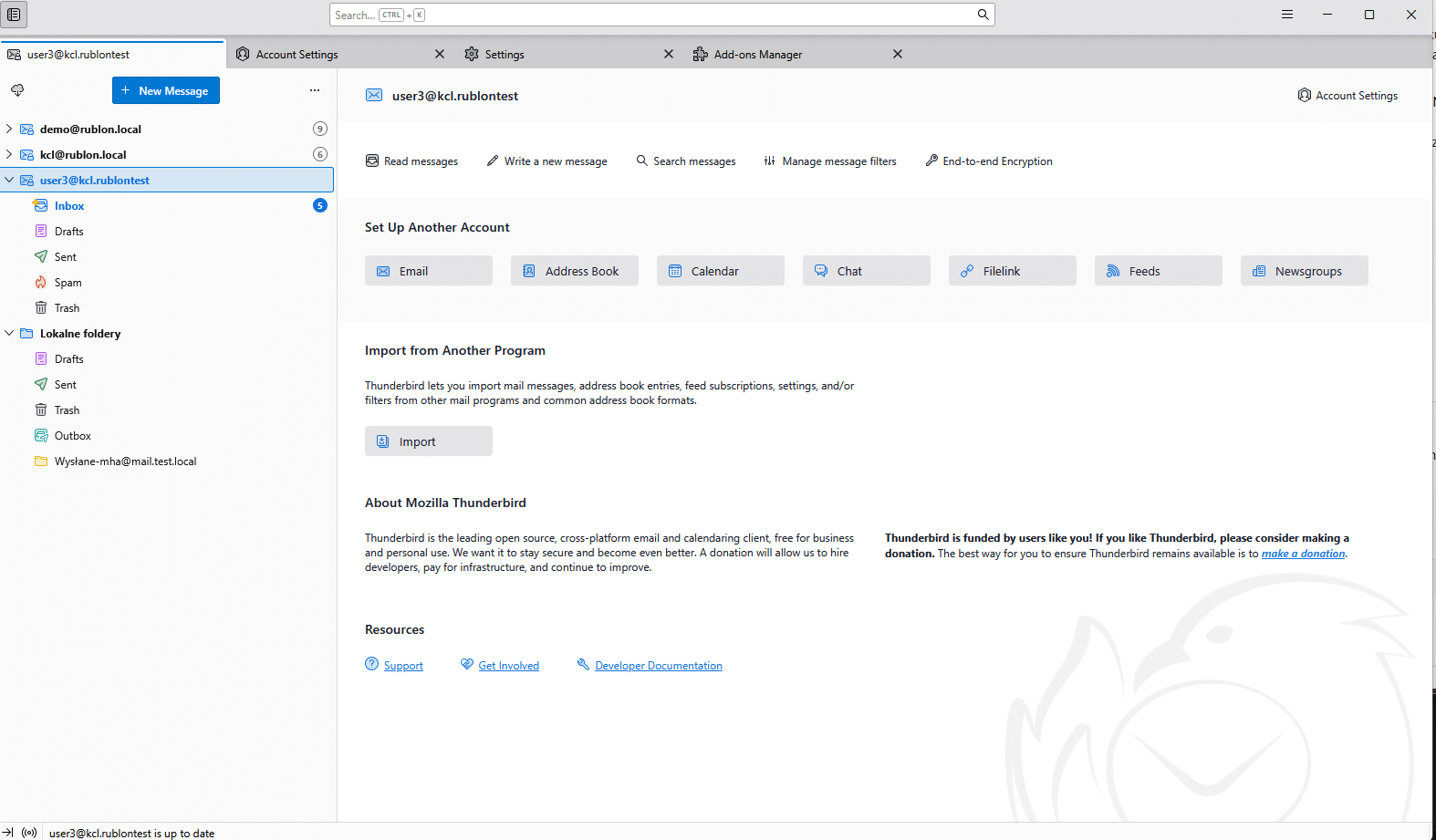
Thunderbird displaying the configured email account and its mailbox folders.
Users continue working with their email account in the familiar Thunderbird desktop application.

Phishing-Resistant MFA with FIDO2 Security Keys

Use FIDO2 security keys at the Rublon MFA step to give employees phishing-resistant multi-factor authentication for the configured email sign-in flow. FIDO2 verification takes place during the sign-in flow initiated by Thunderbird, before the application receives its email access token.

FIDO authentication ties verification to the legitimate sign-in site. This helps protect against fake login pages designed to capture credentials and relay authentication attempts. For organizations handling financial information, customer records, or confidential correspondence, it adds a stronger safeguard against phishing-driven account takeover.

OAuth 2.0 provides the token-based access mechanism, while the FIDO authentication method provides phishing resistance at sign-in. The authentication methods permitted by the organization determine the protection applied to that flow.

Set Up Thunderbird to Use OAuth 2.0 Authentication with Rublon Identity Bridge

Deployment connects three elements:

  1. Thunderbird’s OAuth provider settings
  2. Rublon Identity Bridge’s sign-in and MFA configuration
  3. The mail server’s token validation settings

Rublon has developed a dedicated Thunderbird OAuth provider component that supplies the client with the settings needed to connect to the Rublon Identity Bridge. Rublon Identity Bridge verifies the user’s credentials against the configured identity source, invokes Rublon MFA, and issues an OAuth 2.0 token after successful authentication. The appropriate client configuration depends on the Thunderbird version and the organization’s deployment requirements. The application configured in the Rublon Admin Console represents the Identity Bridge integration for the mail environment. Thunderbird is registered separately as an OAuth client in Rublon Identity Bridge.

To plan a deployment, contact Rublon Support. Include your Thunderbird and Dovecot versions, SMTP server details, user identity source, and preferred MFA methods. Include whether employees also use other mail clients and whether FIDO2 security keys are required.

Deployment planning should cover every email access path, including any password-based IMAP or SMTP logins that could bypass the protected OAuth flow.

Ready to strengthen email access while keeping Thunderbird and Dovecot?


Discuss your deployment with us

Frequently Asked Questions

Can I Add MFA to Thunderbird Without Moving to Another Email Provider?

Yes. Rublon Identity Bridge can add MFA to the OAuth 2.0 sign-in flow used by Thunderbird to access your Dovecot environment. Your organization can retain its existing mail platform, with the client and server configured for this integration.

Does Thunderbird Support OAuth 2.0 for a Self-Hosted Dovecot Server?

Yes. Thunderbird can use a custom OAuth provider when the client has the required provider configuration and the mail server accepts and validates the resulting tokens. In this integration, Rublon Identity Bridge manages sign-in, MFA, and token issuance.

Will Users Have to Complete MFA Every Time Thunderbird Checks for New Mail?

MFA is part of the sign-in flow, rather than a separate prompt for every mailbox synchronization. Thunderbird can continue using valid tokens. When users must sign in again depends on token validity, revocation, and the configured security policy.

Do Users Need an App Password for This OAuth 2.0 Setup?

No. Users authenticate through Rublon Identity Bridge and complete MFA. Thunderbird then uses an OAuth 2.0 token to access the mail server. There is no separate app password to generate or enter in Thunderbird for this flow.

Can Other Email Clients Use This Integration?

Other email clients may be compatible if they support a custom OAuth 2.0 provider and the required authorization, token refresh, and token-based IMAP/SMTP authentication flows. Each client must be registered in Rublon Identity Bridge, configured, and tested separately. Contact Rublon Support to assess your email client.

Filed Under: Documentation

Primary Sidebar

Contents

  • MFA for Thunderbird Using OAuth 2.0
  • Business Benefits of MFA for Thunderbird and Dovecot
  • How MFA for Dovecot Using OAuth 2.0 Works
  • Phishing-Resistant MFA with FIDO2 Security Keys
  • Set Up Thunderbird to Use OAuth 2.0 Authentication with Rublon Identity Bridge
  • Frequently Asked Questions
    • Can I Add MFA to Thunderbird Without Moving to Another Email Provider?
    • Does Thunderbird Support OAuth 2.0 for a Self-Hosted Dovecot Server?
    • Will Users Have to Complete MFA Every Time Thunderbird Checks for New Mail?
    • Do Users Need an App Password for This OAuth 2.0 Setup?
    • Can Other Email Clients Use This Integration?
Try Rublon MFA for Free
Start your 30-day Rublon MFA Trial to secure your employees using multi-factor authentication.
No Credit Card Required
Rublon 5 star reviews on Gartner Peer Insights

Footer

Product

  • Regulatory Compliance
  • Rublon MFA Reviews
  • Use Cases
  • Deployment Model
  • What is MFA?
  • User Experience
  • Authentication Methods
  • Rublon Authenticator
  • Rublon App Shield
  • Rublon Identity Bridge
  • Remembered Devices
  • Logs
  • Single Sign-On
  • Access Policies
  • Directory Sync

Solutions

  • MFA for Remote Desktop
  • MFA for Windows Logon
  • MFA for Remote Access Software
  • MFA for Linux
  • MFA for On-Premise Active Directory
  • MFA for LDAP
  • MFA for RADIUS
  • MFA for SAML
  • MFA for RemoteApp
  • MFA for Workgroup Accounts
  • MFA for Entra ID
  • MFA for Windows Server Core

Industries

  • Financial Services
  • Investment Funds
  • Retail
  • E-Commerce
  • Technology
  • Healthcare
  • Legal
  • Education
  • Government
  • Utilities
  • Manufacturing

Documentation

  • 2FA for Windows & RDP
  • 2FA for RDS
  • 2FA for RD Gateway
  • 2FA for RD Web Access
  • 2FA for SSH
  • 2FA for OpenVPN
  • 2FA for SonicWall VPN
  • 2FA for Cisco VPN
  • 2FA for Office 365

Support

  • Knowledge Base
  • FAQ
  • System Status

About

  • About Us
  • AI Info
  • Blog
  • Events
  • Careers
  • Co-funded by the European Union
  • Contact Us

  • Facebook
  • GitHub
  • LinkedIn
  • Twitter
  • YouTube

© 2026 Rublon · Imprint · Legal & Privacy · Security